Dialpad Sell is a phone system built for sales, with real-time coaching and CRM integrations. It features call analytics, voice intelligence with objection handling, call sentiment analysis for just-in-time coaching, and support for a range of headsets and phones.
N/A
Salesforce Revenue Cloud
Score 8.7 out of 10
Mid-Size Companies (51-1,000 employees)
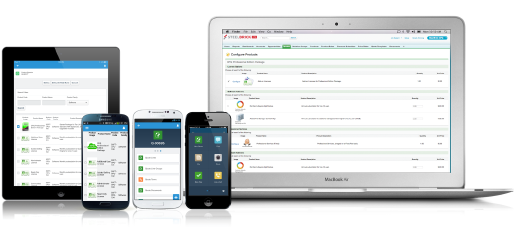
Salesforce Revenue Cloud (formerly Salesforce CPQ or SteelBrick) is built and delivered on the Salesforce Platform and Salesforce1 Mobile App which enables users to create accurate sales quotes quickly and submit error-free orders on the fly from any device.
$30
Per User per Month
Pricing
Dialpad Sell
Salesforce Revenue Cloud
Editions & Modules
No answers on this topic
Basic
$30
Per User per Month
Professional
$50
Per User per Month
Enterprise
$75
Per User per Month
Offerings
Pricing Offerings
Dialpad Sell
Salesforce Revenue Cloud
Free Trial
No
Yes
Free/Freemium Version
No
No
Premium Consulting/Integration Services
No
Yes
Entry-level Setup Fee
No setup fee
Optional
Additional Details
—
—
More Pricing Information
Community Pulse
Dialpad Sell
Salesforce Revenue Cloud
Features
Dialpad Sell
Salesforce Revenue Cloud
Preview Dialer
Comparison of Preview Dialer features of Product A and Product B
Dialpad Sell
8.0
22 Ratings
9% above category average
Salesforce Revenue Cloud
-
Ratings
Contact preview
8.021 Ratings
00 Ratings
Dialer-CRM integration
8.018 Ratings
00 Ratings
Call notes & tags
7.920 Ratings
00 Ratings
Automatic call logging
8.020 Ratings
00 Ratings
Core Dialer
Comparison of Core Dialer features of Product A and Product B
Dialpad Sell
8.4
22 Ratings
9% above category average
Salesforce Revenue Cloud
-
Ratings
Outbound dialing
8.022 Ratings
00 Ratings
Inbound routing
8.022 Ratings
00 Ratings
Custom caller ID
7.021 Ratings
00 Ratings
Click-to-call
9.020 Ratings
00 Ratings
Recorded voicemail drop
10.019 Ratings
00 Ratings
Dialer contact import
8.919 Ratings
00 Ratings
Campaign & list management
8.216 Ratings
00 Ratings
Call Follow-up and Quality Assurance
Comparison of Call Follow-up and Quality Assurance features of Product A and Product B
Dialpad Sell
8.0
21 Ratings
5% above category average
Salesforce Revenue Cloud
-
Ratings
Follow-up calls
8.019 Ratings
00 Ratings
Dialer reporting & analytics
7.121 Ratings
00 Ratings
Dialer compliance
9.018 Ratings
00 Ratings
CPQ
Comparison of CPQ features of Product A and Product B
Well, There are numerous scenarios where a Dialpad can be very helpful in terms of communication tools. It allows the user to send text unlimited messages, making outbound calls, and review daily, weekly, monthly, or custom analytics. Saving n number of contact details, easy to search them on Dialpad. As of now, I did not come across any scenario where I can say Dialpad would not be suited.
What I like best is the ease of use to be able to track all opportunities and quotes in my daily sales tracker I also like the fact that you can reorganize the view for your opportunities. For instance, it is very similar to a spreadsheet where you can filter them by date, dollar amount, name, and several other ways. I found this to be less appropriate when we have to do multiple roles while assigning one task to multiple users. Column resizing within the Quote Line Editor is not supported in the Salesforce mobile app.
Our Salesforce is very messy, which tells me it's not super easy to clean up.
I always have a really hard time removing a contacts from an account - it seems like you can't simply remove the relationship so we have lots of people named DO NOT CONTACT or things of that nature.
Sometimes when saving it doesn't seem like things actually save.
Dialpad Sell is Very easy to use, whether at home or in the office dial pad has very sleek and easy to use features, all features are easy to find and are pretty self explanatory, the switch from regular phones to dial pad was a very easy and non stressful switch for our whole team
I would give it an eight because it's very customizable in the way that you want to create it. I think I'm just docking points because sometimes there can be a little too much customization, which can make it a little complicated, but it just depends on the complexity of your business and how you guys build it out in the first place.
There have been some issues with multi-year pricing of certain products and services which we have been assured will be resolved but I guess are still underway, the support team apart from this has not been needed much and in the rare scenarios, it has been needed the resolutions of conflicts has been prompt and quick, so the overall support would have my high regards for being so helpful and customer-oriented so as to assure good performance of their toolset and customer satisfaction.
I think that Skype for Business was a clunky system to use and didn't seem as up-to-date with their interface as Dialpad Sell does. I have found that Slack does a better job at communicating within the company, but Dialpad Sell is still the best system for external outreach.
There is no comparison to a fully functional instance of CPQ. Nothing comes close due to the amount of customization and ease of use that CPQ offers once it's fully built out. Other solutions may be easier to build or administer, but for the users and business needs, CPQ is the best solution possible.
Easy access to reporting on closed-won, closed-lost, and open quotes.
Accuracy in data referenced in a quote - it's typically accurate as it is pulled directly from opportunity, looking up to associated subscription start/end dates, etc..
We lose valuable time in creating quotes ourselves. Quotes were requested and created through sales ops previously, sales did not have access to the excel templates used to generate quotes.