Chose Dropbox
Dropbox offers a simpler, fast and reliable file synchronization.

| Product | Rating | Most Used By | Product Summary | Starting Price |
|---|---|---|---|---|
 Dropbox | N/A | Dropbox is a cloud storage solution, equipped with features that help users to save time, improve productivity, and collaborate with others. Users can edit PDFs, share videos, sign documents, and collaborate with stakeholders without leaving Dropbox. | $9.99 per month | |
 KROCK | N/A | Krock.io is a video review software and creative collaboration platform built for video production teams, animation studios, and creative agencies. It centralizes the entire review-and-approval workflow — from pre-production through final delivery — in a single workspace. Key capabilities include: Frame-accurate video feedback — Leave time-coded comments, visual drawings, and file attachments directly on video and audio files, eliminating ambiguous revision… | $10 per month per user | |
 Notion | N/A | Notion aims to present users with an all-in-one workspace — for notes, tasks, wikis, and databases, from Notion Labs in San Francisco. | $0 |
| Dropbox | KROCK | Notion | ||||||||||||||||||||||
|---|---|---|---|---|---|---|---|---|---|---|---|---|---|---|---|---|---|---|---|---|---|---|---|---|
| Editions & Modules |
|
|
| |||||||||||||||||||||
| Offerings |
| |||||||||||||||||||||||
| Entry-level Setup Fee | No setup fee | No setup fee | No setup fee | |||||||||||||||||||||
| Additional Details | — | 20% discount for annual billing. | A discount is offered for annual billing. | |||||||||||||||||||||
| More Pricing Information | ||||||||||||||||||||||||
| Dropbox | KROCK | Notion | |
|---|---|---|---|
| Considered Multiple Products |  Dropbox  Aman Rehman Software Developer Chose Dropbox All of these product offer reliable cloud storage and file sharing capabilities but Dropbox is easy to use,fast file synchronization and smooth user experience.Team members were able to adopt it quickly with minimal training. Compared to other products it provide more …  TONY MARCHEI ACCOUNTANT Chose Dropbox Dropbox does everything the others do that we need, and is fast, trouble-free, and offers document signing.  Liz Brandon Sr Manager Performance Analytics Chose Dropbox Dropbox has similar characteristics as Microsoft SharePoint. Both have the ability to share files and access them from multiple devices. Both offer upgrades to higher levels of storage capacity. I tend to use Dropbox more for personal files or ones that I want to share outside …  Melanie VanLue Controller Chose Dropbox We looked at several solutions for file sharing and found Dropbox to have the most options and functions that we require.  Charles Peck Audio Engineer Chose Dropbox The other platform has too many limitations on the storage end, and since I was already a client of Dropbox, it was easier to stay with the same platform.  Kate Wilcox Volunteer Event Photographer Chose Dropbox Years ago I used Flickrr to share my photos. Dropbox was easier to use 13 years ago and I've been very satisfied ever since.  Caleb Cameron Owner and Film Composer Chose Dropbox Dropbox has the best value to feature ratio- and is so much more responsive and reliable than Google Drive- it is almost unusable for storing large media files especially folders of files!  Joshua Hallaran Game Developer Chose Dropbox I find that Dropbox works best for me, because I'm able to simply visit a website, drop off my files, and create a shareable link. Everything in Dropbox is more organised and quicker than the other products I've used - at least, in my experience. |  KROCK  Martin Alternes CEO (Chief Executive Officer) Chose KROCK Easier to use for our clients, which is important, as many of our clients only use the application for a short time and don't care to invest too much time or energy to learn the features. It has a clean and reliable dashboard and overall user interface. | Notion  April Jordan CMO Chose Notion Notion is much more robust than Google Tasks, which I find very limited. Notion is far more customizable and affordable than Asana, which is more of a turnkey solution for teams that want to work within a pre-defined structure. Notion and ClickUp are comparable, in my opinion, in …  Juliana Guzzo Bertolini Operations Assistant Chose Notion because Notion is more comprehensive and offers greater possibilities.  Anushka Garg Senior Associate Chose Notion Needed something outside of Microsoft Office for overall deal and project tracking and collating our collective knowledge and learnings from different deals. We have not evaluated against anything else.  Julia Schaider Closer Chose Notion I tested Trello, which is great for visual tasks, but I missed something more complete.  Janesia Dcosta 🗓️ Freelancer Chose Notion I like Notion more than Trello and Google Sheets because it has the best parts of both. Trello is good for making lists of tasks, but it can’t do much else. Google Sheets is great for organizing data, but it can get messy. I chose Notion because I can make lists, tables, and …  Larissa Bravim Furlan Operations Analist Chose Notion The first major difference is the ability to create formulas using other columns and even using other formulas. This increases the possibility of customization to another level. I couldn't do the same things using these other tools. The second is the infinite number of things …  Sebastian Paredes Smith Researcher Chose Notion not nearly as useful, it is just a file organiser tool but Notion has the functionality of creating many thing in one page, allowing to include more pages and link with other spaces. such as Miro, google drive, calendar, etc Integration is part of what makes Notion the best …  Long Nguyen Vu Research Engineer Chose Notion Notion is less complicated than ClickUp and more user friendly, especially for those who prefer simplicity. I am aware that ClickUp does offer simple template and let us scale it but Notion is one step ahead because of the UI design is easier to use. I like Confluence at work … |
| Dropbox | KROCK | Notion | |||||||||||||||||||||||||||||||||||||||
|---|---|---|---|---|---|---|---|---|---|---|---|---|---|---|---|---|---|---|---|---|---|---|---|---|---|---|---|---|---|---|---|---|---|---|---|---|---|---|---|---|---|
| File Sharing & Management |
| ||||||||||||||||||||||||||||||||||||||||
| Cloud Storage Security & Administration |
| ||||||||||||||||||||||||||||||||||||||||
| Cloud Storage Platform |
| ||||||||||||||||||||||||||||||||||||||||
| Project Management |
| ||||||||||||||||||||||||||||||||||||||||
| Communication |
|
| Dropbox | KROCK | Notion | |
|---|---|---|---|
| Small Businesses |  SugarSync Score 3.8 out of 10 |  Frame.io Score 9.0 out of 10 |  Stackby Score 8.9 out of 10 |
| Medium-sized Companies |  Druva Security Cloud Score 9.4 out of 10 |  Asana Score 8.5 out of 10 |  Troop Messenger Score 9.8 out of 10 |
| Enterprises | Druva Security Cloud Score 9.4 out of 10 |  Wrike Score 8.6 out of 10 |  HCL Connections Score 9.0 out of 10 |
| All Alternatives | View all alternatives | View all alternatives | View all alternatives |
| Dropbox | KROCK | Notion | |
|---|---|---|---|
| Likelihood to Recommend | 8.8 (0 ratings) | 10.0 (0 ratings) | 8.6 (0 ratings) |
| Likelihood to Renew | 8.2 (0 ratings) | - (0 ratings) | 10.0 (0 ratings) |
| Usability | 8.8 (0 ratings) | - (0 ratings) | 8.4 (0 ratings) |
| Availability | 8.9 (0 ratings) | - (0 ratings) | - (0 ratings) |
| Performance | 8.6 (0 ratings) | - (0 ratings) | - (0 ratings) |
| Support Rating | 7.1 (0 ratings) | 10.0 (0 ratings) | - (0 ratings) |
| In-Person Training | 9.1 (0 ratings) | - (0 ratings) | - (0 ratings) |
| Online Training | 9.0 (0 ratings) | - (0 ratings) | - (0 ratings) |
| Implementation Rating | 8.0 (0 ratings) | - (0 ratings) | - (0 ratings) |
| Configurability | 8.0 (0 ratings) | - (0 ratings) | - (0 ratings) |
| Ease of integration | 9.1 (0 ratings) | - (0 ratings) | - (0 ratings) |
| Product Scalability | 7.9 (0 ratings) | - (0 ratings) | - (0 ratings) |
| Vendor post-sale | 8.2 (0 ratings) | - (0 ratings) | - (0 ratings) |
| Vendor pre-sale | 8.2 (0 ratings) | - (0 ratings) | - (0 ratings) |
| Dropbox | KROCK | Notion | |
|---|---|---|---|
| Likelihood to Recommend |
|
Martin Alternes CEO (Chief Executive Officer) |
Larissa Bravim Furlan Operations Analist |
| Pros |
 Kara Beech, SHRM-CP Owner |
Martin Alternes CEO (Chief Executive Officer) |
|
| Cons |
 Stephanie Crawford Realtor | No answers on this topic |
|
| Likelihood to Renew |
 Michelle Hidalgo Development and Marketing Manager | No answers on this topic |
 Mantra Manan Saraswat Product Manager |
| Usability |
| No answers on this topic |
|
| Reliability and Availability |
 Deependra Gahane Customer Support Engineer L2 | No answers on this topic | No answers on this topic |
| Performance |
| No answers on this topic | No answers on this topic |
| Support Rating |
|
Martin Alternes CEO (Chief Executive Officer) | No answers on this topic |
| In-Person Training |
Deependra Gahane Customer Support Engineer L2 | No answers on this topic | No answers on this topic |
| Online Training |
| No answers on this topic | No answers on this topic |
| Implementation Rating |
 Annesa L Lacey Founder & CEO | No answers on this topic | No answers on this topic |
| Alternatives Considered |
 Joy Cobert REALTOR |
Martin Alternes CEO (Chief Executive Officer) |
April Jordan CMO |
| Scalability |
Deependra Gahane Customer Support Engineer L2 | No answers on this topic | No answers on this topic |
| Return on Investment |
 Howard R. Berger Financial Advisor |
Martin Alternes CEO (Chief Executive Officer) |
|
| ScreenShots | Dropbox Screenshots    | KROCK Screenshots 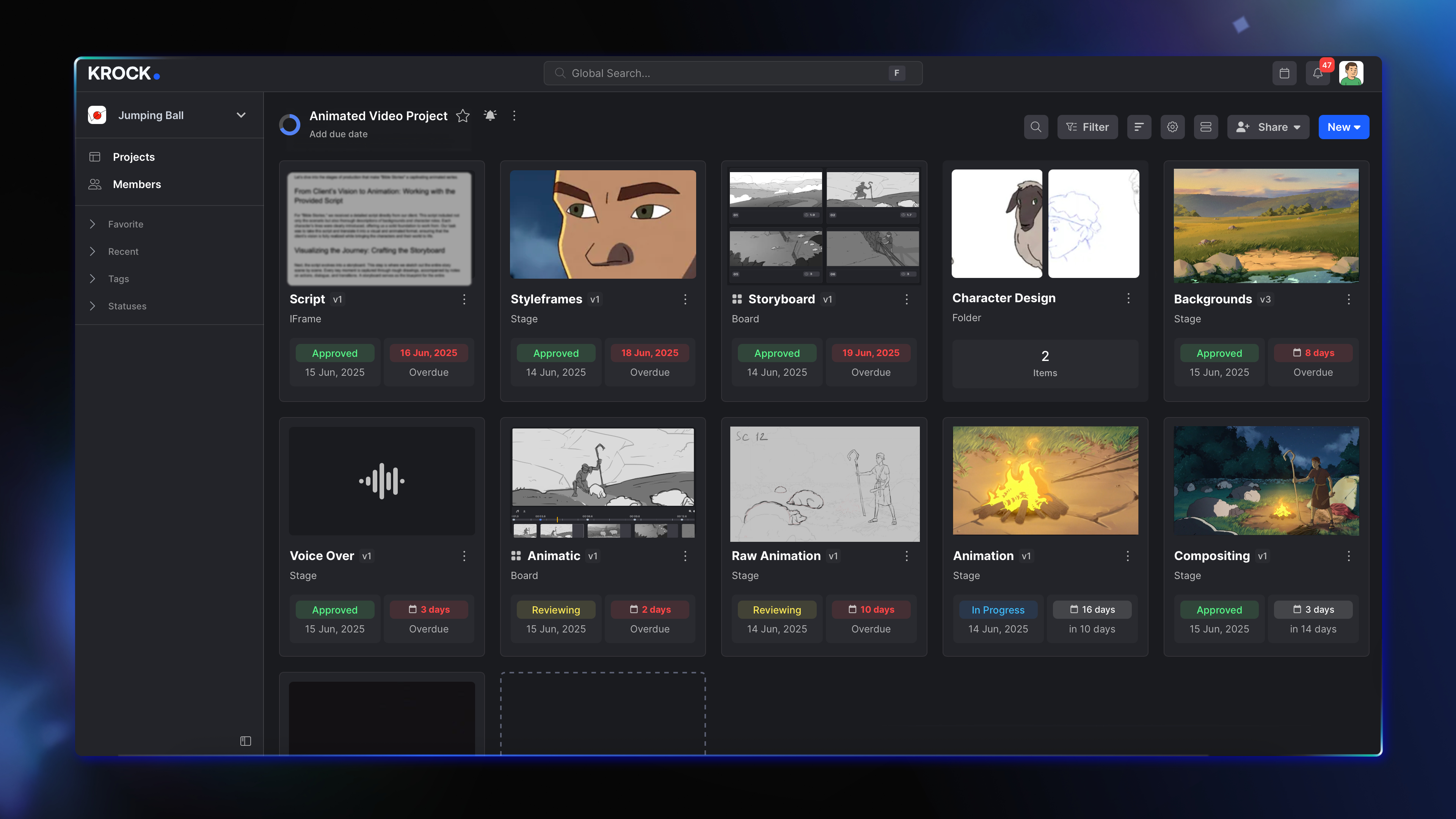 |