eSUB is a SaaS platform for commercial subcontractors running large, complex, long duration projects to proactively track and manage their costs, deadlines, deliverables and correspondence; the vendor says this can result in operational efficiencies and improved profits. eSUB is a cloud and mobile-based solution enabling real-time field updates from connected smartphones, tables and mobile PC users.
$39
per month per user
Planview ChangePoint
Score 7.0 out of 10
N/A
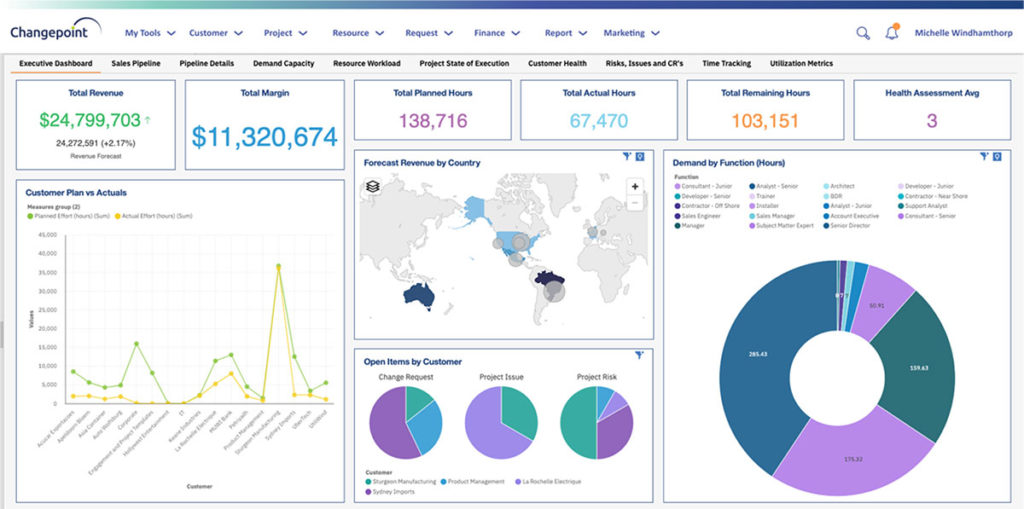
Planview Changepoint is a platform that marries professional services automation (PSA), project portfolio management (PPM) and business analytics to provide managers broad operational visibility and control over their strategic business portfolios.
N/A
Quickbase
Score 8.6 out of 10
N/A
Quickbase helps users tackle any project, no matter how complex. Quickbase helps customers see, connect and control complex projects. Whether it’s raising a skyscraper or coordinating vaccine rollouts, the no-code software platform allows business users to custom fit solutions to the way they work – using information from across the systems they already have.
$700
per month
Pricing
eSUB Construction Software
Planview ChangePoint
Quickbase
Editions & Modules
Base
$39
per month (annually) per user
Advanced
$59
per month (annually) per user
Premium
Contact
No answers on this topic
Enterprise
Full Customizable
per month/billed annually
Business
Starting at $2,200
per month
Team
Started at $700
per month
Offerings
Pricing Offerings
eSUB Construction Software
Planview ChangePoint
Quickbase
Free Trial
Yes
No
Yes
Free/Freemium Version
No
No
No
Premium Consulting/Integration Services
No
No
Yes
Entry-level Setup Fee
No setup fee
No setup fee
Optional
Additional Details
—
—
Quickbase offers three key plans, with feature distinction, simple and consistent entitlements, and a flexible licensing model, giving users the option of either user based or usage based licensing across all 3 plans.
More Pricing Information
Community Pulse
eSUB Construction Software
Planview ChangePoint
Quickbase
Features
eSUB Construction Software
Planview ChangePoint
Quickbase
Human Resource Management
Comparison of Human Resource Management features of Product A and Product B
eSUB Construction Software
1.0
1 Ratings
150% below category average
Planview ChangePoint
-
Ratings
Quickbase
-
Ratings
Employee demographic data
1.01 Ratings
00 Ratings
00 Ratings
Employment history
1.01 Ratings
00 Ratings
00 Ratings
Job profiles and administration
1.01 Ratings
00 Ratings
00 Ratings
Workflow for transfers, promotions, pay raises, etc.
1.01 Ratings
00 Ratings
00 Ratings
Organizational charting
1.01 Ratings
00 Ratings
00 Ratings
Organization and location management
1.01 Ratings
00 Ratings
00 Ratings
Compliance data (COBRA, OSHA, etc.)
1.01 Ratings
00 Ratings
00 Ratings
Payroll Management
Comparison of Payroll Management features of Product A and Product B
eSUB Construction Software
1.0
1 Ratings
148% below category average
Planview ChangePoint
-
Ratings
Quickbase
-
Ratings
Pay calculation
1.01 Ratings
00 Ratings
00 Ratings
Support for external payroll vendors
1.01 Ratings
00 Ratings
00 Ratings
Off-cycle/On-Demand payment
1.01 Ratings
00 Ratings
00 Ratings
Benefit plan administration
1.01 Ratings
00 Ratings
00 Ratings
Direct deposit files
1.01 Ratings
00 Ratings
00 Ratings
Salary revision and increment management
1.01 Ratings
00 Ratings
00 Ratings
Reimbursement management
1.01 Ratings
00 Ratings
00 Ratings
Asset Management
Comparison of Asset Management features of Product A and Product B
eSUB Construction Software
1.0
1 Ratings
149% below category average
Planview ChangePoint
-
Ratings
Quickbase
-
Ratings
Tracking of all physical assets
1.01 Ratings
00 Ratings
00 Ratings
Reporting & Analytics
Comparison of Reporting & Analytics features of Product A and Product B
eSUB Construction Software
2.5
1 Ratings
102% below category average
Planview ChangePoint
-
Ratings
Quickbase
-
Ratings
Dashboards
4.01 Ratings
00 Ratings
00 Ratings
Standard reports
4.01 Ratings
00 Ratings
00 Ratings
Custom reports
1.01 Ratings
00 Ratings
00 Ratings
Data exportability
1.01 Ratings
00 Ratings
00 Ratings
Construction Project & Field Management
Comparison of Construction Project & Field Management features of Product A and Product B
eSUB Construction Software
3.5
2 Ratings
72% below category average
Planview ChangePoint
-
Ratings
Quickbase
-
Ratings
Plan distribution & viewing
1.02 Ratings
00 Ratings
00 Ratings
Plan markups & sharing
1.02 Ratings
00 Ratings
00 Ratings
Issue tracking & punchlists
1.02 Ratings
00 Ratings
00 Ratings
Photo documentation
1.02 Ratings
00 Ratings
00 Ratings
Jobsite reports
10.02 Ratings
00 Ratings
00 Ratings
Document sharing
1.02 Ratings
00 Ratings
00 Ratings
RFI tools
10.02 Ratings
00 Ratings
00 Ratings
Collaboration & approvals
1.02 Ratings
00 Ratings
00 Ratings
As-built drawings
1.02 Ratings
00 Ratings
00 Ratings
Mobile app
5.02 Ratings
00 Ratings
00 Ratings
Submittal design and management
4.02 Ratings
00 Ratings
00 Ratings
Checklists
1.01 Ratings
00 Ratings
00 Ratings
Meeting Minutes
3.01 Ratings
00 Ratings
00 Ratings
Specifications
2.01 Ratings
00 Ratings
00 Ratings
Change orders
10.01 Ratings
00 Ratings
00 Ratings
Estimating
Comparison of Estimating features of Product A and Product B
If you are doing any sort of new construction, eSUB is a budget friendly option for managing the process. It's helpful for keeping track of submittals, RFI's and for foreman doing Daily Work Reports. It is not suited really well for plan management and scheduling. The modules for these are not well thought through. Also if you specialize in service work or projects that have short durations (i.e. 1-2 weeks or less), eSUB isn't the best option for you. It would take too long to set up a job vs the time it takes to do the job.
Changepoint is basic and would, therefore, work for businesses with uncomplicated requests, pretty straightforward workflows and willingness to work with an unsightly solution. It is basic, from the UI to the search option and the way the information is captured, which can be frustrating and counter-intuitive at times. It is relatively robust (i.e. I have been using it for almost 2 years and have not seen it crash once) but it does log me out when the system has been inactive for about 30 minutes - and I am only notified about being logged out upon clicking the Submit button, meaning many a line of text have been typed more than once!
I no longer think that Quickbase is the way of the future. They do not fix major bugs in a timely manner, and are releasing basic functionality behind a paywall. I believe that Enterprise Level Tier should be given certain things, like SLAs on Support and up-time. However, as a low-code no-code platform the majority of the accounts, "builders", and users are not going to be able to justify the cost of an Enterprise Tier Plan, and won't be able to use the features that Quickbase continues to advertise.
It is built with subcontractors in mind. There are many PM software available but this one aims at the commercial subcontractor.
It does a great job covering the basics of typical commercial work. There are areas that allow you to customize such as adding reservations of rights to documents.
It can integrate with Microsoft quite a bit, we use this in our work every day and being able to export or sync data/calendars has been helpful.
Changepoint has significant reporting capabilities, though of course, the data that comes out is only as good as the data that goes in. I enjoy being able to use the standard reports to understand exactly how much a project has cost us and to compare it to how much we are charging. This allows us to more accurately set our prices. Though we have not used the report designer capability, I understand that custom reports can be designed with relative ease.
Changepoint has a versioning capability for changes made to user profiles in the system manager, which I find particularly helpful. As a non-power user, it is valuable to be able to see what changes I have made to various profiles so that I can troubleshoot a problem down the line.
Changepoint has significant functionality well beyond the features that we are currently using, and for this reason, I think it is affordable and a good deal. Particularly if your organization is interested in dedicating the time and resources into using all of the features around project planning, resource allocation, etc., the price is well worth the value.
We use Changepoint to manage the IS organization. I would like to see more advancement in order to do benefits management.
I would like to see a capability where a project manager can build a very detailed work breakdown structure, but only require project resources to charge time and provide a task status at a higher level.
I'd like to see a link on email notices that take you directly into said notice. On an app that only has 1 or 2 email notices firing, there's no issue. However, we have some tools that are so complex that they have about 20 email notices firing at any given time based on the action users take. In this case, if we have to go in to modify a notice, we have to guess or scroll down the long list of notices to see which one we need to customize. It would be great if Quickbase had the URL of said notice somewhere at the footer of that notice so when Administrators click on it, it takes them into the exact notice they need to update.
When filling out or reviewing a lengthy form, I'd like to see the Save & close button, as well as a Save & next option at the bottom of the form rather than having to scroll back up to the top of those forms just to click on those choices.
Sometimes the decision to renew boils down to an old adage "if it isn't broken don't fix it". Previous to moving to Changepoint, it was obvious that we needed a better project management tool. Projects we completed on time but the time zone difference between the teams and several iterations of back and forth caused a number of communication issues with projects. The difference is night and day.
For our use-case of QuickBase, there really aren't any other products out there that can offer us the same out-of-the-box solutions they provide to us. We're also so integrated with it in our daily processes that to move away from it abruptly would cause mass chaos, so it's going to be renewed for at least the next several years.
Quick Base has done everything we have asked it to do and then some. Our original goal was to have one system for CRM that encompassed both the sales process and the customer management. We have gone w-a-y beyond that with analytics, project management, system bug logging, and historical effort reporting.
Once we did get Quick Base configured and customized it was reliably available when we needed it. We may have had one or two occasions when the product was inaccessible but those were few. The greatest challenge with its availability was its difficulty with integrating with our systems.
Some of our tables that hold over a million records are starting to perform poorly, with some summaries taking over 20 seconds to load. This may be an indication that it is best to archive old data when reaching large volumes like this.
It has been helpful whenever I've called. They have been able to walk me through solutions and even direct me to the right answer. There was only 1hr difference between time zones so this was manageable. If we experienced bugs, their IT department was helpful at remedying and they were always rolling out updates.
If you utilize the community, the support is amazing. Unfortunately, I find their actual support system a bit underwhelming. They don't seem to have a great process for interacting directly with an issue and often sweep significant issues under the rug by categorizing them as "Enhancement" ideas or legacy items.
Quick Base already is having a separate portal of providing training to customers and it is very easy to use and updates as per the new features added in to the application
I was not directly involved with the initial account implementation, only a bystander. For the app I directly implemented for my department only, I wish I had know to create an app diagram first. I don't remember if that was suggested. I think that would be a great help tip tool when a new app is created, to have a page with a check list of what is needed or how to get started. If you are a regular app builder, then you can bypass it or have the ability to turn it off in the app settings.
eSUB is not even close when it comes to the offerings that the others have. eSUB is a happy medium for the functionality it provides and is at an affordable price point that it doesn't break the bank. Other solutions are a lot more integrated into the company processes and procedures, which means more upfront investment to get the platform to go live. eSUB's simplicity makes it easier to roll out because it doesn't integrate with as many aspects of the business.
Planview Changepoint helps us to understand our key customers enabling us to capitalize on every financial opportunity and helps us to forecast demand against the capacities required for new opportunities, and also it automates and monitors contractual terms and conditions. It gives us visibility into our employees' skills and helps to optimize resource allocation.
Well, there's a plethora of low-code tools out on the marketplace and, you know, there's a reason that we've decided to partner with QuickBase because it has all the right balance of the ability to integrate with the ability for a citizen developer to create apps successfully. So if you look at something like Zo Ho's low-code offering, for example, yes, there are some similarities there, but they're really dependent on all of their other licensed products to get you where you want to be, where with QuickBase you have the ability to truly create something custom.
It has evolved really well with our company, but there is a hard limit to the table size that has begun to affect us and not let us grow. The table size limit is set at 500 MB and we have had to jump through quite a few hoops to be able to get by.
Employee efficiency has decreased significantly within our Project MAnagement team. The main causes are lack of logical steps/not user-friendly and the slowness of the entire program.
Changepoint PSA has greatly improved being able to track budgets for all projects. Before this software, budgets were done manually by hand and cross-referenced with Accounting. Now, we can pull a report out of the system, as long as all parties entered their time and data correctly.
ROI is HUGE. Our company saved over 3.5 million in one year alone based on developments that year in Quickbase that saved time for many teams
Less user error - implementing automations and standardized workflows has led to less user error as was previously seen by maintaining spreadsheets or Smartsheets