Overview
ProductRatingMost Used ByProduct SummaryStarting Price
EZ Texting
Score 9.0 out of 10
N/A
EZ Texting provides businesses and organizations with a text marketing solution, including features and integrations to keep conversations going. The solution can be used by businesses to connect with their audiences. It can be used to send promotions, promote a new product, build brand awareness, or drive traffic to websites or storefronts. EZ Texting Key Features EZ Texting's features are designed to enhance the effectiveness of text marketing…
$25
per month
Omnisend
Score 8.1 out of 10
N/A
Omnisend is an email and SMS marketing platform with features made to help ecommerce stores grow their audience and sales. It features one-click integration with major ecommerce platforms, pre-made automation and email templates, and 24/7/365 live customer support.
$16
per month 500 contacts, 6,000 emails / month
Pricing
EZ TextingOmnisend
Editions & Modules
Launch
Starting at $25
per month
Boost
Starting at $75
per month
Scale
Starting at $125
per month
Enterprise
Starting at $3,000
per month
Free plan
$0
Standard plan
$16
per month
Pro plan
$59
per month
Offerings
Pricing Offerings
EZ TextingOmnisend
Free Trial
YesNo
Free/Freemium Version
NoYes
Premium Consulting/Integration Services
NoNo
Entry-level Setup FeeNo setup feeRequired
Additional DetailsLAUNCH PLAN: Recommended for up to 500 contacts. Local EZ Textable Number. Max Speed: up to 500/day. Cost Per Msg:$0.030. Delivery Rate: 95% Includes 500 free msg/mo or 6k annually. BOOST PLAN: Recommended for 501-2,000 contacts. Local EZ High-Volume Number. Max Speed: up to 2,000/day. Cost Per Msg: $0.025. Delivery Rate: 95% Includes 500 free msg/mo or 6k annually. SCALE PLAN: Recommended for 2,000-50,000 contacts. Local EZ High-Volume, High-Speed Number. Max Speed: up to 50,000/day. Cost Per Msg: $0.020. Delivery Rate: 95%. Includes 500 free msg/mo or 6k annually. ENTERPRISE PLAN: Recommended for 50,000+ contacts. This Plan offers. Dedicated Short Codes. Max Speed: up to 1 MM/day. Cost Per Msg: $0.010. Delivery Rate: 99%. Includes 200k msg/mo. Pricing information for EZ Texting is supplied by the software provider or retrieved from publicly accessible pricing materials. Final cost negotiations to purchase EZ Texting must be conducted with the seller. Included in All Plans: Unlimited Incoming Messages, Contacts, & Keywords. New Features: Realize ROI faster with AI Compose & Team Inbox with AI Reply. Live Support Chat: Monday-Friday 8am-8pm ET and Saturday-Sunday 9am-5pm ET. Growth Tools: QR Codes, Keywords & Signup Forms. MMS Edge: Enhanced Image Library + Editor powered by Shutterstock. CRM-Lite: Upload, Management, Groups & Personalization.Omnisend offers three pricing plans: Free, Standard and Pro. The Free plan is used to explore all of Omnisend's features (emails, SMS, push notifications, popups, segmentation, analytics, etc), send up to 500 emails and push notifications, plus 60 SMS per month at no cost. The standard plan starts at $16 per month and includes everything in Free, unlimited web push notifications, a customer success manager and 24/7 support. From $59 per month, the Pro plan can be used to send unlimited emails and push notifications, get advanced reporting features, a dedicated Customer Success Manager, and priority 24/7 support. It also includes free SMS credits equal to the price of the Pro plan selected.
More Pricing Information
Community Pulse
EZ TextingOmnisend
Features
EZ TextingOmnisend
Email & Online Marketing
Comparison of Email & Online Marketing features of Product A and Product B
EZ Texting
-
Ratings
Omnisend
7.0
14 Ratings
12% below category average
WYSIWYG email editor00 Ratings8.113 Ratings
Dynamic content00 Ratings4.912 Ratings
Ability to test dynamic content00 Ratings8.011 Ratings
Landing pages00 Ratings8.67 Ratings
A/B testing00 Ratings8.19 Ratings
Mobile optimization00 Ratings8.611 Ratings
Email deliverability reporting00 Ratings6.413 Ratings
List management00 Ratings5.913 Ratings
Triggered drip sequences00 Ratings4.411 Ratings
Reporting & Analytics
Comparison of Reporting & Analytics features of Product A and Product B
EZ Texting
-
Ratings
Omnisend
6.3
13 Ratings
19% below category average
Dashboards00 Ratings5.512 Ratings
Standard reports00 Ratings5.413 Ratings
Custom reports00 Ratings8.010 Ratings
Pre-Send Testing
Comparison of Pre-Send Testing features of Product A and Product B
EZ Texting
-
Ratings
Omnisend
8.9
10 Ratings
12% above category average
Link Tracking00 Ratings9.08 Ratings
Image Validation00 Ratings8.57 Ratings
Inbox Display00 Ratings9.07 Ratings
Email Previews00 Ratings9.110 Ratings
Best Alternatives
EZ TextingOmnisend
Small Businesses
OneSignal
OneSignal
Score 8.0 out of 10
Mad Mimi
Mad Mimi
Score 10.0 out of 10
Medium-sized Companies
Flurry Analytics (discontinued)
Score 9.0 out of 10
VerticalResponse
VerticalResponse
Score 10.0 out of 10
Enterprises
Flurry Analytics (discontinued)
Score 9.0 out of 10
Emma by Marigold
Emma by Marigold
Score 9.3 out of 10
All AlternativesView all alternativesView all alternatives
User Ratings
EZ TextingOmnisend
Likelihood to Recommend
9.0
(278 ratings)
5.5
(14 ratings)
Likelihood to Renew
9.9
(12 ratings)
-
(0 ratings)
Usability
8.9
(116 ratings)
8.8
(7 ratings)
Availability
9.8
(3 ratings)
-
(0 ratings)
Performance
8.9
(3 ratings)
-
(0 ratings)
Support Rating
9.6
(112 ratings)
5.0
(1 ratings)
Implementation Rating
7.1
(5 ratings)
-
(0 ratings)
Configurability
7.9
(3 ratings)
-
(0 ratings)
Contract Terms and Pricing Model
9.1
(2 ratings)
-
(0 ratings)
Ease of integration
8.0
(5 ratings)
-
(0 ratings)
Product Scalability
8.8
(3 ratings)
-
(0 ratings)
Professional Services
8.2
(2 ratings)
-
(0 ratings)
Vendor post-sale
9.1
(3 ratings)
-
(0 ratings)
Vendor pre-sale
8.2
(3 ratings)
-
(0 ratings)
User Testimonials
EZ TextingOmnisend
Likelihood to Recommend
CallFire
For what we use EZ Texting for (Emergency contact system), it does what we need and is very easy to manage and keep up to date. The team always reaches out to see if there is anything more we need, which is kind as well. I can't speak to its features as a whole, however, as its use is very narrow in scope in our business.
Read full review
Omnisend
It's kind of an automation workflow, but for example you can set up a popup to appear at a specific time on a specific product page and offer the visitor something. The visitor then signs up and then (after you've set up your automation sequence) that visitor gets a specific welcome page based on the popup they signed up through, and then a specific order confirmation email and everything else flows from that specific popup. That's great because it's allowed us to sort of fine-tune our offerings to get our visitors' emails in the first place and offer, for example, someone browsing a product page for 3 minutes something different than someone staying 20 seconds on the homepage and then leaving.
Read full review
Pros
CallFire
  • I appreciate the detailed delivery reports.
  • The support team’s quick responses are appreciated.
  • The automation feature is incredibly handy for instantly messaging leads right after they sign up.
  • The onboarding process is straightforward.
  • Genuine customer inquiries show up in the inbox, organizing important messages in one place.
  • You can avoid the email spam folder by using ez texting!
  • Opt-outs resolve themselves.
Read full review
Omnisend
  • Newsletter campaigns - the content editor is the usual one you see on email marketing apps, but it works so smoothly and well. Of course, there's Product Picker that allows you to just pick a product from your store and it goes straight into your newsletter--no need to add images or descriptions. Really easy.
  • Popups are great because they look amazing right out of the box. It's all pre-filled so if you don't like looking at a blank screen, you can just adapt the wording and it's there. voila!
  • Automation really is nice and it's the bulk of what we're doing now. It's like second level ecommerce marketing I guess, because you really see after some time how having automated steps can really save you time and make you a lot more money. Omnisend's automations are really good and intuitive and was really easy to learn and implement.
Read full review
Cons
CallFire
  • Drafts don't save well, seemed like I kept having to redo the same text because a draft wouldn't save.
  • I want to be able to click and update users quickly, but there were too many steps to add/remove people from lists.
  • The app didn't work if I used google SSO - i couldn't ever get signed in.
Read full review
Omnisend
  • Initial setup wasn't firing right, support issue was handled pretty quickly and easily.
  • It does not go back and put previous orders/customers into the automation. It will only work with go-forward customers from the time you install the product. (At least that's what the outcome of our support inquiry told us...).
  • Would like to see more sample templates and campaigns.
Read full review
Likelihood to Renew
CallFire
We're excited about EZ Texting and what it does for us. We want to get more into automation with campaigns dealing directly with web sales so a more robust solution will likely leave EZ Texting as our event activation partner and only be used during select times of the year.
Read full review
Omnisend
No answers on this topic
Usability
CallFire
I think it is straightforward to use. UX is always challenging, and the platform does an excellent job of making it easy enough to use. However, it's not 100% intuitive and takes just a bit of figuring out, so I gave it an 8 / 10. It's easy enough as is, but of course, it could always be better.
Read full review
Omnisend
The platform is super easy to use — even without deep technical knowledge. And the best part is, Omnisend keeps improving all the time.
Read full review
Reliability and Availability
CallFire
We have never needed to use the system and it be unavailable. They seem to schedule their server maintenance perfectly (at least for us!).
Read full review
Omnisend
No answers on this topic
Performance
CallFire
It works pretty well but sometimes things don't work the way you would assume, IE marking messages as read is not as intuitive
Read full review
Omnisend
No answers on this topic
Support Rating
CallFire
EZ Texting "gets it"! When I have had something I needed customer service to help me with, they returned my emails and calls promptly. I have a smaller business and they came through as if I was a huge corporate entity. They really care about all sizes of customers!
Read full review
Omnisend
Support is weird. They ask you to keep everything in one thread, but they can't see your replies if they forward it to tech, and things easily get lost. Also tech support is HORRIBLE, they just seem snobby, and give horrible advice liek to test things on a live version vs staging
Read full review
Implementation Rating
CallFire
The most important aspect of implementation was selecting a valuable keyword. When we first started using EZ Texting, we were able to grab a simple, easy word to use to connect people to our texts. That proved invaluable in our marketing and selling people on using the service. If we didn't have a good word, I would imagine it wouldn't have been as successful.
Read full review
Omnisend
No answers on this topic
Alternatives Considered
CallFire
EZ Texting has a much better user interface and better support. At first I wanted to "pay as you go" so switched from EZ Texting to BulkSMS. BIG MISTAKE. After 2 hours of banging my head against the wall, I went straight back to EZ Texting and paid the little extra monthly and it was like light from Heaven shined down upon me
Read full review
Omnisend
We can create marketing campaigns that can span across multiple channels so that we can reach more customers regardless of the platform they are using. The system combines multiple channels into a single workflow for maximum engagement. Comes with various features that make it easy to personalize messages based on the customer's journey.
Read full review
Contract Terms and Pricing Model
CallFire
We have been grandfathered into our old package, but I wish there were better package options offered now.
Read full review
Omnisend
No answers on this topic
Scalability
CallFire
We haven't really utilized it for this purpose but it does seem like there are a lot of great options you can utilize.
Read full review
Omnisend
No answers on this topic
Professional Services
CallFire
easy access
Read full review
Omnisend
No answers on this topic
Return on Investment
CallFire
  • Customers, as well as potential customers, do not seem to have any issue, providing their phone numbers for text messages as opposed to receiving countless emails.
  • Upselling items has improved considerably due to our ability to notify customers of new products and specials that we are offering in the store.
Read full review
Omnisend
  • I am able to see if ordered were placed based on who opened the email and clicked on links.
  • It’s had a positive impact on my business by being able to see what emails have produced direct sales.
  • It has helped to increase website traffic
  • It has allowed my to expand how I can communicate with potential customers.
Read full review
ScreenShots

EZ Texting Screenshots

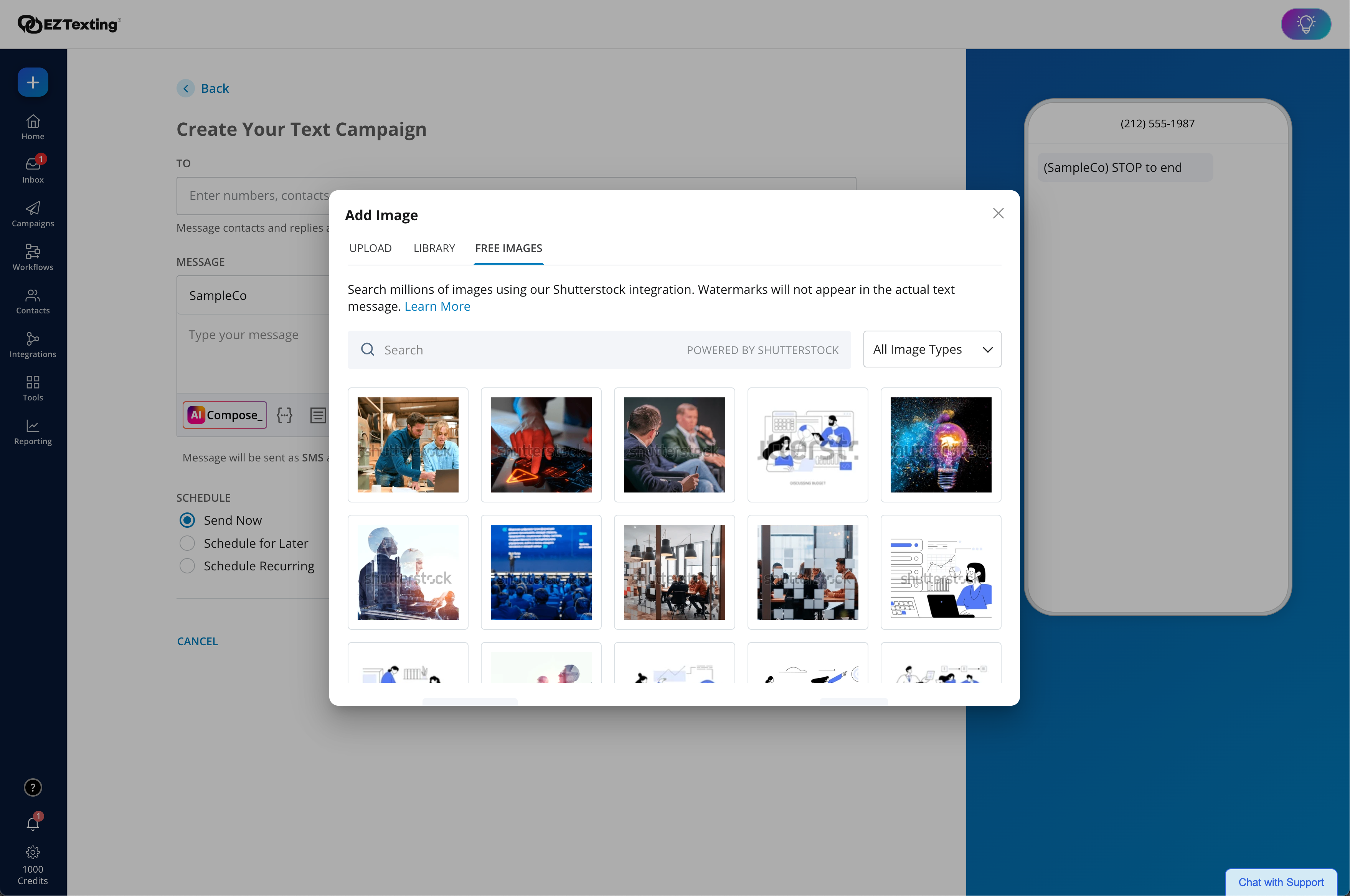
Screenshot of where the user can view recent activity, upcoming campaigns, and access AI Assistant.Screenshot of the enhanced Image Library + Editor powered by Shutterstock, which includes 450+ million free images and 20k design templates to create more scroll-stopping texts.Screenshot of the upgraded AI Compose - Used to create engaging messages with emojis, helpful templates,, easy editing, and Spanish translations.Screenshot of workflows. These are used to send texts triggered by actions and events to boost engagement and drive conversions. With a drag & drop editor, technical expertise or code is never required.Screenshot of delivery confirmations, as well as where the user can check on bounce rates and view opted-outs.

Omnisend Screenshots

Screenshot of an overview of landing pages, with OmnisendScreenshot of an overview of email marketing, with OmnisendScreenshot of a description of Omnisend's pre-built ecommerce workflowsScreenshot of an overview of Omnisend's customer supportScreenshot of an overview of Omnisend's customer supportScreenshot of an overview of Omnisend's reporting