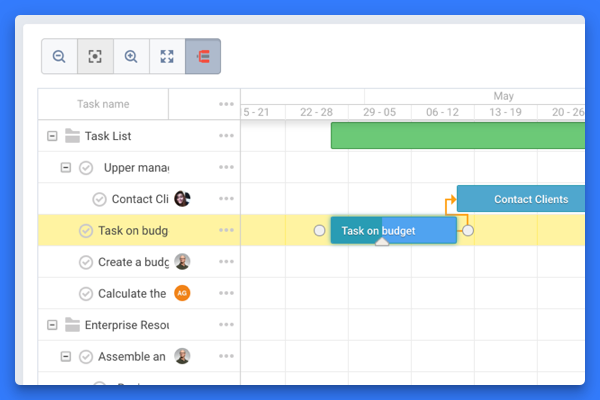
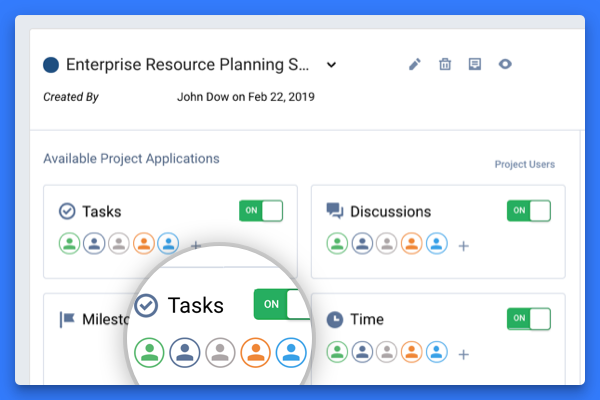
The vendor states Freedcamp helps tens of thousands of teams around the world manage their work. Their free plan contains tasks(in list and kanban view), milestones, discussions, calendar,
time-tracking and password management. On their premium plans, they also offer Gantt charts, Wikis, Issue Tracking, CRM and Invoices+.
$2.49
per month
monday.com
Score 8.2 out of 10
Mid-Size Companies (51-1,000 employees)
monday.com Work OS is an open platform designed so that anyone can create the tools they need to run all aspects of their work. It includes ready-made templates or the ability to customize any work solution ranging from sales pipelines to marketing campaigns, CRMs, and project tracking.
$36
per month (3 seats)
Zoho Projects
Score 8.2 out of 10
N/A
Zoho Project is online project management and planning software that provides project teams with a web-based collaborative environment. Zoho Projects can also include a bug tracking module specifically design to support software development project. It is integrated with other Zoho products including Zoho CRM.
What sets monday.com apart is the customisable workflow that allows my teams to collaborate based on their needs. The extensive integration with mail chimp, zoom, GitHub help us share files, track tasks. UI of it in superior and intuitive than others.
monday.com has the only interface that is 100% customizable, can use public and private boards, can be shared with customers, produce Gantt charts, and has THE MOST integrations "in house". The professional relationships that monday.com has established to be "on board" with …
Monday.com has been the first task management/project management tool we have assessed that met every need our digital agency requires. And to top it all off, we've had an amazing time with the customer support team, who have been helpful and timely in their assistance. We …
I won't say that Zoho Projects is the best in comparison to its competitors, however, it does exactly what we need it to do and we are saving on the monthly fees we are paying for its competitors. The pros outweigh the cons. I would say that it's also not the fastest in terms …
We decided on Zoho Projects since the integration with Google Workspace is easier to perform. Also, the way to create our project templates was faster to perform, and we could integrate our final customers on all of their tasks that need focus. Finally, the principal point is …
Zoho Projects is far superior as a project management tool compared to the simple ones we investigated. The pricing was very competitive to the market and the free trial helped out with our proof of concept. Compared to Workfront, you get similar functionality but at a …
We were testing out Asana at the time we moved on to Zoho. Zoho seemed to have more features that met our needs. Asana was not quite developed to the point of our liking. Zoho has an awesome calendar function that I loved, which Asana did not.
I have used a number of different Project Management Tools and this is the one I always make the team come back to, it's easy to use, has great support, and can be used by people of various levels of technical ability. When planning a complicated network, that needs to be sold to a customer, all people within the company have needs that have to be addressed, from the obvious technical, but also legal, regulatory, finance, and ordering of equipment and all these have different milestones, that interconnect, this is where Freedcamp shines, it allows all of the company to work together to achieve the technical sale.
monday.com can handle a lot of complex needs for an organization while keeping permissions, usage, and workflows separated by who needs what. It's a great software that multiple people can work out of without needing to buy separate software to keep track of some super different tasks. We love being able to upload files and use it as an archive for various things, too, so the important things don't get lost in a company folder, never to be seen again!
My work involves projects of 5-15 people with numerous projects running simultaneously. Prior to Zoho, I did not have a central location from which to view all project statuses at once. Zoho looks to provide this and also looks like it will deliver. I am anxious to see how our organization's use of it develops. At this time, I feel I am likely to recommend Zoho Projects because my organization has made great software decisions in the past so I have a level of trust already that the research has been done that Zoho is the best solution for our line of work.
Intuitive board functionality with a variety of column types and customizations to address different use-cases, such as templates for user lifecycle management, checklists for onboarding.
Extensive automation capabilities to reduce tedium in more complex boards, such as our company's computer asset inventory board, to ensure devices are kept organized within the board for quicker reference.
The ability to connect boards and mirror info across them allowed us to build out a cross-functional, quasi-ticketing system enabling more efficient processing of requests that involved action items from different departments and/or teams.
We could use both the many board functions in tandem with the WorkForm feature to create an IT ticketing system that could be replicated and tailored for other teams needs.
We use it to manage our sales orders as there are lots of moving parts which are necessary to get client orders done properly.
I use it anytime I have a new idea I want to put into motion. As I can create a list for brainstorming, feedback, specific actions necessary in order to test and or implement the idea.
Unrelated to business, it's a great way to plan travel in order to make sure you don't forget those important things like passport, flight arrangement, client meeting confirmation, and meeting prep as far as what specific documents or things do you need to bring with you.
And since everyone is on the go and expected to keep up with work, the mobile/tablet app makes it a breeze to keep up, work on, and create new projects.
Monday AI needs integration with Excel, Outlook and Microsoft 365. If I could share my staff availability for a given week, monday.com could learn what tasks I regularly assign to team members and build out future schedules for me based on availability and weekly needs.
Make it easier to add outside team members. Right now we have to give an account to each person who needs to view something -- and this is labor and cost intensive.
Maybe a drag and drop feature? If I create a series of tasks, could I just drag it to an individual user and let it assign them to that person?
An easier-to-print filtered calendar. Once I filter to certain tasks or staff members, I need to be able to create a legible, useful PDF that I can share out.
Teams involved in content creation, such as marketing or editorial teams, could use monday.com to manage the entire content lifecycle. Boards might track content ideas, assignments, drafts, reviews, approvals, and publication schedules, helping teams collaborate and keep content production on track.
I've reviewed about 8 other project management solutions and Zoho Projects is the best I've seen without being overly complicated. Zoho Projects keeps getting better! Recent new enhancements makes it even easier to navigate. There are new keyboard shortcuts that cut my time way down. The tools are very easy to use.
It basically provides everything we need in terms of functionality. No tool is perfect and this one can improve in the visual department and maybe doesn't offer quite as much as the most advanced project management tools out there.
We love the library of templates offered on monday.com. We also love the fact that we can modify any template to fit our needs. And if we can't find what we need, all we have to do is reach out to support for help with creating what we need
Zoho Projects is an easy project management tool to use. It provides all the functionality that we required for handling projects. We can easily create personal forms for projects and tasks, allowing us to add and report on our own desire. Apart from this we can create and edit documents in real time which saves our time. This allows us to share text docs, presentations, tables with the whole team and we can work on them together
Everything performs fairly well. Every now and then there are user errors where an employee will not click "ok" on a note they've created and simply exit out (I do wish that something was in place to prevent this, such as a pop "are you finished?")
Especially a few years ago when Freedcamp was first starting, I needed support, sometimes, I'd find a bug as a heavy user, Igor and Angel are great people who are quick to reply and help you as well as the other great staff. Freedcamp's support is the best of any software product I use.
Regarding customer support, I have had a good experience. With many tools, you often need to wait at least 24 to 48 hours. However, with monday.com support, I always receive an instant reply on chat with a live agent. The last time I used their support, I initiated the chat with an AI and was connected with a live agent within 5 minutes. This level of convenience is unmatched elsewhere.
Although it might lack intuitiveness, once you get a hang of how Zoho Projects works, you can do a LOT. The impact good project management has on profitability is huge, and it has helped not only improve communication and coordination when working on a project, but more importantly have adequate tracking of time, due dates and potential bottle necks
To have someone walk you thru the features and capabilities of Monday.com is priceless. Someone also coming along later in the contract to see if you are maximizing the program to suit your company needs is beyond helpful. The staff that have provided this training are fun, creative and very patient.
We signed up for the accounts. Created the accounts. Ran the trial version and tested it live while we were running multiple projects and found that it was fitting our needs perfectly. When the trial ended and we were asked to purchase the full version, we did. We have found other ways to use it and it's a breeze.
Maybe not as good and visually appealing as Jira and Trello. But it offers a much better free tier and better prices for a small organisation as we are. Freedcamp and Kanbanchi is quite similar but Kanbanchi lacks the wide range of functionality in its free tier and makes it difficult to start up in a team.
When I arrived at my org, I was initially disappointed to hear that we used something other than Asana for project management. Fast forward just a few months, and I became a complete monday.com convert. While its organization is similar to Asana's, it's user interface, automation, and support blow Asana out of the water. I have received so many compliments from new hires about the onboarding experience, and I believe that's a testament both to the decision to use monday.com and the way we've built the program within.
Zoho Projects provides a more limited set of functionality and customization options than other task/bug trackers on the market, but what it lacks in functionality it makes up for in ease of use. It probably has 80-90% of the features of its competitors but takes about a third of the time to get up and running and realizing value.
For it to work across multiple departments and sites, I would like to see improvements made with integrations and automation. For this question, I am acknowledging not only the addition of internal triggers/automation, but also an expansion on external ones.
Much easier to review my prior month and report to clients on work completed; easy to extract the information and work done to Excel to add budget tracking etc - I see this is possible in monday.com and I will investigate how/if this is possible on our current plan.
Very fast and easy set-up of Boards.
Still lots to learn and grasp - many more opportunities to become more efficient using monday.com. I'm only just getting started.
The initial automations are quick and easy to set up, and if set up correctly.
My month-end client status and progress reports are now more accurate, and I can keep track of all the information in one place (inside monday.com).
We needed a system to organize our growing business, so anything was better than what we had, which was nothing.
Recording time spend is a huge reason for using project software. It has made me aware of the tasks that are taking too long and where we are not being profitable as a company.
It has kept our team accountable for what needs to get completed and when projects are not in motion or completed timely. It's helpful to know in order to get billing out faster.