Overview
ProductRatingMost Used ByProduct SummaryStarting Price
Google Vault
Score 9.5 out of 10
N/A
Google Vault is an ediscovery and archiving service for messaging and content created through some applications in G Suite. Users can retain, search, and export an organization’s data from select apps with Vault for G Suite Business and Enterprise editions.N/A
Microsoft Exchange
Score 8.6 out of 10
N/A
Microsoft Exchange is a secure email / messaging gateway with file archiving and encryption / data loss capability, available as a hosted service (Exchange Online) or installed (Exchange Server).N/A
RMail
Score 10.0 out of 10
N/A
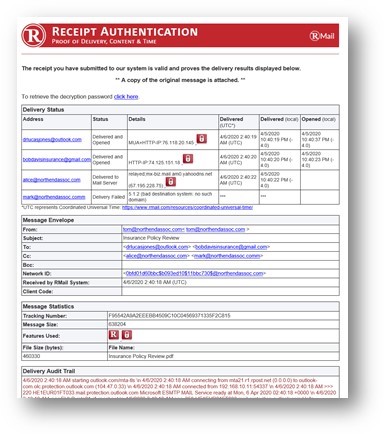
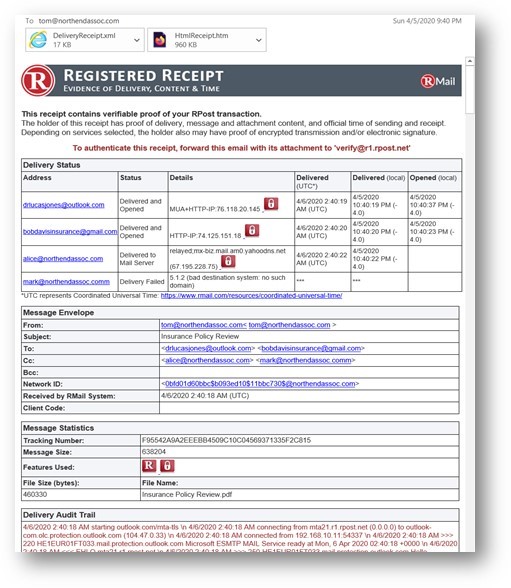
RMail is RPost’s software-as-a-service solution that enables business users to track and prove email delivery and encrypt sensitive emails. Available as a MS Outlook add-in and for other popular software platforms, RMail works with any email address without any customization required. RMail provides users with a Registered Receipt email record proving delivery status, time of delivery, and exact content.
$7
per month
Pricing
Google VaultMicrosoft ExchangeRMail
Editions & Modules
No answers on this topic
RMail Personal
$7.00
per user, per month
RMail Standard
$15.00
per user, per month
Shared Volume
Varies by Plan
for 5 or more users
Offerings
Pricing Offerings
Google VaultMicrosoft ExchangeRMail
Free Trial
NoNoYes
Free/Freemium Version
NoNoNo
Premium Consulting/Integration Services
NoNoYes
Entry-level Setup FeeNo setup feeNo setup feeNo setup fee
Additional Details
More Pricing Information
Community Pulse
Google VaultMicrosoft ExchangeRMail
Considered Multiple Products
Google Vault
Chose Google Vault
Veritas Enterprise Vault although the best backup solution present was quite expensive and difficult to implement at an org level. Google Vault is very smooth and easy to implement with orgs already using Google Workspace for business. The only reason for selecting Google …
Chose Google Vault
Google Vault, unlike the above platforms, has an effective Cloud performance which helps save project time and cost, and its analytical functionalities are the best. Managing multiple information through Google Vault is also an easy operation and its data archiving capabilities …
Chose Google Vault
The product is similar offering but it is already well integrated into the other g-suite products that we use. It works really well in terms of searching and indexing documents. Other products seemed more elaborate and were complex to implement and use. Since our use case was …
Microsoft Exchange

No answer on this topic

RMail

No answer on this topic

Features
Google VaultMicrosoft ExchangeRMail
Secure Email Gateway
Comparison of Secure Email Gateway features of Product A and Product B
Google Vault
-
Ratings
Microsoft Exchange
7.3
84 Ratings
14% below category average
RMail
-
Ratings
Anti-malware00 Ratings6.567 Ratings00 Ratings
Customizability00 Ratings8.079 Ratings00 Ratings
Data Loss Protection00 Ratings8.368 Ratings00 Ratings
Threat Detection00 Ratings6.566 Ratings00 Ratings
Sandboxing00 Ratings7.444 Ratings00 Ratings
End-to-End Encryption00 Ratings6.767 Ratings00 Ratings
Management Tools00 Ratings8.080 Ratings00 Ratings
Best Alternatives
Google VaultMicrosoft ExchangeRMail
Small Businesses
Cove Data Protection
Score 9.1 out of 10
Zoho Mail
Zoho Mail
Score 9.2 out of 10
Paubox Email Suite
Paubox Email Suite
Score 9.0 out of 10
Medium-sized Companies
Cove Data Protection
Score 9.1 out of 10
Avanan
Avanan
Score 9.8 out of 10
OpenText Core Email Encryption
Score 9.6 out of 10
Enterprises
Microsoft Exchange
Microsoft Exchange
Score 8.6 out of 10
Avanan
Avanan
Score 9.8 out of 10
DataMotion
DataMotion
Score 9.3 out of 10
All AlternativesView all alternativesView all alternativesView all alternatives
User Ratings
Google VaultMicrosoft ExchangeRMail
Likelihood to Recommend
8.7
(16 ratings)
9.0
(102 ratings)
10.0
(7 ratings)
Likelihood to Renew
-
(0 ratings)
10.0
(4 ratings)
9.1
(2 ratings)
Usability
-
(0 ratings)
8.5
(6 ratings)
9.1
(2 ratings)
Availability
-
(0 ratings)
10.0
(1 ratings)
-
(0 ratings)
Performance
-
(0 ratings)
9.0
(1 ratings)
9.1
(1 ratings)
Support Rating
-
(0 ratings)
9.9
(12 ratings)
9.1
(1 ratings)
Implementation Rating
-
(0 ratings)
10.0
(1 ratings)
6.4
(2 ratings)
Configurability
-
(0 ratings)
7.0
(1 ratings)
-
(0 ratings)
Ease of integration
-
(0 ratings)
5.0
(1 ratings)
-
(0 ratings)
Product Scalability
-
(0 ratings)
10.0
(1 ratings)
-
(0 ratings)
Vendor post-sale
-
(0 ratings)
5.0
(1 ratings)
-
(0 ratings)
Vendor pre-sale
-
(0 ratings)
8.0
(1 ratings)
-
(0 ratings)
User Testimonials
Google VaultMicrosoft ExchangeRMail
Likelihood to Recommend
Google
Well suited - 1. Quick archival esp in Google workspace apps. Very easy to archive and store important conversations, chats, etc. 2. Search and eDiscovery - Very important feature. Less appropriate - 1. Export - Very limited options and sometimes a cause of concern due to limited options post eDiscovery. 2. Integration - Very limited integration options and leads to the use of multiple alternatives or workspaces. 3. Archival post deletion - No option for this that leads to missing important elements sometimes.
Read full review
Microsoft
Creating and receiving emails is simple. Managing contacts is a nice feature, especially connecting to Active Directory. Calendar management is also helpful and sharing access to others' calendars for scheduling meetings is useful. And reserving resources such as rooms or equipment is also useful. Personal and shared mailboxes are good features, as well. Tasks are a little lacking, but other than that, the features are thorough.
Read full review
RPost
RMail is great for sending emails with information that is sensitive but that the recipient is not going to put a lot of work into retrieving. I do psychological evaluations for criminal courts and I use it to send reports to courts and attorneys. I need to use something compatible with HIPAA privacy rules, which courts and attorneys are typically not as concerned about. If they had to use a password or go to an outside web address to retrieve the email, they wouldn't do it. It's also common for an attorney to say they didn't get an email, but I always know if they did or not, and I have clear documentation of it, which is important in legal cases.
Read full review
Pros
Google
  • Archiving - Archiving of emails, chats, etc, Pretty easy to use and have some amazing features wrt to duration, access, etc.
  • Search - Post archival, Google Vault makes it pretty easy to search for relevant content and eDiscovery.
  • Auditing - Workspace manager can easily audit user activities. Helps security at the org level.
Read full review
Microsoft
  • As we have a large user base of 11,000 users we use MailTips to avoid people getting confused with people with similar names in the organization.
  • The integration between Teams Meeting and Resource booking is generally very good. The Scheduling Assistance makes it easy to scan calendars and find free periods to provisionally scheduled events.
  • Marking yourself as Out of the Office and busy is easy, as is sharing your calendar within the team/organization or individuals.
  • Voicemail integration and the ability to receive missed chats in your inbox are highly used and useful.
Read full review
RPost
  • Read receipts tell you the time a message was actually opened
  • The electronic signature feature is nice, and usually not included with these types of services
  • Many times, a recipient doesn't need a password to open their email. RMail leverages TLS technology in most cases
  • Recipients do have the option of creating an account, but generally they don't need to
  • Outlook integration is very easy to set up
  • Gmail integration within Chrome is pretty amazing
Read full review
Cons
Google
  • More export options are available to the user, specifically allowing exported data to be imported into a new account easily
  • The interface is very basic and easy to use, but the dashboard could show more information to make it more usable
Read full review
Microsoft
  • The two main factors for the better reliability & Uptime of internally hosted Exchange Server depends on Exchange Server configuration and the level of investment the organization is willing to provide for hosting the Exchange Server On-Premise Environment. As the data is stored in the organization’s hardware, any disaster may lead to the loss of email and servers.
  • Losing data might affect business continuity and rebuilding it can be costly.
  • Security remains a major concern.
  • Security of data loss is main concern. To ensure that, organization needs to configure networks, systems and Exchange platform against possible threats.
  • Hardware and license costs are high.
Read full review
RPost
  • Program plug-in crashes on occasion.
  • Issues can arise if your computer's clock is not synced to RMail's time servers.
  • Setup was initially tedious (but has gotten much better since 2019).
Read full review
Likelihood to Renew
Google
No answers on this topic
Microsoft
Email and calendars in a business setting are requirements. And Microsoft continues to be the standard of business applications. Microsoft 365 makes Microsoft Exchange easy to use. Everything is in the cloud. Let Microsoft take care of the hardware, the software, and the security. You just enable your business users with the functionality they need.
Read full review
RPost
I don't think RPost has any competition, at least none that I can use. I think that once registered email becomes widely accepted (someday soon?), it will be indispensable for anyone in business, and RPost is the leading vendor (maybe the only vendor).
Read full review
Usability
Google
Using Google Vault is straightforward
Read full review
Microsoft
Microsoft Exchange has come a long way over the years and has nowhere near the technical overhead required for support as it did back in 2003/2007 and prior. The integrations with Teams, Defender, Sharepoint, Copilot and many other products make it a solid and well-rounded tool used for many day-to-day tasks.
Read full review
RPost
It is as simple as downloading a plug-in or installing a chrome extension, then you click a button to use it. The interface is straightforward.
Read full review
Reliability and Availability
Google
No answers on this topic
Microsoft
Exchange is setup with multiple servers behind load balancers to provide high availability.
Read full review
RPost
No answers on this topic
Performance
Google
No answers on this topic
Microsoft
I would say it's the best email product I've experienced.
Read full review
RPost
Works well routinely without problems.
Read full review
Support Rating
Google
No answers on this topic
Microsoft
We have a good enterprise agreement with Microsoft which affords us quick phone support. I have found the support staff knowledgeable and prompt with a solution when required. At times it may be difficult to schedule a call back, this is mainly due to our need for calls early in the morning which happens to be during a shift change at Microsoft support.
Read full review
RPost
Support is easy to access via email or phone. They also reach out to you periodically with new features, but they aren't intrusive about it. I usually appreciate it when I get an email from RMail, which is not very often.
Read full review
Implementation Rating
Google
No answers on this topic
Microsoft
Implementation/conversion can be quite complex and, unless you have certified Exchange administrators in-house, you should strongly consider a 3rd party consultant for this implementation.
Read full review
RPost
Works great.
Read full review
Alternatives Considered
Google
The product is similar offering but it is already well integrated into the other g-suite products that we use. It works really well in terms of searching and indexing documents. Other products seemed more elaborate and were complex to implement and use. Since our use case was rather simpler data backup and retrieval, hence it seemed a good fit to implement
Read full review
Microsoft
Microsoft Exchange Product The best cloud-based enterprise-grade archiving platform with a host of features that enable files to be securely archived and retrieved with advanced search options. This tool is very easy to use and has a User-friendly interface. It is a highly reliable platform that allows all employees to automatically store their data without any limitations. It offers a cost-effective solution with customized policy management. We are happy that the customer support team is always fast and concerned, and the product's uninterrupted service experience. It is very good that it stores data in real-time without losing it, even in the event of a disaster. The cost-effective solution and integration with other tools are seamless.
Read full review
RPost
RMail is really useful when wanting to send important encrypted information, and have control of what happens on the other end. It also comes with a complete set of features that help in any other way you can imagine. I've been through other products, and nothing compares to it.
Read full review
Scalability
Google
No answers on this topic
Microsoft
The only time Exchange has failed us is when we did something to cause the failure.
Read full review
RPost
No answers on this topic
Return on Investment
Google
  • Positive ROI- able to conveniently store and access files/data that otherwise would not have been as organized. Not only makes my day more efficient but leads to a better client experience.
  • Organized storage.
  • Easy interface once you get used it it- give it about a month.
Read full review
Microsoft
  • It has been an important factor in allowing seamless communication with clients and scheduling business meetings, which in turn works in the company's favor.
  • Haven't noticed any negative impact Exchange has had on our ROI. The support team is also responsive and helpful.
Read full review
RPost
  • There's not much ROI, because we don't get it much cheaper than the list price.
  • However, being able to offer this service strengthens our service offerings.
Read full review
ScreenShots

RMail Screenshots

Screenshot of EMail encryptionScreenshot of Encrypted EmailScreenshot of Large File SharingScreenshot of Receipt AuthenticationScreenshot of Registered ReceiptScreenshot of SideNote