Less Annoying CRM vs. monday CRM

Overview
ProductRatingMost Used ByProduct SummaryStarting Price
Less Annoying CRM
Score 9.6 out of 10
N/A
Less Annoying CRM is a customer relationship management (CRM) solution built specifically for small businesses to help clients manage contacts and track leads.
$15
per month per user
monday CRM
Score 8.2 out of 10
N/A
monday CRM provides control over the entire sales funnel and helps users close deals faster by automating manual work and streamlining sales activities from A-Z.
$45
per month 3 seats (minimum)
Pricing
Less Annoying CRMmonday CRM
Editions & Modules
Always
$15
per month per user
Basic
$15
per month per seat
Standard
$20
per month per seat
Pro
$33
per month per seat
Ultimate
Contact Sales
Offerings
Pricing Offerings
Less Annoying CRMmonday CRM
Free Trial
YesYes
Free/Freemium Version
NoNo
Premium Consulting/Integration Services
NoNo
Entry-level Setup FeeNo setup feeOptional
Additional DetailsThe system is $15 per user per month. No hidden costs or fees, or paying unused functionality. No long-term contracts. The first 30 days with the product are free, and the vendor won’t ask for payment information until that trial period ends.Plans start with 3 seats. Yearly save 33%
More Pricing Information
Community Pulse
Less Annoying CRMmonday CRM
Considered Both Products
Less Annoying CRM
Chose Less Annoying CRM
Less Annoying CRM has such a small learning curve compared to all of the others.
monday CRM

No answer on this topic

Features
Less Annoying CRMmonday CRM
Sales Force Automation
Comparison of Sales Force Automation features of Product A and Product B
Less Annoying CRM
9.1
60 Ratings
15% above category average
monday CRM
7.1
75 Ratings
10% below category average
Customer data management / contact management9.959 Ratings7.868 Ratings
Workflow management9.351 Ratings8.273 Ratings
Territory management8.922 Ratings6.741 Ratings
Opportunity management9.944 Ratings7.066 Ratings
Integration with email client (e.g., Outlook or Gmail)9.249 Ratings6.959 Ratings
Contract management8.423 Ratings6.751 Ratings
Quote & order management7.721 Ratings00 Ratings
Interaction tracking9.942 Ratings6.754 Ratings
Channel / partner relationship management8.724 Ratings00 Ratings
Customer Service & Support
Comparison of Customer Service & Support features of Product A and Product B
Less Annoying CRM
10.0
51 Ratings
26% above category average
monday CRM
-
Ratings
Case management10.044 Ratings00 Ratings
Help desk management10.045 Ratings00 Ratings
Marketing Automation
Comparison of Marketing Automation features of Product A and Product B
Less Annoying CRM
8.6
37 Ratings
10% above category average
monday CRM
7.2
56 Ratings
8% below category average
Lead management8.936 Ratings7.256 Ratings
Email marketing8.320 Ratings00 Ratings
CRM Project Management
Comparison of CRM Project Management features of Product A and Product B
Less Annoying CRM
9.6
48 Ratings
22% above category average
monday CRM
7.6
71 Ratings
1% below category average
Task management9.947 Ratings8.270 Ratings
Reporting9.234 Ratings7.560 Ratings
Billing and invoicing management00 Ratings7.249 Ratings
CRM Reporting & Analytics
Comparison of CRM Reporting & Analytics features of Product A and Product B
Less Annoying CRM
9.0
33 Ratings
16% above category average
monday CRM
6.8
69 Ratings
12% below category average
Forecasting8.316 Ratings5.857 Ratings
Pipeline visualization8.929 Ratings7.366 Ratings
Customizable reports9.924 Ratings7.460 Ratings
Customization
Comparison of Customization features of Product A and Product B
Less Annoying CRM
9.0
49 Ratings
16% above category average
monday CRM
6.8
68 Ratings
12% below category average
Custom fields9.648 Ratings6.868 Ratings
Scripting environment8.210 Ratings7.241 Ratings
API for custom integration9.19 Ratings6.542 Ratings
Custom objects00 Ratings6.660 Ratings
Integrations with 3rd-party Software
Comparison of Integrations with 3rd-party Software features of Product A and Product B
Less Annoying CRM
8.1
9 Ratings
8% above category average
monday CRM
8.3
40 Ratings
10% above category average
Marketing automation8.29 Ratings8.340 Ratings
Compensation management8.13 Ratings00 Ratings
Platform
Comparison of Platform features of Product A and Product B
Less Annoying CRM
9.9
32 Ratings
27% above category average
monday CRM
8.1
64 Ratings
7% above category average
Mobile access9.932 Ratings8.164 Ratings
Security
Comparison of Security features of Product A and Product B
Less Annoying CRM
10.0
30 Ratings
17% above category average
monday CRM
8.1
62 Ratings
4% below category average
Role-based user permissions10.030 Ratings7.962 Ratings
Single sign-on capability00 Ratings8.355 Ratings
Best Alternatives
Less Annoying CRMmonday CRM
Small Businesses
Salesmate
Salesmate
Score 10.0 out of 10
Salesmate
Salesmate
Score 10.0 out of 10
Medium-sized Companies
Creatio
Creatio
Score 9.1 out of 10
Creatio
Creatio
Score 9.1 out of 10
Enterprises
Creatio
Creatio
Score 9.1 out of 10
Creatio
Creatio
Score 9.1 out of 10
All AlternativesView all alternativesView all alternatives
User Ratings
Less Annoying CRMmonday CRM
Likelihood to Recommend
9.9
(60 ratings)
8.6
(85 ratings)
Likelihood to Renew
9.1
(1 ratings)
9.6
(5 ratings)
Usability
9.9
(46 ratings)
8.7
(82 ratings)
Support Rating
9.4
(29 ratings)
7.2
(57 ratings)
Implementation Rating
9.1
(1 ratings)
8.2
(1 ratings)
User Testimonials
Less Annoying CRMmonday CRM
Likelihood to Recommend
Less Annoying CRM
Less Annoying CRM is an excellent system for us as we log everything we do with a customer and has easy access to the imfromation later. May sound "of course" but this is by far the easiest CRM I've ever worked with during my 30 years in sales. Follow-up and scheduling is easy managable as well as designing forms and fields our selves. Less Annoying CRM has a good list of plug'ins to other software for integrational puposes. Most important to us is support when needed. Less Annoying CRM excels in its support. Don't hesitate, it doesn't do everything, but get started and get surprised
Read full review
monday.com
Our Integrated/brand marketing and Lifecycle marketing teams find monday CRM to be particularly useful for project management. Integrated marketing uses monday to build out our yearly promotional calendar, which keeps the entire company informed on all the launch and sale details for the year, across both retail and digital channels. The Lifecycle marketing team uses monday CRM to track individual campaign projects, mainly consisting of email asset creation. There are times when monday is not the preferred CRM platform, such as data and analytics tracking, project performance tracking, or scenarios when immediate feedback is required.
Read full review
Pros
Less Annoying CRM
  • Simple, intuitive usage
  • Daily agenda emails
  • Ease of moving calendar / action items around, closing out
  • Customer service is extremely responsive, they don't hide behind a "contact us" form on their website as so many companies seem to do. You can readily reach them by phone!
Read full review
monday.com
  • It is very easy to use and logical. Teams and departments can collaborate together to work as one team.
  • It is very useful in automating the processes of relevant departments.
  • The field names, types, and data you enter can be customized as per your organization's requirements.
Read full review
Cons
Less Annoying CRM
  • The one thing I was looking for is a place to manage multiple businesses with one project. Like if I am selling a "summer camp guide," I would like to have info for sales in one place with multiple contacts and businesses. LACRM customer service provided a workaround for me by suggesting I set up a specific pipeline for each project and them put each business in there. It is working great and, actually, a much better way to manage the project than I have originally intended.
  • I really don't have anything else to add. LACRM is perfect for us.
Read full review
monday.com
  • It takes a while to get used to the UX if you are used to Hubspot or another CRM
  • We are still testing mass email functionality, it's a little less intuitive vs Hubspot
  • The quote/invoice forms are not pre-built into the CRM the way they are in Hubspot, so you have to manually set those up. Some might see that as a positive thing because it's more flexible with your respective tech stack, but it required more research on our end to make sure we set it up to flow efficiently.
Read full review
Likelihood to Renew
Less Annoying CRM
Excellent product which meets my needs of a complex industry
Read full review
monday.com
It is the best tool we have found as a small business to be able to track our bookings, tasks and income.
Read full review
Usability
Less Annoying CRM
The biggest reason I came to Less Annoying CRM was how simple it was to use and how powerful it is. The learning curve is very small, and I was able to start using it in a productive way right from the beginning. When I had questions or asked for suggestions the CRM Coaches at the company responded immediately and made sure my questions were answered.
Read full review
monday.com
It's a really easy to use and improve tool, that helps you to quickly master its functions and then helps you to improve the features usage as quickly as you learned the basis. Any doubts you have are easily solved by the contents and tutorials it provides, and if it doesn't solve it, the team is always quick to reply and help you.
Read full review
Support Rating
Less Annoying CRM
I can't stress enough, how Less Annoying CRM's Customer Service is the absolute best thing. You're never going to be waiting weeks for a response. You're always going to know someone will call you back. They don't forget you or lose your ticket. And If you don't THINK something can be done with Less Annoying CRM, write or call Customer Service, and they are sure to have a wealth of information and ideas to offer you. They really are about helping you find simple solutions that work! They are SMART about workflows and productivity!
Read full review
monday.com
When I have requested customer service from monday.com account the person who I spoke with was really helpful but the set up to get a hold of someone in customer service was a little complicated and time-consuming. I had to get a ticket in an email and then wait for a specific person to call me back at a certain time, that's why I gave a six.
Read full review
Implementation Rating
Less Annoying CRM
After explaining that I was moving from Salesforce and the problems I was encountering, they took over and implemented the data in such a quick and efficient way, I was looking for the other shoe to drop but they did an amazing job so very impressed
Read full review
monday.com
It was very easy to start using. It is also safe to use lots of trial and error whilst setting up.
Read full review
Alternatives Considered
Less Annoying CRM
HubSpot has a huge selection of tools, reports, integrations and supports that Less Annoying does not have. It is not comparable in price or functionality - but I am comparing it because it was the last CRM I used before I used Less Annoying, and it made me realize that if you don't need all the bells and whistles, but you just need to track your Customers and manage your leads and you don't want to spend a lot of money, Less Annoying CRM is the way to go.
Read full review
monday.com
Monday is significantly better. Not only is it more aesthetically pleasing it is just better overall. I feel as if Monday has a better system in regard to keeping track of all the files we have. Moreover, I also feel like the fact that it allows me to tag my other coworkers enables me to have better communication in the office.
Read full review
Return on Investment
Less Annoying CRM
  • Not just storage of information, but utilizing that information to build stronger relationships with clients
  • Because it's web-based, we can be at our desk or on the road and still have the full functionality of the CRM at our fingertips, which helps us keep focusing on sales!
Read full review
monday.com
  • I feel since we integrated to monday CRM, that the speed of our invoicing rate has increased, due to the easier navigation monday CRM provides.
  • Communication with other peers & departments has become easier to reach out since we all share this platform and able to tag the needed person.
  • We are also able to view and give reports easier to our VP's/ higher up, providing visibility and graphs of our trending sales numbers categorized by each store with different sales type.
Read full review
ScreenShots

Less Annoying CRM Screenshots

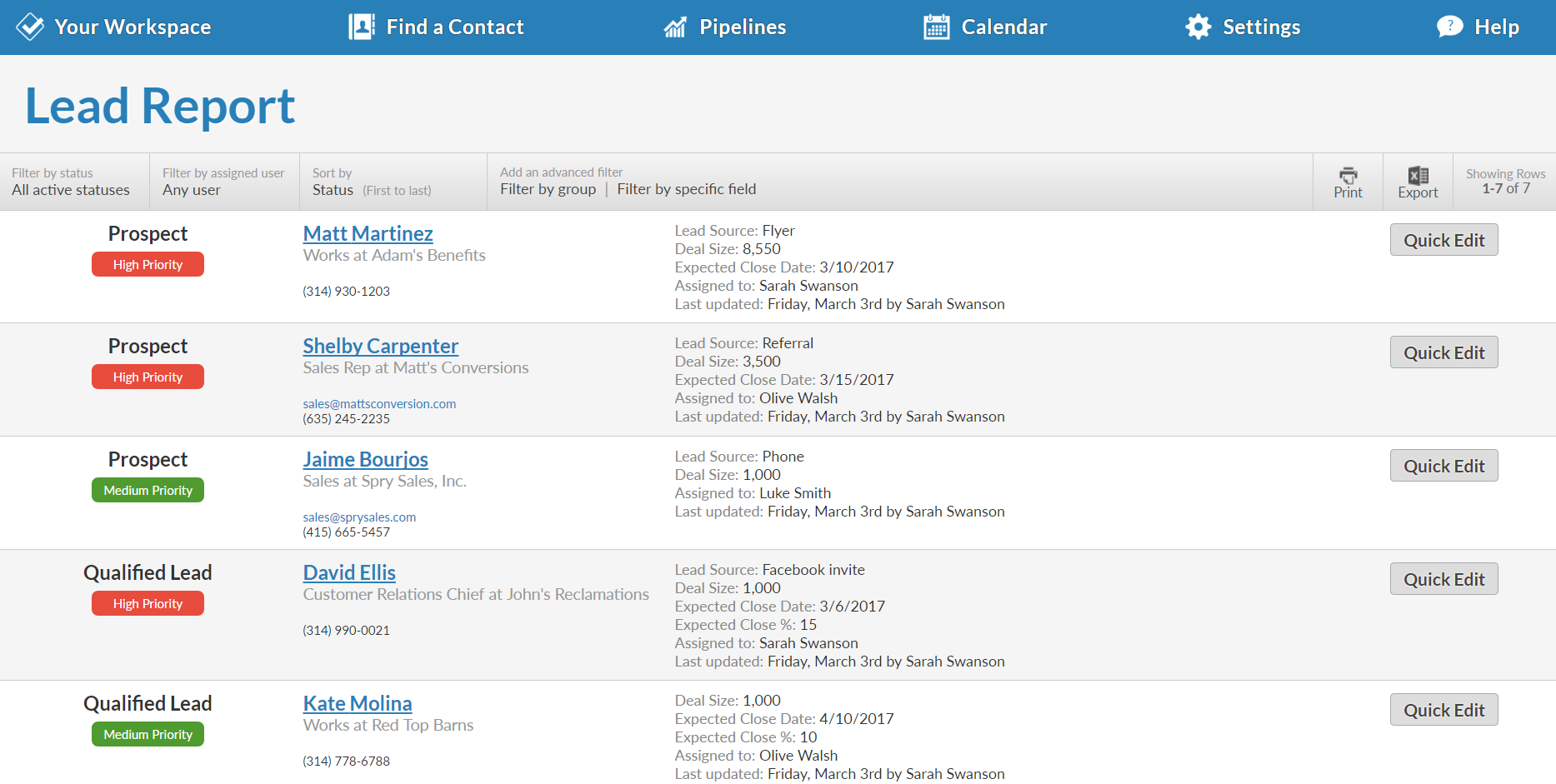
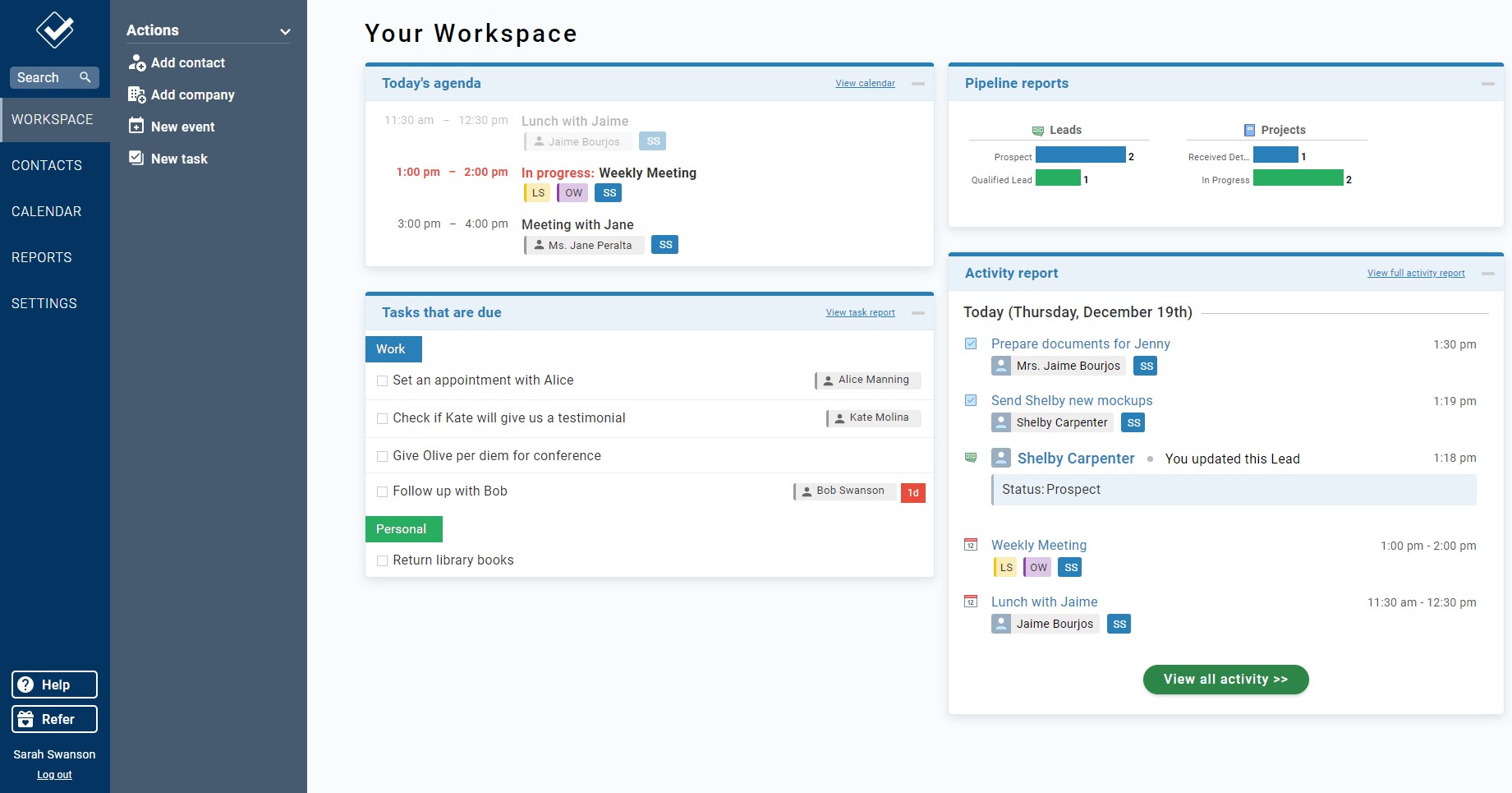
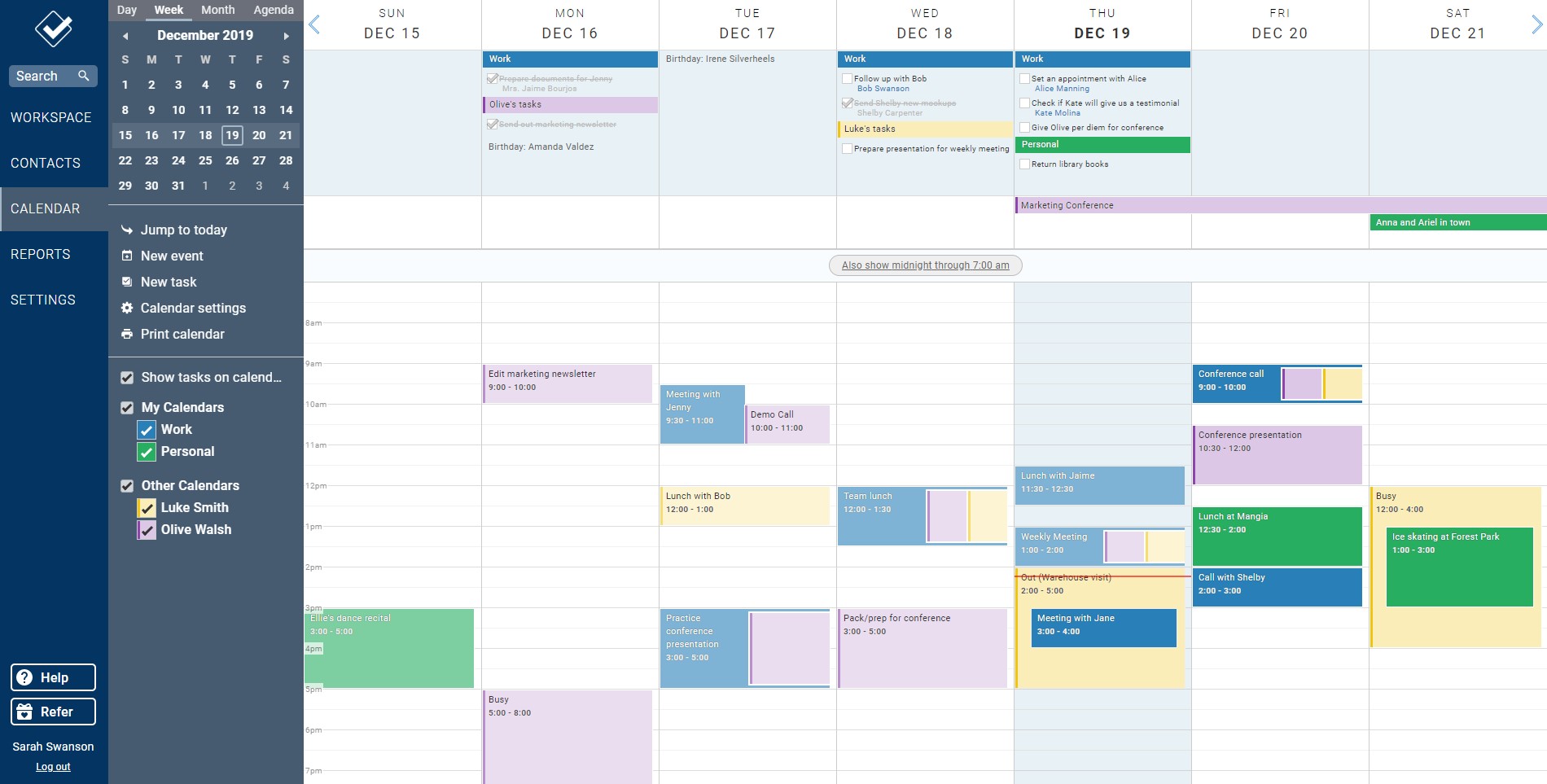
Screenshot of The full-customizable Lead Report keeps you updated on every opportunity in your pipeline.Screenshot of Every contact and company has a profile that shows your entire history, along with any leads, files, events, to-dos, and more.Screenshot of Your Workspace is your homepage for your CRM. It give you a quick overview of everything that's going on.Screenshot of The full-customizable Lead Report keeps you updated on every opportunity in your pipeline.Screenshot of Our powerful web calendar allows you to stay on top of your events and to-dos and those of your co-workers.Screenshot of Our fully-featured mobile site means you can access your CRM from anywhere you have an internet connection.

monday CRM Screenshots

Screenshot of Sales Pipeline - Ensuring leads do not slip through the cracks.Screenshot of Sales Analytics - Used to build dashboards in real time with no development help, to gain insights into where deals stand, expected revenue, team performance, etc.Screenshot of Automations - Automates sales processes including automatic assignment of leads to reps, reminders for upcoming activities,  and notifications when a lead opens an email.Screenshot of Email Capabilities - Automatically logs sent emails, keeps track of interactions, and enables mass emails with personalized email templates.Screenshot of Activities Logging & Tracking - Displays all past and upcoming sales activities in one organized timeline.Screenshot of Post-sales Management - To help users build lasting customer relationships once the deal is done or stay on top of client projects, with collection tracking.