Overview
ProductRatingMost Used ByProduct SummaryStarting Price
Lifetimely
Score 7.0 out of 10
N/A
Lifetimely, by the company of the same name in Finland, is a Shopify app that helps e-commerce stores figure out their customer lifetime value and find products & marketing channels that bring in the big spenders, so users can double down on what’s working.N/A
Looker
Score 8.3 out of 10
N/A
Looker is a BI application with an analytics-oriented application server that sits on top of relational data stores. It includes an end-user interface for exploring data, a reusable development paradigm for data discovery, and an API for supporting data in other systems.N/A
Sisense
Score 7.1 out of 10
N/A
Sisense is a BI software and analytics platform. With what the vendor calls their In-Chip™ and Single Stack™ technologies, users have access to a comprehensive tool to analyze and visualize large, disparate data sets without IT resources.N/A
Pricing
LifetimelyLookerSisense
Editions & Modules
No answers on this topic
Offerings
Pricing Offerings
LifetimelyLookerSisense
Free Trial
NoYesYes
Free/Freemium Version
NoNoNo
Premium Consulting/Integration Services
NoNoNo
Entry-level Setup FeeNo setup feeRequiredNo setup fee
Additional DetailsMust contact sales team for pricing.Must contact sales team for pricing.
More Pricing Information
Community Pulse
LifetimelyLookerSisense
Considered Multiple Products
Lifetimely

No answer on this topic

Looker
Chose Looker
Looker seems friendlier and more accessible.
Chose Looker
Looker was the most customizable option for our business and cost wise made the most sense. They do have a free tier option that some of the other weren't offering to us at the time. Looker has a great- mobile app solution while tableau is a desktop-based platform. Tableau also …
Chose Looker
The biggest advantage that Looker Studio has is that it's really easy to use and to distribute to other use. You can have a really complex report set up in a couple of minutes with an extract data source that enables Looker to update really fast.
Chose Looker
Looker is less complex to use and links directly to google suite which we use across the business and personally think is a better user experience than microsoft.
Chose Looker
We have not used any other products; we've only ever needed to use Looker Studio and didn't need to demo anything else because it provided everything we needed.
Chose Looker
Looker stacks up well against other data providers for usability and friendly interfaces, plus the ability to customise. We actually integrate Looker with other analytics tools in the same sphere (power bi, dreamdata and others) so that we can have one comprehensive dashboard …
Chose Looker
In my opinion, Looker is no Power BI. It is good, but I think Power BI is amazing. That said, in my experience, Power BI is nowhere near as easy to setup and report on Google services as Looker is. We plan to continue using Power BI for c-suite and corporate reporting, …
Chose Looker
Looker is a free and easier analytics and dashboard tool. It provides enough data and features to get things done and analyze marketing data. The other tools have more advanced features and are more suited for other things besides marketing.
Chose Looker
Tableau provides additional visual functionality and is great for more in-depth visuals or further data exploration, but it is costly and an extremely robust solution for simple data reporting. Looker can't be beat when it comes to integrating with other G-Suite tools. All in …
Chose Looker
Looker is a lot less overwhelming and lets you take the data that you have in Google analytics to make it understandable, focused and specific to the audience that is viewing the content. I haven’t used any other tools, but feel because of the ease of accessibility and cost, …
Chose Looker
I prefer agency analytics as it has a lot more agnostic integration options and is much speedier but does come at a cost. I would recommend this over Looker studio for sure. It has great templates to use too and allows for more customisation and racing benchmarks which is a …
Chose Looker
We'll still use Semrush's reporting for some clients - depending on the metrics which are important for them and whether they have an interest in live reporting or simply monthly PDF reports.
Chose Looker
If you company is using Google suite products, Looker is a no-brainer. Tableau is probably the most flexibly but as a result it has the least governance capabilities. Power BI is kind of old-school in terms of how it feels to use it. I think in general, Looker brings a lot of …
Chose Looker
Better in terms of data configuration with slight harder learning curve, available help material is not that much and we usually have to connect with Looker Help with chat for our data and analysis questions. While Looker offers a wide range of visualization options, there were …
Chose Looker
Looker Studio, you can easily report on data from various sources without programming. Looker Studio is available at no charge for creators and report viewers. Enterprise customers who upgrade to Looker Studio Pro will receive support and expanded administrative features, …
Chose Looker
It takes forever sometimes to have data ready in tableau dashboard, and also it takes effort to maintain each dashboards. We do not have so many efforts to maintain all. Also, we need to be able to see data faster and therefore take actions and work faster. With Looker we might …
Chose Looker
Looker gives you options to integrate external APIs with great ease. Our data analytics team is able to easily use multiple data sources as input to the Looker dashboard, and everything is consolidated in one single Dashboard. You also have an option for Shared folders to be …
Chose Looker
I chose Looker because can incorporate multiple sources, mostly which are Google owned. The data can sync automatically, and the graphs are visually appealing.
Chose Looker
Looker Studio is not as robust as Tableau or Microsoft BI. So it does not provide quite as much insight or depth and it has more limitations overall then the other major reporting products. However, it is also free and connects perfectly with other Google products. Plus, all of …
Chose Looker
Technically, Power BI is much more complete and powerful, but it's like an ocean liner. I didn't need all that equipment. In my case, I needed to move more quickly, like on a speedboat, to build a page with several data sources in a single source of truth that could be easily …
Chose Looker
Looker is a free tool to use on the basic level, which can't really compare apples to apples since all of the other services are paid services. Looker already has a leg up because of that. The other platforms definitely have more features and capabilities off the bat because it …
Sisense
Chose Sisense
Each tool has strengths, but Sisense stands out for its ease of use, scalability, and robust data integration. We chose Sisense for its balance of robust functionality and ease of use. We are happy that it can handle complex data integrations that aligned perfectly with our …
Chose Sisense
Sisense provides better services than Looker and also its functionalities are more advanced and effective.
Chose Sisense
As someone coming from more of an enterprise tool level Sisense seemed like a step down at first. Compared to other tools in the market or tools that it replaced (Looker), it provides far better data integrations and the ability to build their data cubes meant less reliance on …
Chose Sisense
We evaluated IBM Cognos Analytics and it was vastly more expensive and offered less features than what Sisense offered.
Chose Sisense
Sisense is a differentiator in the marketplace. They help align companies who need a BI solution and a quick and reliable way to get up to speed fast.
Chose Sisense
Sisense was chosen as our BI platform for a few key reasons. Excellent customer support is a key reason why. Additionally, continuing innovation in new product features and the ability to embed reports and do quite a bit in terms of customization.
Chose Sisense
It totally depends on your system requirements, as already shared its features, pros and cons, please select tool accordingly.
Chose Sisense
Sisense truly stacks up against Power BI, Domo or Tableau as one of the most accurate data analysis applications that offers an intuitive approach to data exploration. You can use its web-based interface to tap the expertise of your data analytics team. They can build and share …
Chose Sisense
Sisense worked out of the box, there was a lot of setup with the other 3. Out of the 3 others Board's was the only one that connected to Salesforce without a problem like Sisense. Sisense pricing destroyed the other 3 as well.

Chose Sisense
We chose Sisense due to pricing structures as well as its speed and ability to connect to more robust data sources. Ultimately, the differences were minimal in regards to abilities and functionality; we just felt that Sisense provided the most reliable and consistent results …
Chose Sisense
Sisense does very well against most of the tools in the market. We chose this tool because of its great visualizations and easy to deploy procedures. The reports are very easy to generate and distribute them across departments and organization. It provides a great interface to …
Chose Sisense
I've used a few different analytical engines over the last few years and none have the efficient ability as both a data manager and a dashboarding tool - usually, other platforms excel in one area or another. To expand further, tools that succeed in data management and …
Chose Sisense
Sisense can't compare to any tool for the ease of user, intuitive interface and "time to data". I gave been working with both large enterprise and small SMB's using Sisense, and it is amazing to see how small companies quickly learn how to use it and how practical and efficient …
Chose Sisense
1) Easy to use, really, there is nothing too much to say. The set up is easy and not confusing. You can use it internally or externally.
2) Customer Service, having spoken to various product reps from similar industry. Sisense rep provides you with the best support to get …
Chose Sisense
Before purchasing Sisense and began recommending it as a solution to our clients, we tested four other BI visualization tools. All four of these ranked high on the Gartner Magic Quadrant. We researched Domo, Looker, MS Power BI and Tableau. Looker could be a better solution if …
Chose Sisense
Crystal Reports is much better at building static reports than building dynamic dashboards.

Visual Studio will allow you to build anything that you want to display your information, but the programming effort will be much higher.
Chose Sisense
Sisense's greatest advantage is its ability to import the data into sisense, perform in-server data modelling, and then create dashboard reports from the modelled data. This takes load off of your production database servers, and leverages sisense's technology for handling huge …
Chose Sisense
Sisense - in POC alongside Birst and Qlik, Sisense ran circles around Birst and Qlik and made them look stupid by comparison

Birst - ETL was super slow and complex AND requires you to learn a proprietary scripting language
Chose Sisense
Sisense can crunch loads more data and has consistently better performance than other modern BI tools; It successfully retains the best of the Cube world and also provides the power of modern in-chip visualization engine.
Chose Sisense
Sisense is a step ahead of the field and continues to make major improvements and enhancements to its product with every release.
Chose Sisense
Have more options for datasource connection. Possibility to add personalized widgets or improve the ones they already offer.
Chose Sisense
Sisense offered very reasonable enterprise licensing and was eaiser for end users than most other tools that can interface w/ the iSeries.
Chose Sisense
Sisense allows you to export individual widgets as iframes. It provides cube and row level security and can manage lots of data without interfering with the data sources. Tableau data sources were harder to manage and version. The customer support team with Sisense was head and …
Features
LifetimelyLookerSisense
BI Standard Reporting
Comparison of BI Standard Reporting features of Product A and Product B
Lifetimely
-
Ratings
Looker
7.5
Ratings
9% below category average
Sisense
9.7
Ratings
17% above category average
Pixel Perfect reports00 Ratings6.50 Ratings10.00 Ratings
Customizable dashboards00 Ratings8.30 Ratings10.00 Ratings
Report Formatting Templates00 Ratings7.50 Ratings9.00 Ratings
Ad-hoc Reporting
Comparison of Ad-hoc Reporting features of Product A and Product B
Lifetimely
-
Ratings
Looker
6.9
Ratings
15% below category average
Sisense
8.8
Ratings
9% above category average
Drill-down analysis00 Ratings6.50 Ratings10.00 Ratings
Formatting capabilities00 Ratings6.70 Ratings9.00 Ratings
Integration with R or other statistical packages00 Ratings5.70 Ratings9.00 Ratings
Report sharing and collaboration00 Ratings8.80 Ratings7.30 Ratings
Report Output and Scheduling
Comparison of Report Output and Scheduling features of Product A and Product B
Lifetimely
-
Ratings
Looker
8.0
Ratings
2% below category average
Sisense
10.0
Ratings
20% above category average
Publish to Web00 Ratings7.70 Ratings10.00 Ratings
Publish to PDF00 Ratings7.90 Ratings10.00 Ratings
Report Versioning00 Ratings7.90 Ratings10.00 Ratings
Report Delivery Scheduling00 Ratings8.40 Ratings10.00 Ratings
Data Discovery and Visualization
Comparison of Data Discovery and Visualization features of Product A and Product B
Lifetimely
-
Ratings
Looker
6.6
Ratings
19% below category average
Sisense
9.5
Ratings
17% above category average
Pre-built visualization formats (heatmaps, scatter plots etc.)00 Ratings7.70 Ratings10.00 Ratings
Location Analytics / Geographic Visualization00 Ratings7.50 Ratings9.00 Ratings
Predictive Analytics00 Ratings4.60 Ratings9.00 Ratings
Pattern Recognition and Data Mining00 Ratings00 Ratings10.00 Ratings
Access Control and Security
Comparison of Access Control and Security features of Product A and Product B
Lifetimely
-
Ratings
Looker
7.4
Ratings
14% below category average
Sisense
10.0
Ratings
16% above category average
Multi-User Support (named login)00 Ratings7.60 Ratings10.00 Ratings
Role-Based Security Model00 Ratings7.30 Ratings10.00 Ratings
Multiple Access Permission Levels (Create, Read, Delete)00 Ratings7.30 Ratings10.00 Ratings
Report-Level Access Control00 Ratings7.40 Ratings10.00 Ratings
Mobile Capabilities
Comparison of Mobile Capabilities features of Product A and Product B
Lifetimely
-
Ratings
Looker
5.3
Ratings
37% below category average
Sisense
9.7
Ratings
22% above category average
Responsive Design for Web Access00 Ratings5.20 Ratings10.00 Ratings
Mobile Application00 Ratings5.00 Ratings10.00 Ratings
Dashboard / Report / Visualization Interactivity on Mobile00 Ratings5.90 Ratings10.00 Ratings
Best Alternatives
LifetimelyLookerSisense
Small Businesses
Yellowfin
Yellowfin
Score 8.6 out of 10
Yellowfin
Yellowfin
Score 8.6 out of 10
Yellowfin
Yellowfin
Score 8.6 out of 10
Medium-sized Companies
Reveal
Reveal
Score 10.0 out of 10
Reveal
Reveal
Score 10.0 out of 10
Reveal
Reveal
Score 10.0 out of 10
Enterprises
Kyvos Semantic Layer
Score 9.5 out of 10
Kyvos Semantic Layer
Score 9.5 out of 10
Kyvos Semantic Layer
Score 9.5 out of 10
All AlternativesView all alternativesView all alternativesView all alternatives
User Ratings
LifetimelyLookerSisense
Likelihood to Recommend
-
(0 ratings)
8.3
(0 ratings)
10.0
(0 ratings)
Likelihood to Renew
-
(0 ratings)
9.2
(0 ratings)
8.9
(0 ratings)
Usability
-
(0 ratings)
8.8
(0 ratings)
10.0
(0 ratings)
Availability
-
(0 ratings)
10.0
(0 ratings)
8.2
(0 ratings)
Performance
-
(0 ratings)
6.0
(0 ratings)
8.2
(0 ratings)
Support Rating
-
(0 ratings)
8.8
(0 ratings)
9.0
(0 ratings)
In-Person Training
-
(0 ratings)
-
(0 ratings)
7.3
(0 ratings)
Online Training
-
(0 ratings)
-
(0 ratings)
8.2
(0 ratings)
Implementation Rating
-
(0 ratings)
10.0
(0 ratings)
7.1
(0 ratings)
Configurability
-
(0 ratings)
10.0
(0 ratings)
8.2
(0 ratings)
Ease of integration
-
(0 ratings)
10.0
(0 ratings)
8.2
(0 ratings)
Product Scalability
-
(0 ratings)
10.0
(0 ratings)
8.2
(0 ratings)
Vendor post-sale
-
(0 ratings)
10.0
(0 ratings)
9.1
(0 ratings)
Vendor pre-sale
-
(0 ratings)
10.0
(0 ratings)
9.1
(0 ratings)
User Testimonials
LifetimelyLookerSisense
Likelihood to Recommend
No answers on this topic
When data drives potential for new orders, Looker earns its place in our tech stack. If, on the other hand, we are hoping for pipeline generation, Looker is useful if you are willing to repeatedly go check customer utilizations .... it is not appropriate if you are hoping to automate data analysis for this purpose.
Read full review
I believe Sisense is perfectly suited for any organization of any size that have access to the proper resources, as the tool is very expensive. The data connectors come in all shapes and sizes out of the box, which allows a great deal of data control within the ElastiCubes. Additionally, while the platform only runs on Windows platforms, the web application can be accessed on any client: mobile, Apple, Windows, etc. This allows a much more flexible user experience, resulting in data and dashboards reaching further than any other tool.
Read full review
Pros
No answers on this topic
  • It is very easy to start a new dashboard and configure what you want to display by just selecting/dragging from the list of available columns.
  • It is intuitive, mainly if you use other Google services like Google Sheets.
  • The look and feel is modern and nice.
  • It it very useful to have an immediate visual overview of the data in a spreadsheet.
Read full review
  • The biggest pro I found with Sisense is that you do not need a DBA in order to manage the system. This makes the learning curve really easy, which helps lots when thinking of implementation across a whole organization. This reflects well for the tool, since it is powerful, but easy to use.
  • ALL-IN-ONE! Sisense answered all of my customers and our company's requirements, to include data modelling and complex calculations.
  • Sisense is as accurate as your data, and best of all, it is real time. After using other visualization tools, I learned that when using multiple sources, errors occur. Sisense prevents this risk by allowing all of the resources to be managed at their engine, maintains connections, and as a developer, the EliastiCube allows you to source large volumes of data with an easy click.
Read full review
Cons
No answers on this topic
  • I wish I could get more granular in the Google ad data, such as down to the campaign type, instead of having to see only all campaigns.
  • The setup can be time-consuming if you're not using the product regularly.
  • Editing the dashboard requires a few logins; I wish it was more seamless.
Read full review
  • Some functionality is missing as built-in functionality, and can only be added by using Javascript, which requires technical knowledge of JS from the dashboard designer to implement. So although almost anything is possible to implement, some things which should be basic require high-level skills.
  • Viewers of dashboards have very limited customization options, almost any customization requires the dashboards designer to implement.
  • Particularly, viewers are unable to select conditional formatting, rename fields, change the order of items, etc.
Read full review
Likelihood to Renew
No answers on this topic
We are very haooy with Looker, it provides us with all the funciomalities we need for both the day to day oerformance tracking and longer periods reporting. It is easy to use for account managers, configurable and customizable for soecialists and what is most imoortant, our clinets generally really love it
Read full review
I think the business and myself as a user has come to rely on SiSense as a dashboarding and quick ad-hoc reporting tool. I am hoping to integrate SiSense dashboards into more parts of the business in the future. We have reduced our report turn-around time for the most part from hours/days to minutes and in some cases almost the speed of thought. Reports are also easier on the eye and more easily distributed. I would also like to say that the support and professionalism from the SiSense team has been excellent.
Read full review
Usability
No answers on this topic
Looker is relatively easy to use, even as it is set up. The customers for the front-end only have issues with the initial setup for looker ml creations. Other "looks" are relatively easy to set up, depending on the ETL and the data which is coming into Looker on a regular basis.
Read full review
There is no doubt it is easy to use solution. It always equips me with authentic reporting, I can have the detailed analysis of the operations. This tool has helped me to collect every bit of the data and it would be just to say that it has influenced my lead generation and helped to build strong customer relations.
Read full review
Reliability and Availability
No answers on this topic
No objections
Read full review
There are very few situations when there is unexpected downtime. Mostly during development, new dashboard implementation and during upgrades. other then that there were very few crashes.
Read full review
Performance
No answers on this topic
Somehow resources heavy, both on server and client. I recommned at least 50Mbs data rate and high performance desktop comouter to be abke to run comolex tasks and configure larger amount of data. On the other hand, the client does not need to worry when viewing, the performance is usually ok
Read full review
SiSense is usually performing better then other solutions even if going for complex reports/dashboards(of course within reasonable frames). I haven't noticed any bad influence on other systems, usually if something happens it stays within SiSense.
Read full review
Support Rating
No answers on this topic
Never had to work with support for issues. Any questions we had, they would respond promptly and clearly. The one-time setup was easy, by reading documentation. If the feature is not supported, they will add a feature request. In this case, LDAP support was requested over OKTA. They are looking into it.
Read full review
SiSense's support ninjas are very knowledgeable and are exceptionally responsive. So far, all of the issues we ran into were resolved within minimum time. My sense of dealing with the support staff at SiSense is that they are very focused on not just answering your immediate question, but also to delve into the cause of the matter.
Read full review
In-Person Training
No answers on this topic
Easy and free training that allowed us quickly understand basics in SiSense and start using them. More advanced features requires some browsing through SiSense forums, but there is always support to help, and SiSense support is one of the best whith which I worked so far.
Read full review
Online Training
No answers on this topic
Many examples, videos and scenarios which you try on your own right away. This combined with in-person training gives you enough to utilize most of SiSense's power.
Read full review
Implementation Rating
No answers on this topic
Very satisfied, easy to implement
Read full review
Would like to have more information about configuration of dev to production deployments architectures.
Read full review
Alternatives Considered
No answers on this topic
In my opinion, Looker is no Power BI. It is good, but I think Power BI is amazing. That said, in my experience, Power BI is nowhere near as easy to setup and report on Google services as Looker is. We plan to continue using Power BI for c-suite and corporate reporting, especially for internal databases, but will gladly use Looker for our marketing information for AdWords, Analytics, Search Console, and YouTube.
Read full review
Sisense was chosen as our BI platform for a few key reasons. Excellent customer support is a key reason why. Additionally, continuing innovation in new product features and the ability to embed reports and do quite a bit in terms of customization.
Read full review
Scalability
No answers on this topic
Product is quite easily scalable. The whole installation can be easily moved to stronger machine if needed.
Read full review
Return on Investment
No answers on this topic
  • Other than some people not liking the numbers, I don't see any negative impacts; we haven't experienced that.
  • The reports help us unravel the story of our users and how they are sifting through our pages.
  • Our clients enjoy seeing the numbers to understand better what stands out on their sites.
  • The reports have helped us see what campaigns are working and where we need to tweak things.
  • The reports have enabled us to have better conversations with stakeholders about how their web pages should be modified, edited, etc., to reflect the data.
Read full review
  • Report development time is reduced from 2~3 days to 2~3 hours.
  • Report querying time is improved from 0.5~10 mins to 2~30 seconds.
  • A 2-staff team delivers 10 times the BI output that we did on the old system.
  • We were able to deliver BI and data analysis for all business functions instead of a very limited group of users
Read full review
ScreenShots

Looker Screenshots

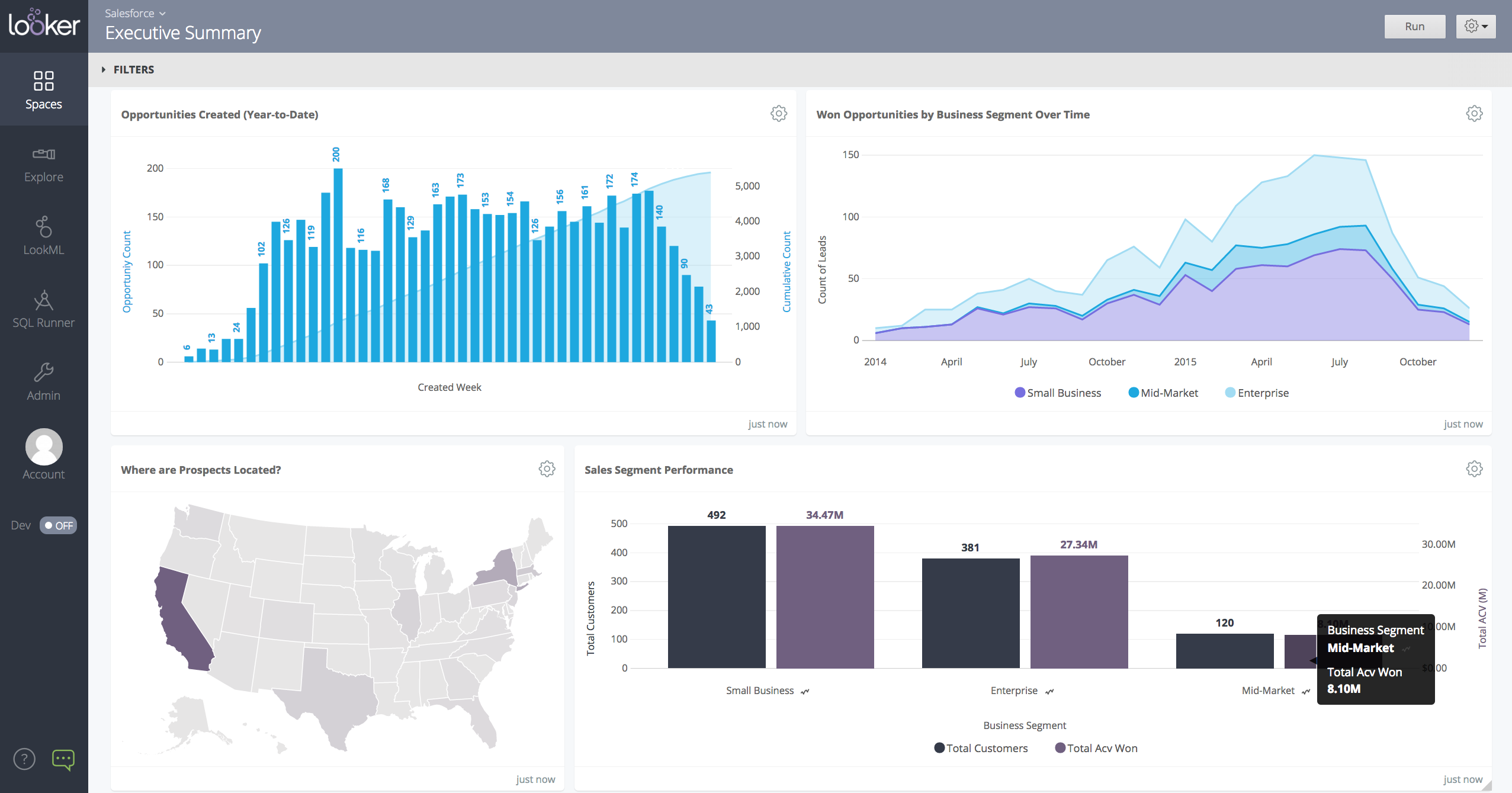
Screenshot of a Looker dashboard with a geo chart.