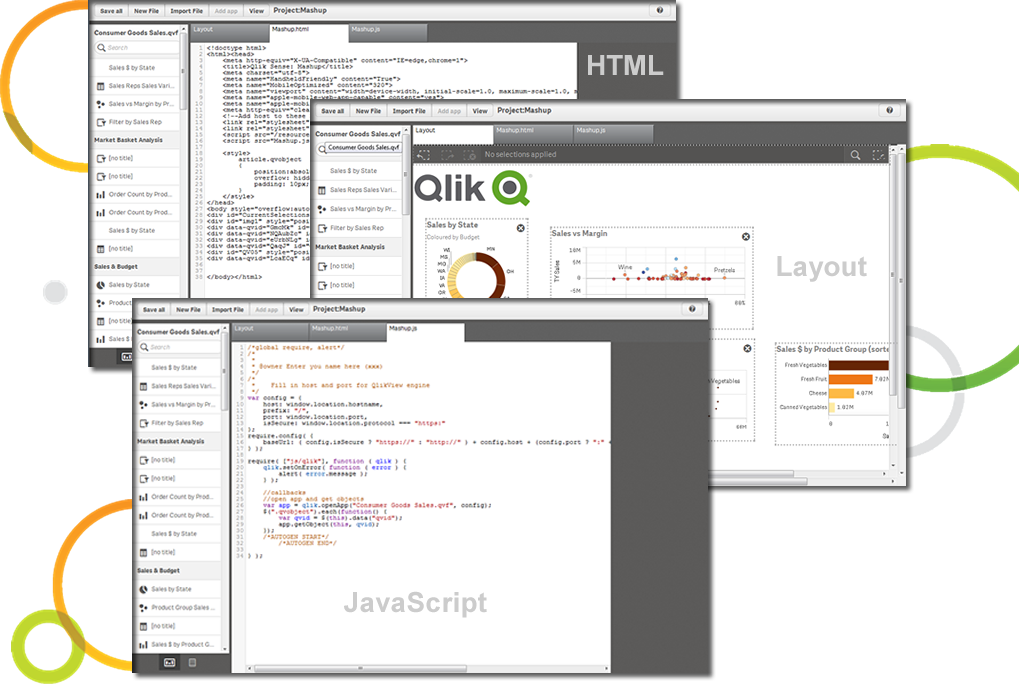
Qlik Sense® is a self-service BI platform for data discovery and visualization. It supports a full range of analytics use cases—data governance, pixel-perfect reporting, and collaboration. Its Associative Engine indexes and connects relationships between data points for creating actionable insights.
$200
per month
Salesforce CRM Analytics
Score 8.4 out of 10
N/A
Salesforce CRM Analytics (formerly Tableau CRM) is a cloud-based business intelligence solutions and analytics software. It provides users with automated data discovery, CRM-connected analytics, top-down views of data, augmented analytics, predictive insights, and customizable data visualization tools.
$125
per month
Tableau Desktop
Score 8.4 out of 10
N/A
Tableau Desktop is a data visualization product from Tableau. It connects to a variety of data sources for combining disparate data sources without coding. It provides tools for discovering patterns and insights, data calculations, forecasts, and statistical summaries and visual storytelling.
We looked at both Microsoft Power BI and Tableau. They both have similar functionality and can get to the end results of Qlik Sense. The big determining factor was how much time that we would have to develop reports and stories. We found that Qlik Sense allowed us to develop …
When it comes to working with large datasets out of the box, Qlik in my opinion is unrivaled amongst the competitor. However, the overall user experience and customization options available to developers require a lot of work. When compared to other options on the market, …
Qlik Sense is one of the best reporting systems. It is stronger than PBI and Tableau when speaking about complex KPIs. It is really similar to MicroStrategy Analytics when you speak about obtained results, but it is easier to use, especially as it is more code-based. But is it …
Qlik Sense can easily integrate multiple data models to
visualize customer data. Tableau is easy to use—perhaps more manageable than Qlik—but
expensive. Microsoft BI was chosen because it was similar to previously used
Data Analyst | Data Developer - Advanced Analytics
Chose Qlik Cloud Analytics (Qlik Sense)
The experience with View has certainly been a strong lever to help us in the choice, but what was proposed by this new product was certainly in line with the tool we were looking for.
Qlik Sense cost of licensing is cheaper compared with other tools which always gives an upper edge in analytics industry with good functionality. More enhanced level of security with better user community group available to discuss about new updates. Understanding of Qlik Sense …
Qlik Sense comes out as a superior product as well as more cost efficient than some of the other products we evaluated as a part of our Enterprise Business Intelligence stack. It offers unified view of our data and extensibility. Qlik Sense being the most interactive …
We originally went with Qlik Sense because the desktop version used to be free for single users and was a very good proposition for us (we are a non-profit with a limited budget). However, from what I see, the functionality is comparable, and Qlik Sense stacks up well.
As soon as you want to pull data from two or more separate tables, Qlik Sense leaves the rest in the dust, since it does not require joins or complex transformations. Zoho CRM analytics are limited to the data located in the product itself. No external tables can be combined.
Other tools were not able to handle complex business requirements and performance was not too good with very huge volume data. we were required to maintain history, time-based data backups, and snapshots. Also, some of the tools were too costly compare to Qlik [Sense] solutions.
I prefer Qlik due to its ability to combine multiple data sources and flexibility offer by the data load editor, other tools lack this capability or they don't do as good of a job as Qlik
I have used SSRS previously for reporting. One interesting feature of SSRS is its email scheduling process, which comes in the same package as SSRS, but in Qlik Sense, we need to get the NPrinting package to make this happen (email scheduling). Still, we decided to go with Qlik …
Qlik Sense offers the most flexible and deepest data modelling compared to many other competitors. The scripting language offers a ton of options which allow us to manipulate complex data scenarios. The scripting is robust and is something missing from many competitors. The …
QlikView has many more options for styling within charts and objects - this hurts our ability to style things to our needs within Qlik Sense. Qlik Sense looks more modern, responsive for browser size and visually more appealing.
We have used different BI Reporting tools, but overall, Qlik Sense [has been used longer]. Customers are really happy with the dashboards we made through Qlik Sense.
Qlik Sense has the ability to handle huge data and the data loading and performing analytics on huge data [is] a plus as compared to other tools in the market. Qlik Sense ability to integrate open-source tools is the best compared to other tools in market.
Director of HR Analytics and Artificial Intelligence
Chose Qlik Cloud Analytics (Qlik Sense)
Qlik was selected before I arrived and I would not select it again in comparison to any of the alternatives I've worked with, unless that was the enterprise mandate.
Tableau is the absolute top of the class when it comes to business intelligence, but it doesn't make sense for every business case. In our case, we needed a simple data visualization platform for our CRM platform and sales pipeline. Salesforce Analytics, while nowhere near as …
Tableau is a great product that becomes better every year, but Salesforce is more popular and has more integration options and we had used Salesforce before, so most of our team members already knew how to use it and what features it has. Maybe in the future we will consider Tab…
Salesforce analytics cloud was selected for its client management capabilities that were already setup internally. As an analysis tool, Tableau was the most valuable tool, but it didn’t have the CRM capabilities of the Salesforce ecosystem.
Salesforce Analytics Cloud is easier to integrate with Salesforce since it has a native integration and connection point. It does lack in functionality compared to heavy tools like Tableau and Microstrategy. If you want more functionality and are not currently using Salesforce …
Have used Tableau before which is my all-time favorite. I would recommend Tableau over any other BI tool. It is widely known, widely used, and easily imported into your business no matter what other software or tools you use.
Tableau is more of a developer tool and for non-technical workers, it is hard to learn. The product is superior to Einstein Analytics, but if the first goal is to get this out to an entire company, then Salesforce is the way to go. For the technical workers, the limitations of …
Compared to Tableau and quicksight, [Salesforce Einstein Analytics (formerly Wave Analytics)] is quite similar and the preference depends on which database you use. Quicksight is more useful if you are using aws service and Salesforce Einstein Analytics is better if you are …
Compare to other solutions Tableau CRM provides more attractive GUI and interactive dashboards. Cost and integration are still a challenge as It cost around $150 per user license cost.
[Salesforce Einstein Analytics (formerly Wave Analytics)] is far far better than these alternatives as everything can be done on single platform from data extraction to data transformation. Sharing of data is very easy and secure. One dashboard is suitable for different users …
Salesforce needs fully baked data for its architecture and design to give you the best results you deserve. Teams not having used Salesforce previously take some time getting used to EA. But its ability to give the data points for KPIs to the sales team in real time and to the …
Our company also uses Tableau Server - also provides valuable visual insight into data but not as easily accessible as the Analytics cloud through our Salesforce tech stack.
Pentaho has fewer visualizations and they haven't been making a lot of improvements in their visualization space. You can't really add a lot of customized visualizations as well. If Tableau has 100 features then Pentaho Analyzer has 10 with no ray of hope for improvements. …
It has a better user interface compared to Microsoft Power BI. The Tableau integration process is quite simple and clear with the third-party application whereas Power BI is not easily integrated with other tools and requires a complex process to follow for integration. DAX …
Tableau can create visually attractive customizable dashboards than can quickly by drag-drop while in power bi we can create simple dashboard. Power bi support lesser data source while in Tableau there is a lot of options When we talk about data handling tableau is a clear …
We have chosen Tableau [Desktop] for its ability to extract live information from any data source, for its simplicity and simplicity that it has a very short learning curve.
Tableau Desktop is the market leader when it comes to creating interactive and appealing graphs and charts. The beauty of the tool is that is can work with almost any kind of back-end source and in real-time take the data and present you with an amazing insight based on the …
It is very easy to use, we can create numbers of charts through it which I think other tools lack in. Lots of online communities are there which have provided solutions to the basic issues. Its ODS(output delivery system) is also very effective. We can use SQL in it for …
Excel has better-embedded coding functions, such as VBA developing environment, but cannot publish reports to an online portal and has limited visualization function. QlikView has fewer online resources and a small community to help you solve problems.
Most companies are going towards visualization tools and products like Tableau. It's user-friendly, offers unlimited options and, best of all, looks pretty!
Tableau Desktop is powerful in terms of data sources and dashboarding creation. You can customize and fine-tune your graphics (color, size, text, tooltips and so on). You can make calculations on measures and dimensions. It's also has a cool geocoding function and maps layers.
Qlick is a good tool too but when handling more than 5G of data you better have a strong machine. Tibco is good too, but the business model doesn't suit us.
Qlik Sense is a program whose purpose is to greatly improve all your operations and use of all data in an organic way. The mission will always be to increase the economic and commercial processes of the company in a short time. I recommended it for its high technology, which was Created for this area, the results are successful. We have noticed how it has increased relationships with our clients thanks to the credibility and security that we provide.
For us it really comes down to that book management and next best contact for our advisors. When we're thinking about a book of business that may range, depending on the advisor, from 400 clients to a thousand clients, how do they really optimize their time? Who do they call next? Who do they work with to make sure not only they're keeping those clients engaged, they're not leaving the firm going to other advisors who they haven't talked to in a while who might need their attention. That's really where that CRM analytics is really proven pretty powerful for us.
The best scenario is definitely to collect data from several sources and create dedicated dashboards for specific recipients. However, I miss the possibility of explaining these reports in more detail. Sometimes, we order a report, and after half a year, we don't remember the meaning of some data (I know it's our fault as an organization, but the tool could force better practices).
An excellent tool for data visualization, it presents information in an appealing visual format—an exceptional platform for storing and analyzing data in any size organization.
Through interactive parameters, it enables real-time interaction with the user and is easy to learn and get support from the community.
Implementation takes time and resources. It is a heavy lift to implement and at first, it can take a little bit of time to understand what you are looking at. But once it's implemented it's easy to get started.
Without any BI expertise or resources available to your organization, the implementation of this is difficult. If you aren't used to BI tools and don't have an expert in house, the terminology can be difficult to understand at first.
Their support is not on hand to help you if you encounter any issues, at least not on all the plans or the basic plans. Real-time support service is an add-on, so you'll need to be patient if you require help or pay extra money.
More functionality for the tool is needed to compete with other heavyweights in the arena like Tableau, Qlik, and Microstrategy. Still lacks the robustness, functionality, and flexibility other competing products possess.
Qlik Sense is a constantly improving it's software and working with its' users to make it better. They are great at keeping their users informed of progress and care about delivering a quality product
Our use of Tableau Desktop is still fairly low, and will continue over time. The only real concern is around cost of the licenses, and I have mentioned this to Tableau and fully expect the development of more sensible models for our industry. This will remove any impediment to expansion of our use.
Qlik Sense has a better and easy to learn user interface compared with other analytics tool which always help us to create regular and adhoc reports within the stipulated time frame and can be easily refreshed at a scheduled time and sent to multiple stakeholders for timely update regarding the Key metrics indicator.
For someone who don't have coding background, this could be a useful tool and fairly easy to learn and use given the good support. However, if you know other open source tools, it would be much easier to use the other tools and the knowledge is more transferable in the future.
Tableau Desktop has proven to be a lifesaver in many situations. Once we've completed the initial setup, it's simple to use. It has all of the features we need to quickly and efficiently synthesize our data. Tableau Desktop has advanced capabilities to improve our company's data structure and enable self-service for our employees.
When used as a stand-alone tool, Tableau Desktop has unlimited uptime, which is always nice. When used in conjunction with Tableau Server, this tool has as much uptime as your server admins are willing to give it. All in all, I've never had an issue with Tableau's availability.
Tableau Desktop's performance is solid. You can really dig into a large dataset in the form of a spreadsheet, and it exhibits similarly good performance when accessing a moderately sized Oracle database. I noticed that with Tableau Desktop 9.3, the performance using a spreadsheet started to slow around 75K rows by about 60 columns. This was easily remedied by creating an extract and pushing it to Tableau Server, where performance went to lightning fast
Qlik is great for companies with lots of business domains and departments because it scales well, especially if data that is reported is saved in SQL and similar structures. Its ease of use and good UI enables business units to create and manage their own reports. That removes a great burden of creating and managing/modifying these pages from the IT team. Overall, it's a win-win for both IT and business units.
I was not able to be in interaction much with Salesforce support team since every feature works the way it should be working. So far I have not experienced any bug or major glitches that would delay the result of my work and performance. There is also a hotline in our company for Salesforce issue but so far I have not used it.
Tableau support has been extremely responsive and willing to help with all of our requests. They have assisted with creating advanced analysis and many different types of custom icons, data formatting, formulas, and actions embedded into graphs. Tableau offers a weekly presentation of features and assists with internal company projects.
It is admittedly hard to train a group of people with disparate levels of ability coming in, but the software is so easy to use that this is not a huge problem; anyone who can follow simple instructions can catch up pretty quickly.
I think the training was good overall, but it was maybe stating the obvious things that a tech savvy young engineer would be able to pick up themselves too. However, the example work books were good and Tableau web community has helped me with many problems
An implementation partner would certainly result in greater output in a more efficient amount of time. However, I have found implementation partners to be extremely expensive for the output received (at least working for a non-profit company they are frequently unaffordable). Internal implementation does help with usable output though since internal knowledge would better know the data architecture and business processes
Again, training is the key and the company provides a lot of example videos that will help users discover use cases that will greatly assist their creation of original visualizations. As with any new software tool, productivity will decline for a period. In the case of Tableau, the decline period is short and the later gains are well worth it.
The customization of the platform opens up plenty of other options depending on the use cases. The API layer is incredibly rich and makes integration of Qlik based visualization into web pages a simple and effective pattern. It's been very easy to use with a great community made up of professionals. Qlik Sense has introduces artificial Intelligence into my data visualization and reporting activity.
Tableau is the absolute top of the class when it comes to business intelligence, but it doesn't make sense for every business case. In our case, we needed a simple data visualization platform for our CRM platform and sales pipeline. Salesforce Analytics, while nowhere near as robust, did the job we needed it to do perfectly in a significantly more cost-effective manner.
I have used Power BI as well, the pricing is better, and also training costs or certifications are not that high. Since there is python integration in Power BI where I can use data cleaning and visualizing libraries and also some machine learning models. I can import my python scripts and create a visualization on processed data.
Tableau Desktop's scaleability is really limited to the scale of your back-end data systems. If you want to pull down an extract and work quickly in-memory, in my application it scaled to a few tens of millions of rows using the in-memory engine. But it's really only limited by your back-end data store if you have or are willing to invest in an optimized SQL store or purpose-built query engine like Veritca or Netezza or something similar.
I would say it's been positive just because as a company, anyone that has access to it can go in there and pull any company information and we're very up to date then on all of our client base. So I would say it's been a very positive impact.
Tableau was acquired years ago, and has provided good value with the content created.
Ongoing maintenance costs for the platform, both to maintain desktop and server licensing has made the continuing value questionable when compared to other offerings in the marketplace.
Users have largely been satisfied with the content, but not with the overall performance. This is due to a combination of factors including the performance of the Tableau engines as well as development deficiencies.