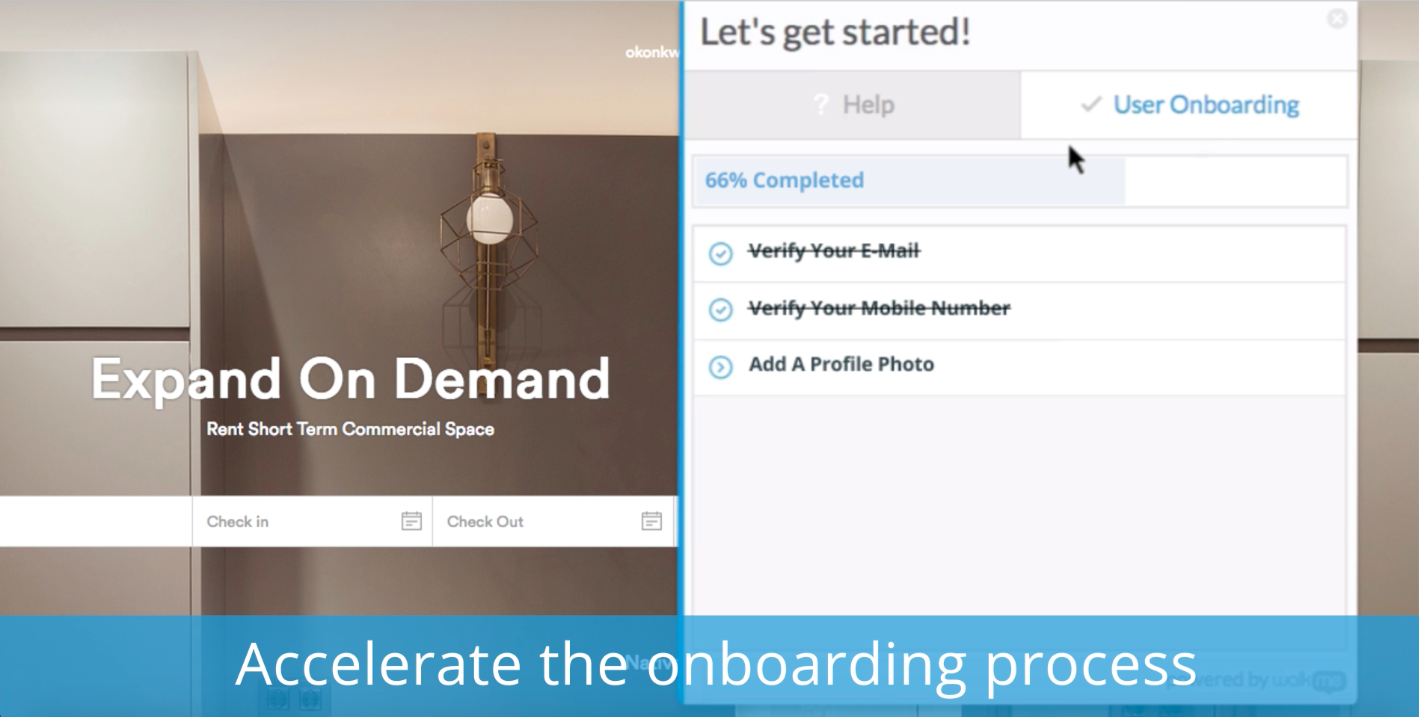
WalkMe is a Digital Adoption Platform (DAP) that promises to transform the user experience in "today’s overwhelming digital world." Using artificial intelligence, analytics, engagement, guidance and automation, WalkMe offers a transparent overlay that assists users to complete tasks easily within any enterprise software, mobile application or website. Founded in 2011, WalkMe software is used by more than 1,500 enterprises globally, including over 30 percent of Fortune 500 companies.…
N/A
Zoom Workplace
Score8.6 out of 10
N/A
Zoom Workplace, Zoom’s open collaboration platform with an AI Companion, empowers teams to be more productive, and strengthen customer relationships throughout the customer lifecycle with Zoom’s Business Services for sales, marketing, and customer experience teams, including Zoom Contact Center.
New system implementation - if you're switching or upgrading systems, you can ease users through the transition by providing in-system contextual guidance, extra tips, and automating clicks they don't need to worry about.
Data integrity - if you have users making mistakes in the system, you can add validation with WalkMe without the need for developer time and reduce those errors and upstream problems, and related costs
Reducing support tickets - if you have support tickets coming through about how to do tasks in a system, you can reduce the time and cost of your support staff answering these tickets by addressing the queries with WalkMe content
Change management - ease users through change with guidance and provide in-system surveys
Onboarding - bring new users quickly up to speed with onboarding tasks
Automation - automate your regular processes and cut system time, freeing users up for more important tasks
Process/system analysis - use the analytics to track where users are dropping off in processes and making errors and address these with WalkMe content
User experience - make your system more user friendly
A de minimis incentive was given to thank the reviewer for their time. The incentive was not used to bias or drive a particular response, nor was the incentive contingent on a positive endorsement. More Info
In most cases, and I mean almost all, Zoom is vastly superior to Teams in terms of functionality and ease of use. Case in point: I recently tried to join a Teams meeting in the web browser, and it took me multiple attempts to access it. This NEVER happens with a Zoom link.
A de minimis incentive was given to thank the reviewer for their time. The incentive was not used to bias or drive a particular response, nor was the incentive contingent on a positive endorsement. TR verified that a representative sample of customers was invited. More Info
Ease of use and getting up-to-speed in a few days only. WalkMe can be used by new users easily and quickly, yet provides a many advance features for power users to keep exploring and creating innovative solutions--there are always some things that you have not used earlier
Great analytics on our platform, usage and adoption by users, and surveys
Very friendly community of users who help each other all the time and structured upskilling programs, weekly tips keep the learning going
Audio quality of phone calls is spot on. Calls are clear and crisp.
Video quality of video meetings are clear and there aren't any pixelization artifacts that some systems can have.
Having AI summaries have been life changing for us. We no longer have to concentrate on note taking, like we did in the past. The summaries are accurate and enable us to put our efforts in the meeting or conversation. Plus, we can save them into our practice management system as required.
A de minimis incentive was given to thank the reviewer for their time. The incentive was not used to bias or drive a particular response, nor was the incentive contingent on a positive endorsement. More Info
Firefox plugin: The only time I use Firefox is when building a walk-thru. I would like to be able to use Chrome to build the walk-thrus.
Logic: Walk-thrus, Launchers, Shoutouts and walk-thru steps use different logic. I can't always fire something based on a click or URL when sometimes I would like to.
Design: You can use CSS to customize the look of your walk-thrus, but there isn't a way to remove the sidebar color of the walk-thrus.
A de minimis incentive was given to thank the reviewer for their time. The incentive was not used to bias or drive a particular response, nor was the incentive contingent on a positive endorsement. More Info
Allow a way to group individual people chats - not channels just individual peeps into groups for ease of finding - like how you can group shared calendars into sections in Outlook
A de minimis incentive was given to thank the reviewer for their time. The incentive was not used to bias or drive a particular response, nor was the incentive contingent on a positive endorsement. More Info
We're sticking with Zoom for the foreseeable future--given its compelling feature set, ease of use, and advanced technology, there's just no other competition to be excited about. Plus it's a Gartner-recognized industry leader, so it's a rather easy choice.
WalkMe has done a great job of making their tool easy to use. However because it is a Firefox plugin it causes me to need another browser and sacrifice the left 2 - 3 inches of my display, when working on a laptop this makes it a bit painful. Also when publishing you can organize your list of walk-thrus, the window size is small and limited to the constraints of the WalkMe tool.
A de minimis incentive was given to thank the reviewer for their time. The incentive was not used to bias or drive a particular response, nor was the incentive contingent on a positive endorsement. More Info
Zoom is made for the non tech office. It has features that can be made to do what you need to run things on a day to day basis. Immediately we we able to get meetings going with remote employees. The ability to be able to add smartphone connected people was a big plus. Zoom met our needs at the time.
There have been less than a handful of outages during our two years with Zoom, and whenever there was one, an email informing us of the outage went out immediately, and they had the issue resolved shortly thereafter.
Zoom has among the best performance of any video conference platform, as I've mentioned several times. Besides that, their Chat platform works great, and their back end always runs smooth. It's unfortunate that reporting can now only be done by one month at a time, but nonetheless, it only takes a second to run any kind of Zoom report, whether it's an attendee report, Poll results, a user report, a list of meetings from the past month, etc.
The WalkMe Support Team was phenomenal. My support rep made a genuine effort to ensure my success with using the WalkMe Software. She was kind, patient, and very knowledgeable on the software. If there was a question she did not know the answer too, she would find the answer and get back to me as soon as possible
A de minimis incentive was given to thank the reviewer for their time. The incentive was not used to bias or drive a particular response, nor was the incentive contingent on a positive endorsement. More Info
Because I got a response right away, and was assigned one specific individual to work with me from the beginning to the resolution. I had an actual email address and direct contact with this person without having to start over and over every time I contacted Zoom - this singular individual remained attentive and was well informed on the subject matter and quite able to resolve my needs.
A de minimis incentive was given to thank the reviewer for their time. The incentive was not used to bias or drive a particular response, nor was the incentive contingent on a positive endorsement. More Info
If you receive any pushback from higher ups, point to any of the various positive reviews like this one. Or show Zoom's excellent Gartner report, or articles describing Zoom's partnership with Sequoia capital. It's not difficult to show how Zoom is a trustworthy industry leader with best-in-class technology.
My understanding is that WalkMe was selected based on its capability to support our requirements for our enterprise software. We wanted a product that allows us to provide help at the point of need, provide as little or as much help to guide the user to successfully use the product, and a product that is scalable and can support our growing capabilities.
Zoom Workplace is typically on the more expensive end against other options, but it's the industry leader for a reason. It has the most brand credibility by far, but that doesn't mean it's perfect. There are limitations when it comes to technical performance, customization and video/audio quality. I prefer Slack myself for communication apps, but Zoom Workplace is a good alternative.
A de minimis incentive was given to thank the reviewer for their time. The incentive was not used to bias or drive a particular response, nor was the incentive contingent on a positive endorsement. TR verified that a representative sample of customers was invited. More Info
The billing and price model is really fair for so many functions that they offer, our remote work requires each of the features that Zoom offers, so accepting payment for a tool like this is the least we can do. I like that billing arrives on time and that they offer opportunities and payment times.
Because the Basic licenses are completely free, and because it's very easy to configure and install Zoom, and because anyone can join Zoom from a link without needing an account, scaling is a Breeze. There are absolutely no roadblocks. My company keeps adding more Zoom Pro license every week since it's so in demand. We were able to convert users from several different platforms onto Zoom with no trouble at all.
Zoom is perfect for our business. We use it to video chat with prospective clients. The name recognition alone gives us credibility and it is very easy to screen share and send content out.
With a promise to help onboard, we found that as people interacted with the walk throughs they didn't get any significant value. Self-service wasn't improved, in fact, we got more complaints from the walk throughs than help from them.
NPS surveys were a nightmare to try and integrate with our CRM so we could action the results. Lost time and energy without much support from the WalkMe team
No improvement to our Product Adoption, so all cost and time and energy spent on implementation was a loss.
We have not lost much productivity in our teamwork during the pandemic because of the ability to have Zoom video calls and keep everyone in touch. This is definitely a positive.
We are able to have more people participate in coaching sessions (described earlier) because we don't have room space limitations. This is a big positive.
Being able to start a meeting instantly is great when we are doing support and/or training with a client over the phone and need to be able to share a visible
A de minimis incentive was given to thank the reviewer for their time. The incentive was not used to bias or drive a particular response, nor was the incentive contingent on a positive endorsement. More Info