TrustRadius: an HG Insights company

Teamcenter

Score9.1 out of 10

184 Reviews and Ratings

What is Teamcenter?

Teamcenter is a product lifecycle management system designed to help organizations integrate and standardize product development processes across functional silos.

Media

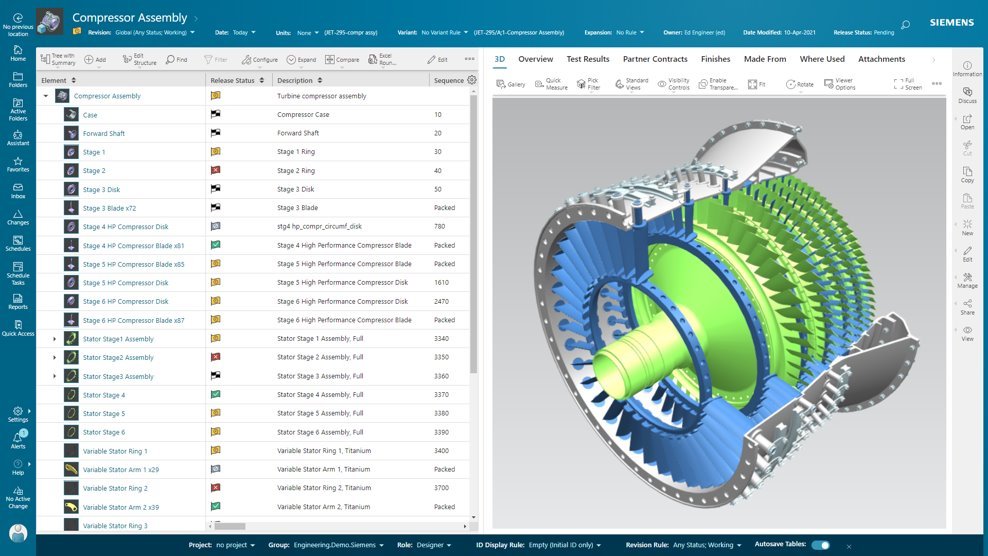
Screenshot of Active Workspace, the User Interface (UI) to drive Teamcenter. With no install required, it is a visual UI to navigate through products and processes, with tooltips to guide users along the way.
Screenshot of BOM configuration, in Teamcenter. With flexibility in how a BOM is managed and defined, it can provide an up-to-date source of information that eliminates the need for standalone spreadsheets and systems. Teamcenter X provides a flexible BOM management strategy that enables a single, accurate product definition for all who interact with the BOM.
Screenshot of Teamcenter X search and analytics capabilities provides a streamlined product lifecycle management (PLM) search experience to help quickly find data. Teamcenter X visually presents search results in logical groups so users can drill down through product structures and relationships.
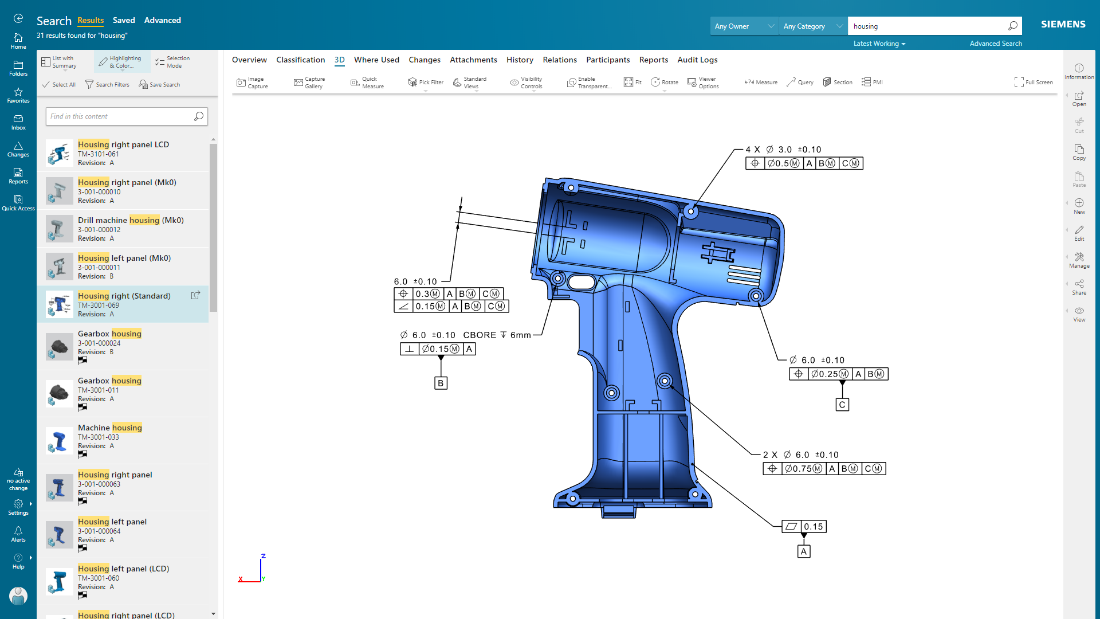
Screenshot of Product design intent can be communicated, and product data visualized, in their entirety using 2D and 3D visualization and markup capabilities. The user can also visualize and interrogate Product Manufacturing Information (PMI).
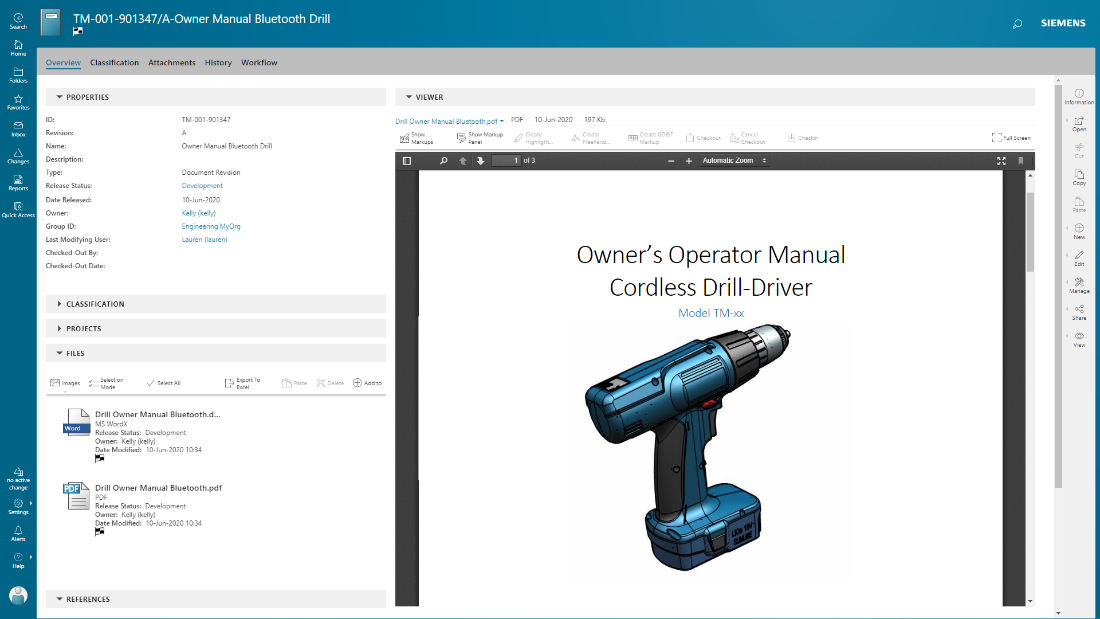
Screenshot of documents are managed in conjunction with product development, with integrated PDF for viewing and markup.

1 / 5

Screenshot of Active Workspace, the User Interface (UI) to drive Teamcenter. With no install required, it is a visual UI to navigate through products and processes, with tooltips to guide users along the way.

The best software for manufacturing teams

Use Cases and Deployment Scope

We use Teamcenter to manage product data, engineering changes, and design collaboration. It helps reduce manual errors, speeds up approvals, and improves version control across teams. Our scope includes CAD management, BOM handling, and workflow automation.

Pros

  • revision control
  • integrates smoothly with CAD tools
  • workflow automation helps manage engineering change orders with proper approvals and traceability

Cons

  • In our experience, the user interface can feel cluttered and slow, especially for new users.
  • I think search performance and filtering options could be faster and more intuitive.
  • For us, customization often requires complex IT support instead of simple configuration options

Return on Investment

  • Teamcenter has delivered strong ROI by improving design collaboration
  • cutting down rework
  • speeding up product releases

Alternatives Considered

PTC Windchill

Other Software Used

Slack, Google Meet, ZoomInfo Sales, Microsoft Teams

A story of Teamcenter in a Energy Manufacturing company

Use Cases and Deployment Scope

We use Teamcenter to manage entire lificycle of our product, from CAD to BOM

Pros

  • Lot of integration available
  • High level of customization
  • Good support

Cons

  • AWC should be more user configurable
  • Preference should be more clear to use and user friendly
  • Error message shold be more clean for the user

Return on Investment

  • Teamcenter with his BOM struvture gives us possibility to control entire product structures
  • Thanks to high level of comatibility we can manage 3D from various format
  • JT integration allow manufacturing users to visualize directly 3D Model and BOM structures

Alternatives Considered

PTC Windchill

Other Software Used

Microsoft 365, ServiceNow Now Platform, SAP Fieldglass

Workflows and Product Lifecycle made simple with Teamcenter

Use Cases and Deployment Scope

Our main use case with Teamcenter is the centralization of workflows and connecting different organizational silos to work together on a product lifecycle. Additionally, our product development has become more efficient and quicker with the introduction of Teamcenter, mainly through the comprehensive integrations that it provides and also with the tailored solution that it provides us.

Pros

  • Document handling is very much smooth and stable with Teamcenter
  • The version control feature is outstanding with Teamcenter
  • Communication gap between internal teams is greatly reduced, thereby improving overall efficiency

Cons

  • Direct Integrations for compliance matching is difficult with Teamcenter
  • While working with large data files, the performance of Teamcenter is sub par
  • The overall user interface feels a bit outdated and could use more vibrant colors.

Return on Investment

  • The centralized workflow management saves a lot of time and effort for us and improves overall efficiency
  • The level of customizations provided by Teamcenter is very good and allows to get niche requirements done smoothly
  • We have seen a 25% boost in our overall efficiency and 20% increase in our product lifecycle with the introduction of Teamcenter

Other Software Used

Oracle Analytics Cloud, Zoho Books, Microsoft 365

test Teamcenter

Use Cases and Deployment Scope

We use Teamcenter in our organisation for a plm service connected with catia V5. It is our data center cloud for our all 3d and drawing data. But it is not the best software plm for catia V5. It is much more useful with NX. But we can manage the life cycle of our product.

Pros

  • manage data
  • open and transfer
  • data library classification

Cons

  • interoperability with catia
  • modification of product data
  • improve the experience of user

Return on Investment

  • gestion of data process
  • revision and production go
  • problem between drawing and 3d connection

Maximizing our development efficiency

Use Cases and Deployment Scope

Teamcenter in our organization plays an important role of company’s product lifecycle management framework. We use it to interconnect the processes of design, engineering, and production in order to eliminate intermediaries. The system resolves major business issues, such as information organization, version control and the lack of efficient flows. Our solutions cover the integrated product data requirements integration of change management processes and real-time global collaboration.

Pros

  • Teamcenter stands out when it comes to compiling data belonging to a product for easy access by various parties.
  • They are also impressive to know about the capability of the platform regarding large data and complex products. Also integration of Groco with other systems such as CAD tools and ERP has helped in eradicating manual transfer of data thereby improving efficiency.
  • It has an effective change management structure that helps in noting and inputting changes without complications.

Cons

  • Teamcenter can confuse users, especially novices and training employees to use this software may take a lot of time.
  • Customization is also time consuming and most of the time is needed IT assistance. The reporting could be a tad better which is why sometimes, creating extensive reports take several steps. Having a clearer dashboard and easier setting modifications could be a major improvement to the current design.

Return on Investment

  • Teamcenter roll out and customization took us not more than six months and the training was also done concurrently. The changes could be observed immediately and a sense of team work was improved within a period of about three months.
  • After six months one of the areas that we noted improvement was on the reduction of errors and increased efficiency in decision making. It was effective to implement since it did not interrupt other projects that were being worked on.
