TrustRadius: an HG Insights company

Able2Extract Professional vs. Smallpdf vs. Tungsten Power PDF

Save this comparison

Save this comparison

Contact about Tungsten Power PDF

Please fill out the form below to get in touch.

Tungsten Automation formerly Kofax

Connect with Tungsten Automation formerly Kofax

What are you interested in?

Already have an account?

You hereby consent to have TrustRadius share the information supplied on this form with Tungsten Automation formerly Kofax so that Tungsten Automation formerly Kofax and TrustRadius may contact you in regard to the information requested.

Add Product

Recommended Comparisons

    Overview
    ProductRatingMost Used ByProduct SummaryStarting Price

    Able2Extract Professional

    Score8.4 out of 10
    N/AAble2Extract Professional, is a PDF converter, editor, and creator - a PDF suite that aims to cut down on time spent dealing with PDFs and increase PDF productivity in the office. Able2Extract lets users convert scanned (multi-language OCR included) and native PDFs to more than 10 formats, such as MS Word, Excel, PowerPoint, Publisher, Text, AutoCAD, HTML, CSV, and image formats. It also comes with batch PDF conversion and creation that let users manage multiple PDFs in seconds.…

    $34.95

    30-day full version single-user license.

    Smallpdf

    Score7.4 out of 10
    N/AMade in Switzerland, Smallpdf is a company that offers a suite of document management tools for everyone-for work, for home, for life. Founded in Switzerland in 2013, Smallpdf provides what they describe as a simple, secure, and reliable answer to the world's PDF challenges. Smallpdf boasts serving over a billion users in 24 different languages since 2013, and in every country in the world.

    $0

    Tungsten Power PDF

    Score9.8 out of 10
    Small Businesses (1-50 employees)
    Tungsten Power PDF (formerly Kofax) is an easy-to-use, secure and inexpensive solution to manage PDFs for businesses and individuals. Benefits: Ease of Use: Works like Office desktop products, so it's easier to learn Compatibility: Works across devices and platforms, share documents in a storage cloud …

    $129

    one-time fee per license

    Pricing
    Able2Extract ProfessionalSmallpdfTungsten Power PDF
    Editions & Modules
    No answers on this topic
    Smallpdf Basic
    $0.00
    Smallpdf Pro
    $12.00
    per month
    Smallpdf Pro
    $108.00
    per year
    Power PDF Standard
    $129
    one-time fee per license
    Power PDF for Mac
    $129
    one-time fee per license
    Power PDF Advanced
    $179
    one-time fee per license
    Power PDF Business
    Get a Quote: Subscription and Perpetual available
    per year per seat
    Offerings
    Pricing Offerings
    Able2Extract ProfessionalSmallpdfTungsten Power PDF
    Free Trial
    YesYesYes
    Free/Freemium Version
    NoYesNo
    Premium Consulting/Integration Services
    NoNoYes
    Entry-level Setup FeeNo setup feeNo setup feeNo setup fee
    Additional DetailsLifetime license: $149.95 / 30-Day License: $34.95 / Volume licensing available: Contact usDiscounts are available for bulk purchasesDesktop licenses are buy once, own forever. No subscription fees. Business server licenses are term-based or perpetual with optional maintenance & support contract. Volume and upgrade discounts available.
    More Pricing Information
    Community Pulse
    Able2Extract ProfessionalSmallpdfTungsten Power PDF
    Considered Multiple Products
    Investintech.com Inc.
    No answer on this topic
    Smallpdf
    No answer on this topic
    Tungsten Automation formerly Kofax
    No answer on this topic
    Key User Insights
    Would buy again
    No answers on this topic
    93%
    Would buy again
    14 Answers
    98%
    Would buy again
    588 Answers
    Delivers good value for the price
    No answers on this topic
    100%
    Delivers good value for the price
    13 Answers
    98%
    Delivers good value for the price
    578 Answers
    Happy with the feature set
    No answers on this topic
    100%
    Happy with the feature set
    15 Answers
    97%
    Happy with the feature set
    586 Answers
    Lived up to sales and marketing promises
    No answers on this topic
    82%
    Lived up to sales and marketing promises
    9 Answers
    96%
    Lived up to sales and marketing promises
    529 Answers
    Implementation went as expected
    No answers on this topic
    91%
    Implementation went as expected
    10 Answers
    97%
    Implementation went as expected
    559 Answers
    Features
    Able2Extract ProfessionalSmallpdfTungsten Power PDF
    PDF Editors
    Comparison of PDF Editors features of Able2Extract Professional and Smallpdf and Tungsten Power PDF
    Feature
    Able2Extract Professional
    -
    Ratings
    Smallpdf
    -
    Ratings
    Tungsten Power PDF
    8.7
    30 Ratings
    1% above category average
    Edit Text and Images00 Ratings00 Ratings5.528 Ratings
    Merge or Split PDFs00 Ratings00 Ratings9.930 Ratings
    Add Annotations00 Ratings00 Ratings9.228 Ratings
    Text Recognition (OCR)00 Ratings00 Ratings6.924 Ratings
    Page Management00 Ratings00 Ratings7.228 Ratings
    Form Creation and Editing00 Ratings00 Ratings9.622 Ratings
    Secure PDFs00 Ratings00 Ratings9.922 Ratings
    Convert to Different Formats00 Ratings00 Ratings9.825 Ratings
    Comment and Review Tools00 Ratings00 Ratings9.425 Ratings
    Undo and Redo Actions00 Ratings00 Ratings9.825 Ratings
    Best Alternatives
    Able2Extract ProfessionalSmallpdfTungsten Power PDF
    Small Businesses
    Tungsten Power PDF
    Score9.8 out of 10
    M‑Files
    Score8.9 out of 10
    Foxit PDF Editor
    Score8.4 out of 10
    Medium-sized Companies
    PDF Xchange Viewer and Editor
    Score9.3 out of 10
    Esker
    Score7.4 out of 10
    PDF Xchange Viewer and Editor
    Score9.3 out of 10
    Enterprises
    Adobe Acrobat Reader
    Score8.6 out of 10
    Tungsten Capture
    Score9.5 out of 10
    Adobe Acrobat Reader
    Score8.6 out of 10
    All AlternativesView all alternativesView all alternativesView all alternatives
    User Ratings
    Able2Extract ProfessionalSmallpdfTungsten Power PDF
    Likelihood to Recommend
    10.0
    (2 ratings)
    8.7
    (25 ratings)
    9.9
    (601 ratings)
    Likelihood to Renew
    -
    (0 ratings)
    -
    (0 ratings)
    9.2
    (112 ratings)
    Usability
    -
    (0 ratings)
    9.5
    (6 ratings)
    9.8
    (46 ratings)
    Availability
    -
    (0 ratings)
    -
    (0 ratings)
    9.1
    (13 ratings)
    Performance
    -
    (0 ratings)
    9.4
    (6 ratings)
    9.1
    (13 ratings)
    Support Rating
    -
    (0 ratings)
    9.9
    (2 ratings)
    9.9
    (436 ratings)
    In-Person Training
    -
    (0 ratings)
    -
    (0 ratings)
    3.6
    (1 ratings)
    Online Training
    -
    (0 ratings)
    -
    (0 ratings)
    8.2
    (1 ratings)
    Implementation Rating
    -
    (0 ratings)
    -
    (0 ratings)
    9.1
    (33 ratings)
    Configurability
    -
    (0 ratings)
    -
    (0 ratings)
    9.1
    (9 ratings)
    Ease of integration
    -
    (0 ratings)
    6.8
    (6 ratings)
    9.1
    (10 ratings)
    Product Scalability
    -
    (0 ratings)
    -
    (0 ratings)
    9.1
    (12 ratings)
    Vendor post-sale
    -
    (0 ratings)
    -
    (0 ratings)
    9.1
    (7 ratings)
    Vendor pre-sale
    -
    (0 ratings)
    -
    (0 ratings)
    9.1
    (7 ratings)
    User Testimonials
    Able2Extract ProfessionalSmallpdfTungsten Power PDF
    Likelihood to Recommend
    Investintech.com Inc.
    Able2Extract is extremely helpful if you have a PDF with text that you want to manipulate. By converting it into another file format that is more conducive to text, you can correct spelling mistakes, copy paragraphs, and remove them or relocate them. Since I had to take spreadsheets and text from a PDF and insert them into a Word document, Able2Extract Professional was the exact tool I needed to avoid simply taking screenshots.
    Incentivized
    Read full review
    Smallpdf
    As per my knowledge and experience, Small PDF is well suited when we want to convert the large and bulk processing on the images to convert them into a single file and share. I found it well suited for college students because daily they scan multiple images and merge them to send as a single assignment file. Smallpdf has the future in the education field. Sometimes it is less appropriate for the people who want to share official documents by converting them into pdf without a watermark. I personally really like the Small PDF, it really helped reduce the difficulty of sending files, and photos to others.
    Incentivized
    Read full review
    Tungsten Automation formerly Kofax
    Tungsten Power PDF works well in all situations and scenarios where I work on PDFs. In my work, I create many forms where I need to let clients add information and sign (contracts, statements of work, scoping documents, project plans) and the form features are easy to use and I am able to request digital signatures. I also create resources such as role profile templates that I share, and the forms allow me to protect my IP while giving clients the ability to add their own situational information. The merging multiple documents, page organization, and extraction features make it easy to create individual resources but also package them together as a bundle without needing to recreate them.
    Incentivized
    Read full review
    Pros
    Investintech.com Inc.
    • Creates editable spreadsheets from Excel documents that have been scanned.
    • Allows certain segments of documents to be selected for editing.
    • Allows bulk conversion.
    Incentivized
    Read full review
    Smallpdf
    • It's PDF editing tool suite is extremely comprehensive.
    • Drag & Drop functionality and intuitive user interface means non-technical users can easily use most of its features.
    • It's online-first design avoids typical problems of depending on one specific computer for specific tasks.
    Incentivized
    Read full review
    Tungsten Automation formerly Kofax
    • Typewriter functionality is great, although can take some time to load. This allows you to fill in text wherever applicable without turning the rest of the pdf into editable text.
    • Fast load times
    • Has autogenerated text feature so anything in the pdf can become editable
    Incentivized
    Read full review
    Cons
    Investintech.com Inc.
    • GUI can always improve, even if it's currently good
    • Better how-to instructions to address initial learning curve
    • Functionality could be inserted into Adobe Acrobat Pro, potentially merging products
    Incentivized
    Read full review
    Smallpdf
    • It has everything I'm not sure what I will say. E-sign, Share, convert. You can give an option in upload priorities features which I can see later.
    • Background remover thing also you can add in it. So I can remove the unnecessary thing from an image.
    • You can add a chatbot for help.
    Incentivized
    Read full review
    Tungsten Automation formerly Kofax
    • Sometimes the software updates don’t make sense. Staff are encouraged to wait at least a month before downloading and installing updates.
    • The PDF converter which is supposed to covert PDF to Word format is lackluster at best and makes frequent mistakes on complex documents.
    • The PDF editor is robust but doesn’t deal well with images.
    Incentivized
    Read full review
    Likelihood to Renew
    Investintech.com Inc.
    No answers on this topic
    Smallpdf
    No answers on this topic
    Tungsten Automation formerly Kofax
    Tungsten Power PDF is easy to use, the staff all like it, and there are no issues with it on any level. It is a more cost-effective solution to our PDF needs than other products currently available on the market. This product works as intended and it fits our business needs perfectly.
    Incentivized
    Read full review
    Usability
    Investintech.com Inc.
    No answers on this topic
    Smallpdf
    I give this rating to Smallpdf because it comes with a large array of tools and gadgets. It allows not only pdf reading but also mixing, splitting, conversion to and from pdf, pdf compression or protecting. It is really complete and it works excellent compared to other much more expensive alternatives in the market.
    Incentivized
    Read full review
    Tungsten Automation formerly Kofax
    It is fast and easy to get the hang of. It really didn't take a lot of effort to learn how to use this program and I appreciated that it was pretty "plug and play" and there wasn't a long learning curve.
    Incentivized
    Read full review
    Reliability and Availability
    Investintech.com Inc.
    No answers on this topic
    Smallpdf
    No answers on this topic
    Tungsten Automation formerly Kofax
    Other that a PDF partially disappearing if left up for a long period of time - no issues. (If you close it and reopen it, it is all there. We have some PDFs that are 400-600 pages long.)
    Incentivized
    Read full review
    Performance
    Investintech.com Inc.
    No answers on this topic
    Smallpdf
    1.- Because it is easy to use and each function is duly indicated so you can not go wrong. 2.- Its service is fast, it takes only a few seconds to transform the files and in less than a minute it is downloaded and you can occupy it without problem. 4.-This IS online so you do not install anything, which is very useful because you can also use it from a tablet or your mobile
    Read full review
    Tungsten Automation formerly Kofax
    Pages nearly always load at the expected rapid speed. Some documents that print quickly from Adobe Reader print much more slowly from Power PDF. I have never generated a report - that's a feature I didn't know existed until now and do not know what it's for
    Incentivized
    Read full review
    Support Rating
    Investintech.com Inc.
    No answers on this topic
    Smallpdf
    Everything is so simple and works so well, you shouldn't need support, but on the one occasion in several years that I needed it, support was quick and courteous.
    Read full review
    Tungsten Automation formerly Kofax
    I have used it for 15 years and have only needed support once: a simple update that allowed me to use the software as intended. The support team was attentive and responsive, and I was on my way very quickly.
    Incentivized
    Read full review
    In-Person Training
    Investintech.com Inc.
    No answers on this topic
    Smallpdf
    No answers on this topic
    Tungsten Automation formerly Kofax
    I got an overview of the product from my predecessor who was about to retire from the job I now hold. He did not go into very many of the features and probably only knew about the ones he used most frequently.
    Incentivized
    Read full review
    Online Training
    Investintech.com Inc.
    No answers on this topic
    Smallpdf
    No answers on this topic
    Tungsten Automation formerly Kofax
    We watched the training videos and tested out the features and functionality side by side. Some features are not used on a regular basis is it is convenient to go back and review training on that particular functionality when needed.
    Incentivized
    Read full review
    Implementation Rating
    Investintech.com Inc.
    No answers on this topic
    Smallpdf
    No answers on this topic
    Tungsten Automation formerly Kofax
    Easy and quick, with no problems or support needed. Worked as intended right out of the box. E-signing was the only area that implementation was dificult and required support
    Incentivized
    Read full review
    Alternatives Considered
    Investintech.com Inc.
    None, except for conversions in Acrobat.
    Incentivized
    Read full review
    Smallpdf
    I think that Smallpdf stacks up against its competitors in terms of easiness of use. The tool is very user-friendly, every feature is communicated in an efficient way and very simple to user so the user doesn't have to be particularly good at using software. Its features are superficial when compared to Acrobat but easiest to use for sure.
    Incentivized
    Read full review
    Tungsten Automation formerly Kofax
    There is nothing to compare it to. Tungsten Power PDF is by far an easier and more efficient option. The one advantage of CutePDF is the functionality of overlay and underlay with headers and footers. The other functions in Tungsten Power PDF are much easier to use. Pricing is also an attractive option.
    Incentivized
    Read full review
    Scalability
    Investintech.com Inc.
    No answers on this topic
    Smallpdf
    No answers on this topic
    Tungsten Automation formerly Kofax
    Not really familiar since I'm the only person who uses it. But in the past it has been my understanding that Power PDF was offered only on a single-license basis, so it's been expensive for me to use it at home and at work because I had to pay for it on my own. In my current position management supports it so I at least only have to pay for it once.
    Incentivized
    Read full review
    Return on Investment
    Investintech.com Inc.
    • Able2Extract Professional allows me to compile annual reports without having to seek out creators of supplemental material and ask them to rerun their reports in a different file format
    • Our business objective of maintaining consistent branding is achievable through converting PDFs into file formats where we can alter text and swap out logos
    • Able2Extract Professional has the speed and ease of use we need to meet our reporting deadlines
    Incentivized
    Read full review
    Smallpdf
    • It has definitely increased efficiency. Lower paid employees can complete a simple task with Smallpdf rather than having a higher paid employee use their time to do it differently.
    • Smallpdf decreases the customer-response time. Being able to send over the proper sized file quickly makes us look great!
    Incentivized
    Read full review
    Tungsten Automation formerly Kofax
    • As a freelance desktop publisher and proofreader, I've reduced overhead by buying Kofax Power PDF instead of the competition. The fact that I have all the tools I need without worrying about subscription renewal costs is a relief. People who have tried other PDF apps will appreciate that Kofax Power PDF is a workhorse, totally reliable, and delivering on its promises.
    Incentivized
    Read full review
    ScreenShots

    Able2Extract Professional Screenshots

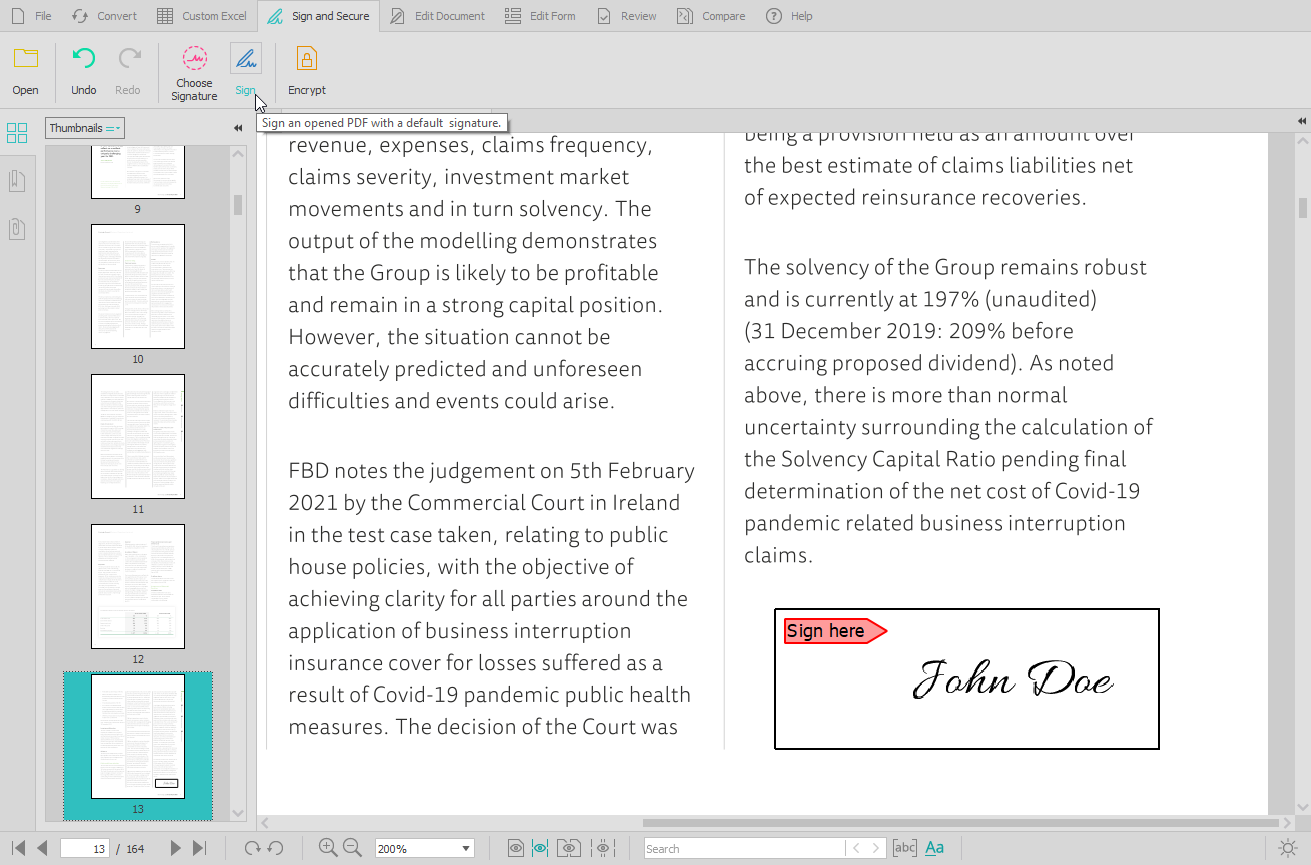
    Screenshot of the PDF conversion interface, that work with most popular formats and lets users extract all images from a PDF document in one click, extract PDF form data, and Batch convert hundreds of PDFs in one go.Screenshot of the Custom PDF to Excel feature, for the conversion of PDF tables to spreadsheet file formats. Users can manually designate columns and rows, preview results before conversion, or manage headers and footers.Screenshot of the PDF editing interface, used to modify or add text and graphics, redact content, merge and split documents, insert, delete, move, rotate, and resize PDF pages.Screenshot of the digital signature feature, secured with cryptographic certificates.Screenshot of the comparison of printable documents, that displays all differences in a handy side-by-side view.

    Smallpdf Screenshots

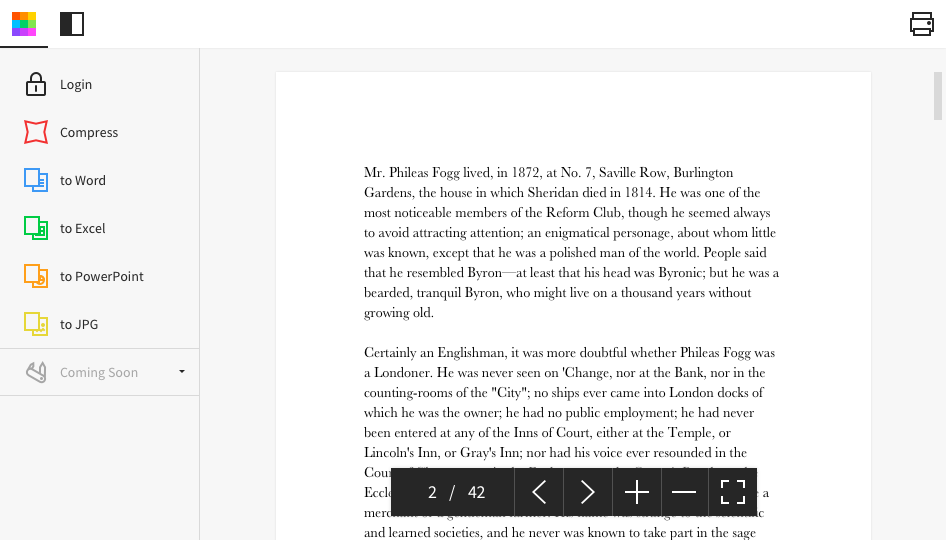
    Screenshot of Desktop AppScreenshot of Homepage

    Tungsten Power PDF Screenshots

    Screenshot of the PDF Create Assistant, which can be used to create multiple PDFs at the same time from a variety of source formats. Create individual PDFs, or combine into one PDF package.Screenshot of PDF Profiles that can be created to apply commonly desired settings to new PDF documents created in Power PDF.Screenshot of the application's color, changed from purple to blue, light gray or dark gray.Screenshot of some lightweight document automation that can also be achieved with the Watched Folder and Sequence features.Screenshot of where packages can be signed with pre built templates using Kofax Sign Doc or other integrating e-signersScreenshot of PDFs that can be navigated with a thumbnail view