Absorb LMS aims to empower organizations to train employees with the skills needed to stay modern and relevant in today's fast-paced world. The LMS software focuses on aligning learning needs with business demands.
N/A
ADP WorkForce Suite
Score 5.9 out of 10
N/A
The WorkForce Suite, by WorkForce Software, is a mobile-first, cloud-based modern workforce management solution with integrated employee communications and collaboration capabilities. The WorkForce Suite aims to help global enterprise organizations optimize their labor, protect against compliance risks, and maximize productivity while building a highly engaged, resilient, and agile workforce.
N/A
Workvivo
Score 9.2 out of 10
N/A
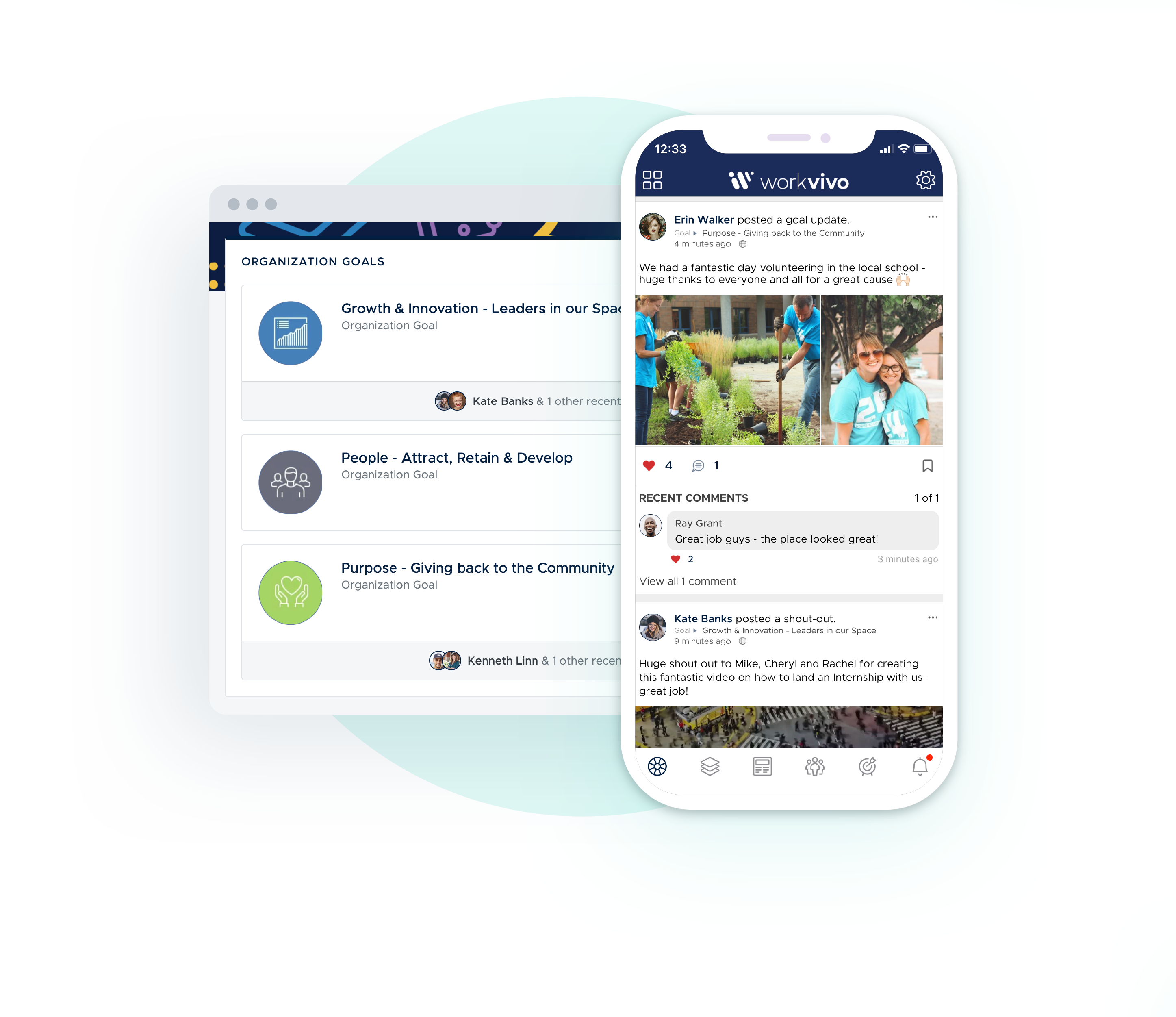
Workvivo is an employee communication platform designed to build natural, meaningful bonds between teams, allowing companies to reach and engage their employees.
It’s presented as an intranet, comms tool, and employee app all blended into one familiar social experience so that people naturally embrace it, offering companies oversight while giving employees freedom and flexibility. It's goals are to provide: ✔️ Less distraction, greater engagement
✔️ Adoption for fast time-to…
Absorb LMS is far more robust. We are actually able to create relevant trainings. Thanks to all the content creation tools, the training we are able to create actually reaches our vision. ADP was unable to perform some of the basic functionality we were looking for. Managing …
Absorb offers a more flexible and robust experience for managing learning ecosystems. The user interface is more modern and provides a stronger user-centric learning experience. Absorb is at parity for social learning, which most learning platforms struggle with. The admin …
I think that both Docebo and Skillsoft provided more modern look-feel and more advanced features. I particularly like the OTJ features offered on Docebo.
We evaluated a few well-known LMS options, including Docebo, Cornerstone, and Mindtickle. Each has strengths (especially in very specific use cases), but we selected Absorb LMS because it matched our priorities best: value for money, global scalability, straightforward …
I previously tested three more but cant remember what they are as it was a while ago, but Absorb was the only one that answered the 58 questions/ tasks i needed it to achieve.
At the end of the day, Absorb LMS had the best user experience. When we looked at all the options, we felt like Absorb was superior in user experience, learning tools, and the content creator. Additionally, the support they promised (and that we've experienced), made them a …
I have only ever used Moodle in a personal educational setting, so not from an administrator-perspective, but Absorb definitely has a ton of settings and customizability. I know that one reason we decided to go with Absorb is their ability to create custom templates, which has …
Absorb LMS is feature packed with small but smart elements (can have a username that isnt an email, can change the core language used in the platform, can change the font and layout) that offer greater security and accessibility for learners.
The user interface in Absorb is awesome; the back end - admins don't have as much ability. In the past, I could do things like exclude groups from training, build groups based on people who had completed courses, link courses without having to put them in a curriculum, etc.
We used Cornerstone Learn at my previous organization and it seemed like there were way too many issues from an administrative standpoint. I haven't had many issues at all with Absorb LMS, which makes me think Cornerstone was just expensive junk. Prior to moving to Absorb LMS …
Not sure, haven't used anything else outside of Absorb I would say based on my current experiences that it would stack up quite well however, it can be a little difficult to navigate and sometimes hard to find the thing we want / not intuitive Outside of this, it's a great …
Although Cornerstone was also suited for a global audience as well, Absorb is more user friendly than Cornerstone from a learner and admin perspective. The look of the Cornerstone platform was outdated with small font buttons with labels that were not intuitive. Cornerstone …
Absorb LMS offered the best e-commerce for what we origionally wanted, however, we stayed due to their CSM support and anticipated/ongoing additon of features. Additionally we were drawn to the Create feature and gamification options, along with the Collaboration features.
WorkForce Suite was an improvement to ADP Vantage's timekeeping offering, but ultimately didn't meet the mark when it came to what our company needed. It was not able to keep up with the complexities of an environment where employees work multiple shifts per week and/or day, at …
Deputy was a LOT easier to use, and I personally liked it more. It did not make approving payroll at the end of the week as easy as WorkForce, and Deputy did not show any PTO balances. Deputy seemed like a simpler, less in-depth version of WorkForce. Personally, I would prefer …
EmpCenter is a new software to the company however, I only trained on the old software for a few months before EmpCenter was introduced. I think EmpCenter has a smoother data entry process and can run more in depth reports, but since this is the system I know best I cannot …
Verified User
Anonymous
Chose ADP WorkForce Suite
For previous employers I have used Kronos and Payrollmation. I think EmpCenter is in the middle of those two. It is easier to use but does not seem to have all the bells and whistles such as Kronos.
Auxiliaries and Activities Business Center Payroll Coordinator
Chose ADP WorkForce Suite
I did not make the decision to select EmpCenter and only know our university also considered Kronos although I assume there were other products considered. My use of Kronos was only at an employee level and I am not sure how it all stacks up for sure. What I do think is that …
We looked at about 6 solutions and narrowed the field down to 3 which included Empcenter, Kronos and I believe worqplace. The real two were Empcenter and Kronos as it really had the flexibility we needed for all our different scenarios. We liked them both and the cost was going …
The interface is more simple and meant for the purpose of communication. Though the product misses on the aspect of one on one chat, the main purpose of communicating to group all together is handled well through the software. Employees are more engaging when they see …
I've used one internally built similar program, but much more limited and not as effective. I'd say Workvivo is a very completed system, which provides a lot of necessary features and functionalities to engage with your employees in many different ways. I'm not the business …
Every other similar platform was riddled with internal errors and caching issues. Microsoft is far too expansive to dive into blind unless you know exactly what you're looking for. Workvivo allows you to see everything happening in real-time and go from there.
Very different products - Workvivo is like an internal noticeboard but a lot more than that allowing for social posts, charitable posts, events, policy documents., announcements etc.
Workvivo is the standout performer in driving companies vision, mission, and values. It creates a real sense of family and information is at the press of a button.
I used a similar tool in South Africa while working for WesBank, I cannot remember the name, but Workvivo is a lot more interactive and a lot more popular with staff.
I really have very limited to no experience with any other platform that fits the same field as Workvivo. My company as a whole had no program to do the jobs Workvivo has fulfilled. Workvivo has taken the responsibilities of many different smaller programs or even just large …
LinkedIn Learning, paid for by the company, gives us the opportunity for development specific to our areas of interest. This is why I spend more time on LinkedIn. Workvivo is only limited to those in our company, but it would be great if we could somehow access other public …
We looked at several options when evaluating which system to use. I used a G2 review and looked at recommendations. We don't have an enormous budget, and we were looking to get the most features for our dollar. Our company is also growing, so we needed something that would …
I see Workvivo as another corporate tool that we can use in Keyloop. I only use this tool for work purposes, and it allows me to be more in touch with my colleagues. It is an exclusive social network for Keyloop! It is important for me to have quick access to other corporative …
I selected Workvivo because this application will make me stay connected with my peers, near and dears. Also, through this application, I can come to know about the past, present, and future news. Moreover, there's also unity in diversity. We can build super friendly …
Slack was more chat based, but didn't have the resources as easily accessible. Plus slack relied on people sending things when they need to be sent, rather than just having things posted to a space.
Workvivo is very up to date. There never seems to be any problems with the system. It seems as though it is always working efficiently and always updating the news feed for us Spearliners. Sales Navigator is a similiar application but I find Workvivo alot easier to navigate and …
The layout is better organized and intuitive, easier to use. It has a wall where everyone can share different information. It combines all necessary features for involvement of all the people within the company. I like in Workvivo that it serves as platform where you can show …
We use the system to automatically assign compliance courses to new hires. This varies by location and employee level. Absorb lets us dynamically enroll users in the required courses based on their geographic location and level. We use the system to build comprehensive leadership development programs for managers. This includes helping managers develop a coaching habit to build bench strength on their teams.
Functionality is lacking for anything beyond basic clock in/clock out features. Job costing, scheduling, etc. is clunky and requires high level configuration, and still does not always work as intended. The number of steps required to get data from one location to another is over complicated - should be more streamlined and simple
WorkVivo works really well for us as we have colleagues all across the country. These colleagues don't use pc's in their working day so it was proving more and more challenging to reach them. With the diversity of people now using social platforms, the adoption of WorkVivo by all members of our team was really easy!
Customizing the user interface was fairly simple and our learners WANT to use the platform because it looks so nice.
Admins have so many tools at their fingertips to pull reports, create new users, author new courses, and more!
Absorb LMS has been the solution to so many problems we had experienced in our previous LMS: ease of use, course library, course authoring, tracking, reporting, etc.
The "And" and "Or" rules for self + automatic enrollment could be spelled out more to clarify who we're enrolling into courses
The thumbnail and poster "Upload photo" section is confusing. There should be a "Favorites" folder where we can easily find most commonly used posters and thumbnails
more education around Absorb analyze essentials
How the Featured courses section ranks courses is confusing on the back-end. I need to switch the primary one to second place to feature the new one first. But if the previous one now becomes second place, what happens to the old course that was in second place? I've noticed the order you select on the back-end for this isn't always reflected on user side
Same comment as Featured Courses but for appearance of billboards. Hard to position each in the right order
EmpCenter's report features need improvement. While it is nice that the user has several options for the format to receive the report in and with a recent update reports can be scheduled to run and be printed or emailed to the user or someone else of their choosing on a regular basis, daily, weekly, monthly. The reports never seem to have all of the information you need on one report and need a lot of manipulating to get the results you actually need. For example we have reports with employees names that show total hours worked, but don't include rates of pay or the job title. When employees have more than one job or rate for the work they are preforming you don't get that breakdown of information with their total hours worked. Another report includes three ways of reporting the same total hours but don't all round the same so, for example the total clocked hours may show 34.3 hours and the work study hours on the same report that should match round to 34.2. We have asked for certain data to be added to certain reports such as a supervisor name and it seems to be such a task for that to be provided and a high cost we are not getting these request met.
Management of time sheets when a supervisor has many employees is difficult. EmpCenter only allows for one manager to be named for each employee. In most settings this may make sense but in our environment in particular with student employees we often have more than one person who oversee different aspects of that employees work and both need access to their records. In our Housing and Dining department we have three managers who are together overseeing several hundred student employees. One manager may be primarily responsible for the employees pay rates and evaluations while another scheduling and they may not all be working at the same time. Because only one of them can have access to an employee’s time sheet if that person is not in and an employee needs assistance with something in EmpCenter the other managers can't help them. Also the display only shows up to 500 employees or assignments. We have some units who have up to eight different assignments for one employee. These areas will have several employees each with several different assignments which means several individual time sheets. This all will result in more than 500 and the supervisor has to use a search feature to get to the employees who do not display in their more user friendly list. Also this many assignments results in many time sheets and the clock times report separately for each and do not combine into one larger complete time sheet so each must be managed separately. It would be nice if there was a view that combined all hours into one time sheet view. Finally on this note when a supervisor is approving time they can only approve one time sheet per employee at a time so they have to do mass amounts of approvals and ultimately simply don't approve time sheets when they are dealing with so many.
Probably our largest problem is that when we do have programming that is not working properly or aspects of the system that we would like improved it is difficult to get those corrections made and made in a timely manner. I do not work directly with the company, but it has taken a few payroll cycles to get programming fixed for some things causing a lot of manual work in my area to pay employees correctly. If anyone is looking at purchasing this product I advise that they be very clear and detailed upfront with what they are getting and what is included in the cost they are being quoted. Because this is a customizable program you buy an off the shelf basic and the company works with you to price what programming will be done from there. Things we thought were covered we are finding are not and it is very costly to add other programming to our contract. I often feel it is not a high priority for them to resolve problems we are experiencing however it is very important for us and the work we are trying to do.
We also have problems with access to the system in different ways and needing more roles. EmpCenter has a role for a user who only has access to certain activity such as reporting their time and requesting time off, a role as a manager who can approve time off and time sheets and see their employees records, and a super user role who has more administrative access to override things and handle some of the errors and issue we may experience. in my role I am an administrator for several different areas of the campus and need to access the system at a higher level to assist employees and managers but can only have the manager role but with wider access granted. So by this I mean that I see the features a manager sees but am seen as a manager of all employees in several areas on campus where the other manager role is restricted to just that managers employees alone. In this sense I suppose this is a fourth role the system allows, but I can't do any more actions than a manager can i can just see more people. The super user role is not granted because it is at such a higher level that they can actually effect programming and this role is highly restricted so that users don't inadvertently corrupt the program. I feel there needs to be one more layer in between the super user level and the manager level. I would like to be able to delete time when employees have clocked in by mistake and simply want that removed or when there are more minor problems with a record that I can't correct. Also when a manager is out and has not delegated their employees to someone else to manage I would like to be able to make that delegation so that someone in the unit can review, correct and approve time in place of that supervisor who is gone.
Overall we have had many problems with things not working right and trying to get the system to calculate properly, finding ways to get information we need from it, and managing and using it. I am sure these are general growing pains anyone would have when transitioning an entire university to a new electronic system, but it has been a difficult first year. If you are thinking of implementing this program have a good communication plan, someone who is the lead and will get things taken care of when they need to be, and clear roles and responsibilities lined out so that everyone knows who does what and who to go to when there is a problem.
Comment's visibility under a post: before, you saw all the comments, but now it displays only one, making you lose the others (you have to open the post to read them)
Possibility to change your job title manually: from the app, it is not possible to change your job title (mine remained on stage)
Absorb provides the platform and support for us to create a place for resources that is agile and simple to deploy. We are able to use across multiple countries and departments. Absorb is also constantly developing their platform to meet users needs, which is helpful for us as we grow.
After spending close to 5 years to decide on which payroll product to acquire for our University, I cannot image we would switch now that we have it in use.
To my best friend Workvivo, I would like to give 10/10. Everything is running smoothly. I feel glad when people at my workplace from other departments and also from other shifts recognise me with my name. That gives me inner peace. I am feeling blissful. I am on the moon.
Absorb is a solid platform that is relatively easy to use for users and admins and provides basic features with minimal problems. Their support and sales staff are helpful and knowledgeable. There are some features that are less user friendly and more advanced features such as career pathing and advanced gamification are non-existent.
Super user friendly, I've not once wondered how to access, find do anything. As soon as I log in I am confident I can find whatever I need and whatever I am looking for and I it is very easy to engage with coworkers and colleagues all over the world.
We have never had any major issue with Absorb's availability. Any outages that have occurred have been planned an communicated. Any small issues that occur within the Absorb platform have been addressed efficiently and quickly by support and the development team
We have experienced infrequent issues with things like load times on reporting, or pages timing out, but for the large majority of our time within the system things have worked as they should
My client success manager had to reach out once for our company once. Although it was not an Absorb issue (it was an issue on the course vendor side), Absorb offered a resolution while the vendor was fixing the issue. We were very happy with the resolution and feel like Absorb went above and beyond for us.
The training was comprehensive - there were existing modules to learn functionality but working with Absorb staff, and receiving recordings of those walk-throughs, made a rapid understanding of the LMS achievable and covered the necessary material that was needed and allowed for specific questions to be addressed.
All the things were explained in an effective way. Easy to understand the tools, features, their use, implementation. Monitoring & support wherever required. Feedback was recorded & improvements were done wherever required to improve the coaching experience. Knowledge checks were taken to understand understanding levels. Overall experience was very well with the training.
The implementation of Absorb went very seamlessly. We previously had the Oracle LMS and importing user data and getting the new system up to speed was painless. The smooth transition helped leaders and staff gain confidence early in the application/company and we have had a successful partnership with Absorb since.
Absorb LMS is far more robust. We are actually able to create relevant trainings. Thanks to all the content creation tools, the training we are able to create actually reaches our vision. ADP was unable to perform some of the basic functionality we were looking for. Managing training assignment and completion is also much easier with Absorb LMS. Absorb LMS also allows employees to pause in the middle of training and work from comfortably from mobile devices. This was impossible with ADP and was a huge dealbreaker as many of our employees work from the field while completing services for customers.
I did not make the decision to select EmpCenter and only know our university also considered Kronos although I assume there were other products considered. My use of Kronos was only at an employee level and I am not sure how it all stacks up for sure. What I do think is that EmpCenter is more customizable than other products and was seen to be able to adapt to fit all of our needs so it was a system that could be used by everyone. I think it is good we have one time keeping system and don't have some employees using paper or a different system because the one could not meet our needs, but as I said this also makes it more difficult to network with other users and to get improvements made quickly.
The interface is more simple and meant for the purpose of communication. Though the product misses on the aspect of one on one chat, the main purpose of communicating to group all together is handled well through the software. Employees are more engaging when they see achievement of their colleagues on it. For leaders it’s become one place to any something to private or public groups as per their needs
We have already scaled our LMS from a couple hundred users to 1000 users and have plans to scale even larger. We use the LMS across multiple internal departments. countries and user types. Absorb has made it easy to integrate and scale and we will continue to scale in the near future.
Absorb LMS has made a real difference in how smoothly we run training. By automating enrollments and standardizing how we assign key courses, we spend much less time on manual admin and chasing people for completions. Onboarding is also easier now because required learning paths live in one place, so our New Hires ramp up faster, and managers get fewer “what does my team need to take?” questions. The biggest win is simply having cleaner, more reliable data when we need it for reporting or audits.
From a global quality and standardization point of view, Absorb LMS has been the backbone for scaling learning without things turning into chaos. It has helped us bring more structure and governance, so we can actually see what’s being created, who it is meant for, and whether the right settings are in place. That means a better experience for learners (less noise, more relevant assignments) and more confidence for the business that our training records are accurate and easy to validate.
I work remotely so maintaining interaction with your colleagues is more difficult. With Workvivo, I can stay tuned to what my colleagues are doing (in more fun, personal way) so I get to know them and break that distance barrier.
Workvivo helps to share work-related information and it is also a way to connect to the community all around the world that shares the same values and interests. Workvivo is fun and easy to use which is very helpful to the user.
It solves the problem of learning the organizational chart, which changes frequently. It helps me quickly find a co-worker's profile with contact info and helps me learn their interests, which I value as a remote employee.