Acronis Cyber Protect integrates backup with cybersecurity with the goal of delivering comprehensive cyber resilience. It offers rapid, one-click recovery, and simplified management for all IT environments.
$85
per year
Action1
Score 9.6 out of 10
N/A
Action1 is an autonomous endpoint management platform that is cloud-native, scalable, and configurable in 5 minutes. It is free for the first 200 endpoints, with no functional limits. By pioneering autonomous OS and third-party patching - AEM’s foundational use case - through peer-to-peer patch distribution and real-time vulnerability assessment without needing a VPN, it eliminates costly, time-consuming routine labor, preempts ransomware and security risks, and protects the digital…
N/A
Citrix Endpoint Management
Score 8.5 out of 10
N/A
Citrix Endpoint Management (formerly XenMobile), is a UEM and enterprise mobility management application for securing mobile applications and devices.
It works great as a cloud backup solution, and restoring data from a past backup is easy. If you need an easy-to-use cloud backup solution for some servers, I would recommend Acronis. If we had a need, I would use this to back up all of our computers as well. I am not too sure how it would handle backing up over 50 devices, though.
If your organization is like mine (nonprofit and tight budget) this product is for you. The first 200 endpoints are free and being we are a small organization, this product is perfect for us. I was able to use Action1 to upgrade all my endpoints from Windows 10 to 11 pretty much effortlessly. If you are not a nonprofit and have more endpoints over 200, this is still a great product to use as I don't find it very expensive to incorporate into your infrastructure.
This product is well suited for any healthcare organization, especially one privately owned by the providers. Many of our providers were displeased with our efforts to use a product that forced sandboxing of Exchange information. Therefore, we needed something that was flexible enough that sandboxing could be used where desired but still allowed native OS integration where necessary.
Easy remote access to devices. That simple. We have some very unskilled users in the field where asking them to access their PC via conventional remote tools like TeamViewer, Anydesk, etc. was always a pain. Now, all they have to do is ensure their PC is online, and we can connect to them.
Remote software deploy. Before Action1, we did have some GPOs and scripts, but again - being able to deploy to PCs outside of our office/LAN, is just beautiful. On top of the standard repository, being able to create new packages is very useful for our scenario.
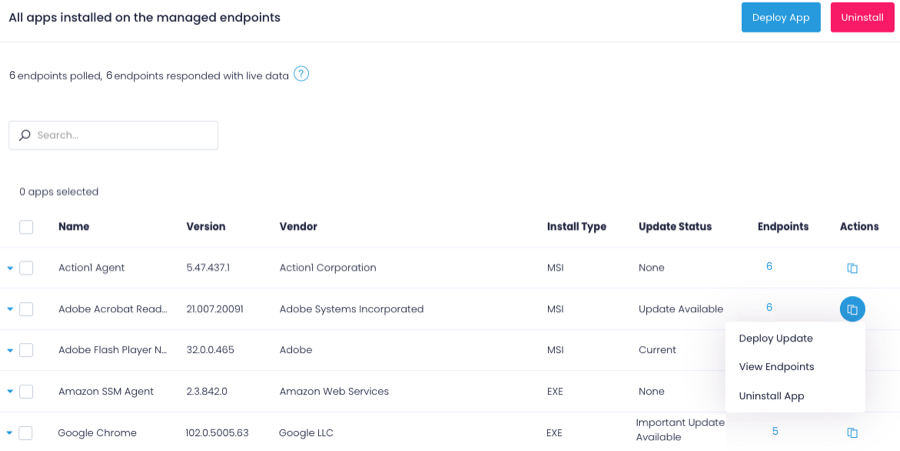
Inventory Reporting. Recently we had to identify PCs running old versions of Windows. Can't highlight enough how easy it is.
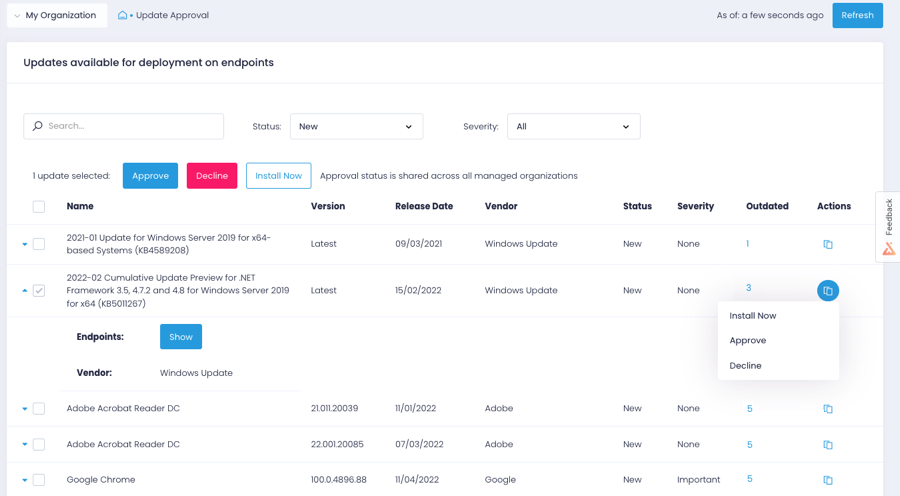
The deployment screens for update deferrals can be hard to understand at first and easy to skip since it carries some default info when you create a new automation rather than a more conspicuous prompt to update.
issues with non apple, non samsung devices: if it is not setup with an apple or samsung phone, then the Certificate onboarding is a struggle/unable to be done.
user-pin setup: for a user to be onboarded, requiring a PIN; there is a self service way but it is clunky and users prefer to call in instead of trying to follow the 15 step process via PDF
if the certificate is ever lost, due to an upgrade via IOS or android, then the entire process [uninstall, reinstall] has to be done, which means downtime for the end user, and higher call volume when a service provider pushes an iOS update.
We have renewed our subscription over the course of a few years now. We used to use Backup Exec and it was tedious and difficult to obtain our backups when needed. Acronis just fits our environment style and the way we prefer to do business and use our third party software.
The overall platform is great. The backup solution stands out with integrated cybersecurity. The ability to turn on the security features like endpoint protection, email security, RMM, and PSA is great. It makes things so much easier to manage a few different services from the same portal instead of logging into multiple accounts.
Action1 has taken many of the tasks that are time consuming and made them simple automated tasks that can be run on a schedule. I can schedule tasks to run off-hours and know that they will be done and I no longer have worry about it. As someone who does IT support for a living, it just makes my job so much simpler with less stress.
The software's usability is what we expected. We knew what our organization needed and Citrix was able to meet our needs. The ability to have the apps on a mobile device has been a great plus and Citrix seems to have really developed a software based on the every day needs of the user.
I only got one issue resolved for more than 20 cases open. The escalation is ineffective. Most of the time, I have the feeling that I know the solution better than the support technician. Overall, case management is time-consuming, as our resolution rate is really low
Overall the support from the customer service team has been good. They are very timely and expert in resolving the tickets. They have appropriate knowledge to resolve issues in all stages to development. They were up to the point during the implementation stage of the XenMobile, all queries were answered in time to help finish the deployment. The support for last three years has been extraordinary in helping us use XenMobile effectively and efficiently.
I don't have any real key 'insights' per say except that it wasn't difficult at all, and do not be afraid to dabble in its tools and settings. It is quite intuitive with built in common sense. I cannot say enough good things about our companies experience when using this backup software.
Barracuda Cloud Essentials has email security, archiving, and allows users to manage their own spam email. Barracuda also comes with a backup feature and it all works together under one roof. Barracuda has been our alternative to other major services on the market. Acronis does well as a backup service, but Barracuda provides us a much more broader experience as an IT client.
After looking at different solutions, Action1 [Cloud Remote Monitoring and Management Solution] was the perfect fit for us that delivered all of the features we wanted without being as costly as some of the others alternatives we've looked at. There was no minimum endpoint count and they even offer up to 50 endpoints for free, which is really great for a small organization like us to help us lower our starting costs and still allows us to grow at our pace without having to commit to a defined amount of endpoints to start.
With a zero trust solution for the entire digital workspace, you can continually monitor and assess session activities before, during, and after login. Reduce risk, gain more control over every session, and get deeper insights across your entire application landscape. To achieve this strong security posture across all environments, you need an application delivery solution that shares a common code base. This lets you implement consistent security policies across all your applications for comprehensive protection.
The ability to back up multiple servers from one source is a great tool to have for businesses that have equipment in different locations on the same network with a variety of software data to back up such as SQL, Exchange or a Files Server. You can decide to purchase individual server licenses as well if you would like to keep the process separate or have multiple sites where your data is housed.
Saved hours per week on patching and able to ensure a 100% patching success rate.
Able to create custom alerting on potential problems as well as able to create some automation to automatically address problems.
Improved support to our remote locations and users.
Custom deployments allow us to have a mechanism to deploy custom applications we build as well as other third party applications we need to distribute.
Specific ROI was on us avoiding purchasing company managed cell phones - one of the most important drivers
Makes on boarding, and especially offboarding remote users a heck of a lot easier w/the ability to wipe the container, even if not connected (via time setting)
Easy access to internal resources - no need for separate vpn, etc...