Adobe Marketo Engage (acquired by Adobe in 2018) is a marketing automation platform whose basic features include email marketing, drip nurturing, landing pages, and lead scoring, but other editions offer additional advanced features. Typical customers are B2B firms with complex sales cycles.
N/A
Webtrends Analytics
Score 4.4 out of 10
N/A
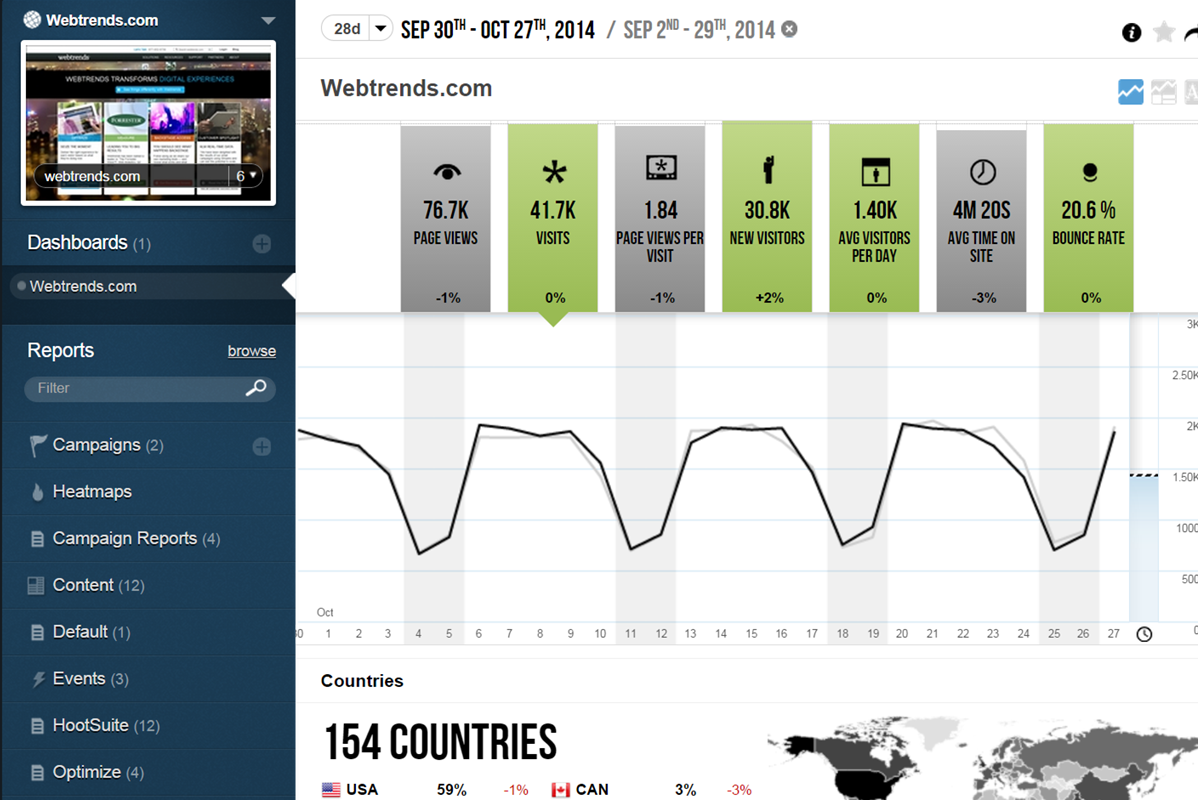
WebTrends provides an enterprise web analytics platform and, according to Forrester, has a strong focus on support for mobile and social channels and a very open platform. Webtrends competes directly with Adobe Site Catalyst, IBM Coremetrics. and comScore DigitalAnalytix.
Adobe Marketo Engage best matched our needs for managing complex buyer journeys, improving lead quality, supporting account-based marketing, integrating with sales systems, and providing analytics to measure marketing impact on revenue.
Adobe Marketo Engage compares favorably with other marketing platforms for its enterprise-level capabilities, flexibility, and support for complex marketing processes.
We selected Adobe Marketo Engage because it combines enterprise-grade marketing automation, advanced personalization, and seamless integration with our CRM and other business systems.
We used Adobe Marketo Engage because it is more suited for a B2B environment. We are exploring Adobe Journey Optimizer B2B edition for the future as this can have capabilities for ABM efforts, however we currently use Marketo for the majority of our efforts. Marketo allows us …
Hubspot is a solid platform software that is more user friendly, that being said, I think Marketo Engage is better able to provide reports that are import to us and we can use on a daily basis. It has better data normalization properties than Hubspot that we can utilize easier.
Marketo is a lot more robust and allows for more customization. Workflows require more work but that always for your own take on it. Hubspot is a lot user friendly but doesn't have Marketo's capabilities.
Adobe Marketo Engage is the best since it barely shine on inbound marketing but also focuses on large to global enterprises complex B2B-buying journey, lead management and external CRM integrations which is contrary in Hubspot Marketing Hub
I would say Adobe Marketo Engage is better than other prospect tools because Adobe Marketo Engage uses AI and several tools in one and Adobe Marketo Engage integrates with other software like Microsoft and Google. Adobe Marketo Engage is very smart and intuitive. Adobe Marketo …
Not even clise Marketo is such a better tool. Forms alone. In Marketo you could set one form with an ID and market could use the referring URL as attribution SFMC forces us to remake each and every form for proper attribution. As simple changes need to roll out the level of …
Webtrends has its work cut out for itself considering you have the behemoth Google Analytics and Google Analytics premium having a strong offering and brand recognition for the price of free. After reviewing the paid service I'd suggest you start off with GA as a cheaper …
Compared to WebTrends, Google Analytics has a slicker interface, provides live site usage data, and is easier to jump into with basic usage. These days users expect to be able to create their own reports as needed, rather than have an "expert" do it for them. They are used to …
Using Omniture at my current place of employment and using google analytics as a backup at both, Webtrends is the clear superior product. I go back to how easy the UI is to navigate and how simple it is to get user level data that isn't duplicated or doesn't try to pigeon hold …
We currently use WebTrends, Google Analytics, Kissmetrics and ClickTale. I would like us to consolidate our activities to be focused on just Webtrends as it covers all of the requirements we have very well.
We've used Google Analytics - and Webtrends really wipes the floor with them. The data we get from Mixpanel can be mirrored in Webtrends - which is something we're working on at the moment with the Webtrends team. As for competitors to Webtrends, we did consider Adobe and …
I have only had significant experience with Google Analytics (GA) and WebTrends in this space. Overall - it is easier to learn and modify GA reports as a casual user - I always struggled with the fact that GA only offered partial data (sampling based).
Webtrends was selected because of the price for Google Analytics Premium ($110k per year) and Adobe Omniture Analytics (twice the price). Clearly, it needed the Visitor Data Mart to get additional capability that you would expect as part of a Web Analytics suite. In our case, …
Webtrends as the pioneer WA tool from the early 90s stands tall among its competitors paid and free. Choose it when you need good product support from the vendor and you need flexibility for data collection methods.
I actually did not personally select Webtrends, but rather fell into an organization already using the tool. In general, the reasons for staying with Webtrends vs another tool involve the price point issue and the types of users and support needed. You may be able to get all …
I find Google Analytics to be very limiting. This may also be the way that the reports have been structured by our organization. It is viewed as an older way to obtain the metrics we are after and no new projects are implemented through Google Analytics.
Webtrends is just an option, depending on client budget. It's a simple analytics tool that does the job but we always recommend Omniture whenever possible.
If you are looking to, you're looking to scale up your lead gen work. Adobe Marketo was a very good tool for that. You're looking to deliver leads to a sales team from marketing campaigns. It's a very good tool for that. It runs everything we do on the marketing side and I think a small lead gen team or a very large one could use an equally well.
Scenarios 1. If you want to use web server log files as input to your web analytics, then Webtrends will provides a good product, with great ease of implementation. Don't even think about being cheap on hardware, and make sure Webtrends runs on real servers, not in a VM environment. 2. If you want to use Data Tagging, similar to Google Analytics or Site Catalyst, Webtrends has a powerful product, just be prepared to pay. 3. If you are new to Web Analytics, but it is the strategic direction, start with Webtrends on Premises. Questions to Ask 1. What are you trying to accomplish? 2. Can you place a dollar value on the benefit that you expect/need from Webtrends? 3.Can you live with Webtrends running SaaS?
Adobe Marketo Engage excels at automating complex marketing workflows and delivering personalized customer experiences at scale.
Adobe Marketo Engage enables marketers to create targeted campaigns, schedule automated email sequences, and personalize content based on user demographics and interactions, resulting in more relevant customer engagement.
Adobe Marketo Engage provides robust analytics and reporting, allowing teams to track campaign performance, monitor conversion rates, and measure return on investment(ROI).
Webtrends Analytics makes complex situations understandable to a non-technical audience. The vast capabilities and ways to slice data is both a great tool, but can also cause a user/users many hours of frustration.
Visual data display is clean, to the point, and not overly convoluted with unneeded variables and standard (defualt) settings. Everything the end user sees is customizeable.
Exports of raw data collections was easy and accurate. Once the parameters of data collection are finally set up and working, its easy to get what you want from the UI and is delievered in a variety of options.
Adobe Marketo Engage crashes a lot or freezes. We don't have many users and less than 300k contacts so there's no reason it should ever crash.
It's really expensive! It would be nice to pick which features we want a la cart versus being stuck paying more for a feature and not using the others in the package.
Because of our integration with Dynamics, we had to use a 3rd party tool called Scribe for field matching. No one at Adobe will help us now that we have a 3rd party tool
Webtrends is not great at providing statistical data for analysis. You need to enable Log File Delivery or create an analysis export to perform this. This could theoretically be done with Streams.
Webtrends has difficulty identifying multi-visit users due to the inherent fragility of cookie-based tracking.
Webtrends Analytics does not provide Pathing capabilities for segments, only for the aggregate. However, this can be worked around with Scenario functionality selectively fired by a tag management system.
Segmentation by high-cardinality parameters tends to cause issues with table limits. Even after scrubbing and scrutinizing data, we commonly see up of 10K rows per dimension. Due to this, we use Webtrends Analytics to roll up data into larger segments and export all of our log data into our database for heavy duty number crunching.
The obstacles to renewing are 1) finding people to manage it who know it well and 2) frustration because of the lack of on-the-fly analysis. Usually, renewal prices are reasonable and the cost of switching to something else when you have a somewhat complicated setup far outweigh the renewal costs, especially if your implementation is sound and your reports are humming along. A lot of renewal decisions are going to hinge on the new product that will start to roll out this month.
In some aspects, the tool can feel quite clunky in parts. But with the rich feature set it has, it's understandable. There is a lot of room for improvement for the user interface. The system itself doesn't have a slick or modern feel, so the usability could feel nicer to use with these areas considered.
If I could give it a 0, I would. Not having an intuitive user interface made it impossible to convince non-analytic business users to use the tool on their own. Even as a seasoned analyst, frequent calls were needed to get what should be simple tasks done. Account managers don't understand the tool either, and have to refer you to technical support
Marketo provides different way and abilities to connect. If you are having product support or unexplained errors you can get someone on Marketo support 24 hours a day. One of Marketo's greatest assets in my opinion however would be the community. Often times our company is just looking for case success stories from someone else. In the community you can search for problems you are currently facing and see others having the same issue and solutions for those issues. If not, you can pose a question to the whole community and champions of the product and others can chime in to provide suggestions to fix your needs. The community is truly a 24/7 place to get your answers quickly.
There are times when it is slightly slow for us, where we sit on a screen waiting for it to load. This could be our internet since we have had the same issue occasionally with other systems, but it is enough to make you crazy.
The v9 admin interface and v10 reporting interface work as well as expected, but have a tendency to be pokey, especially for bulky reports and whenever you're connected to wifi. I much prefer using the REST API for all reporting for this reason, which simply dumps out the data and doesn't bother with the user interface.
On multiple occasions we've had Marketo support (technical and license based) issues. Technical issues were minor and resolved within a day. License based issues (even things encouraged by Marketo for partners, like provisioning another license) took WEEKS. They actually took so long to respond that the client we were working with withdrew from the contract because they were no longer convinced Marketo was capable of supporting their business. As an agency trying to sell the software, you can only explain away so much before they just made us look silly.
The Webtrends Support Engineers are expert at what they do, and we get to speak to someone on the support team quickly. They provide great solutions when available, and when there is no solution, which can happen, they describe work-arounds.
If you are first time user then the training is perfect, but the advance training is not that effective. After working in Marketo for 5 years there is nothing new to learn. The new tools that Marketo have are expensive and too difficult to use. + I would recommend to learn the basic and use Marketo on the daily bases as you will forget everything in a month if you don't use it.
The in-person training was comprehensive enough to get you started, but I strongly recommend having a more experienced person when beginning with the tool.
You can get 100% of your training done online. Marketo's community is filled with experts and they list free training videos on marketo.com. They also have user groups in every major city that help you get the most out of your Marketo instance and Marketing Automation in general. It's really easy to pick up this tool and start running on day one.
Webtrends provides several free webinars over the course of the year, many of which I would expect to pay for. The people providing the webinars seem to have a good feel for real-world application of the product.
1. Have a content marketing plan to run in parallel with the marketing automation installation--you'll need a lot of content to make full use of Marketo's capabilities. 2. Work with sales (and ISRs) to define and document a workflow--build your Marketo installation around how you do business--not figure out how to apply your business to the tools 3. Spend time of data cleaning--both an initial project as well as a strategy for ongoing data management. We found some change manaement issues (no more appending ZZZ to the first name to identify contacts who have left the company, for example, or prohibiting the entry of "info@company.com" email addresses). 4. Find some champions in the sales and ISR teams. You'll have both fans and detractors--work with the fans to build some success stories
Careful planning and patience. Use a non-public test site to fine tune tags and reporting. Despite best laid plans, there will be surprises when you collect the data, run the analysis and begin generating reports using the tool. Perform a tag audit to ensure tags fire as desired.
[...] is a partner of HubSpot, and we are mutual customers of each other. This may be because HubSpot is a [...] investor, but roughly half of [...]'s customers are Adobe Marketo Engage customers (the other half being HubSpot customers).
Webtrends has its work cut out for itself considering you have the behemoth Google Analytics and Google Analytics Premium having a strong offering and brand recognition for the price of free. After reviewing the paid service I'd suggest you start off with GA as a cheaper alternative that is just as robust, if not much more flexible in regards to the reporting and goal tracking needs for our company.
As we have grown, Marketo has grown with us. We started with simple single email campaigns and are now doing complex campaigns with multiple emails and tracks that we send a contact to if they take certain actions within our emails. We also have a complex integration with several systems and have the visibility into our marketing activities throughout our organization.
Adobe Marketo Engage automation capabilities have reduced the amount of manual work required to execute campaigns, allowing our marketing team to focus more on strategy and customer engagement rather than repetitive administrative tasks.
The platform has helped us generate more qualified leads through personalized campaigns and lead scoring, enabling our sales team to focus on prospects with the highest likelihood of converting.
Webtrends has had a positive impact on site visitation because it allowed us to understand the sources by domain for site traffic and find out ways to increase visits from those domains.
Webtrends has also allowed us to understand areas of optimization on the site, which has had a positive impact on the overall user journey on the site, likely leading to longer site duration and engagement.