Arcoro is an HR technology company focused on the construction industry, offering solutions to help companies hire, manage and grow their back office, professional and skilled trade workforce.
N/A
myStaffingPro
Score9 out of 10
Mid-Size Companies (51-1,000 employees)
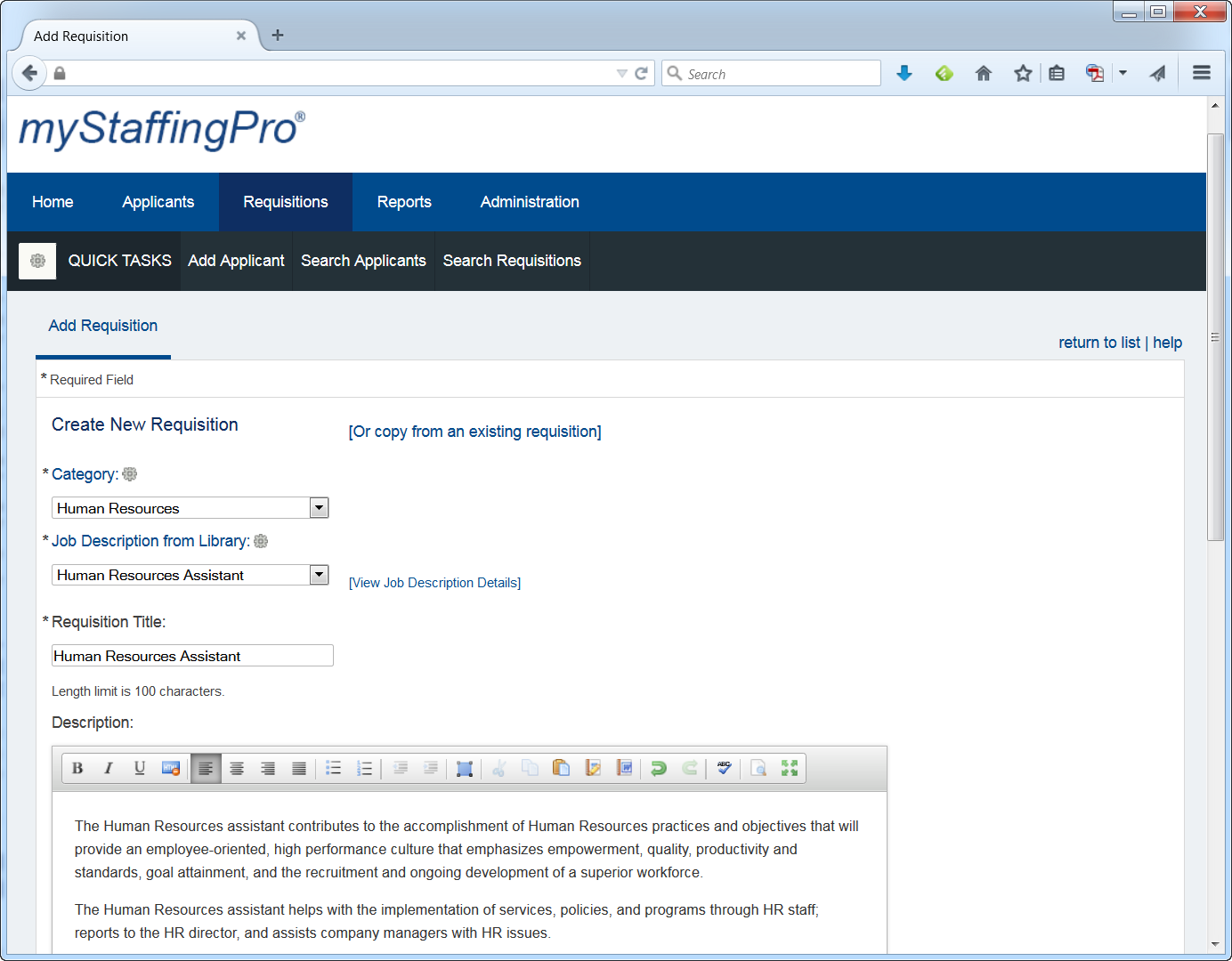
myStaffingPro is a web-based applicant tracking system (ATS) that offers applicant tracking, candidate recruiting, and onboarding in a scalable, configurable solution. It is a SaaS model makes it accessible from anywhere at any time, and offers unlimited integration capabilities. Some key features include: Social Recruiting, Interview Scheduling and Tracking, and Resume and Social Media Parsing.
N/A
Pricing
Arcoro HR
myStaffingPro
Editions & Modules
No answers on this topic
myStaffingPro Express
$0
Per User per Month
myStaffingPro
$0
Per User per Month
myStaffingPro Premier
$0
Per User per Month
Offerings
Pricing Offerings
Arcoro HR
myStaffingPro
Free Trial
No
No
Free/Freemium Version
No
No
Premium Consulting/Integration Services
No
Yes
Entry-level Setup Fee
No setup fee
Optional
Additional Details
—
Pricing is based on the number of users and configuration selected.
From sales to implementation, the process was a little oversold. We didn't know the right questions to ask - had we known what to ask, it would have been easier to embrace from the beginning. Once the training begins, it's comfortable with the tools and team. Our Project Manager had changed throughout the implementation process, but we didn't miss a beat. Arcoro takes care of us, and I would recommend them as a Sage partner.
A de minimis incentive was given to thank the reviewer for their time. The incentive was not used to bias or drive a particular response, nor was the incentive contingent on a positive endorsement. More Info
myStaffingPro is very easy to configure and setup and takes less than 2 business days to configure and get it up and running. It facilitates the HR Business Partners in their recruitment activities. For the Open Position in the Organization, with the use of the software, they can quickly shortlist the candidates with quick mix and match of the requirements. Interviews can be scheduled with the candidate. If a Candidate is selected, the proper background screening process is initiated and finally, the Onboarding process is also tightly integrated within the software.
A de minimis incentive was given to thank the reviewer for their time. The incentive was not used to bias or drive a particular response, nor was the incentive contingent on a positive endorsement. More Info
Open Enrollment - this is an AWESOME feature. We have over 900 employees and we wouldn't dream of doing this by hand again! Everything legible and every required field filled out.
Electronic feeds to the insurance carriers/benefit vendors - this is seamless and we have more issues with the vendors than with Arcoro HR!
ACA reporting is something that they handle and it is one less headache that we have to deal with!
Applicant tracking that flows into onboarding then into the benefits module!
A de minimis incentive was given to thank the reviewer for their time. The incentive was not used to bias or drive a particular response, nor was the incentive contingent on a positive endorsement. More Info
One strength of myStaffingPro is because of its heavy manual interface, there is a lot of detail and very specific reason codes. This is very useful for later reporting to get specific information on hires and rejects.
Also the ability to upload documents (CVs, resumes, phone screen notes, etc) is all located in a convenient place
The calendar function is good, there are stop measures to prevent double booking and the time zones are preset
Since we started using the HUB, I have things listed as jobsites that are not jobsites on Exaktime, I'd like them removed such as DO NOT SYNC, JBLMANG, JENSEN, 1 HOME OFFICE, 2 DM OFFICE I guess they are called "locations" but every once in a while one of our guys will clock into one of them by mistake.
When submitting a ticket, quicker response time would be appreciated. Arbaz is quick to respond but the tickets are not responded to very quickly. I think Arcoro HR is a great product but response time is important! Especially when you have a lot of employees counting on a paycheck every Friday.
A de minimis incentive was given to thank the reviewer for their time. The incentive was not used to bias or drive a particular response, nor was the incentive contingent on a positive endorsement. More Info
It is easer to keep someing going then change things out. Our employees have taken 6 months to learn this one, I do not want to reinvent the wheel. Just this week I have seen inprovment as they now know they do not get paid if they do not clock in and back out every day.
A de minimis incentive was given to thank the reviewer for their time. The incentive was not used to bias or drive a particular response, nor was the incentive contingent on a positive endorsement. TR verified that a representative sample of customers was invited. More Info
If I were a decision maker, I would not choose to renew myStaffingPro because of the overly manual process and lost productivity. I've found other ATS's that have the same functionality but are more intuitive, user friendly and appealing. Getting a hold of customer service and support was difficult and they were rarely able to fix the immediate issue.
Very user friendly. Nothing's perfect but ExakTime is pretty close! Employees are diligent about clocking in and out in order to get paid! I love that we can customize reports to get exactly the info that we need. It's also very helpful to provide documentation of hours worked for our customers.
A de minimis incentive was given to thank the reviewer for their time. The incentive was not used to bias or drive a particular response, nor was the incentive contingent on a positive endorsement. TR verified that a representative sample of customers was invited. More Info
I have used a lot of applicant tracking systems in my career. I've always gone back to MSP saying that it's always been my favorite. It's easy to use, I've never worked with a system so easy to use. It's also easy to figure out if you don't know where something is located - you can typically figure it out on your own without having to ask anyone.
A de minimis incentive was given to thank the reviewer for their time. The incentive was not used to bias or drive a particular response, nor was the incentive contingent on a positive endorsement. More Info
They are good about scheduling maintenance during overnight periods. There have been a few server issues with the e-signature system over the weekends.
A de minimis incentive was given to thank the reviewer for their time. The incentive was not used to bias or drive a particular response, nor was the incentive contingent on a positive endorsement. More Info
A de minimis incentive was given to thank the reviewer for their time. The incentive was not used to bias or drive a particular response, nor was the incentive contingent on a positive endorsement. More Info
I have not had to use support other then as we got started and had a few hick ups but they were great. They answered all our questions even if some of them were no the program does not do that. I guess the best support is one that is not needed because the product works great and does its job right
A de minimis incentive was given to thank the reviewer for their time. The incentive was not used to bias or drive a particular response, nor was the incentive contingent on a positive endorsement. TR verified that a representative sample of customers was invited. More Info
We recently had an issue where it was brought to our attention by a candidate that specializes in Information Assurance and Network Engineering that their site was missing a secure socket layer for entering in your ssn, which means that when entering it, your ssn is in plain text in plain site. It should hide it with dots or asterisks as you type it to make it secure like when you enter passwords online. I turned off the field that collects SSN's immediately and have been waiting for a response as to when this would be updated so I could turn it back on. I submitted this to our rep back in October 2013 and they said they would forward it to their IT team. I never received any further follow up as to whether or not they would be updating this. I sent a follow up email and left voice messages asking for a status update in Jan. 2014 with no response. I finally called again at the end of Feb. 2014 and emailed. The rep seemed put out that I was telling her I was frustrated with the lack of follow through and that I told her I needed a response on whether or not this would be resolved. She then forwarded me an email from the IT team that said they didn't think this was an actual requirement, they would look into it. Today she emailed to let me know the IT team will not be making any changes.
Whether or not the issue above is a DoD issue or not, the length of time to receive the final response was way too long and involved too much follow up on my part. The fact that they are unwilling to update the SSN field is also troublesome. Even if this is not an actual DoD violation or a mandate, it's a pretty common practice on most websites for collecting private information. Would you enter your PIN number into an ATM if it showed your PIN number until you hit enter? Identity theft is very high these days and people should feel like the company cares enough to help provide that extra layer of protection of their personal information.
This recent development has really changed my opinion of MyStaffingPro drastically since I last wrote my review
A de minimis incentive was given to thank the reviewer for their time. The incentive was not used to bias or drive a particular response, nor was the incentive contingent on a positive endorsement. More Info
A de minimis incentive was given to thank the reviewer for their time. The incentive was not used to bias or drive a particular response, nor was the incentive contingent on a positive endorsement. More Info
Gave a notice to all employees to come to work 15 min early on the day planned to implement the program. I had Spanish and English signs on how to down load the program and log in I showed them ALL how to log in and out and explained that they are responsible for reporting accurate time. I had them all sign a policy that lunch breaks were mandatory for all employees at least 30 min per day. This ensures safety on the roofs. We had a few people who did not have passwords to the app store and we had a few problems with android phones but most of them were on their way quickly. Most not happy about the change but I hope they see the benefit of it now.
A de minimis incentive was given to thank the reviewer for their time. The incentive was not used to bias or drive a particular response, nor was the incentive contingent on a positive endorsement. TR verified that a representative sample of customers was invited. More Info
We still use Sage, and ExakTime is compatible with it, which is why we went with ExakTime. So technically we use both at this time. ExakTime is a great pairing with Sage since Sage does not have any applications that let employees clock in and out. So we use ExakTime for that and then transfer the information to Sage for the reporting and issuing of deposits/checks, etc.
A de minimis incentive was given to thank the reviewer for their time. The incentive was not used to bias or drive a particular response, nor was the incentive contingent on a positive endorsement. TR verified that a representative sample of customers was invited. More Info
We thought it would've been better than ADP, but it wasn't. Also, the sales person who sold us on Paychex promised that this and Paychex would be able to do a lot of things we needed, which turned out to be a lie when we were implementing it, and the MyStaffingPro expert told us it wasn't possible, and it never was. It wasn't as user friendly either.
A de minimis incentive was given to thank the reviewer for their time. The incentive was not used to bias or drive a particular response, nor was the incentive contingent on a positive endorsement. More Info
A de minimis incentive was given to thank the reviewer for their time. The incentive was not used to bias or drive a particular response, nor was the incentive contingent on a positive endorsement. More Info
A de minimis incentive was given to thank the reviewer for their time. The incentive was not used to bias or drive a particular response, nor was the incentive contingent on a positive endorsement. More Info
Payroll Accuracy - Hours used to be manually calculated here. Depending on the person it was almost never accurate resulting in employees being under paid or the company losing money.
Time - To calculate 30+ employees hours, including overtime was a nightmare and took an entire day. I now do minor changes day of payroll to fix up things and ask questions and I am no more than 20 minutes. That is a huge time and money saver.
A de minimis incentive was given to thank the reviewer for their time. The incentive was not used to bias or drive a particular response, nor was the incentive contingent on a positive endorsement. TR verified that a representative sample of customers was invited. More Info