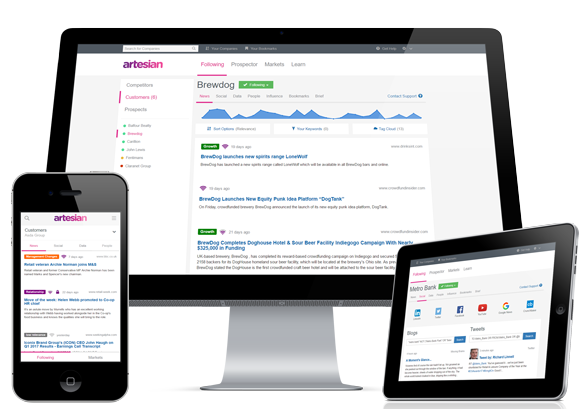
Artesian is designed to help B2B sales teams leverage Internet-based insights (from web and social media) about prospects in order to decrease sales lead time.
Customers are typically B2B enterprises.
$90
per month
LinkedIn Sales Navigator
Score 8.6 out of 10
N/A
LinkedIn Sales Navigator is a sales intelligence software solution offered by LinkedIn.
$79.99
per month
Agentforce Revenue Management
Score 8.7 out of 10
Mid-Size Companies (51-1,000 employees)
Salesforce Revenue Cloud (formerly Salesforce CPQ or SteelBrick) is built and delivered on the Salesforce Platform and Salesforce1 Mobile App which enables users to create accurate sales quotes quickly and submit error-free orders on the fly from any device.
$30
Per User per Month
Pricing
Artesian
LinkedIn Sales Navigator
Salesforce Agentforce Revenue Management
Editions & Modules
Subscription
$90.00
per month
Professional
$79.99
per month
Team
$134.99
per license
Enterprise
Contact sales team
Basic
$30
Per User per Month
Professional
$50
Per User per Month
Enterprise
$75
Per User per Month
Offerings
Pricing Offerings
Artesian
LinkedIn Sales Navigator
Agentforce Revenue Management
Free Trial
Yes
No
Yes
Free/Freemium Version
No
No
No
Premium Consulting/Integration Services
No
No
Yes
Entry-level Setup Fee
No setup fee
No setup fee
Optional
Additional Details
Have questions? If you’re unsure of your requirements or you need some advice, get in touch. 0330 321 0101. *Pricing varies by number of users*
LinkedIn Sales Navigator really doesn't have any true competitors. There is a huge value in the tool being proprietarily linked to the LinkedIn network and being able to leverage that network every day. No other sales tool has that advantage. Their competitors use their …
Linkedin Sales Navigator has allowed me to access company contact information and analytical data. This has led to more personal connections and leads generated. InsideView is great for industry information and org chart hierarchy, but I found the data to be inaccurate in some …
It was not my choice to move to Salesforce CPQ. Our organization chose to move to this platform because Octiv gave the reps too much flexibility. They wanted to tighten the reins. Everyone hates Salesforce CPQ and the guy who implemented it isn't even at the company anymore.
We looked into using BigMachines and FPX but decided to implement Apttus many years ago. The Apttus implementation never went live after several hiccups along the way and we shifted our focus to Salesforce CPQ which has had it's moments as well. Overall, Salesforce CPQ is the …
LinkedIn Sales Navigator is hands down the best tool for identifying targeted contacts or leads. You can drill down on a company and look at its entire workforce, or search by the exact title that is your key target. The information is up to date, as people tend to keep their LinkedIn profiles current. In terms of other marketing functions LI Sales Navigator is extremely limited. BUT if you are looking to identify contacts for prospecting purposes, then this tool is what you need.
What I like best is the ease of use to be able to track all opportunities and quotes in my daily sales tracker I also like the fact that you can reorganize the view for your opportunities. For instance, it is very similar to a spreadsheet where you can filter them by date, dollar amount, name, and several other ways. I found this to be less appropriate when we have to do multiple roles while assigning one task to multiple users. Column resizing within the Quote Line Editor is not supported in the Salesforce mobile app.
Search Functionality: LinkedIn Sales Navigator has one of the most powerful search functions. The filters are not unnecessary and some are very well thought of. You can drill down to finding a needle in a haystack of 20000 employee company when it comes to using LinkedIn Sales Navigator if done in the right manner.
Smart Links: Gone are the days of attached Decks. One can simply create their deck online using this feature on LinkedIn Sales Navigator, or even upload an existing ppt. A smart link is shareable as well as trackable for opens and clicks.
Fewer Clicks: With a single click, I can filter out decision-makers in any company. With a single click, I can import contacts from LinkedIn Sales Navigator to Salesforce. Lesser clicks are actually less stressful if you think.
Our Salesforce is very messy, which tells me it's not super easy to clean up.
I always have a really hard time removing a contacts from an account - it seems like you can't simply remove the relationship so we have lots of people named DO NOT CONTACT or things of that nature.
Sometimes when saving it doesn't seem like things actually save.
This question is a no-brainer. The tool is the industry standard for anyone tied to sales and marketing. The name "LinkedIn Sales Navigator" is synonymous with streamlining relevant customer and account data in an easy to use format that is actionable and intelligent. The focus on continuous improvement and richer means of communicating with customers and prospects is evident each time new features are rolled out. The social component of the tool even includes a gamification component to ensure that peers remain relevant among each other, which is refreshing and enjoyable for those who engage the tool on a daily basis.
Overall, it's very user-friendly. It's hard for a tool to make sorting through loads of data easy, but Sales Nav does this very well. Its advanced search features enable us to be selective in finding the right people to talk to and connect with.
I would give it an eight because it's very customizable in the way that you want to create it. I think I'm just docking points because sometimes there can be a little too much customization, which can make it a little complicated, but it just depends on the complexity of your business and how you guys build it out in the first place.
I would recommend LinkedIn Sales Navigator entirely. It has been the most user-friendly tool to use starting off in a sales role. I genuinely enjoy the navigation of the tool and how easy it is to save lists and see job changes within those lists. Generating leads and finding the most up to date information on prospects is all housed within this tool.
There have been some issues with multi-year pricing of certain products and services which we have been assured will be resolved but I guess are still underway, the support team apart from this has not been needed much and in the rare scenarios, it has been needed the resolutions of conflicts has been prompt and quick, so the overall support would have my high regards for being so helpful and customer-oriented so as to assure good performance of their toolset and customer satisfaction.
I am unsure of the rollout, as I was not involved. I was an early adopter, and I have had a lot of success with the tool personally at multiple organizations, but I have no idea whether the implementation process encountered any errors. I can personally say that it works, and that I have not encountered significant issues with the tool since adoption, although a few issues like messages showing up as being unread even though they have been opened have been an on-again/off-again issues throughout the past few years. Overall, the company is doing a great job, and our implementation seems to have been effective.
LinkedIn Sales Navigator is much more valuable than Dice or Cognism, as we do most of our prospecting on LinkedIn. Therefore, it means we can build lists of our prospects based on activity, connections, and buying intention. With Cognism and Dice, you cannot do this as they do not work alongside the LinkedIn platform and, therefore, lack the functionality that is essential to what we are using the platform for.
There is no comparison to a fully functional instance of CPQ. Nothing comes close due to the amount of customization and ease of use that CPQ offers once it's fully built out. Other solutions may be easier to build or administer, but for the users and business needs, CPQ is the best solution possible.
Easy access to reporting on closed-won, closed-lost, and open quotes.
Accuracy in data referenced in a quote - it's typically accurate as it is pulled directly from opportunity, looking up to associated subscription start/end dates, etc..
We lose valuable time in creating quotes ourselves. Quotes were requested and created through sales ops previously, sales did not have access to the excel templates used to generate quotes.