Confluence is a collaboration and content sharing platform used primarily by customers who are already using Atlassian's Jira project tracking product. The product appeals particularly to IT users.
$6.40
per month per user
GitKraken
Score 8.8 out of 10
N/A
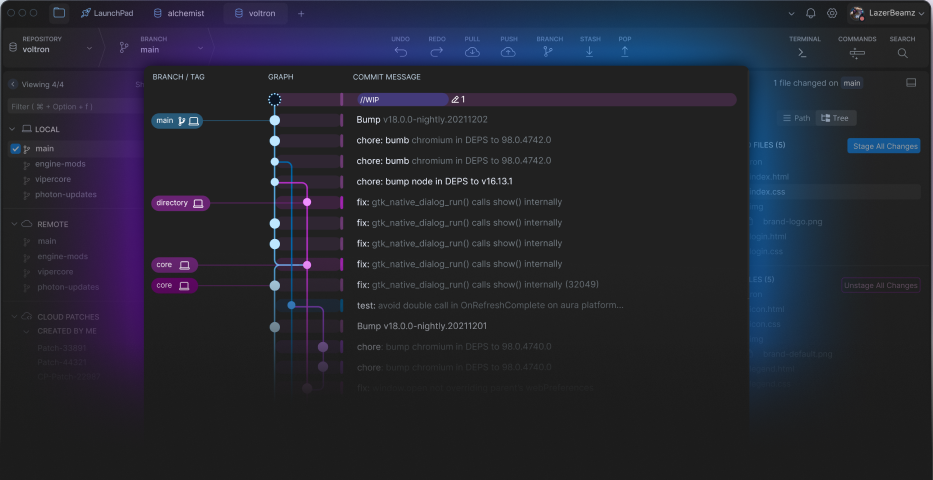
GitKraken's commit graph helps visualize branch structure and commit history. It helps verify recent Git actions on the repo, and also shows who made what code changes and when, so it’s easier to track down when a bug was introduced and revert back to a previous version. GitKraken Client is a Git GUI that detects and alerts users of potential conflicts so as to prevent them from happening. With itsuser Activity Status, the user can know who is online in the GitKraken Client.
$0
Microsoft Visual Studio Code
Score 9.3 out of 10
N/A
Microsoft offers Visual Studio Code, an open source text editor that supports code editing, debugging, IntelliSense syntax highlighting, and other features.
$0
Pricing
Atlassian Confluence
GitKraken
Microsoft Visual Studio Code
Editions & Modules
Free
$0
Free for 10 Users
Standard
$6.40
per month per user
Premium
$12.30
per month per user
Data Center
220,000.00
40,001+ Users - Annually
Enterprise
Contact Sales
Hosted by GitKraken
Customized according to the amount of team members.
No answers on this topic
Offerings
Pricing Offerings
Confluence
GitKraken
Microsoft Visual Studio Code
Free Trial
Yes
Yes
No
Free/Freemium Version
No
Yes
Yes
Premium Consulting/Integration Services
No
No
No
Entry-level Setup Fee
No setup fee
No setup fee
No setup fee
Additional Details
Prices shown here reflect prices for deployments with 100 users or less. The prices decrease wien the user base surpasses 100.
As described earlier, for low overhead projects, Microsoft Visual Studio Code does a great job of getting you in and out, all the way down as far as launch time for the app and compile time. Xcode is really feature heavy, but that makes learning how to use it a task of its …
Visual Studio Code was easy for us to install and to begin developing applications with from day one. Being freely available also makes it easier to adopt the application without having to go through a lot of bureaucratic hurdles initially. It isn't really fair to compare VS …
I would recommend Atlassian Confluence for companies that want to have internal documentation and minimum governance processes to ensure documentation is useful and doesn't have a lot of duplicated and non-updated content. I wouldn't recommend Atlassian Confluence for companies with a low budget since this product might be a little costly (especially with add-ons).
As a general workhorse IDE, Microsoft Visual Studio Codee is unmatched. Building on the early success of applications such as Atom, it has long been the standard for electron based IDEs. It can be outshone using IDEs that are dedicated to particular platforms, such as Microsoft Visual Studio Code for .net and the Jetbrains IDEs for Java, Python and others. For remote collaborative development, something like Zed is ahead of VSCode live share, which can be quite flakey.
Cross product linking - If you use other Atlassian products then Atlassian Confluence is a no-brainer for your source of documentation, knowledge management etc. You can show previews of the linked asset natively E.g. showing a preview of a JIRA ticket in a Atlassian Confluence page.
Simple editing - Though the features available may not be super complex right now, this does come with the benefit of making it easy to edit and create documents. Some documentation editors can be overwhelming, Atlassian Confluence is simple and intuitive.
Native marketplace - If you want to install add-ons to your Atlassian Confluence space it's really easy. Admins can explore the Atlassian marketplace natively and install them to your instance in a few clicks. You can customise your Atlassian Confluence instance in many different ways using add-ons.
UI Design is very simplistic and basic could make use of more visually interesting colour choices, layout choices, etc.
Under the 'Content' menu, it defaults to having a landing page for all L1 and L2 category pages. Meaning as long as the broader content category has a sub-category, it still creates a separate landing page. In my team's case, this often creates blank pages, as we only fill out the page at the lowest sub-category (L3).
Hyperlinks are traditionally shown as blue, however, this results into very monotonously blue pages in cases where a lot of information is being linked.
The customization of key combinations should be more accessible and easier to change
The auxiliary panels could be minimized or as floating tabs which are displayed when you click on them
A monitoring panel of resources used by Microsoft Visual Studio Code or plugins and extensions would help a lot to be able to detect any malfunction of these
I am confident that Atlassian can come with additional and innovative macros and functions to add value to Confluence. In 6 months, Atlassian transformed a good collaborative tools into a more comprehensive system that can help manage projects and processes, as well as "talk" with other Atlassian products like Jira. We are in fact learning more about Jira to evaluate a possible fit to complement our tool box.
Solid tool that provides everything you need to develop most types of applications. The only reason not a 10 is that if you are doing large distributed teams on Enterprise level, Professional does provide more tools to support that and would be worth the cost.
Great for organizing knowledge in a hierarchical format. Seamless for engineering and product teams managing software development. Helps in formatting pages effectively, reducing manual work. Tracks changes well and allows for easy rollbacks. Granular controls for who can view/edit pages. Search function is not great which needs improvement. Hire some google engineers
Over the years, I have used many Git tools, but GitKraken stands out. It's now my favorite Git tool by far—excellent graphical overview of the branches, straightforward usage of all functionality, and lots of integration available. Currently, I am using GitKraken to connect to the ADO and quickly create PRs, using gitflow and tracking the work of my team mates.
Microsoft Visual Studio Code earns a 10 for its exceptional balance of power and simplicity. Its intuitive interface, robust extension ecosystem, and integrated terminal streamline development. With seamless Git integration and highly customizable settings, it adapts perfectly to any workflow, making complex coding tasks feel effortless for beginners and experts alike.
Overall, Microsoft Visual Studio Code is pretty reliable. Every so often, though, the app will experience an unexplained crash. Since it is a stand-alone app, connectivity or service issues don't occur in my experience. Restarting the app seems to always get around the problem, but I do make sure to save and backup current work.
We never worked against the tide while using Confluence. Everything loads considerably fast, even media components like videos (hosted on the platform or embed external videos from Youtube, for example). We are not using heavy media components a lot, but in the rare occasion we happen to use one we have no problems whatsoever.
Microsoft Visual Studio Code is pretty snappy in performance terms. It launches quickly, and tasks are performed quickly. I don't have a lot of integrations other than CoPilot, but I suspect that if the integration partner is provisioned appropriately that any performance impact would be pretty minimal. It doesn't have a lot of bells and whistles (unless you start adding plugins left and right).
This rating is specifically for Atlassian's self-help documentation on their website. Often times, it is not robust enough to cover a complex usage of one of their features. Frequently, you can find an answer on the web, but not from Atlassian. Instead, it is usually at a power user group elsewhere on the net.
Active development means filing a bug on the GitHub repo typically gets you a response within 4 days. There are plugins for almost everything you need, whether it be linting, Vim emulation, even language servers (which I use to code in Scala). There is well-maintained official documentation. The only thing missing is forums. The closest thing is GitHub issues, which typically has the answers but is hard to sift through -- there are currently 78k issues.
We chose Atlassian Confluence over SharePoint because it's much more user-friendly and intuitive. Atlassian Confluence makes collaboration and knowledge sharing easier with its simpler interface and better search. While SharePoint can be powerful, it often feels clunky and complex, making it harder for our team to actually use it.
Visual Studio Code stacks up nicely against Visual Studio because of the price and because it can be installed without admin rights. We don't exclusively use Visual Studio Code, but rather use Visual Studio and Visual Studio code depending on the project and which version of source control the given project is wired up to.
It is easily deployed with our Jamf Pro instance. There is actually very little setup involved in getting the app deployed, and it is fairly well self-contained and does not deploy a large amount of associated files. However, it is not particularly conducive to large project, multi-developer/department projects that involve some form of central integration.