Chose Axcient x360Recover
The Axcient x360Recover has been a better solution than others for managing data recovery for multiple clients.

| Product | Rating | Most Used By | Product Summary | Starting Price |
|---|---|---|---|---|
 Axcient x360Recover | N/A | Axcient x360Recover (formerly BRC) can not only recover a single server or desktop, but can automate the recovery of an entire customer site through its Virtual Office and automated Runbook features. In a disaster event, authorized users can log into the web application or Remote Management Console and create a virtual private cloud called a Virtual Office. The Virtual Office ensures security, privacy and reliability for every organization needing to run one or more failover virtual machines in… | N/A | |
 OpenText Data Protector | N/A | OpenText Data Protector standardizes and consolidates backups across multiple platforms. It provides secure, comprehensive backup protection for business-critical data and applications whether virtual, physical, or online in the cloud. | N/A | |
 Veeam Data Platform | Mid-Size Companies (51-1,000 employees) | Veeam’s® premier product, Veeam Backup & Replication™, delivers availability for all cloud, virtual, Kubernetes and physical workloads. Through a management console, the software provides backup, archival, recovery and replication capabilities. | $428 per year per 5 instances |
| Axcient x360Recover | OpenText Data Protector | Veeam Data Platform | ||||||||||||||||||||||
|---|---|---|---|---|---|---|---|---|---|---|---|---|---|---|---|---|---|---|---|---|---|---|---|---|
| Editions & Modules | No answers on this topic | No answers on this topic |
| |||||||||||||||||||||
| Offerings |
| |||||||||||||||||||||||
| Entry-level Setup Fee | No setup fee | Optional | No setup fee | |||||||||||||||||||||
| Additional Details | — | — | Veeam sells through channel partners. Contact a partner for detailed pricing and quotes. Resellers or sales personnel are available for assistance. | |||||||||||||||||||||
| More Pricing Information | ||||||||||||||||||||||||
| Axcient x360Recover | OpenText Data Protector | Veeam Data Platform | |
|---|---|---|---|
| Considered Multiple Products |  Axcient x360Recover  Michael Arnold CEO (Chief Executive Officer) Chose Axcient x360Recover We've been a Datto partner for many years. For the longest time, Datto was the "Gold Standard" for this type of Business Continuity and Data Recovery (BCDR) solutions. Since our partnership with Axcient, we have completely moved away from Datto... especially now that Datto is a …  Chris Wetzel Senior Engineer Chose Axcient x360Recover Axcient x360Recover has been a more reliable product and more competitively priced as well as provided better support than the Datto product line.  Kevin Walker Director Chose Axcient x360Recover Axcient x360Recover is a premium product and stacks up well compared to the competition. The value is amazing for all the features you receive.  Eric Rise Network Administrator Chose Axcient x360Recover Axcient has the ability to back up both Linux and Windows and the ability to backup iSCSI attached volumes on servers. I have an environment with many servers that have direct attached iSCSI volumes mapped to them direct to the storage arrays. The other solutions do a fine job … |  OpenText Data Protector  Kevin Loeffler Manager Technical Services Chose OpenText Data Protector When selecting a backup solution for our virtual environment we chose HP Data Protector for its cost savings in licensing, our familiarity with the software and the ability to backup to disk, tape or both with the standard installation. |  Veeam Data Platform  Brian Marcum System Administrator Chose Veeam Data Platform We currently have Data Protector but it doesn't have anywhere near the capabilities Veeam does. Testing your backups is critical and Veeam makes it easy to test them regularly. Veeam is easier to set up a new backup where Data Protector is confusing and clunky. |
| Axcient x360Recover | OpenText Data Protector | Veeam Data Platform | |||||||||||||||||||||||||||||||||||||||||||||||||||||||||||
|---|---|---|---|---|---|---|---|---|---|---|---|---|---|---|---|---|---|---|---|---|---|---|---|---|---|---|---|---|---|---|---|---|---|---|---|---|---|---|---|---|---|---|---|---|---|---|---|---|---|---|---|---|---|---|---|---|---|---|---|---|---|
| Data Center Backup |
| ||||||||||||||||||||||||||||||||||||||||||||||||||||||||||||
| Enterprise Backup |
| ||||||||||||||||||||||||||||||||||||||||||||||||||||||||||||
| Disaster Recovery |
|
| Axcient x360Recover | OpenText Data Protector | Veeam Data Platform | |
|---|---|---|---|
| Small Businesses |  Cove Data Protection Score 9.1 out of 10 | Cove Data Protection Score 9.1 out of 10 | Cove Data Protection Score 9.1 out of 10 |
| Medium-sized Companies | Cove Data Protection Score 9.1 out of 10 |  Bacula Enterprise Score 9.6 out of 10 | Bacula Enterprise Score 9.6 out of 10 |
| Enterprises |  Keepit Score 9.5 out of 10 | Bacula Enterprise Score 9.6 out of 10 | Bacula Enterprise Score 9.6 out of 10 |
| All Alternatives | View all alternatives | View all alternatives | View all alternatives |
| Axcient x360Recover | OpenText Data Protector | Veeam Data Platform | |
|---|---|---|---|
| Likelihood to Recommend | 10.0 (53 ratings) | 8.3 (10 ratings) | 9.1 (781 ratings) |
| Likelihood to Renew | 9.1 (12 ratings) | 8.4 (6 ratings) | 8.7 (42 ratings) |
| Usability | 8.8 (3 ratings) | 8.0 (7 ratings) | 9.6 (36 ratings) |
| Availability | - (0 ratings) | 9.1 (1 ratings) | 8.4 (8 ratings) |
| Performance | 1.0 (1 ratings) | 8.2 (1 ratings) | 8.0 (8 ratings) |
| Support Rating | 7.0 (2 ratings) | 6.7 (7 ratings) | 10.0 (37 ratings) |
| Online Training | - (0 ratings) | - (0 ratings) | 7.3 (1 ratings) |
| Implementation Rating | 2.0 (1 ratings) | 9.1 (2 ratings) | 10.0 (24 ratings) |
| Configurability | - (0 ratings) | 9.1 (1 ratings) | 8.0 (7 ratings) |
| Contract Terms and Pricing Model | - (0 ratings) | 7.7 (4 ratings) | - (0 ratings) |
| Ease of integration | - (0 ratings) | 9.1 (1 ratings) | 7.9 (8 ratings) |
| Product Scalability | - (0 ratings) | 9.1 (1 ratings) | 7.3 (8 ratings) |
| Professional Services | - (0 ratings) | 7.5 (5 ratings) | - (0 ratings) |
| Vendor post-sale | - (0 ratings) | 9.1 (1 ratings) | 6.4 (7 ratings) |
| Vendor pre-sale | - (0 ratings) | 9.1 (1 ratings) | 5.2 (8 ratings) |
| Axcient x360Recover | OpenText Data Protector | Veeam Data Platform | |
|---|---|---|---|
| Likelihood to Recommend | ConnectWise
| OpenText
| Veeam Software
 Scott Blaydes Intermediate System Administrator |
| Pros | ConnectWise
Michael Arnold CEO (Chief Executive Officer) | OpenText
 John Glenn Network Operations Manager | Veeam Software
|
| Cons | ConnectWise
Chris Wetzel Senior Engineer | OpenText
| Veeam Software
|
| Likelihood to Renew | ConnectWise
| OpenText
John Glenn Network Operations Manager | Veeam Software
 George Rodgers-Clark IT Manager |
| Usability | ConnectWise
| OpenText
| Veeam Software
 Nick Vardis IT Director |
| Reliability and Availability | ConnectWise No answers on this topic | OpenText No answers on this topic | Veeam Software
|
| Performance | ConnectWise No answers on this topic | OpenText
| Veeam Software
|
| Support Rating | ConnectWise
 Rob Rotundo Information System Analyst | OpenText
| Veeam Software
 Stan York VP of Development |
| In-Person Training | ConnectWise No answers on this topic | OpenText No answers on this topic | Veeam Software
|
| Online Training | ConnectWise No answers on this topic | OpenText No answers on this topic | Veeam Software
|
| Implementation Rating | ConnectWise
 Richard Meade Jr. Network Services Engineer | OpenText
| Veeam Software
|
| Alternatives Considered | ConnectWise
| OpenText
Kevin Loeffler Manager Technical Services | Veeam Software
 Jork Coronado Jefe de Infraestructura y seguidad |
| Contract Terms and Pricing Model | ConnectWise No answers on this topic | OpenText
 Markus Pernek Storage & Backup Engineer | Veeam Software No answers on this topic |
| Scalability | ConnectWise No answers on this topic | OpenText
| Veeam Software
|
| Professional Services | ConnectWise No answers on this topic | OpenText
| Veeam Software No answers on this topic |
| Return on Investment | ConnectWise
| OpenText
| Veeam Software
 Dustin Belcher IT Infrastructure Manager |
| ScreenShots | OpenText Data Protector Screenshots | Veeam Data Platform Screenshots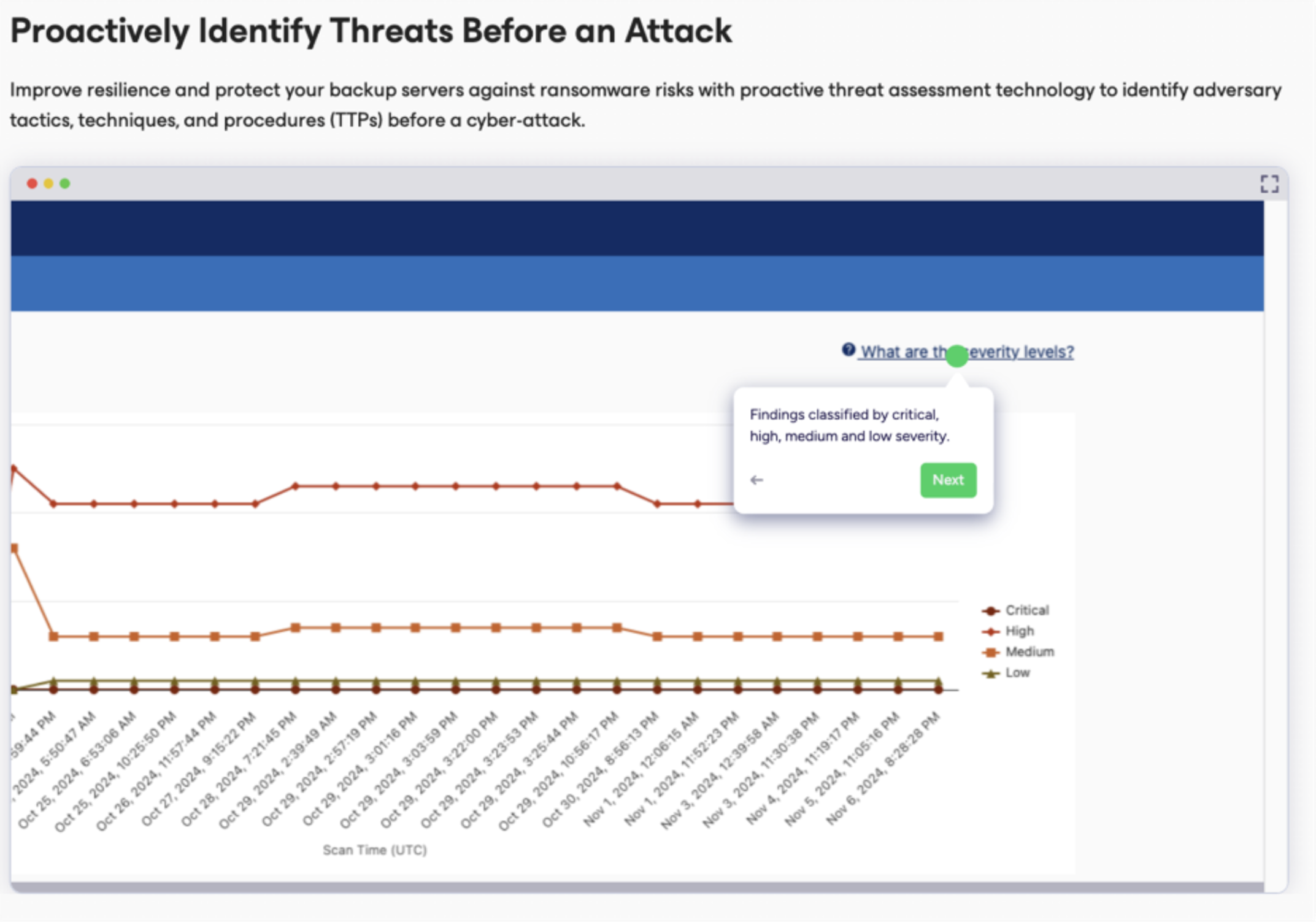 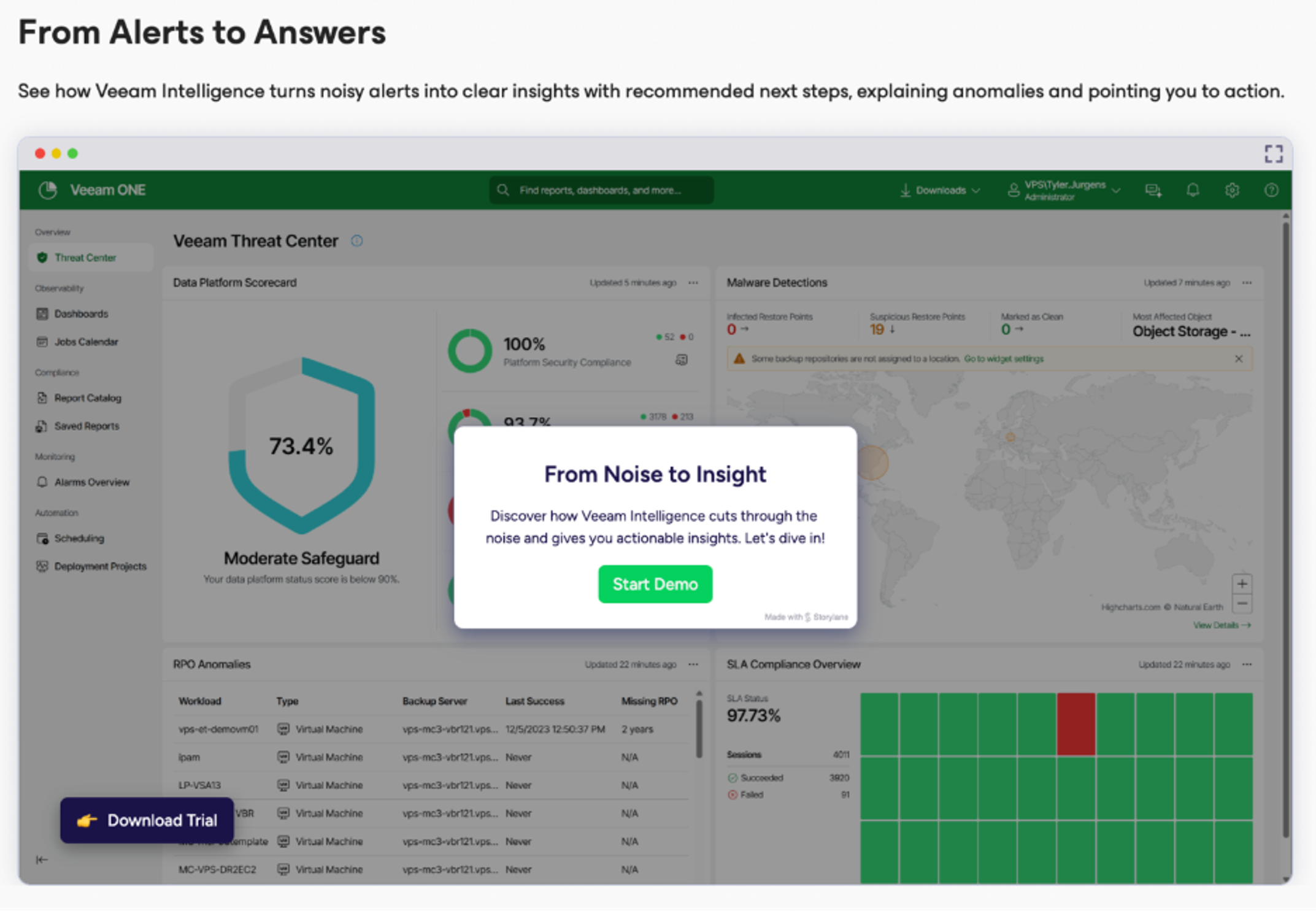 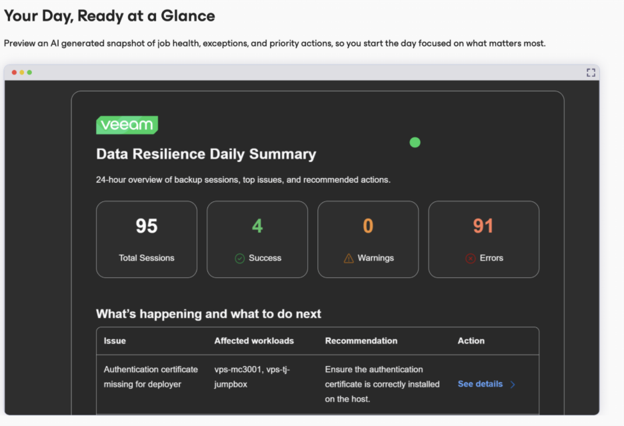 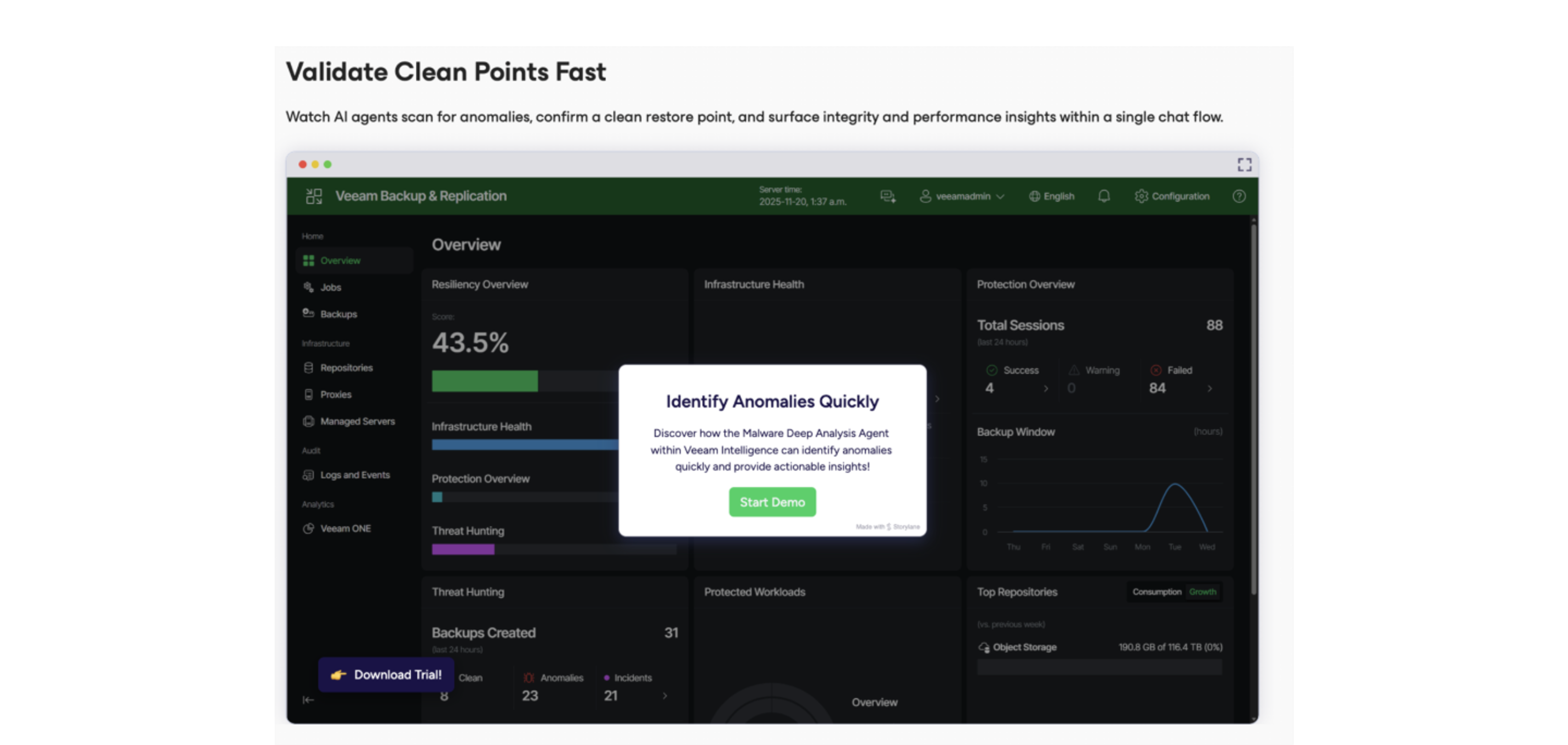 |