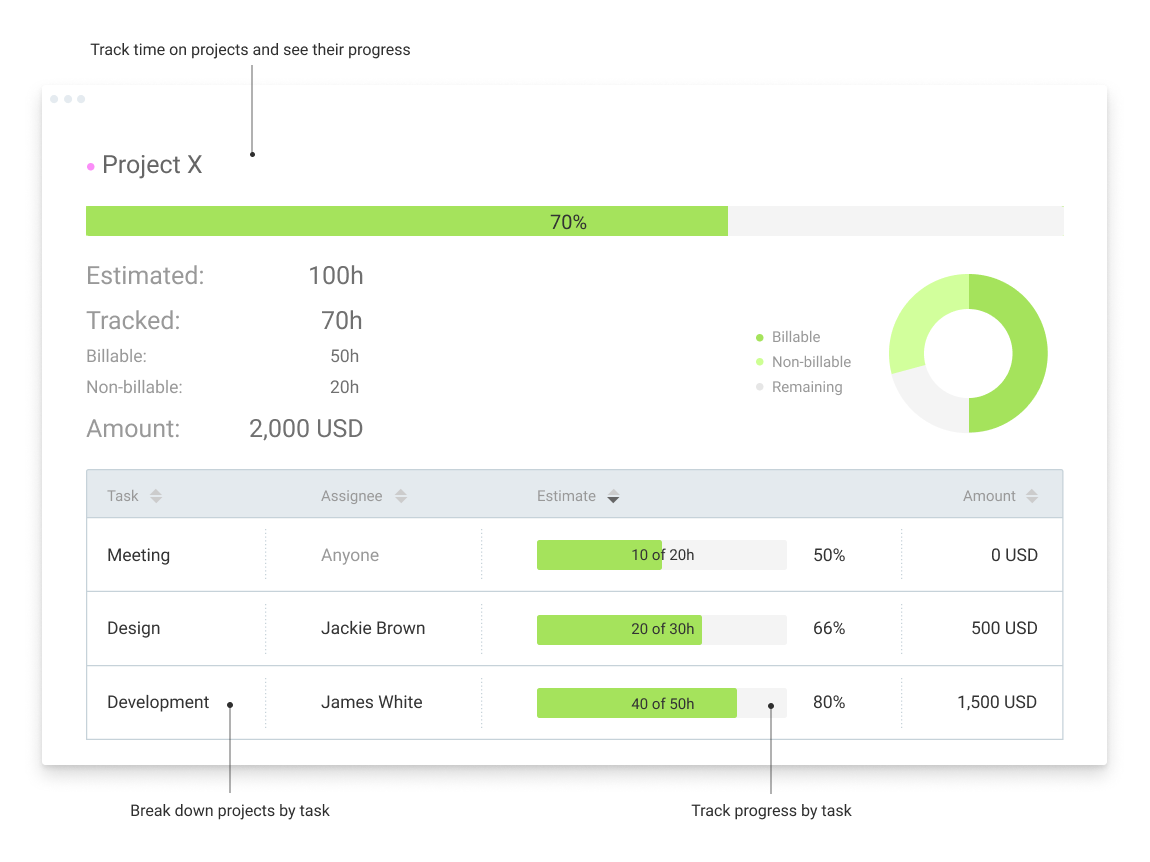
Clockify, from COING in Palo Alto, is a time tracker and employee timesheet software for teams of all sizes. Clockify lets users track how much time is spent working on tasks, as well as keep track of employee timesheets and billable hours, project completion, reports, and schedules.
$0
forever, unlimited everything
Gusto
Score 8.9 out of 10
N/A
Gusto offers payroll, benefits and compliance capabilities. Gusto is scaled for small to mid-sized businesses, and emphasizes an easy to use interface.
$49
per month
QuickBooks Online
Score 8.1 out of 10
N/A
QuickBooks Online is a SaaS version of the QuickBooks product. It contains all of the features found in the local version. Higher-priced plans include greater automation, payment management, inventory and time tracking, and analytics features.
$38
per month
Pricing
Clockify
Gusto
QuickBooks Online
Editions & Modules
Clockify Free
$0
forever, unlimited everything
Clockify Plus
$9.99
per month, per workspace
Clockify Enterprise
$9.99
per month, per user, per workspace
Clockify Premium
$29.99
per month, per workspace
Clockify Server
Starts at 450
Simple: A streamlined set of automatic payroll features and benefits integrations
$49/month + $6/mo per person
per month
Plus: Comprehensive payroll, benefits, and HR tools for employers building a great place to work
$80/month + $12/mo per person
per month
Premium: Scalable payroll and benefits, expert HR, and dedicated support for the complex needs of growing teams
$180/month + $22/mo per person
per month
Simple Start
$38
per month
Essentials
$75
per month
Plus
$115
per month
Advanced
$275
per month
Offerings
Pricing Offerings
Clockify
Gusto
QuickBooks Online
Free Trial
Yes
Yes
Yes
Free/Freemium Version
Yes
No
No
Premium Consulting/Integration Services
Yes
Yes
Yes
Entry-level Setup Fee
Optional
No setup fee
No setup fee
Additional Details
Unlimited usage and number of users for free. Paid plans are solely for access to additional features. Self-hosting software on own servers available.
Gusto offers three pricing plans for payroll, benefits, and HR.
I prefer Gusto's visual interface and ease of use. The employee visual for Gusto was much better. The customer service support that I have received with Gusto has far exceeded any other payroll processing service that I have used.
Gusto is so much more user friendly and the customer service is excellent. Waiting on hold for ADP and Quickbooks was very frustrating and I almost never got my issue resolved. When I did get a call back, there was often a “hard sell” attached to the call.
It's been a while since I used QuickBooks for payroll, but it doesn't even come close to it. Gusto is infinitely easier, allowing for employee time tracking, handling calculations and payments of payroll and payroll taxes, managing regulatory compliance in the background, and …
Gusto seems to offer everything that ADP Payroll does, but at a much more affordable cost. Gusto's prices are much more reasonable for very small businesses and startup businesses. Most of my clients fall into that category. I would say ADP is more for larger small …
Gusto is more approachable with a less corporate, more personalized feel. When we started, it was helpful for Paychex to be a one-stop shop where they offered a ton of add on services we hadn't thought of but found useful. Now that we are better able to navigate our needs, …
Gusto is incredibly user friendly and leaves you with a step by step guide of what you need to do, what you're missing and helps catches everything you might have missed.
Workful was a budget-conscious choice last year. However, it couldn't handle the nuances of a non-profit and was also not available to automate payroll tax filing in every state. They abruptly stopped offering payroll service, leaving me to switch clients immediately. Justwork…
Gusto is way easier to use and understand than other platforms. They just focus on what they're really good at without cluttering up the experience with other offers. The customer service is much better as well. Support is very responsive and helpful.
I think Quickbooks is hard to navigate and it has too many outages/down times. In my experience, you have to jump through hoops to get your information updated. I think it is slow and ugly
Personally, I believe that Gusto is the superior product, especially if used by a smaller firm. It has all of the same capabilities as QBO, but has a much simpler design that makes it more user friendly. As I've stated early, the technical support for Gusto is certainly more …
Gusto offers a better experience for both employees and employers with more intuitive navigation, simplified step-by-step builds for back-end structure, and user-friendly, secure processes for employees. Gusto is a well-designed platform that is years ahead of the others in …
QBO was awful. It never quite worked correctly and was not intuitive at all. Plus, it was expensive! And when we had a problem getting something to work right, it took three days for their customer support team to respond. And they're answer was basically, "Sorry. We can't fix …
The only other service I have used that was similar to QuickBooks was Gusto. My experience with it was pretty limited. We did not use it for very long. We tried it because it was made for small businesses and we are a smaller department. QuickBooks was more scalable and worked …
I use Gusto but have not evaluated it. It works great for us.
Verified User
Director
Chose QuickBooks Online
Sage Intacct is very difficult to use and the inter-face is decades behind QB online. The ease to which one can find and manage information on QB online versus Sage Intacct is remarkable. QB Online is made for people who actually manage and facilitate financial information. I …
As an accountant, QuickBooks Online uses the language I learned in school and throughout my career. Xero tries to simplify it, while actually making it more difficult to understand.
As I've mentioned, there aren't a lot of similar products, and certainly not with all the capability of QuickBooks Online. In my opinion, they nickel and dime for everything but they also do work pretty well across the board. I think the reconciliation process is also by far …
Other software packages such as NetSuite and Intacct I used in the past are more robust in terms of supporting a bigger organization, but at my current company we selected QuickBooks Online as our ERP because it is a perfect fit for the size of the company and our operations as …
I have used larger ERP systems like SAP and Netsuite which do offer a better solution however for the size of business (small) that is best fit for QuickBooks Online, it is a good tool to use. We selected this because its cloud bases, billed easy, low cost, and easy to learn.
Clockify is an easy 10 over 10 recommendation for me. I would recommend this anyone especially if they're required to track their time and productivity while on the job. Office workers, tellers, bankers - any desk jobs really can very well use the awesome features of Clockify to the fullest extent. It is easy to use, very simple to set up, and doesn't require that much resource from your computer for up-keep
Gusto is well-suited for small businesses looking for a one-stop platform for payroll, tax-related tasks, and onboarding. It has many automated features that make tasks related to running a business/running an S-Corp simpler. I have not tried any other similar platforms, so I am unsure how it compares, but the pricing Gusto offers feels reasonable compared to other providers.
QBO is a great solution for small and midsize companies. If the goal is to record all transactions and pull reliable financial reports, QBO is a great option. QBO is also a great solution if most operations are run in a system like Ramp. It syncs well with systems like that and turns the data into something management can use to make decisions. QBO is great because so many people use it. It is easy to find training online, and many people have experience with it.
Clockify records exact times on a per project basis when you click Start/Stop.
User interface is very easy. It is easy to add a project on the fly, change the times I just recorded if I forgot to click Stop for example. The interface is intuitive and gives me the flexibility I need.
Reporting gives me everything I need from times, hours per project, billable or not, per client and any tags I've created. This provides enough flexibility for many different use cases.
Workflows for accounts payable invoice review are terrific.
Bill payment allows you to pay vendors online via ACH or check without having to write a physical check, which reduces admin time.
The cloud based login lends well to a remote or hybrid work environment for staff.
QuickBooks Online allows you to pre-configure vendors' general ledger expense accounts. This helps with general ledger coding accuracy and consistency.
QuickBooks Online integrates with Rippling HRIS, Coast, Capital One, JPMorgan Chase, etc., which lends well to an efficient month-end closing and reduced administrative time.
In general, manuals or how to use instructional videos are always welcome - just covering the very basic are very good to get everyone up and running.
Maybe work on your scalability - the main reason why we switched to a different provider is because the company was ramping up and the competitors have more features that come with not just time and productivity tracking.
I always like the classic blue and white pallets on the app but sometimes I just wish there's more option to customize how it looks just to give it a little more flavor.
Gusto upsold us labor law posters, but I later found them available for free online. Since we’re a fully remote team, I had to manually download and distribute them digitally. It would be much more efficient if Gusto offered free, auto-distributed digital posters tailored to remote compliance.
Benefits setup is unintuitive for startups
While our rep was helpful, navigating the benefits system felt complex and not tailored to early-stage companies. More guided flows or simplified options for small, remote startups would be a big help.
Limited dashboard customization for remote workflows
As a fully online company, we’d benefit from dashboard options that highlight relevant tools for remote operations—like compliance tracking, digital communications, or onboarding checklists.
I dislike that the online bill pay option through QuickBooks is required for their invoicing.
The auto-fill portion of the customer setup, specifically the company name, is listed, but it also auto-fills in the name portion, which is inconvenient and time-consuming to remove.
I'm using the free version at the moment and loving it. What a great product, easy, responsive and has better up time than Yahoo Mail. :) What isn't there to like?
Unless they break it, I'm never leaving. It's just too easy. Gusto is also really affordable, and for what I pay, it's worth having the historical record within the system. I like that I can go back and pull up W2's for year's past. This sort of easy access reporting, has been helpful especially when getting reports for PPP loans.
It like the product 'right out of the box' and I trust Intuit will continually improve it over the years based on my experience with their desktop products. The large providers of Apps makes customizing the entire package relatively easy and seamless for a wide variety of business types.
Very affordable, accessible and simple. For this very reason I would say, it culminates to Clockify being very beginner and start-up friendly. It is its strongest suit after all, and this is the main reason why I would recommend this to anyone. I am very thankful for me ex colleague who recommended this to me, we're no longer working together but I still hear that he's still using Clockify to this very day on his own business
Wonderful overall usability – especially for the new business owner. The user interface is clean and intuitive, so it's easy to find what you're looking for. They also have great explanation pages ingrained into the process, so if you get stuck knowing what to do next, there's a link right there to walk you through the process!
Beyond being overkill for a small org's needs, QBO is constantly stealing screen real estate and attention by hammering users for account upgrades, connecting to one of their approved consultants or buying add-ons. The idea of using a simple configurable bookeeping and light accounting interface is completely missing. At the very least, we should be able to hide functions like inventory that we will never use.
I have never had an issue logging in or it not being available. I use Clockify every work day during the week, frequently starting/stopping projects. I've had past experience with other systems that suddenly aren't usable for an hour and that is something I have never experienced with Clockify. They are doing something right on their backend. Nice job, Clockify folks
I already mentioned how it feels light across the wire. Pages load fast in the web browser. I have not tried the browser plug-in nor the mobile app. I give it a 9 instead of 10 as the desktop app seemed to hesitate when I clicked the start/stop of a project/task
I dealt very little with customer support because Clockify is so easy to use. That being said, the few times I did, I got fast responses and any issues that I did have were solved in a very fast manner.
Gusto's customer service has really deteriorated lately and they seem to have really changed their focus. It used to be when you called you were routed to an individual who knew about payroll, benefits, reporting, etc. but now you get someone who seems to have not received the correct training. My last call about a dismissal payroll took me over an hour of my time and the person still could not help me and finally transferred me to someone else.
In my experience, most representatives keep me on the phone for hours, literally, for a single issue and then usually cannot resolve it satisfactorily. I have 10 open cases that need resolution and, in my experience, there has been NO follow-up communication on any of them.
Reach out to support immediately if you are having trouble setting up Gusto. Rather than being confused and trying to figure it out yourself, it's much better to talk to someone who knows what they are doing. Save yourself time and frustration and reach out to support
The person in charge of QB needs to be very accurate with record keeping and is recommended to stay on top of tasks. The biggest issue we have is reconciliation, and those issues occur only when too much time has occurred between reconciliations
Harvest is very similar to Clockify. The only difference is that Harvest also has an invoicing and billing system built into it. So if you're billing your clients based off of time directly, Harvest may be a better option as far as that goes. Of course, Harvest only has minimum billing increments of 6 or 10 minutes, there is no 10-minute option so that's something where Clockify has them beat. They are both very easy to use.
It's been a while since I used QuickBooks for payroll, but it doesn't even come close to it. Gusto is infinitely easier, allowing for employee time tracking, handling calculations and payments of payroll and payroll taxes, managing regulatory compliance in the background, and more. I had a lot of moments using QuickBooks Payroll where I thought, "Am I even doing this right?" — it felt like you had to have additional knowledge of HR regulations in your state to do everything correctly. Gusto has it ALL handled so you can focus your time on higher-impact tasks in your business.
As a freelance bookkeeper, the Desktop version of QuickBooks Online doesn't allow for ease of access from any device. Having to be on a computer with the software downloaded creates additional work to gain access to all required filings etc. Also, I personally find the linking functionality on the Online version to be much more streamlined and user friendly.
Because it feels light on the wire and runs so smoothly with great up-time. I have to assume that the same is true as it scales. I'm a single user so maybe I don't see if there are any scalability issues. With the way it seems architected to run so quickly across many platforms (desktop, mobile, web, browser plug-in), I have to think that it is using recent technology that provides scalability options
As we have grown along our professional path, we have also expanded our use of QB. The scalability is easy and features seem to be waiting for you until you need them. We have increased profits by over 10x from our first year in business to the current and have yet to find a reason to look elsewhere
The free plan really did everything we needed for the 6 months or so we used it. Without Clockify, we would have had to pay roughly $40+/month for a software tool.
When we upgraded to the paid version, it was still only $10/month and helped us be able to have minimum billing increments which is a huge monetary increase.
I am not involved enough to know well, but I would say that Gusto has saved me about 1-2 hours in my onboarding process with my new company compared to my past experiences trying to onboard with ADP. I have also finished the process and am not frustrated like usual.
QuickBooks has given us a useful portal by which to get an overview of our financials.
QuickBooks has given us a relatively easy way to send out invoices quickly and efficiently.
Due to the customization limitations on QuickBooks, we've had to get creative in third-party implementations to better represent our brand and to track financials.