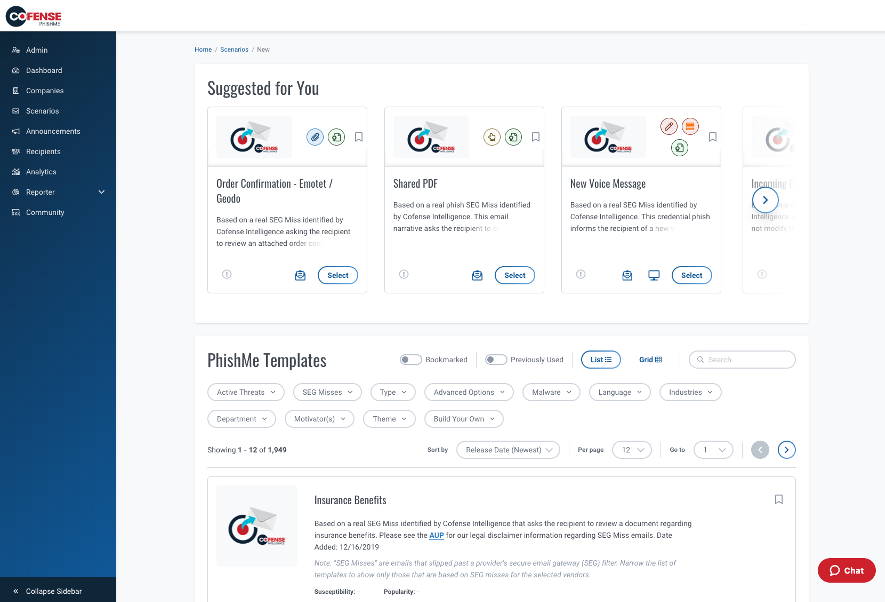
Cofense PhishMe is a cyber threat and phishing simulator meant to be of use in training employees to be wary against threats and also to gain information about general employee threat knowledge and preparedness. A free trial is available for small business.
N/A
KnowBe4 Security Awareness Training
Score 9.1 out of 10
N/A
KnowBe4 is a security awareness and compliance training and simulated social engineering product. It is used by organizations worldwide to strengthen their security culture and reduce human risk. The product includes a comprehensive suite of awareness and compliance training, real-time user coaching, AI-powered simulated social engineering, crowdsourced anti-phishing defense and an AI suite that enhances human risk management through personalized training and automation. With…
$0.95
per month (billed annually) per seat
Microsoft Defender for Endpoint
Score 8.9 out of 10
N/A
Microsoft Defender for Endpoint (formerly Microsoft Defender ATP) is a holistic, cloud delivered endpoint security solution that includes risk-based vulnerability management and assessment, attack surface reduction, behavioral based and cloud-powered next generation protection, endpoint detection and response (EDR), automatic investigation and remediation, managed hunting services, rich APIs, and unified security management.
We closely looked at KnowBe4's platform as well when it came time to renew. We chose to continue with Cofense because we already had over a year's worth of data in the platform that we would lose by switching vendors.
PhishMe is a market leader in terms of phishing simulation solutions. The customization appears unmatched when compared with competitors and the support we have experienced from Cofense has been excellent. Phish me offers lots of realistic templates which are updated regularly …
Cofense was selected as a vendor before I was in this role. Another vendor was evaluated for additional security awareness training but not to replace the Cofense PhishMe program. We also looked at Ninjio to supplement our phishing education program.
VP, Enterpise Architecture and Software Development
Chose KnowBe4 Security Awareness Training
We previously used PhishMe before the cofense acquisition. At the time, it felt clunky and outlook integration was flakey. We've had much more success via training and overall usage with KnowBe4 due to effective tools and campaigns. Costs and support were also a factor, with …
We looked at PhishMe, but it just didn't have the same feature set as KnowBe4. So far to us, this has been the best product we can find. There are some others that have made up ground and have some of the same features, but overall, KnowBe4 is still the best in our minds.
KnowBe4 is easy to integrate with AD and Outlook so onboarding and off boarding users is easy. The reporting, training, and templates are varied and easily changed to tailor to our business. PhishMe is strictly a security training and reporting tool, while KnowBe4 includes …
By far, KnowBe4 Security Awareness Training had the most phishing and training templates available. They also had the most professional and fun templates. that helps keep it more interesting to our users.
Although Cofense was a good product, years of limited updates of any substance caused us to look into additional products. We have reduced our time of needing to review phishing emails by almost 90%. For example, 800 messages delivered into our phishing platform resulted in 650 …
KnowBe4 is similar in many ways to its competitors, but has an edge in terms of training content, usability, and integration. I would like to see more technical options with our level of subscription.
We knew that most of our "sister schools" used KnowBe4 Security Awareness Training and once we got in communication with the KnowBe4 Security Awareness Training team we knew it was the best product. It balances that security and robustness with ease of use and ease of …
I had used KnowBe4 Security Awareness Training previously and therefore knew that it's intuitive, easy to use, quick to customize where I'm able to and works well for reporting. I did like Cofense's ability to customize training modules but ultimately went for KnowBe4 Security …
Code as was strictly a phishing simulator. KnowBe4 goes beyond phishing simulations by providing security training modules, posters, and exciting new features such as QR codes.
We have still utilized Knowbe4 for the last 3 years and on going! Hoping the pricing can come down as it is starting to become expensive especially with the current reducing IT spend and ROE
We explored using Terranova before deciding on KnowBe4 Security Awareness Training. The integration between M365 and KnowBe4 was ultimately what sold us. You're easily able to set up groups and SAML authentication with KnowBe4 that allows seamless onboarding into the system. …
I have felt the leadership of KnowBe4 was ahead in this field and has maintained a lead on others in the field. I find the platform more mature and continuing to grow in content, functionality and overall maturity. With Kevin Mitnick, a former hacker, helping to grow the …
Assistant Vice President / Security Awareness Program Manager
Chose KnowBe4 Security Awareness Training
When we looked at other vendors, we felt like the platforms were relatively similar in that they would help us provide phishing exercises and education to our associates. What really set them apart was the great customer service we received from the sales team through each of …
Tech guard is an up and comer and has some features that KnowBe4 could learn from. However, in terms of total product assets, it is much smaller than KB4, particularly in terms of available training modules.
This product so far has outpaced anything we've looked into in the past. It seems they are on the cutting edge of hacker methods and it shows. We have a much better grasp on the topics with KnowBe4 than we ever did. Our users seem happy with the training and testing as well.
I normally refer to Gartner's Magic Quadrant before selecting a product for my organization. Seeing KnowBe4 Security Awareness Training as a leader really helped boost our confidence. However we didn't want to rely only upon the Gartner's report, hence created our own test …
KnowBe4 seems to be a more complete package from campaigns to training end users. We really liked the short training videos for our end users. They are pressed for time during the school year and we sometimes hesitate to break their stride with long mandatory trainings. We push …
KnowBe4 stands alone in its ability to communicate to the user what to look out for and how to be on the alert to common malicious emails. Others that I've tried just don't have the ease of use that this does. The last product was a lot more confusing for all our employees.
Cofense PhishMe is an excellent solution for scenarios where it will be sold as a managed service. I believe that PhishMe is too expensive for many clients and instead would benefit from the economies of scale where an MSSP sells it as part of a whole service, which offers the analysts and reporting included. PhishMe is excellent for training and awareness of Phishing, but shouldn't replace mandatory training for new joiners or yearly refreshers, it should only be used as an additional training option.
I don't have any frame of reference for comparison, but the training that I have used has proved impactful for my staff. Since starting KnowBe4 training, we've seen a great increase in the number of phishing attempts, but also a great increase in the number of attempts that have been recognized by staff, and we have thus not been the victim of phishing or other cyberattact vectors
Microsoft Defender for Endpoint is easy to deployed across the entire organization. Having a cloud based solution with a single pane of glass to manage all assets is a real no-brainer. Being able to receive immediate alerts when suspicious activity occurs is extremely helpful in keeping risks at a minimum. Microsoft Defender for Endpoint management is also smart enough to not send several alerts when an attack could be hitting multiple targets within a certain time frame or when it's the same attack multiple times. However, be prepared to click through multiple pages all over the site to figure out what happened when an attack occurs.
It gives clear-cut segregation of different parts of an email, header, text and HTML body, URL, attachments, HTML preview and some analytical insight like "similar reports." This distinctive approach actually helps reduce data overload during an analysis.
The URLs captured here pass through an automatic reputation check [in our case VirusTotal] and add a tag of the reputation. If it is a well-known bad URL the tag helps us take the decision fast.
For creating automation rules on the reported emails the "Recipes" section is really helpful. We can create easy recipes [or rules ] to handle a huge flow of reports and also we can create more sophisticated rules depending on the Cyber intelligence feed to catch the really bad currently less known attack attempts by malicious emails.
The "Threat Indicators" section is also useful to use as a threat intelligence source to check the URLs for their maliciousness.
One, it's crazy lightweight, so compared to some of the competitors that we also have used with our security services, it's really lightweight and so I don't have a lot of overhead on the system that it's running on.
The provided templates for phishing simulations are mainly available in English. There are also some templates available in our native language, but their number is small. We have seen other platforms offer way more phishing simulation templates in our language.
Although there is a really huge number of training videos available, some of them are outdated and no longer have much to offer. Some cleaning up could help in this direction.
Although there a some games / puzzle like trainings available, we have seen other platforms offer more and better ones (on the other platforms had they had almost no videos at all...). It would help significantly to also invest in enriching the provided puzzles / games.
We have seen other platforms offer games, where, for example, employees of the company can compete against each other while working together in groups to achieve a common goal (e.g., eliminate a fictional security threat that has "hit" the company. Plan the steps needed to be taken, take the steps one after another and have a chance to see the impact each action has. At the end the team that has suffered the least cost to end the threat is the one that wins. Just an example. The point is to make this challenging, using gamification and to make the employees part of the prevention force of the company against cybersecurity threats.
Between the ease of use, cost effectiveness, functionality and continued improvements Knowbe4 continues to make it would be pretty hard to find another competitive product that wraps it all up like KnowBe4 has. Not saying it couldn't happen, but haven't seen anything that competes at this point.
Cost add-ons for Security features is nickel and diming the process to keep pace with cybercrime. Limited Education budgets require us to be more pro-active in finding cost-effective measures to protect our devices, staff and students. Defender is a strong, well-featured product that is pricing itself out of the education market
Its built with UX in mind and is aimed at non-tech people, to ensure that almost everyone can run the campaign. But if we go deeper - sometimes you will need an HTML editor or support in order to figure out some advanced edits you might want to add in your scenarios.
KnowBe4 Security Awareness Training is simple to use, simple to administer, effective, with quality content. It is easy to take the training and we have the reminders set so that the longer a user puts the training off, the more frequently they will receive reminder emails. Eventually they get emailed every day until they take the training. But with a simple click, they can get into the training content.
It offers multiple security features and integrates well with Microsoft ecosystems. A workflow for threat detection, investigation, automated remediation, and a centralized dashboard is an added advantage. This application is mainly designed for experienced users; new users may feel challenged.
There have only been a handful of outages in the 2 years we have had the product. Even during those instances, parts of the system were still operational
Microsoft Defender for Endpoint chugs along just fine no matter what we throw at it and what systems it's running on. It doesn't take up a lot of resources either, so that's welcomed.
Pages load quickly, filter/sort quickly, and don't slow down or freeze. Everything is smooth and very easy to use. There are a places in the UI where you can forget how to get there, but other than that everything is great. We have had no issues using any part of the website.
I have not had to use their support for pretty much anything. The software works well, and is very intuitive. I would imagine their support would be rather basic as there is not too much that can go wrong with a report phishing button, and if it were I would probably consider a different software.
Tech prod support is great! I did have to ask for a new customer success rep, needed a more experienced person to match my 12 years of experience running Cybersec training programs. Would suggest that more matching of rep level of knowledge to client level knowledge would help.
The first time I tried to onboard my macOS endpoints to MDE I struggled for quite a bit. I had to reach out to Microsoft's MDE support team. The tech was very helpful in walking me through the steps during a screen share session
confusing question. I inherited this application so I didnt get any formal training other than the person who was leaving. The CSM provided some later on when I asked in a zoom call
The implementation went really well and KnowBe4 was there the whole time on setup to make sure things were setup correctly. The only thing we had to figure out on our own was to script users automatically being added to security groups. So that when they sync to knowBe4 from AD they are placed into the same/correct groups.
Deployment was handled by our team here and everything went pretty smoothly. We did have a few hiccups in our test group, but that only took a bit to get ironed out.
Cofense PhishMe was the first choice for us as the user interface as well as their bundle package with Cofense Triage and Vision has helped the organisation to alleviate the overall security awareness posture. The other vendors did not provide a vast range of phishing scenarios as compared to Cofense PhishMe platform.
KnowBe4 offered a significantly more favorable cost-benefit ratio compared to other solutions. Its seamless integration with our existing infrastructure—particularly Active Directory and email systems—was the most compatible with our operational and security requirements.
Defender is far easier to deploy and manage than Sophos and tends to work without as many issues. The threat assessment portal provides an in-depth view of the organization's security posture, whereas Sophos only shows the patching status of the PCs. We did need Intune to get many of the control features (disabling USB drives) that Sophos offered out of the box.
The product scales greatly. As long as you upgrade the license to support the number of users you are needing, adding in those new users is easy. Also getting those users set up with trainings/campaigns is very easy as well
The team was great to work with and took their time to ensure that we knew what we were doing with the product and that it was set up to meet the specific needs of our organization. This wasn't just a cookie-cutter deployment, but rather they focused specifically on our needs.
Recipes in the system are capable of handling almost 2x what an analyst does, which cuts down the efforts [of] an analyst and provides more time for accurate strategies.
With roughly 90% false positives coming through, the remaining 10% of true positives need as much attention as they can get for the full investigation and analysis.
1,500 or more phishing messages can come through in a given week and the amount of time/employees required to review this without a tool like Cofense is surely beyond [the] expected/anticipated budget.
With the implementation of KnowBe4 Security Awareness Training, we have reduced a lot of issues of social engineering attacks like Phishing attacks, Smishing attacks, Vishing attacks, and a lot more. After implementing the KnowBe4 Security Awareness Training, we have seen a significant decrease in the clicking on a phishing email. Now users are aware of phishing attacks and they know how to react to them.
With KnowBe4 Security Awareness Training, we got another tool Phish Alert Button that we have installed on the user's outlook and after providing training on these topics, now we are receiving a lot of spam report emails are users are protecting them from clicking and just reporting it to the IT team.
With the Phishing test, we are seeing the growth and analyzing how our users will react in the case of a real phishing attack, and with this, we are providing more training to them and going with them as per the test report. This whole process is making our company more stronger against any type pf social engineering attack.
After implementing KnowBe4 Security Awareness Training, we have seen a lot of improvements in the account compromise case in our company because users are not clicking on fake links now.