Overview
ProductRatingMost Used ByProduct SummaryStarting Price
Cx Observer
Score 0.0 out of 10
N/A
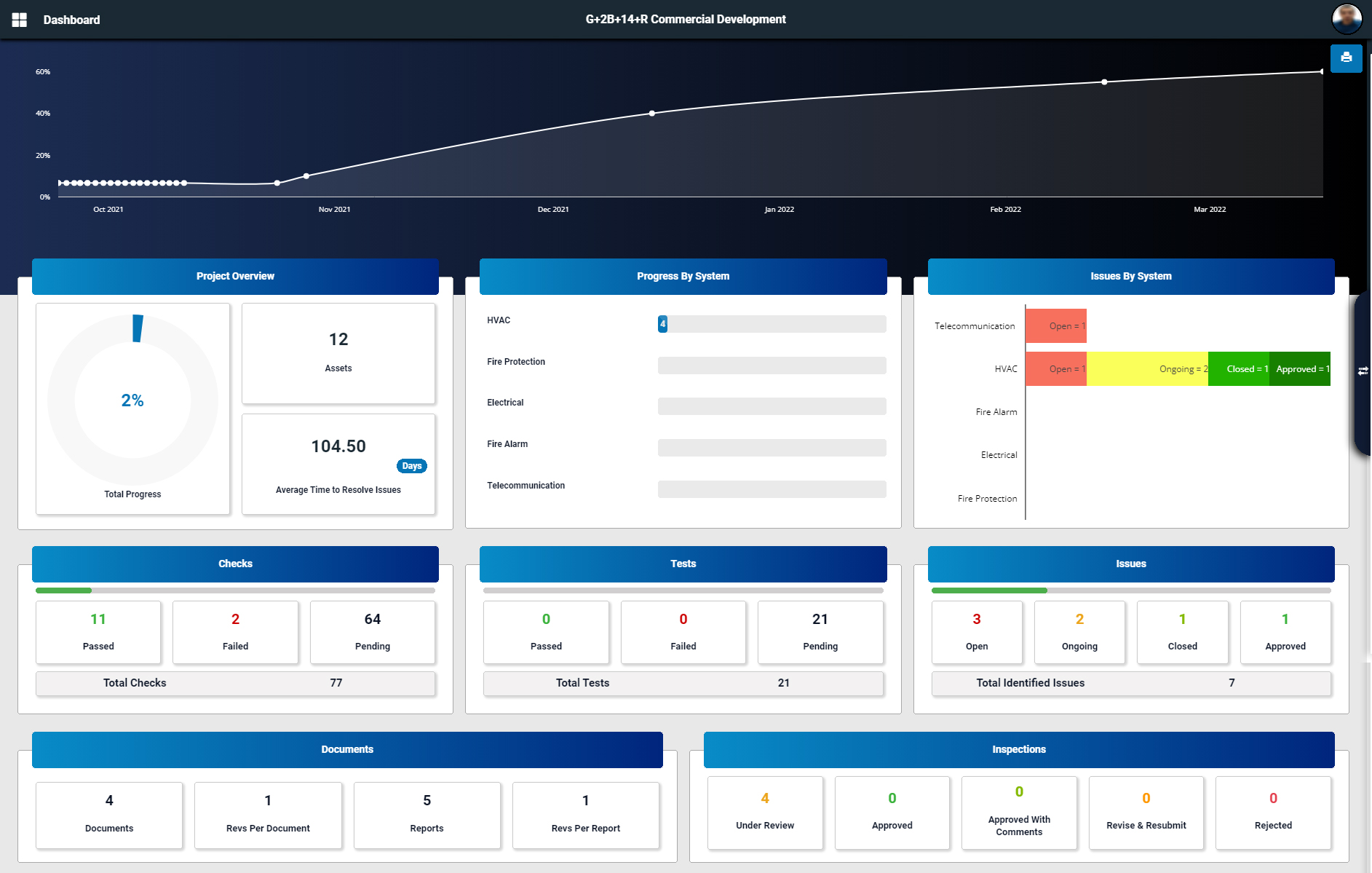
Cx Observer is a project commissioning software and collaboration platform that handles processes including asset progress, issues, documentation, commissioning reports, reviews, inspections and meetings. While every user updates his own work, the Cx Observer takes care of presenting the full commissioning process progress.N/A
Microsoft Dynamics GP
Score 5.4 out of 10
N/A
Microsoft Dynamics GP is an ERP software with accounting capabilities. It includes various packs for customizability and features tailored to specific industries’ needs. GP is offered as a perpetual license or subscription.N/A
QuickBooks Desktop Enterprise
Score 7.9 out of 10
N/A
QuickBooks Desktop Enterprise is a widely-used accounting package designed for small to mid-sized businesses. It is the top of the QuickBooks line. Pricing starts at $3,000 for five users, and goes up depending on the number of additional users. They also offer an Advanced Inventory module for $999 / year.
$447
per month per user
Pricing
Cx ObserverMicrosoft Dynamics GPQuickBooks Desktop Enterprise
Editions & Modules
No answers on this topic
Diamond
$447
per month per user
Diamond with Remote Access
$513
per month per user
Gold
2,210.00
per year per user
Platinum
2,717.00
per year per user
Gold with Remote Access
3,000.00
per year per user
Platinum with Remote Access
3,504.00
per year per user
Offerings
Pricing Offerings
Cx ObserverMicrosoft Dynamics GPQuickBooks Desktop Enterprise
Free Trial
NoNoNo
Free/Freemium Version
NoNoNo
Premium Consulting/Integration Services
NoNoNo
Entry-level Setup FeeNo setup feeNo setup feeNo setup fee
Additional Details
More Pricing Information
Community Pulse
Cx ObserverMicrosoft Dynamics GPQuickBooks Desktop Enterprise
Considered Multiple Products
Cx Observer

No answer on this topic

Microsoft Dynamics GP
Chose Microsoft Dynamics GP
Microsoft Dynamics GP is obviously superior to the other platforms I’ve used simply in its robustness and GAAP compliance features, but with far less usability and even in someways less usable reporting.
Chose Microsoft Dynamics GP
Business Central wasn't out then. Nav, the predecessor, was out, but its user interface was dated until 2009, when the role-tailored client came out; it was much better afterwards. If your company has manufacturing, then Business Central is the way to go. It's unfortunate that …
Chose Microsoft Dynamics GP
It is more powerful in features and ease of use as Microsoft GP provides an intuitive user interface leading to quicker adoption.
Chose Microsoft Dynamics GP
Xero is easier to use, closer to Quickbooks. Most of the background GL is automated, where as in GP it is not.
Chose Microsoft Dynamics GP
Due to the size of our company Microsoft Dynamics GP works better for us than Quickbooks because of the reporting capabilities. However, the NetSuite demo proved to be much more user-friendly with more reporting capabilities.
Chose Microsoft Dynamics GP
Because GP doesn't do CRM we have looked at D365 Customer Engagement for our field service, and F&O as a replacement. Vaporware, no direct upgrade path, and if you want to continue with GP for your back office and just use Field Service it's an insanely complex integration …
Chose Microsoft Dynamics GP
Quickbooks, SAP, and Netsuite. We are a small-sized business so Dynamics GP is better for our business.
Chose Microsoft Dynamics GP
There are more features and products overall in the Microsoft package at a better price point. Overall, Salesforce has a much sleeker and more user-friendly design.
Chose Microsoft Dynamics GP
We moved from Epicor Eagle N Series to Dynamics GP as an accounting solution for our new POS system. I believe Dynamics GP has more options to create and present financial statements for a large company with many regions and districts. However, because of the weakness of our …
Chose Microsoft Dynamics GP
They both accomplish the same thing, I think Oracle was what I first learned and thus making the change to Microsoft Dynamics GP just took a little bit of time to learn the technology. After you get the hang of it, it becomes much easier and I taught my coworkers how to use it.
Chose Microsoft Dynamics GP
I did not pick Dynamics over Salesforce, my company was using it and eventually switched over to Salesforce. I would say that Dynamics is user-friendly and the interface is quite easy to understand. I really like the reporting capabilities as well. Once again, the aesthetic …
Chose Microsoft Dynamics GP
GP is more robust than QuickBooks bar none.
Chose Microsoft Dynamics GP
At the time of purchase, Microsoft Dynamics GP seemed more appropriate and more in sync with the needs of our company. The software was more responsive, user-friendly and it allowed for more flexibility with the way it was intended to be used. We were also promised better …
Chose Microsoft Dynamics GP
My recollection of Quickbooks pro isn't great, and it was over 10 years ago. Obviously many things have changed in that time frame, so any comparison would likely not be relevant.
Chose Microsoft Dynamics GP
The only product with have shopped was Sage Intacct. It is somewhat unfair to compare the two solutions, because Sage Intacct is a cloud-based solution. That said, Intacct appears to advertise better reporting/business intelligence capabilities. MS Dynamics GP should be aware …
Chose Microsoft Dynamics GP
Microsoft Dynamics GP is one of the best ERP's for a medium or small business in the market today. When we were looking for the right software, it had already a connection developed with our 3rd party logistics system, so the decision was pretty easy since the logistic / supply …
Chose Microsoft Dynamics GP
Dynamics GP is much more flexible and enterprise-oriented than Quickbooks Pro or similar software. It can support many more users and scenarios. However it requires more dedicated infrastructure (such as servers and databases) and more dedicated IT resources to maintain and …
Chose Microsoft Dynamics GP
I love Dayforce for payroll. It has been configured to meet all our needs, is user-friendly and the customer support is fantastic. We originally moved from MDGP payroll to Ceridian Insync payroll due to the issues we had. We upgraded to Dayforce and are very happy with the …
Chose Microsoft Dynamics GP
Learning GP with so many resources from the GP community has been easy. Someone always has the answer or suggestions to point me in the right direction. I've had very few instances where the systems caused an error that required research in order to fix the glitch.
Chose Microsoft Dynamics GP
We looked at several general ledger software packages. We had excellent customer service and implementation guidance through a third party. Having a knowledgeable consultant is critical to a successful implementation.
Chose Microsoft Dynamics GP
Quickbooks Pro and GP are not on the same playing field. GP is a full account system adhering to GAAP, while QuickBooks is designed for the small business market. While starting out with QuickBooks is easy, if you plan to grow, you will soon outgrow it.
Chose Microsoft Dynamics GP
Microsoft Dynamics is a good, easy to use product for entities that do not have advanced manufacturing.
If I were to go into a distribution or service type business I would highly recommend it.
If I were to go into an advanced manufacturing environment I would not consider GP.
Chose Microsoft Dynamics GP
More user friendly in certain areas and much more cost effective to manage and support
Chose Microsoft Dynamics GP
TechSoup had great privcing, I had experince with GP in previous companys and there are a lot of staff accountants who have relevant experience.
QuickBooks Desktop Enterprise
Chose QuickBooks Desktop Enterprise
Fishbowl was going to be added to QuickBooks to support better control. It was not looked into as a replacement but as an addition to the software.
Chose QuickBooks Desktop Enterprise
I didn't see much difference in these programs. The Enterprise may have a few more options but I haven't tried them.
Chose QuickBooks Desktop Enterprise
We love QuickBooks Time due to the seamless time entry of field technicians from the app to timesheets in QuickBooks Desktop Enterprise. It streamlined our time entry process by at least an hour each week.
Chose QuickBooks Desktop Enterprise
Ease of use, easier to train others that have never been bookkeepers.
Chose QuickBooks Desktop Enterprise
We only considered QuickBooks Desktop Enterprise.
Chose QuickBooks Desktop Enterprise
Quickbooks is better in all aspects of my business.
Chose QuickBooks Desktop Enterprise
Quick Books Desktop Enterprise as it's pros and cons. Pro's is that is much more user friendly and intuitive to learn than other products. It does much better to revise or adjust retroactively to prior period when coding issues or even allocations issues are discovered …
Chose QuickBooks Desktop Enterprise
Not really comparable the interface on QuickBooks enterprise is far superior. It is the easiest to use across all functions.
Chose QuickBooks Desktop Enterprise
Sage Intacct would be the best, but the cost is prohibative of clients. QuickBooks Desktop Enterprise is used more as it is syncs outside systems better.
Chose QuickBooks Desktop Enterprise
Unanet ERP GovCon
Chose QuickBooks Desktop Enterprise
QuickBooks seems to be more focused on the accounting side of the business than FreshBooks. I've also tried Peachtree software. Peachtree seemed more restrictive. The user had to adapt their procedures to the methods of the software rather than the reverse. I tried …
Chose QuickBooks Desktop Enterprise
We have used any software other than Quickbooks for our accouting system.
Chose QuickBooks Desktop Enterprise
It's a great compliment to these tools and works in conjunction to provide an end to end solution to run a consulting/project based business where there is a lot of volume and billable labor hours to track and maintain margin on.
Chose QuickBooks Desktop Enterprise
QuickBooks Desktop Enterprise is easier to use and easier to implement.
Chose QuickBooks Desktop Enterprise
we moved to ADP for payroll, we moved FROM SIMMS because it wasn't integrated & didn't provide global view
Chose QuickBooks Desktop Enterprise
Thomson Reuters CS Professional Suite is a very good alternative to QuickBooks Desktop Enterprise. It is installed and web-based at the same time, taking a load off the server computing power. I think it also is very much more user friendly. As mentioned, QuickBooks Desktop …
Chose QuickBooks Desktop Enterprise
Significantly better in every way except having a cloud access system that does not require a hosting service.
Chose QuickBooks Desktop Enterprise
There were instances that clients do provide their books with using Xero and QuickBooks Desktop Enterprise. When we export data from each other, they do compliment with the data and it's not far from analyzing each of them to see any difference from each sheets. You may need to …
Chose QuickBooks Desktop Enterprise
Xero is too basic and not a very good general ledger system. I found Peachtree (Sage 50) to be very good. Reconciliations and look ups were more logical because it is more of an accounting document.
Chose QuickBooks Desktop Enterprise
QuickBooks Desktop Enterprise for accounting and inventory needs is very easy to use, make corrections and create reports.
Chose QuickBooks Desktop Enterprise
QuickBooks Online
Chose QuickBooks Desktop Enterprise
We upgraded to Desktop Enterprise when our company staff increased. It we find that it is more cost effective for us.
Chose QuickBooks Desktop Enterprise
QuickBooks Desktop Enterprise desktop is so much better than QuickBooks Online.
Chose QuickBooks Desktop Enterprise
QuickBooks Desktop Enterprise vs. Frontier: Frontier's UI/UX is very old compared to QuickBooks Desktop Enterprise. QuickBooks Desktop Enterprise is far more advanced in terms of features and UI/UX. QuickBooks is one of the most widely used accounting software programs for …
Features
Cx ObserverMicrosoft Dynamics GPQuickBooks Desktop Enterprise
Payroll Management
Comparison of Payroll Management features of Product A and Product B
Cx Observer
-
Ratings
Microsoft Dynamics GP
6.4
Ratings
17% below category average
QuickBooks Desktop Enterprise
8.6
Ratings
13% above category average
Pay calculation00 Ratings6.20 Ratings9.30 Ratings
Benefit plan administration00 Ratings5.90 Ratings8.00 Ratings
Direct deposit files00 Ratings7.50 Ratings9.00 Ratings
Salary revision and increment management00 Ratings6.50 Ratings8.10 Ratings
Reimbursement management00 Ratings6.00 Ratings8.40 Ratings
Customization
Comparison of Customization features of Product A and Product B
Cx Observer
-
Ratings
Microsoft Dynamics GP
4.3
Ratings
55% below category average
QuickBooks Desktop Enterprise
7.5
Ratings
1% below category average
API for custom integration00 Ratings2.50 Ratings7.70 Ratings
Plug-ins00 Ratings6.00 Ratings7.30 Ratings
Security
Comparison of Security features of Product A and Product B
Cx Observer
-
Ratings
Microsoft Dynamics GP
7.0
Ratings
16% below category average
QuickBooks Desktop Enterprise
8.9
Ratings
8% above category average
Single sign-on capability00 Ratings5.70 Ratings9.20 Ratings
Role-based user permissions00 Ratings8.20 Ratings8.50 Ratings
Reporting & Analytics
Comparison of Reporting & Analytics features of Product A and Product B
Cx Observer
-
Ratings
Microsoft Dynamics GP
5.4
Ratings
37% below category average
QuickBooks Desktop Enterprise
8.3
Ratings
6% above category average
Dashboards00 Ratings3.50 Ratings8.10 Ratings
Standard reports00 Ratings6.20 Ratings8.90 Ratings
Custom reports00 Ratings6.50 Ratings7.70 Ratings
General Ledger and Configurable Accounting
Comparison of General Ledger and Configurable Accounting features of Product A and Product B
Cx Observer
-
Ratings
Microsoft Dynamics GP
5.0
Ratings
42% below category average
QuickBooks Desktop Enterprise
7.8
Ratings
2% above category average
Accounts payable00 Ratings6.30 Ratings8.70 Ratings
Accounts receivable00 Ratings5.80 Ratings8.30 Ratings
Cash management00 Ratings6.30 Ratings9.10 Ratings
Bank reconciliation00 Ratings5.60 Ratings9.50 Ratings
Expense management00 Ratings4.50 Ratings8.10 Ratings
Time tracking00 Ratings8.00 Ratings6.30 Ratings
Fixed asset management00 Ratings4.50 Ratings7.00 Ratings
Multi-currency support00 Ratings2.80 Ratings6.10 Ratings
Multi-division support00 Ratings3.00 Ratings7.30 Ratings
Regulations compliance00 Ratings3.20 Ratings7.10 Ratings
Electronic tax filing00 Ratings9.00 Ratings6.90 Ratings
Self-service portal00 Ratings7.00 Ratings7.20 Ratings
Global Financial Support00 Ratings6.00 Ratings5.70 Ratings
Primary and Secondary Ledgers00 Ratings4.70 Ratings8.40 Ratings
Intercompany Accounting00 Ratings3.80 Ratings7.70 Ratings
Localizations00 Ratings4.50 Ratings8.40 Ratings
Journals and Reconciliations00 Ratings4.60 Ratings9.30 Ratings
Enterprise Accounting00 Ratings2.80 Ratings8.50 Ratings
Configurable Accounting00 Ratings3.80 Ratings8.40 Ratings
Centralized Rules Framework00 Ratings3.60 Ratings8.30 Ratings
Standardized Processes00 Ratings6.20 Ratings8.30 Ratings
Inventory Management
Comparison of Inventory Management features of Product A and Product B
Cx Observer
-
Ratings
Microsoft Dynamics GP
4.4
Ratings
50% below category average
QuickBooks Desktop Enterprise
7.7
Ratings
5% above category average
Inventory tracking00 Ratings5.90 Ratings8.30 Ratings
Automatic reordering00 Ratings1.00 Ratings7.70 Ratings
Location management00 Ratings4.00 Ratings7.40 Ratings
Manufacturing module00 Ratings4.10 Ratings7.20 Ratings
Order Management
Comparison of Order Management features of Product A and Product B
Cx Observer
-
Ratings
Microsoft Dynamics GP
3.6
Ratings
70% below category average
QuickBooks Desktop Enterprise
8.1
Ratings
8% above category average
Pricing00 Ratings3.60 Ratings8.40 Ratings
Order entry00 Ratings3.60 Ratings8.20 Ratings
Credit card processing00 Ratings1.00 Ratings7.70 Ratings
Cost of goods sold00 Ratings5.10 Ratings8.70 Ratings
Order Orchestration00 Ratings5.20 Ratings7.80 Ratings
End-to-end order visibility00 Ratings3.60 Ratings8.10 Ratings
Order exception Resolution00 Ratings3.40 Ratings8.10 Ratings
Best Alternatives
Cx ObserverMicrosoft Dynamics GPQuickBooks Desktop Enterprise
Small Businesses
FollowUp CRM
FollowUp CRM
Score 1.5 out of 10
QuickBooks Self-Employed (discontinued)
Score 5.2 out of 10
QuickBooks Self-Employed (discontinued)
Score 5.2 out of 10
Medium-sized Companies
InEight
InEight
Score 8.2 out of 10
Zoho Books
Zoho Books
Score 9.0 out of 10
Zoho Books
Zoho Books
Score 9.0 out of 10
Enterprises
InEight
InEight
Score 8.2 out of 10
Oracle Fusion Cloud Enterprise Performance Management
Score 7.4 out of 10
Oracle Fusion Cloud Enterprise Performance Management
Score 7.4 out of 10
All AlternativesView all alternativesView all alternativesView all alternatives
User Ratings
Cx ObserverMicrosoft Dynamics GPQuickBooks Desktop Enterprise
Likelihood to Recommend
-
(0 ratings)
4.1
(0 ratings)
8.2
(0 ratings)
Likelihood to Renew
-
(0 ratings)
9.9
(0 ratings)
8.6
(0 ratings)
Usability
-
(0 ratings)
5.5
(0 ratings)
9.4
(0 ratings)
Availability
-
(0 ratings)
10.0
(0 ratings)
10.0
(0 ratings)
Performance
-
(0 ratings)
7.0
(0 ratings)
10.0
(0 ratings)
Support Rating
-
(0 ratings)
7.0
(0 ratings)
6.0
(0 ratings)
In-Person Training
-
(0 ratings)
-
(0 ratings)
7.0
(0 ratings)
Online Training
-
(0 ratings)
-
(0 ratings)
9.1
(0 ratings)
Implementation Rating
-
(0 ratings)
8.2
(0 ratings)
7.6
(0 ratings)
Configurability
-
(0 ratings)
-
(0 ratings)
5.0
(0 ratings)
Ease of integration
-
(0 ratings)
-
(0 ratings)
9.1
(0 ratings)
Product Scalability
-
(0 ratings)
9.1
(0 ratings)
10.0
(0 ratings)
Vendor post-sale
-
(0 ratings)
-
(0 ratings)
1.0
(0 ratings)
Vendor pre-sale
-
(0 ratings)
-
(0 ratings)
10.0
(0 ratings)
User Testimonials
Cx ObserverMicrosoft Dynamics GPQuickBooks Desktop Enterprise
Likelihood to Recommend
No answers on this topic
Microsoft Dynamics GP is well-suited for our environment, as we pay a diverse group of employees, including on-the-road drivers, shop employees (some in other locations), and office employees. It easily tracks time off, taxes, pay, etc. The reporting allows us to verify with our drivers how they are paid each week, whether it be through mileage or stop-offs.
Read full review
QuickBooks Enterprise is great for managing our inventory, purchases and income as we receive it. We use it to help budget and plan our monthly purchases, as well as keep each location on track when it comes to their expenses. It's also used for payroll and timekeeping at each store.
Read full review
Pros
No answers on this topic
  • User friendly interface
  • Able to be extended into multiple areas of your business
  • One feature we have been using for a few years is EFT for payables - it has significantly reduced the time spent paying vendors and reduced our check printing and mailing costs. It is very easy to setup and use.
Read full review
  • Made for small to mid-sized product-based businesses.
  • Once you use the program, you will be amazed at how important the tool is and how it can be used to analyze and manipulate numbers.
  • Saves a lot of time and money than if you do all the things manually.
Read full review
Cons
No answers on this topic
  • Supply chain management is adequate but not exceptional, and there are challenges tying the product to a website front end. These features are present and work fine in many environments but are often lacking for customers who need more robust systems.
  • Reporting tools often require consulting expertise or an internal business analyst to develop. Many smaller companies don't have this skill set, so it can be costly to upgrade to GP from a smaller packages like QuickBooks.
  • Some features that are available in competing products are still not present in GP, such as full copy-paste functionality and more intelligent workflow/batch processing functions.
Read full review
  • I would like to see more ways to customize reports and have that process be more user friendly.
  • I would like to see the process of creating year end giving statements be made more user friendly. Since I only do it once a year, I have to figure the process out every year.
Read full review
Likelihood to Renew
No answers on this topic
Due the economic challenges that Puerto Rico is having, the company has had to merge some companies in order to be more efficient. It has been easy in GP to process those merges, even thought we had to spend days to accomplish that the process was smooth and accurate. In addition we were able to streamline the purchasing and sales process and the organization is confident to keep renewing GP for the future versions.
Read full review
While QuickBooks Desktop Enterprise has been an amazing tool for many years, it seems it is getting phased out for QuickBooks Online. Intuit is decreasing the level of support it offers for QuickBooks Desktop in lieu of stronger support for QuickBooks Online. Although the desktop version is robust and helpful, it seems QBO is the way of the future for bookkeeping with QuickBooks.
Read full review
Usability
No answers on this topic
Menus are generally quite difficult to navigate, user-friendliness is lacking, platform can at times be unstable (crashes, etc), reports tha would seem to report one thing do not actually return that data. Usability is probably the biggest weakness of Microsoft Dynamics GP.
Read full review
QuickBooks provides all staff immediate access to the data in whatever form each person wants it. The balancing on entries prevents incorrect data entry on payables/receivables. Reports are easy to customize and save for future use. The records are easy to audit.
Read full review
Reliability and Availability
No answers on this topic
Rating: 7 out of 10
We rate QuickBooks Desktop Enterprise's availability a 7 out of 10. For the most part, the software is dependable and available when we need it. When hosted on a properly managed local server or through a reputable third-party cloud provider, uptime is generally consistent, and routine day-to-day operations run smoothly.
However, availability challenges do arise, particularly when accessing QuickBooks remotely or during periods of high system demand. Because it's a desktop-based solution, availability is highly dependent on our internal IT infrastructure. If our network goes down, a server needs maintenance, or if there’s an issue with a remote desktop connection, access to QuickBooks can be temporarily disrupted. These outages aren’t necessarily caused by QuickBooks itself, but they do impact our experience with availability.
Additionally, we’ve occasionally experienced application errors, especially after updates or when working with large company files. While Intuit support is usually helpful in resolving these issues, they can still lead to frustrating delays—especially during critical periods like month-end closing or grant reporting deadlines.
Planned maintenance, while infrequent, also affects availability, especially when using a hosted environment. Coordination with IT or hosting providers is sometimes needed to minimize downtime.
Overall, QuickBooks Desktop Enterprise is a reliable tool, but its dependence on local infrastructure introduces more potential points of failure compared to cloud-native solutions. Enhancements in cloud-based access or hybrid models could significantly improve both accessibility and uptime. That said, with strong internal IT support or a reliable cloud hosting provider, the availability can easily rise to an 8 or 9.
Read full review
Performance
No answers on this topic
I rate QuickBooks Desktop Enterprise's performance a 5 out of 10, mainly because while it’s functional for most routine tasks, it can lag significantly when handling complex operations, large data files, or during multi-user sessions. As our organization has grown, we’ve noticed that report generation—especially for customized or multi-dimensional reports—can be slow, sometimes taking several minutes to load or refresh. This impacts productivity, particularly during key financial cycles like audits, monthly closings, or grant reporting.
Performance degradation is especially noticeable when multiple users are active in the system at the same time. Even with a solid server setup, there’s often a drop in responsiveness when more than a handful of users are generating reports or entering transactions concurrently.
We’ve also experienced some slowdowns in third-party integrations, particularly when syncing with Vena Solutions or exporting data for use in external tools. While the integrations are valuable, they occasionally stall or require workarounds, adding friction to our workflows.
In short, QuickBooks Desktop Enterprise delivers the basics well, but its performance limitations become more apparent in high-volume or complex use cases. It would benefit from better optimization for large datasets and faster processing for advanced reporting. Upgrades in system architecture—such as deeper support for cloud hosting or more efficient data handling—could significantly improve the user experience and move this rating closer to an 8.
Read full review
Support Rating
No answers on this topic
The rating is directed to the thrid party serive provider that we use. I do not now how good the Microsoft direct support is.
Read full review
Very rare do I call the Quickbooks Enterprise Solutions support staff and I get a customer service associate quickly. On average, my wait time is near an hour, and at times even longer. After spending the first three minutes discussing my problem, they then begin to poke and prod around, sometimes the questions continue. But 80% of the time, the problem is over their head and they have to escalate the issue. The only problem is this escalation arrives usually after spending forty-five minutes poking and proding around but learning nothing. In short, my experience is rarely all that well, let alone great
Read full review
In-Person Training
No answers on this topic
The in-person training for QuickBooks Desktop Enterprise received a 9 out of 10 based on feedback from my manager, and this rating reflects the overall effectiveness and value of the experience. The training provided a hands-on, interactive environment where staff could immediately apply what they were learning to the system, which made the process much more practical and engaging.
One of the standout features was the personalized support provided by the trainer, who was able to address specific questions and scenarios tailored to our organization’s unique needs. This was particularly helpful for areas like nonprofit accounting and grant management, where we had more specific requirements that could have been difficult to grasp in a standard training setting.
The trainer’s expertise and clear explanations allowed the team to gain a deeper understanding of QuickBooks’ more advanced functions, ensuring that everyone could use the software effectively. The small group size also facilitated a collaborative learning environment, where participants could share insights and learn from each other.
However, the training wasn't perfect. Some minor logistical issues—such as coordinating schedules and ensuring all staff could attend—were factors that slightly impacted the overall experience. Despite this, the quality and effectiveness of the training made it an extremely valuable part of the implementation process.
Read full review
Online Training
No answers on this topic
easy to learn system, specially with some kind of support. Just like with any other system, things get lot easier if you have guidance to lead you in your search for answers. having said that, QB is very easy to use and very easy to teach. you wont spend much time memorizing where to click.
Read full review
Implementation Rating
No answers on this topic
Basically the challenge with this implementation was the Business Portal, too many errors and even the aplication is up and running the users are still having issues. We will start planning the migraton to GP 2015 soon.
Read full review
If you're loading QuickBooks Enterprise Solutions onto a computer that you're going to directly log into, you should be able to do it yourself. If you are going to connect to a server through a network or remote connection, you should probably have a professional IT person set it up for you.
Read full review
Alternatives Considered
No answers on this topic
Because GP doesn't do CRM we have looked at D365 Customer Engagement for our field service, and F&O as a replacement. Vaporware, no direct upgrade path, and if you want to continue with GP for your back office and just use Field Service it's an insanely complex integration import/export. D365 F&O is a huge implementation cost, and without a direct migration path every bit of data has to be custom imported. There really is no straightforward way to stack up GP against these programs currently. Again, the future of GP is in some doubt.
Read full review
QuickBooks seems to be more focused on the accounting side of the business than FreshBooks. I've also tried Peachtree software. Peachtree seemed more restrictive. The user had to adapt their procedures to the methods of the software rather than the reverse. I tried Peachtree a number of times but always came back to QuickBooks Desktop Enterprise.
Read full review
Scalability
No answers on this topic
The functionality that GP and related ISV solutions offer and the ease of integration of GP to other systems makes it an extremely scalable solution
Read full review
I would rate QuickBooks Desktop Enterprise a 7 out of 10 for overall scalability. The product offers solid scalability features, particularly for small to mid-sized organizations like ours that are growing and need reliable multi-user access, enhanced data capacity, and cross-departmental functionality. It handles increasing transaction volumes and user growth quite well, especially with its support for up to 40 users and the ability to manage large lists (customers, vendors, accounts, etc.)—a significant improvement over QuickBooks Pro or Premier.
Its role-based permissions system also allows us to assign tailored access by department or user level, which is essential for maintaining control and security across teams like finance, HR, and program management. Additionally, features like advanced reporting, inventory management, and class tracking have helped us better manage multiple programs or sites within one system.
That said, the scalability still has some limits. For example, deploying the software across multiple physical locations or for remote teams requires additional IT infrastructure—such as hosting it on a third-party cloud server or setting up a VPN—which introduces cost and complexity. Also, while QuickBooks Desktop Enterprise can technically handle a high volume of data, performance can decline as the file size grows over time unless regular maintenance and optimization are done.
In summary, QuickBooks Desktop Enterprise scales well within its designed range, particularly for growing nonprofits and NGOs. However, organizations with distributed teams or very large, complex operations may eventually find the system’s desktop-based architecture less agile compared to cloud-native ERP platforms. With enhancements to cloud integration and remote accessibility, this rating could easily increase.
Read full review
Return on Investment
No answers on this topic
  • We have never missed a payroll using Great Plains. We have the ability to fix any issues that come up quickly.
  • It streamlines our departments that handle money into one unified system. This gives accounting and finance the overall picture in one system.
  • With Integration Manager we have to worry less about taking time to hand key transactions. This cuts down on entry time and increase efficiency for our clerks.
Read full review
  • Memorized transactions save time and can prevent errors.
  • Improved accessibility saves time- multiuser, multi-companies open at once.
  • Annual audit with CPA firm is easier being able to export whole file to them.
  • Worry about bookkeepers who claim they know QuickBooks Desktop Enterprise and accounting but in reality do not. Doesn't require really knowing debits from credits. Big worry.
Read full review
ScreenShots

Cx Observer Screenshots

Screenshot of DashboardScreenshot of ChecklistScreenshot of Asset (Equipment) ViewScreenshot of Assets Overview