Chose Deltek Ajera
The previous systems were essentially timesheet systems only with very basic accounting. It's mostly the accounting subsystem that made us select Ajera.

| Product | Rating | Most Used By | Product Summary | Starting Price |
|---|---|---|---|---|
 Deltek Ajera | N/A | Deltek's Ajera is an integrated project management and accounting suite for architectural and engineering (A & E) companies that includes light payroll functionality and also can integrate with third-party payroll providers (ADP, Paychex, Quickbooks, etc.). The product was acquired with original developer Axium in June 2014. CRM functionality can also be added via integration with the Deltek Ajera CRM. | N/A | |
 IBM Planning Analytics | N/A | IBM Planning Analytics, powered by IBM TM1®, is an integrated planning solution designed to promote collaboration across the organization and help keep pace with the speed of modern business. With its calculation engine, this enterprise performance management solution is designed to help users move beyond the limits of spreadsheets, automating the planning process to drive faster, more accurate results. Use it to unify data sources into one single repository, enabling users to build… | $825 per month 5 users | |
 Microsoft Dynamics GP | N/A | Microsoft Dynamics GP is an ERP software with accounting capabilities. It includes various packs for customizability and features tailored to specific industries’ needs. GP is offered as a perpetual license or subscription. | N/A |
| Deltek Ajera | IBM Planning Analytics | Microsoft Dynamics GP | ||||||||||||||||||||||
|---|---|---|---|---|---|---|---|---|---|---|---|---|---|---|---|---|---|---|---|---|---|---|---|---|
| Editions & Modules | No answers on this topic |
| No answers on this topic | |||||||||||||||||||||
| Offerings |
| |||||||||||||||||||||||
| Entry-level Setup Fee | No setup fee | Optional | No setup fee | |||||||||||||||||||||
| Additional Details | — | — | — | |||||||||||||||||||||
| More Pricing Information | ||||||||||||||||||||||||
| Deltek Ajera | IBM Planning Analytics | Microsoft Dynamics GP | |
|---|---|---|---|
| Considered Multiple Products |  Deltek Ajera |  IBM Planning Analytics  Orpha Harrison Product Owner/Analyst-Developer Experience Chose IBM Planning Analytics It includes Oracle Cloud EPM Planning, Anaplan, and Adaptive Insight before deciding to choose IBM Planning Analytics. We selected Planning Analytics because of its work with complicated and many area models, the capability to work with big amounts of data, and compatibility …  Gisel Bustamante Marketing and Digital Communication Specialist Chose IBM Planning Analytics Other options, namely Anaplan, Oracle EPM Cloud, and SAP Analytics Cloud, were also considered. Anaplan's interface lacked analytical depth. For product design metrics, flexibility was not as good in Oracle EPM Cloud. The final choice was moved by the fact that it was driven …  Astrid Ortega Data Analyst and Risk Assessor Chose IBM Planning Analytics Prior to making the decision to go with IBM Planning Analytics, we had considered such options as Anaplan, Oracle Hyperion, and SAP Analytics Cloud. Despite the collaborative solutions offered by Anaplan and the good connection with other systems by SAP, the superb set of tool …  Zulma Quiroz Corporate Credit Risk Analyst Chose IBM Planning Analytics In this case, Vena and Planful are considered as other products that can be compared with IBM Planning Analytics, but among them, IBM Planning Analytics is more optimal in terms of user interface and integration. Its preconfigure risk assessment model and its format and … | Microsoft Dynamics GP  Ray Wong, CPA, CMA Consultant Chose Microsoft Dynamics GP Business Central wasn't out then. Nav, the predecessor, was out, but its user interface was dated until 2009, when the role-tailored client came out; it was much better afterwards. If your company has manufacturing, then Business Central is the way to go. It's unfortunate that …  Lacey Davidson Office Manager Chose Microsoft Dynamics GP Xero is easier to use, closer to Quickbooks. Most of the background GL is automated, where as in GP it is not.  Michael Bartlett President Chose Microsoft Dynamics GP Because GP doesn't do CRM we have looked at D365 Customer Engagement for our field service, and F&O as a replacement. Vaporware, no direct upgrade path, and if you want to continue with GP for your back office and just use Field Service it's an insanely complex integration …  Jason Conner Productivity Coach Chose Microsoft Dynamics GP There are more features and products overall in the Microsoft package at a better price point. Overall, Salesforce has a much sleeker and more user-friendly design.  Alan Tillman Process Engineer Chose Microsoft Dynamics GP My recollection of Quickbooks pro isn't great, and it was over 10 years ago. Obviously many things have changed in that time frame, so any comparison would likely not be relevant.  Mike Bisceglia Director of Information Technology Chose Microsoft Dynamics GP Cannot provide comparison  Guillermo Villamizar Enterprise Products Chief Chose Microsoft Dynamics GP Microsoft Dynamics GP is one of the best ERP's for a medium or small business in the market today. When we were looking for the right software, it had already a connection developed with our 3rd party logistics system, so the decision was pretty easy since the logistic / supply …  Jay Moore CIO Chose Microsoft Dynamics GP Quickbooks Pro and GP are not on the same playing field. GP is a full account system adhering to GAAP, while QuickBooks is designed for the small business market. While starting out with QuickBooks is easy, if you plan to grow, you will soon outgrow it.  Brad Price Corporate Controller Chose Microsoft Dynamics GP Microsoft Dynamics is a good, easy to use product for entities that do not have advanced manufacturing. If I were to go into a distribution or service type business I would highly recommend it. If I were to go into an advanced manufacturing environment I would not consider GP. |
| Deltek Ajera | IBM Planning Analytics | Microsoft Dynamics GP | |||||||||||||||||||||||||||||||||||||||||||||||||||||||||||||||||||||||||||||||||||||||
|---|---|---|---|---|---|---|---|---|---|---|---|---|---|---|---|---|---|---|---|---|---|---|---|---|---|---|---|---|---|---|---|---|---|---|---|---|---|---|---|---|---|---|---|---|---|---|---|---|---|---|---|---|---|---|---|---|---|---|---|---|---|---|---|---|---|---|---|---|---|---|---|---|---|---|---|---|---|---|---|---|---|---|---|---|---|---|---|---|---|
| BI Standard Reporting |
| ||||||||||||||||||||||||||||||||||||||||||||||||||||||||||||||||||||||||||||||||||||||||
| Ad-hoc Reporting |
| ||||||||||||||||||||||||||||||||||||||||||||||||||||||||||||||||||||||||||||||||||||||||
| Report Output and Scheduling |
| ||||||||||||||||||||||||||||||||||||||||||||||||||||||||||||||||||||||||||||||||||||||||
| Data Discovery and Visualization |
| ||||||||||||||||||||||||||||||||||||||||||||||||||||||||||||||||||||||||||||||||||||||||
| Access Control and Security |
| ||||||||||||||||||||||||||||||||||||||||||||||||||||||||||||||||||||||||||||||||||||||||
| Mobile Capabilities |
| ||||||||||||||||||||||||||||||||||||||||||||||||||||||||||||||||||||||||||||||||||||||||
| Budgeting, Planning, and Forecasting |
| ||||||||||||||||||||||||||||||||||||||||||||||||||||||||||||||||||||||||||||||||||||||||
| Consolidation and Close |
| ||||||||||||||||||||||||||||||||||||||||||||||||||||||||||||||||||||||||||||||||||||||||
| Financial Reporting and Compliance |
| ||||||||||||||||||||||||||||||||||||||||||||||||||||||||||||||||||||||||||||||||||||||||
| Analytics and Reporting |
| ||||||||||||||||||||||||||||||||||||||||||||||||||||||||||||||||||||||||||||||||||||||||
| Integration |
| ||||||||||||||||||||||||||||||||||||||||||||||||||||||||||||||||||||||||||||||||||||||||
| Payroll Management |
| ||||||||||||||||||||||||||||||||||||||||||||||||||||||||||||||||||||||||||||||||||||||||
| Customization |
| ||||||||||||||||||||||||||||||||||||||||||||||||||||||||||||||||||||||||||||||||||||||||
| Security |
| ||||||||||||||||||||||||||||||||||||||||||||||||||||||||||||||||||||||||||||||||||||||||
| Reporting & Analytics |
| ||||||||||||||||||||||||||||||||||||||||||||||||||||||||||||||||||||||||||||||||||||||||
| General Ledger and Configurable Accounting |
| ||||||||||||||||||||||||||||||||||||||||||||||||||||||||||||||||||||||||||||||||||||||||
| Inventory Management |
| ||||||||||||||||||||||||||||||||||||||||||||||||||||||||||||||||||||||||||||||||||||||||
| Order Management |
|
| Deltek Ajera | IBM Planning Analytics | Microsoft Dynamics GP | |
|---|---|---|---|
| Small Businesses |  Zoho One Score 9.3 out of 10 | No answers on this topic |  QuickBooks Self-Employed (discontinued) Score 5.1 out of 10 |
| Medium-sized Companies |  Infor VISUAL Score 7.3 out of 10 |  Centage Score 9.4 out of 10 |  Zoho Books Score 9.0 out of 10 |
| Enterprises |  24SevenOffice Score 9.0 out of 10 |  OneStream Score 8.8 out of 10 |  Oracle Fusion Cloud Enterprise Performance Management Score 7.4 out of 10 |
| All Alternatives | View all alternatives | View all alternatives | View all alternatives |
| Deltek Ajera | IBM Planning Analytics | Microsoft Dynamics GP | |
|---|---|---|---|
| Likelihood to Recommend | 6.7 (0 ratings) | 8.0 (0 ratings) | 4.1 (0 ratings) |
| Likelihood to Renew | - (0 ratings) | 9.1 (0 ratings) | 9.9 (0 ratings) |
| Usability | - (0 ratings) | 7.8 (0 ratings) | 5.4 (0 ratings) |
| Availability | - (0 ratings) | - (0 ratings) | 10.0 (0 ratings) |
| Performance | - (0 ratings) | - (0 ratings) | 7.0 (0 ratings) |
| Support Rating | - (0 ratings) | 7.3 (0 ratings) | 7.0 (0 ratings) |
| Implementation Rating | - (0 ratings) | - (0 ratings) | 8.2 (0 ratings) |
| Product Scalability | - (0 ratings) | 9.1 (0 ratings) | 9.1 (0 ratings) |
| Deltek Ajera | IBM Planning Analytics | Microsoft Dynamics GP | |
|---|---|---|---|
| Likelihood to Recommend |
|
|
|
| Pros |
 Thiago Beda, SHRM-CP Payroll Manager |
|
|
| Cons |
|
|
 Constance Quigley Owner |
| Likelihood to Renew | No answers on this topic |
|
|
| Usability | No answers on this topic |
|
|
| Support Rating | No answers on this topic |
|
Brad Price Corporate Controller |
| Implementation Rating | No answers on this topic | No answers on this topic |
|
| Alternatives Considered |
|
|
Michael Bartlett President |
| Scalability | No answers on this topic | No answers on this topic |
|
| Return on Investment |
|
|
 Eric Mereen Application Systems Analyst |
| ScreenShots | Deltek Ajera Screenshots 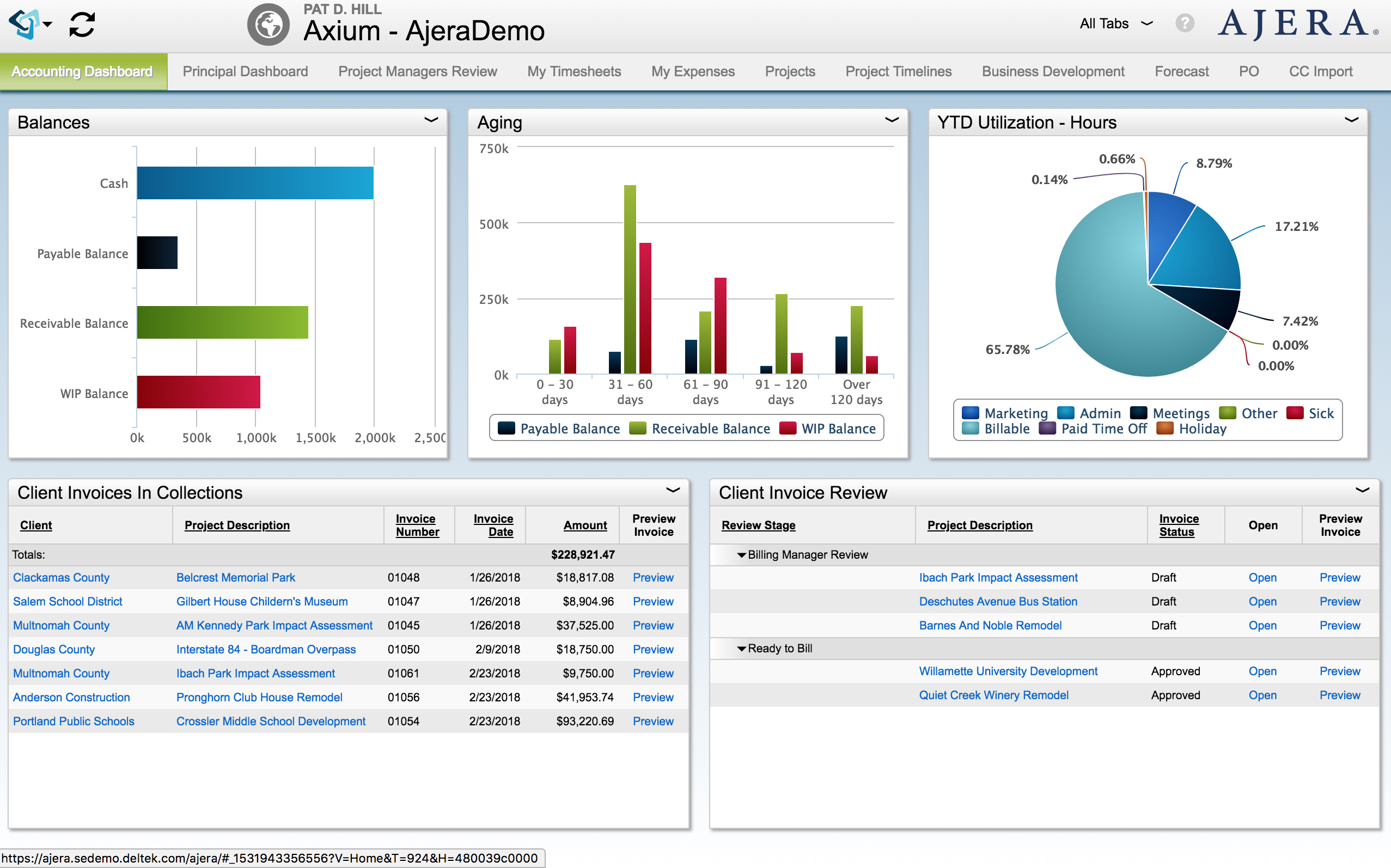 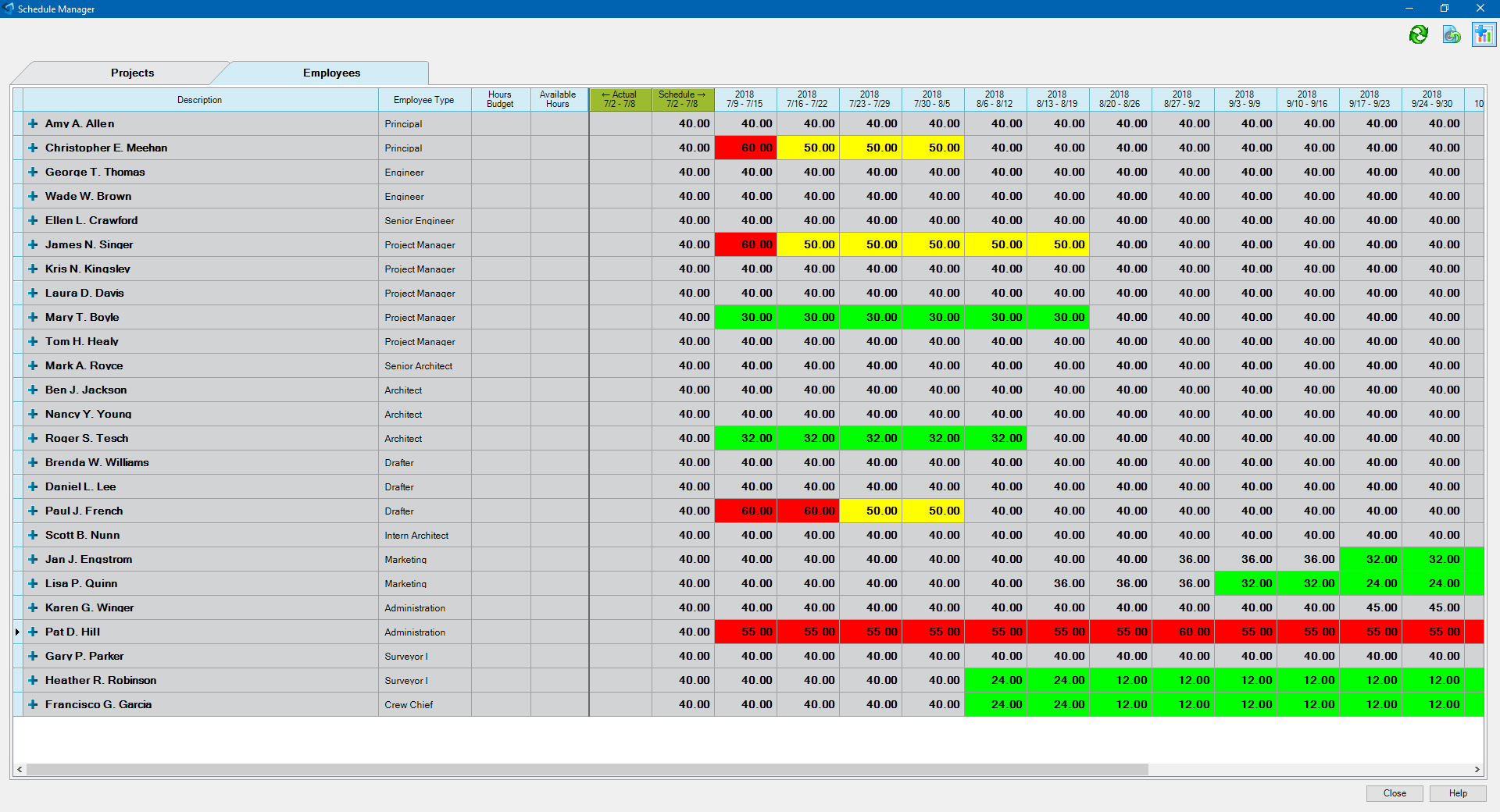   | IBM Planning Analytics Screenshots      |
