DocuSign supports transactions with document sharing and electronic signature, as well as automated and guided data collection and entry, record updating across disparate systems and payment collection upon agreement, as well as analytics and reporting.
$15
per month
Agentforce Revenue Management
Score8.6 out of 10
Mid-Size Companies (51-1,000 employees)
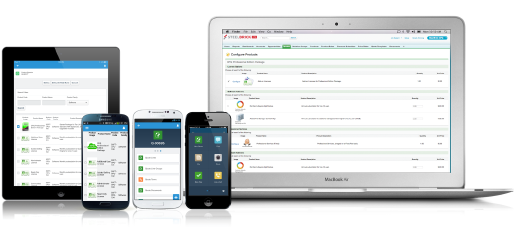
Salesforce Revenue Cloud (formerly Salesforce CPQ or SteelBrick) is built and delivered on the Salesforce Platform and Salesforce1 Mobile App which enables users to create accurate sales quotes quickly and submit error-free orders on the fly from any device.
A de minimis incentive was given to thank the reviewer for their time. The incentive was not used to bias or drive a particular response, nor was the incentive contingent on a positive endorsement. More Info
A de minimis incentive was given to thank the reviewer for their time. The incentive was not used to bias or drive a particular response, nor was the incentive contingent on a positive endorsement. More Info
Vice-President, Business Applications, IT & Facility Operations in Information Technology at HotSchedules (Computer Software, 501-1000 employees)
Chose DocuSign
Looked at PandaDoc about 18 months ago because of the interesting functionality around tracking redlines in contracts. This is something we are interested in, but PandaDoc was not PCI compliant (we capture billing info on our DocuSign forms). At that time they were pursuing it, …
A de minimis incentive was given to thank the reviewer for their time. The incentive was not used to bias or drive a particular response, nor was the incentive contingent on a positive endorsement. More Info
Salesforce
Verified User
Chose Agentforce Revenue Management
We felt Salesforce had less risk with integrations to our CRM - also Big Machines couldn't handle our complexity.
A de minimis incentive was given to thank the reviewer for their time. The incentive was not used to bias or drive a particular response, nor was the incentive contingent on a positive endorsement. More Info
Principal Salesforce Administrator in Information Technology at LogMeIn (Computer Software, 1001-5000 employees)
Chose Agentforce Revenue Management
CPQ is a more inline, integrated and user-friendly product compared to Apttus's offering. The fact that it was bought and embedded by Salesforce into the platform and the support that entails, was the big differentiator for us.
A de minimis incentive was given to thank the reviewer for their time. The incentive was not used to bias or drive a particular response, nor was the incentive contingent on a positive endorsement. More Info
Enterprise Account Executive in Sales at DoubleDutch (Computer Software, 51-200 employees)
Chose Agentforce Revenue Management
It was not my choice to move to Salesforce CPQ. Our organization chose to move to this platform because Octiv gave the reps too much flexibility. They wanted to tighten the reins. Everyone hates Salesforce CPQ and the guy who implemented it isn't even at the company anymore.
A de minimis incentive was given to thank the reviewer for their time. The incentive was not used to bias or drive a particular response, nor was the incentive contingent on a positive endorsement. More Info
Customer Account Manager, Team Lead in Sales at Xactly Corp (Computer Software, 501-1000 employees)
Chose Agentforce Revenue Management
We looked into using BigMachines and FPX but decided to implement Apttus many years ago. The Apttus implementation never went live after several hiccups along the way and we shifted our focus to Salesforce CPQ which has had it's moments as well. Overall, Salesforce CPQ is the …
A de minimis incentive was given to thank the reviewer for their time. The incentive was not used to bias or drive a particular response, nor was the incentive contingent on a positive endorsement. More Info
Senior Account Manager in Sales at International SOS (Hospital & Health Care, 10,001+ employees)
Chose Agentforce Revenue Management
CPQ is much more intuitive and user-friendly than JDE. JDE is clunky and was not native to the Oracle CRM tool, which created problems when it came to quote creation and consistency in how deals are moved through the pipeline. We chose CPQ because we were already using SFDC as …
A de minimis incentive was given to thank the reviewer for their time. The incentive was not used to bias or drive a particular response, nor was the incentive contingent on a positive endorsement. More Info
Enterprise Solutions Architect in Information Technology at ClearSlide (Information Technology and Services, 201-500 employees)
Chose Agentforce Revenue Management
We evaluated Aptus against SteelBrick. SteelBrick had an edge because of low Implementation cost, fewer custom components, clean user interface, and good client references
A de minimis incentive was given to thank the reviewer for their time. The incentive was not used to bias or drive a particular response, nor was the incentive contingent on a positive endorsement. More Info
This product is well suited in the use case that I provided before: when it comes to onboarding employees and providing a clear channel for decision making for human resources, this is an excellent tool to accomplish that. I would say the weak points is when you have back and forth communication with users that it might seem a little redundant to have that back and forth communication in that scenario.
A de minimis incentive was given to thank the reviewer for their time. The incentive was not used to bias or drive a particular response, nor was the incentive contingent on a positive endorsement. More Info
What I like best is the ease of use to be able to track all opportunities and quotes in my daily sales tracker I also like the fact that you can reorganize the view for your opportunities. For instance, it is very similar to a spreadsheet where you can filter them by date, dollar amount, name, and several other ways. I found this to be less appropriate when we have to do multiple roles while assigning one task to multiple users. Column resizing within the Quote Line Editor is not supported in the Salesforce mobile app.
A de minimis incentive was given to thank the reviewer for their time. The incentive was not used to bias or drive a particular response, nor was the incentive contingent on a positive endorsement. More Info
A de minimis incentive was given to thank the reviewer for their time. The incentive was not used to bias or drive a particular response, nor was the incentive contingent on a positive endorsement. More Info
Tracking, particularly when collecting signatures through connected applications, such as an ATS, is not always clean or easily traceable.
Formatting documents to handle electronic signature types (signatures, initials, etc.) is not always easy, and highly dependent on the partner's technology.
It is not convenient to have to use DocuSign as a stand alone product if the signatures are required for 3rd party applications. It definitely excels on its own, but the scope of that usage, at least for us, is slim.
A de minimis incentive was given to thank the reviewer for their time. The incentive was not used to bias or drive a particular response, nor was the incentive contingent on a positive endorsement. More Info
Our Salesforce is very messy, which tells me it's not super easy to clean up.
I always have a really hard time removing a contacts from an account - it seems like you can't simply remove the relationship so we have lots of people named DO NOT CONTACT or things of that nature.
Sometimes when saving it doesn't seem like things actually save.
A de minimis incentive was given to thank the reviewer for their time. The incentive was not used to bias or drive a particular response, nor was the incentive contingent on a positive endorsement. More Info
I can't imagine doing business without DocuSign now. I would never want to go back to the way we used to do things. The "new way" is "the way" is "the right way." We can honestly be proud of a "one right way" process and not have to suffer through "5 ways for 5 days."
A de minimis incentive was given to thank the reviewer for their time. The incentive was not used to bias or drive a particular response, nor was the incentive contingent on a positive endorsement. More Info
Generally user-friendly once you have command of the basics, but also has a lot of nuances that can make it difficult to train others on. DocuSign University is a helpful tool, but understandably a lot of content to get through to become a well-versed user. A lot of different functionalities but only a few I use on a weekly basis.
A de minimis incentive was given to thank the reviewer for their time. The incentive was not used to bias or drive a particular response, nor was the incentive contingent on a positive endorsement. More Info
Because it looked almost impossible to integrate it with Zoho CRM while our Sales Operations team was working on it. But thankfully it worked at last but at the expense of a month's time. However, it has made every possible Revenue operations task simpler now. And that has ultimately made our team more efficient in terms of work hours spent on manual work.
A de minimis incentive was given to thank the reviewer for their time. The incentive was not used to bias or drive a particular response, nor was the incentive contingent on a positive endorsement. More Info
A de minimis incentive was given to thank the reviewer for their time. The incentive was not used to bias or drive a particular response, nor was the incentive contingent on a positive endorsement. More Info
A de minimis incentive was given to thank the reviewer for their time. The incentive was not used to bias or drive a particular response, nor was the incentive contingent on a positive endorsement. More Info
I'd give them a 10, but there has been 1 or 2 small cases that seemed to fall to the wayside, but I was able to call them up and get them resolved. We were having a bad implementation night (after midnight) and we needed assistance from Docusign. They were able to get an engineer to help us in the early morning hours
A de minimis incentive was given to thank the reviewer for their time. The incentive was not used to bias or drive a particular response, nor was the incentive contingent on a positive endorsement. More Info
There have been some issues with multi-year pricing of certain products and services which we have been assured will be resolved but I guess are still underway, the support team apart from this has not been needed much and in the rare scenarios, it has been needed the resolutions of conflicts has been prompt and quick, so the overall support would have my high regards for being so helpful and customer-oriented so as to assure good performance of their toolset and customer satisfaction.
A de minimis incentive was given to thank the reviewer for their time. The incentive was not used to bias or drive a particular response, nor was the incentive contingent on a positive endorsement. More Info
Docusign is super easy to use, and apart from a few administration details, there was really nothing to train on. Post implementation, there were issues with configuration of auto-filled documents with the integrating 3rd party. That training required some time, because the DocuSign expert took the time to walk me through the 3rd party's configuration (how often does that happen?) so I could see how DocuSign should be best used to overcome weaknesses in the 3rd party platform. 10/10 expert care.
A de minimis incentive was given to thank the reviewer for their time. The incentive was not used to bias or drive a particular response, nor was the incentive contingent on a positive endorsement. More Info
Until you get the hang of it, I recommend doing several internal tests before sending a document to a client. As I mentioned earlier, you have to go through a bit of trial and error at first to verify that the workflow works as expected.
There has never been anything that we could really compare to Docusign. We have tried sending documents in a PDF version, but that was not nearly as efficient. DocuSign saves your signature in the system and uses that as it goes through your documents.
A de minimis incentive was given to thank the reviewer for their time. The incentive was not used to bias or drive a particular response, nor was the incentive contingent on a positive endorsement. More Info
There is no comparison to a fully functional instance of CPQ. Nothing comes close due to the amount of customization and ease of use that CPQ offers once it's fully built out. Other solutions may be easier to build or administer, but for the users and business needs, CPQ is the best solution possible.
A de minimis incentive was given to thank the reviewer for their time. The incentive was not used to bias or drive a particular response, nor was the incentive contingent on a positive endorsement. More Info
A de minimis incentive was given to thank the reviewer for their time. The incentive was not used to bias or drive a particular response, nor was the incentive contingent on a positive endorsement. More Info
A de minimis incentive was given to thank the reviewer for their time. The incentive was not used to bias or drive a particular response, nor was the incentive contingent on a positive endorsement. More Info
Easy access to reporting on closed-won, closed-lost, and open quotes.
Accuracy in data referenced in a quote - it's typically accurate as it is pulled directly from opportunity, looking up to associated subscription start/end dates, etc..
We lose valuable time in creating quotes ourselves. Quotes were requested and created through sales ops previously, sales did not have access to the excel templates used to generate quotes.
A de minimis incentive was given to thank the reviewer for their time. The incentive was not used to bias or drive a particular response, nor was the incentive contingent on a positive endorsement. More Info