TrustRadius: an HG Insights company

Save this comparison

Save this comparison

Add Product

Recommended Comparisons

    Overview
    ProductRatingMost Used ByProduct SummaryStarting Price

    EZ Texting

    Score9.1 out of 10
    N/AEZ Texting provides businesses and organizations with a text marketing solution, including features and integrations to keep conversations going. The solution can be used by businesses to connect with their audiences. It can be used to send promotions, promote a new product, build brand awareness, or drive traffic to websites or storefronts. EZ Texting Key Features EZ Texting's features are designed to enhance the effectiveness of text marketing efforts.…

    $25

    per month

    Mouseflow

    Score7.7 out of 10
    N/AMouseflow is a behavior analytics tool used by more than 190.000 digital marketing, UX, Product, Startups and Enterprise clients to optimize their website experiences. With Mouseflow, the user can: Find out what happens between visitors' clicks through watching video recordings of their sessions. Build 6 types of heatmaps for pages automatically to understand what is getting their attention. Set up funnels to watch where and why visitors drop. Use form…

    $39

    per month

    Pricing
    EZ TextingMouseflow
    Editions & Modules
    Launch
    Starting at $25
    per month
    Boost
    Starting at $75
    per month
    Scale
    Starting at $125
    per month
    Enterprise
    Starting at $3,000
    per month
    Starter
    $39
    per month
    Growth
    $129
    per month
    Business
    $259
    per month
    Pro
    $499
    per month
    Offerings
    Pricing Offerings
    EZ TextingMouseflow
    Free Trial
    YesYes
    Free/Freemium Version
    NoYes
    Premium Consulting/Integration Services
    NoNo
    Entry-level Setup FeeNo setup feeNo setup fee
    Additional DetailsLAUNCH PLAN: Recommended for up to 500 contacts. Local EZ Textable Number. Max Speed: up to 500/day. Cost Per Msg:$0.030. Delivery Rate: 95% Includes 500 free msg/mo or 6k annually. BOOST PLAN: Recommended for 501-2,000 contacts. Local EZ High-Volume Number. Max Speed: up to 2,000/day. Cost Per Msg: $0.025. Delivery Rate: 95% Includes 500 free msg/mo or 6k annually. SCALE PLAN: Recommended for 2,000-50,000 contacts. Local EZ High-Volume, High-Speed Number. Max Speed: up to 50,000/day. Cost Per Msg: $0.020. Delivery Rate: 95%. Includes 500 free msg/mo or 6k annually. ENTERPRISE PLAN: Recommended for 50,000+ contacts. This Plan offers. Dedicated Short Codes. Max Speed: up to 1 MM/day. Cost Per Msg: $0.010. Delivery Rate: 99%. Includes 200k msg/mo. Pricing information for EZ Texting is supplied by the software provider or retrieved from publicly accessible pricing materials. Final cost negotiations to purchase EZ Texting must be conducted with the seller. Included in All Plans: Unlimited Incoming Messages, Contacts, & Keywords. New Features: Realize ROI faster with AI Compose & Team Inbox with AI Reply. Live Support Chat: Monday-Friday 8am-8pm ET and Saturday-Sunday 9am-5pm ET. Growth Tools: QR Codes, Keywords & Signup Forms. MMS Edge: Enhanced Image Library + Editor powered by Shutterstock. CRM-Lite: Upload, Management, Groups & Personalization.There is a discount applied to the price if a customer commits to an annual payment plan.
    More Pricing Information
    Community Pulse
    EZ TextingMouseflow
    Considered Both Products
    CallFire
    No answer on this topic
    Mouseflow
    No answer on this topic
    Key User Insights
    Would buy again
    92%
    Would buy again
    116 Answers
    No answers on this topic
    Delivers good value for the price
    95%
    Delivers good value for the price
    108 Answers
    No answers on this topic
    Happy with the feature set
    94%
    Happy with the feature set
    119 Answers
    No answers on this topic
    Lived up to sales and marketing promises
    96%
    Lived up to sales and marketing promises
    107 Answers
    No answers on this topic
    Implementation went as expected
    95%
    Implementation went as expected
    114 Answers
    No answers on this topic
    Best Alternatives
    EZ TextingMouseflow
    Small Businesses
    SimpleTexting
    Score7.6 out of 10
    Smartlook
    Score8.8 out of 10
    Medium-sized Companies
    Attentive
    Score8.6 out of 10
    Crazy Egg
    Score7.9 out of 10
    Enterprises
    Airship
    Score9.1 out of 10
    Crazy Egg
    Score7.9 out of 10
    All AlternativesView all alternativesView all alternatives
    User Ratings
    EZ TextingMouseflow
    Likelihood to Recommend
    9.2
    (284 ratings)
    9.0
    (6 ratings)
    Likelihood to Renew
    10.0
    (12 ratings)
    -
    (0 ratings)
    Usability
    9.1
    (122 ratings)
    8.0
    (1 ratings)
    Availability
    10.0
    (3 ratings)
    -
    (0 ratings)
    Performance
    9.0
    (3 ratings)
    -
    (0 ratings)
    Support Rating
    9.6
    (112 ratings)
    9.8
    (2 ratings)
    Implementation Rating
    7.0
    (5 ratings)
    -
    (0 ratings)
    Configurability
    8.0
    (3 ratings)
    -
    (0 ratings)
    Contract Terms and Pricing Model
    9.0
    (2 ratings)
    -
    (0 ratings)
    Ease of integration
    8.0
    (5 ratings)
    -
    (0 ratings)
    Product Scalability
    9.0
    (3 ratings)
    -
    (0 ratings)
    Professional Services
    8.0
    (2 ratings)
    -
    (0 ratings)
    Vendor post-sale
    9.0
    (3 ratings)
    -
    (0 ratings)
    Vendor pre-sale
    8.0
    (3 ratings)
    -
    (0 ratings)
    User Testimonials
    EZ TextingMouseflow
    Likelihood to Recommend
    CallFire
    EZ Texting would be well suited for a small business that doesn't have the man power to be able to contact all of the leads they have coming in or who struggles to maintain communication with current clients at times. It would not be appropriate for a business who is looking to send phishing texts out to a large group of people.
    Incentivized
    Read full review
    Mouseflow
    Mouseflow is a great when you're working in a busy product development or conversion optimisation environment, and want to understand exactly how customers are interacting with your site or app so you can respond. It's a capable tool that offers some great insight at a fraction of the cost of competitors like SessionCam or ClickTale. It has occasional problems in captures that its competitors suffer from less often, but if you're looking for a general understanding of usage then this is a great tool. It doesn't have built-in integrations with all A/B testing tools, but it does have a built-in Google Tag Manager tag so its very easy to set up without assistance. If you've got the budget to select reliability over cost, then you may choose to opt for a more mature, enterprise offering. But if your budget is limited, or you're just looking to prove the value of session recording as a concept, then Mouseflow will more than do the job.
    Incentivized
    Read full review
    Pros
    CallFire
    • I appreciate the detailed delivery reports.
    • The support team’s quick responses are appreciated.
    • The automation feature is incredibly handy for instantly messaging leads right after they sign up.
    • The onboarding process is straightforward.
    • Genuine customer inquiries show up in the inbox, organizing important messages in one place.
    • You can avoid the email spam folder by using ez texting!
    • Opt-outs resolve themselves.
    Incentivized
    Read full review
    Mouseflow
    • Mouseflow does a great job creating wonderful Heat Maps. These allow you to really see how people are interacting with a page. Great data if you want to create better flow in your pages.
    • The User Session Recordings are also especially useful and when used in conjunction with the heat maps you can really get a feel and a look at how a page is working. This lets you see where people get stuck, elements that might be distracting, etc.
    • In the area of the heat maps Mouseflow can handle A/B testing which I think is priceless.
    • Another advantage to Mouseflow is that unlike many of these types of tools Mouseflow integrates with most Web platforms, well beyond WordPress.
    Incentivized
    Read full review
    Cons
    CallFire
    • Drafts don't save well, seemed like I kept having to redo the same text because a draft wouldn't save.
    • I want to be able to click and update users quickly, but there were too many steps to add/remove people from lists.
    • The app didn't work if I used google SSO - i couldn't ever get signed in.
    Incentivized
    Read full review
    Mouseflow
    • Free version could have more features.
    • Should be optimized for a better view on mobile devices.
    • Although it provides a complete list of data, it is not able to capture certain sessions.
    Read full review
    Likelihood to Renew
    CallFire
    We're excited about EZ Texting and what it does for us. We want to get more into automation with campaigns dealing directly with web sales so a more robust solution will likely leave EZ Texting as our event activation partner and only be used during select times of the year.
    Incentivized
    Read full review
    Mouseflow
    No answers on this topic
    Usability
    CallFire
    EZ Text was very easy to set up and very intuitive. It does not take long at all to add your contact lists or to set up templates. It takes a second to get used to when it comes to sending mass group texts, but all in all, it does what we need to do and was easy to implement. We were able to do it ourselves.
    Incentivized
    Read full review
    Mouseflow
    Mouseflow is pretty easy to use. You need to be a core technical person to implement it on your site. Mouseflow provided us a tracking code that need to be installed on the website, and if do not have the knowledge of how to work on the backend of the website, you will not be able to install it. Here you will need the help of a technical person who has a good knowledge of your website platform to install the code on the website. There are also videos available giving insight on how to use the Mouseflow platform. I personally haven't faced any problem while using Mouseflow. Just login to this tool and a dashboard will open in front of you.
    Read full review
    Reliability and Availability
    CallFire
    We have never needed to use the system and it be unavailable. They seem to schedule their server maintenance perfectly (at least for us!).
    Incentivized
    Read full review
    Mouseflow
    No answers on this topic
    Performance
    CallFire
    It works pretty well but sometimes things don't work the way you would assume, IE marking messages as read is not as intuitive
    Incentivized
    Read full review
    Mouseflow
    No answers on this topic
    Support Rating
    CallFire
    EZ Texting "gets it"! When I have had something I needed customer service to help me with, they returned my emails and calls promptly. I have a smaller business and they came through as if I was a huge corporate entity. They really care about all sizes of customers!
    Incentivized
    Read full review
    Mouseflow
    This is an area where Mouseflow is quite strong. Not only is the support good but they also have some very good training on the use of the product. There is a nicely laid out section of videos that not only cover the use of the tools functions but also how to use the data that Mouseflow produces. They are doing well in the support area.
    Incentivized
    Read full review
    Implementation Rating
    CallFire
    The most important aspect of implementation was selecting a valuable keyword. When we first started using EZ Texting, we were able to grab a simple, easy word to use to connect people to our texts. That proved invaluable in our marketing and selling people on using the service. If we didn't have a good word, I would imagine it wouldn't have been as successful.
    Incentivized
    Read full review
    Mouseflow
    No answers on this topic
    Alternatives Considered
    CallFire
    We chose EZ Texting over enterprise solutions because of it's ease of set up, ease of use, and low barrier to entry. We had discussions with other companies, and it seemed very complicated and would require a lot of set up on our end. We don't have a dedicated IT or marketing team. We are a small business. So those barriers were just too complicated and we decided to go with an easier solution.
    Incentivized
    Read full review
    Mouseflow
    Mouseflow is a supplement to Google Analytics and improves on some Analytics functions. Mouseflow adds qualitative data to the quantitative data that Analytics provides to help marketers better understand their website visitors
    Incentivized
    Read full review
    Contract Terms and Pricing Model
    CallFire
    We have been grandfathered into our old package, but I wish there were better package options offered now.
    Incentivized
    Read full review
    Mouseflow
    No answers on this topic
    Scalability
    CallFire
    We haven't really utilized it for this purpose but it does seem like there are a lot of great options you can utilize.
    Incentivized
    Read full review
    Mouseflow
    No answers on this topic
    Professional Services
    CallFire
    easy access
    Incentivized
    Read full review
    Mouseflow
    No answers on this topic
    Return on Investment
    CallFire
    • Customers, as well as potential customers, do not seem to have any issue, providing their phone numbers for text messages as opposed to receiving countless emails.
    • Upselling items has improved considerably due to our ability to notify customers of new products and specials that we are offering in the store.
    Incentivized
    Read full review
    Mouseflow
    • MouseFlow makes a positive impact on our future marketing decisions. We recently had a change in formula for a product and added a variety of ways for people to read about the changes via our website. Mouseflow allowed us to see which method was effective in communicating our message. We were able to replicate the style on other digital platforms.
    • Mouseflow allows us to save time we would normally spend in developing a website. For example, before building a new website I will spend a couple of weeks analyzing user data via mouseflow. I can clearly see what features are not currently working and where we are loosing people in the current process. This cuts down website revisions by about 10%
    Incentivized
    Read full review
    ScreenShots

    EZ Texting Screenshots

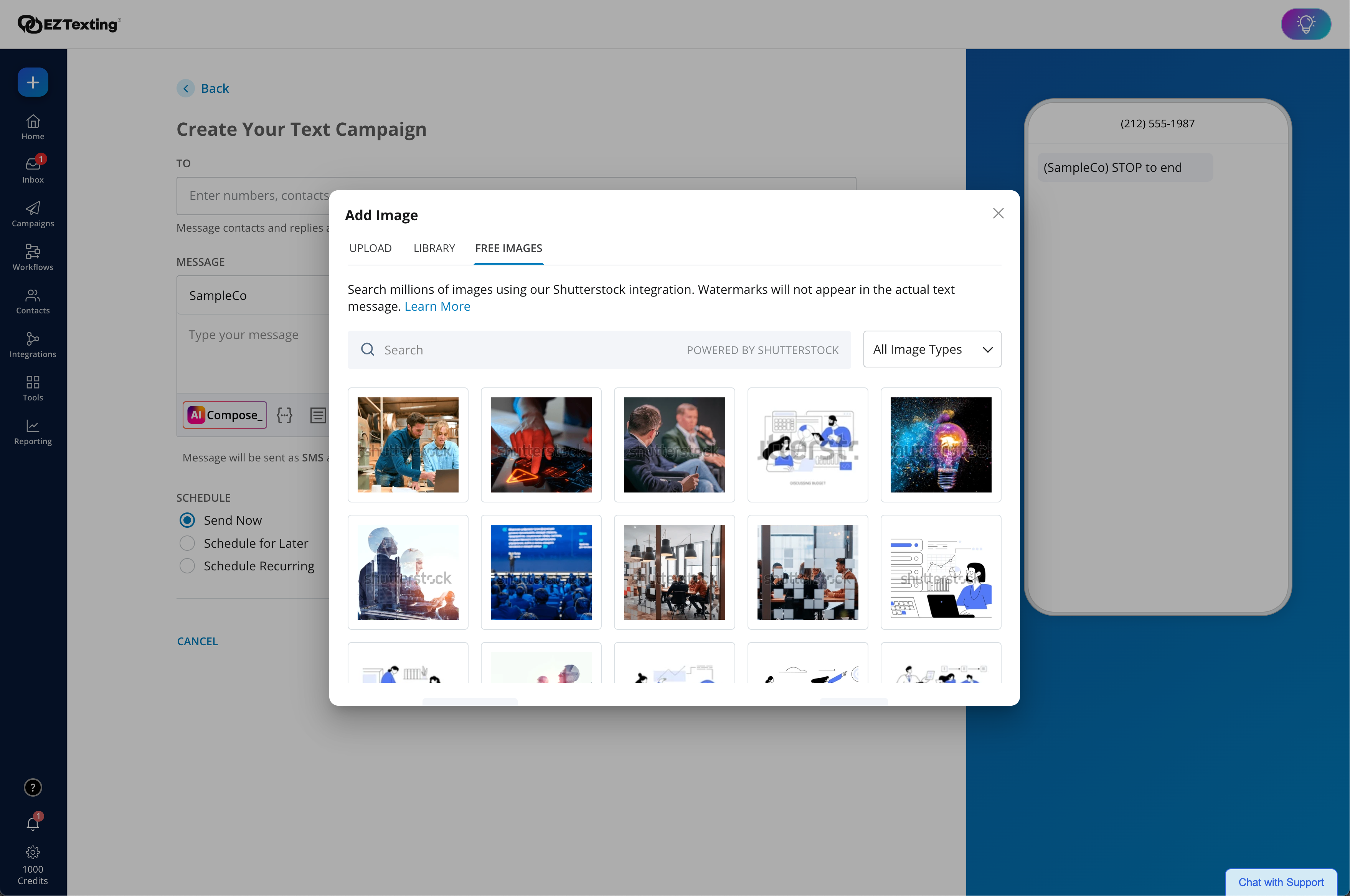
    Screenshot of EZ Texting Dashboard: View recent activity, upcoming campaigns, and access AI Assistant.Screenshot of Enhanced Image Library + Editor: Our enhanced Shutterstock integration helps you unlock and edit 450+ million free images and 20k design templates, giving you the license to create more scroll-stopping texts.Screenshot of AI Compose: Create engaging messages instantly with emojis, helpful templates, easy editing, multilingual translations, and more.Screenshot of Workflows: Effortlessly send texts triggered by actions and events to boost engagement and drive conversions. With a drag & drop editor, technical expertise or code is never required.Screenshot of Quickly create engaging texts with built-in tools, including AI Compose, to add personalization, trackable URLs, media, and more! Stay compliant with EZ Texting's SafeSTOP® feature.Screenshot of Reporting Made Easy: Get delivery confirmations, check on bounce rates and view opted-outs.

    Mouseflow Screenshots

    Screenshot of Session replay
Shows how visitors interact with a site to find out where they struggle.Screenshot of Live Heatmaps
Live Heatmaps work as an overlay on a live website, offering complete support for all dynamic elements – essentially showing the Mouseflow data on top of the site as it looks and works when it is visited live. This includes dynamic elements: SPA's (Single Page Applications) Drop Down Menus.Screenshot of Geo Heatmaps
Build a Heatmap for visitors' locations. The map lights up as filters are applied to understand what the biggest markets are.Screenshot of Click Heatmaps
Optimize a website by understand what drives clicks on it. All heatmaps are built automatically as soon as recording begins.Screenshot of Form analytics
Discover what field in a form is costing customers and replay their sessions to see what distracted them from completing their purchaseScreenshot of Conversion funnels
Optimize check out funnels and drive more conversions.