Google Voice vs. Ooma Office

Overview
ProductRatingMost Used ByProduct SummaryStarting Price
Google Voice
Score 7.7 out of 10
N/A
Google Voice is a free IP telephony service that provides users with one phone number that can be forwarded to multiple phones or devices. It includes features such as call forwarding, voicemail translation, text messaging, and voice calls. Fees may apply for international calling.
$10
per user/per month
Ooma Office
Score 6.8 out of 10
N/A
For businesses of all sizes, Ooma provides advanced voice and collaboration features which they describe as flexible and scalable. With plans starting at $19.95 per user per month, Ooma Office is available without contracts or long-term commitments so as to make it easy for a small business to scale its office phone system with Ooma as its business grows. Ooma Office features include: Unlimited Calling in U.S., Canada, Mexico and Puerto Rico Free Local…
$9.95
per month
Pricing
Google VoiceOoma Office
Editions & Modules
Starter
$10
per user/per month
Standard
$20
per user/per month
Premier
$30
per user/per month
Local Phone Number
$9.95
per month
Toll Free Number
$9.95
per month
Toll Free Calling Plan
$15.00
per month
Base Price
$19.95
per month
User Extension
$19.95
per month
Pro
$24.95
per month
Ooma Linx
$49.99
per month
Ooma Wireless Adapter
$49.99
per month
Ooma DP1 Desk Phone
$89.99
per month
Expansion Base Station
$99.99
per month
Yealink IP Phones
$99.99
per month
Cisco IP Phones
$109.99
per month
Yealink Conference IP Phones
$399.99
per month
Conference Bridge
Free
Ring Groups
Free
Virtual Receptionist
Free
Number Porting
Free
Offerings
Pricing Offerings
Google VoiceOoma Office
Free Trial
NoNo
Free/Freemium Version
NoNo
Premium Consulting/Integration Services
NoNo
Entry-level Setup FeeNo setup fee$19.95 per user/month
Additional DetailsOoma Office offers plans starting at $19.95 per user/month with no contracts, ever.
More Pricing Information
Community Pulse
Google VoiceOoma Office
Considered Both Products
Google Voice
Chose Google Voice
Google Voice operates in a narrow niche compared to other high-volume call products, such as Gong and Outreach. Google Voice would be much better, structured for small teams with limited calling, less structure, and fewer call scripts. For instance, this would better serve a …
Chose Google Voice
Google Voice definitely lacks features compared to enterprise-level solutions. Enterprise VoIP providers have a customer support component well in place. The interfaces for desktop and mobile are also much more refined, and they integrate well with the existing communication …
Chose Google Voice
Google Voice at the peak of its adoption did serve as a very real and effective solution. However bugs persisted, and innovation lacked, and support for the product soon declined. However, there are several other solutions provided that focus on making one product as best as it …
Chose Google Voice
I chose Google Voice for their seamless integration. Calls and text bundle and email alerts. While Skype had great quality calls a long time ago, I noticed their support team is horrible with many bugs and crashes. The call logs on Skype were not registering and sometimes it …
Chose Google Voice
Google Voice stands far above products like Vonage, RingCentral, and Jive (GoToConnect). It is more mature as a VOIP product and free to home/personal users. For small usage scenarios like ours, Google Voice cannot be beat on price and ease of use. It is very affordable to keep …
Chose Google Voice
Google Voice is way easier to get going and use. It's cheaper, more robust, and doesn't have any issues with the app not ringing or not transferring calls correctly. Plus, a lot of our employees already have experience using Google Voice with their personal accounts and found …
Chose Google Voice
Zoom and Slack are the closest comparisons I can come up with, but those are pretty different use cases, at least for us.
Chose Google Voice
The integrations of Google Voice with all our devices are flawless, Android, iOS, Windows, Linux and Mac. Also, the call performance is far superior on wifi as well as on mobile data. With Skype, we had several problems with personal accounts, performance issues, and in …
Chose Google Voice
FluentCloud/FluentStream is what we ended up using for our business. It too is easy to use, a little tougher to integrate, but not bad at all, and much cheaper. Does everything I need it to do. I would switch to Google Voice if it was cheaper as I use all the other Google …
Chose Google Voice
Google Voice is easier to use, but in Skype you can have local numbers in different countries (not only in the US).
Skype call rates are lower than Google Voice's rates for non-US numbers, check the rates according to your predicted usage.
Chose Google Voice
I've used in-house systems at other agencies and they went down all the time, were not reliable and were extremely expensive.
Chose Google Voice
Google Voice is great if you are a one-man business. It allows you to have a business phone number for people to call without having to give your personal cell phone number out to strangers. The cost is very affordable. But as your business grows, you need to look for a better …
Chose Google Voice
Google Voice and Dialpad, I believe, are a very equal match, and we chose Google Voice due to only a small amount of interface differences that made a difference in the service's functionality. Also, we had used google voice for a long time before Dialpad, so making the …
Chose Google Voice
Google Voice has the best interface, and is the easiest to use of all the phone services out there. It also is free! We love Google Voice because it gives us a free phone number that many people can use, so my entire team can have one unified number that employees can call and …
Chose Google Voice
I primarily use Google Voice for texting, but I’ve also used EZ Texting for similar purposes. The main difference is that Google Voice excels at individual communications, while EZ Texting is best for mass texts. Google Voice texting does not cost anything, whereas EZ Texting …
Chose Google Voice
Google Voice is much more cost efficient and doesn't have all the bells and whistles that our small company doesn't need. Google Voice never tries to upsell us and just makes an easy-to-use product that has greatly increased the efficiency of our organization. We aren't …
Chose Google Voice
Google Voice performs similar communication activities compared to many other business service tools. However, one often must integrate other Google apps in order to fully experience the benefits that other platforms experience locally. Voice does have the benefit of merging …
Chose Google Voice
Google Voice was a superior product in our opinion to some that we looked at because of its versatility and ease of implementation. Not only were those big determinants in our decision, but the cost-effectiveness of the program played a major role in our decision. Some of the …
Chose Google Voice
Google has a larger ecosystem.
Chose Google Voice
Google Voice is more reliable than CallHippo and has better call quality. Additionally, Google Voice's integration into Google Hangouts expands it functionality for video calls. Google Voice also provides access into Google's contact directory giving quick access to anyone who …
Chose Google Voice
Google Voice is hard to compare because on a cost basis it is so much lower than it's competitors. As a whole, I would say it's definitely lacking features compared to Nextiva, and a few from RingCentral but the service is reliable and it has the most commonly used core …
Chose Google Voice
The price was a huge standout since we have a large number of users and because of this it was important for us. Aside from cost the reliability was also of utmost importance due to the urgent nature of some of the calls. These were the two main reasons we chose this platform.
Chose Google Voice
Google Voice was perfect for the small team setting where we needed to coordinate calls from time to time with urgency and supported call forwarding in a manner consistent with the services we need to provide to our clients.
Chose Google Voice
We have Cisco tools as a primary option for our VoIP needs due to it's more professional approach. However Google Voice has recently became a business level program as well. I'm happy to use it due to it's unique features and the flexibility as we always expect from Google.
Ooma Office
Chose Ooma Office
We used Spectrum Business phones before switching to Ooma Office, and the difference in overall usability has been night and day. With Spectrum, the installation process was frustrating — it felt overly complicated, and getting support when we needed it was a constant headache. …
Chose Ooma Office
Ooma is programmable. When I had comcast I could not program the phones.
Chose Ooma Office
Ooma was the first and only we have used
Chose Ooma Office
I used a land line company for years and then switched to a VOIP company. When I learned how much better Ooma was, I was really skeptical at first, but they allowed me to try their service. Once I did, there was no comparison. I switched to Ooma and have never looked back.
Chose Ooma Office
Ooma leads the way, especially since they are a VOIP service in the age of teleworking and work from home. It is cheaper and can be used anywhere via their application, which works overall pretty well.
Chose Ooma Office
It's much easier to manage than our previous solutions. It makes our phone infrastructure robust and scalable. The virtual assistant has also been very useful for us to keep our customers updated on changes in pricing, hours etc. We had to manually record any changes earlier …
Chose Ooma Office
I can only speak to Ooma Office, as it was the first product I evaluated and was referred to me by someone I trust who uses it.
Chose Ooma Office
So much better, easier to use and less expensive! Overall better product. Support is heads and tails above what Nextiva pretends to offer its customers! I will save over $6000 my first year alone with Ooma. Thank you for making such a great product. You will help small …
Chose Ooma Office
Ooma [Office] was [the] cheaper option over Nextiva. It didn't have near the features of Nextiva, but saved money for us month to month. The features that we were losing out on, while interesting, were not things we needed in order to support our organization. We were very …
Chose Ooma Office
We only used our local phone company. Compared to our local phone company, Ooma Office beats it hands down. It is much cheaper. It has an app for my phone that works brilliantly. It is user-friendly. We are able to take calls both in the office and when we are mobile. The …
Chose Ooma Office
We were using Open Phone, an app. We paid for 4 different numbers and ran our business this way which was not sustainable. We were also paying $60 a month for this service which had 0 features. Once we switched to Ooma office, we have dropped our bill to $30 and are using 3 …
Chose Ooma Office
We use Ooma Office for everyone in the company including mobile users. It has allowed us to eliminate the spam callers as well give our mobile and remote users the ability to make business calls - from any device, from anywhere, at any time - without having to worry about any …
Chose Ooma Office
We went over to Ooma [Office] after having had Intermedia for several years. Intermedia was good, but they were due for an update on many of their systems, which they did after we left. With Ooma [Office], we have our hold music and other basic, easy to use options that fit …
Chose Ooma Office
This is my first experience with a VOIP phone system, but previously I had tried to use AT&T for my business line, although the setup never even happened because of misinformation I was given. In the end I'm glad I ended up with Ooma instead because it has been much more …
Chose Ooma Office
Digium's uptime and service was not great
Chose Ooma Office
The Ooma product offer significantly more features a small business at a much lower price. The customer service is excellent. We are treated the same as if we were their largest customer. The larger communication companies don’t seem to be too interest in the small business …
Features
Google VoiceOoma Office
Cloud PBX
Comparison of Cloud PBX features of Product A and Product B
Google Voice
5.3
Ratings
40% below category average
Ooma Office
8.1
Ratings
2% above category average
Hosted PBX6.00 Ratings9.50 Ratings
Multi-level Interactive Voice Response (IVR)3.00 Ratings8.50 Ratings
User templates1.40 Ratings00 Ratings
Call reports6.90 Ratings00 Ratings
Directory of employee names9.00 Ratings6.20 Ratings
Call Management
Comparison of Call Management features of Product A and Product B
Google Voice
8.4
Ratings
2% above category average
Ooma Office
6.4
Ratings
25% below category average
Answering rules8.50 Ratings5.80 Ratings
Call recording8.10 Ratings6.70 Ratings
Call park6.40 Ratings6.30 Ratings
Call screening10.00 Ratings6.50 Ratings
Message alerts9.00 Ratings6.80 Ratings
VoIP system collaboration
Comparison of VoIP system collaboration features of Product A and Product B
Google Voice
7.5
Ratings
5% below category average
Ooma Office
4.6
Ratings
53% below category average
Video conferencing6.10 Ratings00 Ratings
Audio conferencing7.90 Ratings4.60 Ratings
Video screen sharing8.00 Ratings00 Ratings
Instant messaging8.00 Ratings00 Ratings
Mobile apps
Comparison of Mobile apps features of Product A and Product B
Google Voice
7.1
Ratings
10% below category average
Ooma Office
7.6
Ratings
4% below category average
Mobile app for iOS6.90 Ratings6.80 Ratings
Mobile app for Android7.40 Ratings8.50 Ratings
Best Alternatives
Google VoiceOoma Office
Small Businesses
CloudTalk
CloudTalk
Score 7.5 out of 10
CloudTalk
CloudTalk
Score 7.5 out of 10
Medium-sized Companies
CloudTalk
CloudTalk
Score 7.5 out of 10
CloudTalk
CloudTalk
Score 7.5 out of 10
Enterprises
Cisco Business Edition 7000 (discontinued)
Score 9.0 out of 10
Cisco Business Edition 7000 (discontinued)
Score 9.0 out of 10
All AlternativesView all alternativesView all alternatives
User Ratings
Google VoiceOoma Office
Likelihood to Recommend
7.6
(0 ratings)
6.7
(0 ratings)
Likelihood to Renew
9.3
(0 ratings)
9.1
(0 ratings)
Usability
8.0
(0 ratings)
7.1
(0 ratings)
Support Rating
7.0
(0 ratings)
8.1
(0 ratings)
Implementation Rating
10.0
(0 ratings)
8.0
(0 ratings)
User Testimonials
Google VoiceOoma Office
Likelihood to Recommend
In the past, I would have happily recommended this for small business use cases. Due to its affordability, versatility, and low barrier to entry as well as its simplicity to use. Google Voice was integrated into the Chrome Browser, it was easily accessed from Gmail, and integrated into Gmail and could even be leveraged in such a way to when phone numbers were clicked on, Google Voice was the tool used. However over the past few years and more, in the past couple of years from 2021 to current, this tool seems to have lost favor with the Alphabet suite of tools. With the lack of integrations, it's becoming less stable, and people are just opting more for Google Meet Voice. The biggest area where this is less appropriate and where opportunity has opened for others is its lack of features, like virtual attendants, call recording, call transcription, SMS, MMS, CRM integration, and other key features even 1 or 2 person business really needs in this day and age
Read full review
[Ooma Office has] good customer service: this is important in our business as we have 24/7 phone service and rely on any tech issues being solved quickly. The price point is very good for small businesses. Being able to block robo / spam calls with one click is a huge plus as it saves us time on the phone and cleans up our incoming calls for the future.
Read full review
Pros
  • Google Voice has been great for setting up additional phone lines and numbers.
  • The voicemail inbox is a great feature and you can see when messages come in online and listen to the messages from your computer.
  • Google Voice allows us to have multiple phone numbers and lines for specific business purposes.
Read full review
  • Saving money: Ooma Office saves a bundle compared to what we were paying for Verizon business phone services.
  • The mobile app is the most helpful part of Ooma Office for us. We can be "in the office" anywhere, even if we're telephonically.
  • The automated assistant can be invaluable in routing calls and handling frequently asked questions.
Read full review
Cons
  • It can be tricky to configure exactly how you want it. If you are particular about which voicemail greeting goes to which number, and how it appears when it rings through to the phone - it can take a good amount of work to set it up properly.
Read full review
  • Cell phone app could be a little easier to use.
  • Ooma Desktop needs some tweaking to make it more user friendly.
  • I would like my 800 number to be assigned to my personal mailbox vs. having to have its own extension.
Read full review
Likelihood to Renew
It's user friendly, how to use it is self explanatory, they support all their own options while someone like Phone Booth uses a third party. I can cancel Google Voice anytime and I choose how much I spend with Google Voice
Read full review
We have found it very easy to configure, manage, and expand our phone operations with Ooma Office. We needed a reliable phone network as this is the first means of communication for our customers - Ooma has made it a lot easier for us to manage. Their support is also available 24x7 so that's a huge plus.
Read full review
Usability
I think it works really well in the arena it operates in, but not so well in areas where an enterprise system would be more appropriate. It's great for quick solutions that just work, but not so much for more complex call management tasks.
Read full review
If I had to rate Ooma Office’s overall usability on a scale from 1 to 10, I’d give it a solid 9 out of 10.From my experience, the setup was incredibly straightforward — honestly one of the easiest systems I’ve ever rolled out for a small business. The dashboard is clean, user-friendly, and doesn’t take a tech-savvy person to navigate. Within a short time, our team was up and running without needing IT support.What I really appreciate is how intuitive the call handling features are — forwarding, voicemail, virtual receptionist — it’s all laid out in a way that just makes sense. Plus, the mobile app makes it super convenient to stay connected when I’m not in the office.
Read full review
Support Rating
They do not offer support unless you have the Business account for Google Voice under G Suite. This is tough, because Google doesn't really have a customer support team for this service, so when it gets shut down for a few hours, we have no choice but to wait it out. But this doesn't happen that often, which is great.
Read full review
Ooma Office support is always available. I've never been on the phone with them for longer than 5 minutes. They are knowledgable, have great active listening skills, are able to make recommendations on how to make Ooma Office work even better for you, and wait times to speak with an agent are reasonable and typically less than 1 minute.
Read full review
Implementation Rating
It is a pretty seamless program to transfer to, even for people who either have little experience with these programs or people who were stuck on Skype
Read full review
Have a plan in place before you start the implementation, open communication with the staff on the changes being made, prepare a reference guide on the system and how to navigate the new setup. Budget and allocate time for helping staff learn the new system. Consolidate and coordinate all the questions internally before reaching out to support.
Read full review
Alternatives Considered
Google Voice operates in a narrow niche compared to other high-volume call products, such as Gong and Outreach. Google Voice would be much better, structured for small teams with limited calling, less structure, and fewer call scripts. For instance, this would better serve a support motion, where you provide a phone number for customers to call, so you have some level of routing and an end destination. If you were also expecting constant change in the personnel who have assigned numbers, it is easy to provision and remove numbers, but you might lose continuity with some of the phone numbers being allocated.
Read full review
We use Ooma Office for everyone in the company including mobile users. It has allowed us to eliminate the spam callers as well give our mobile and remote users the ability to make business calls - from any device, from anywhere, at any time - without having to worry about any long distance charges, or without giving up their personal telephone numbers (at home or cellular).
Read full review
Return on Investment
  • Google Voice has saved us a lot of time in regards to overall productivity.
  • Google Voice allows us to operate at a greater scale than without it.
  • Google voice allows us to track which advertisements are working best.
  • Google Voice allows us to spend less time listening to voicemails.
Read full review
  • Nearly 60% reduction in telephone costs; results were almost immediate
  • 10-15% reduction in time spent on the phone or on calls that may not be revenue impacting.
  • I can literally take my office with me anywhere! I can use my Ooma equipment anywhere I have access to HSI!
Read full review
ScreenShots

Ooma Office Screenshots

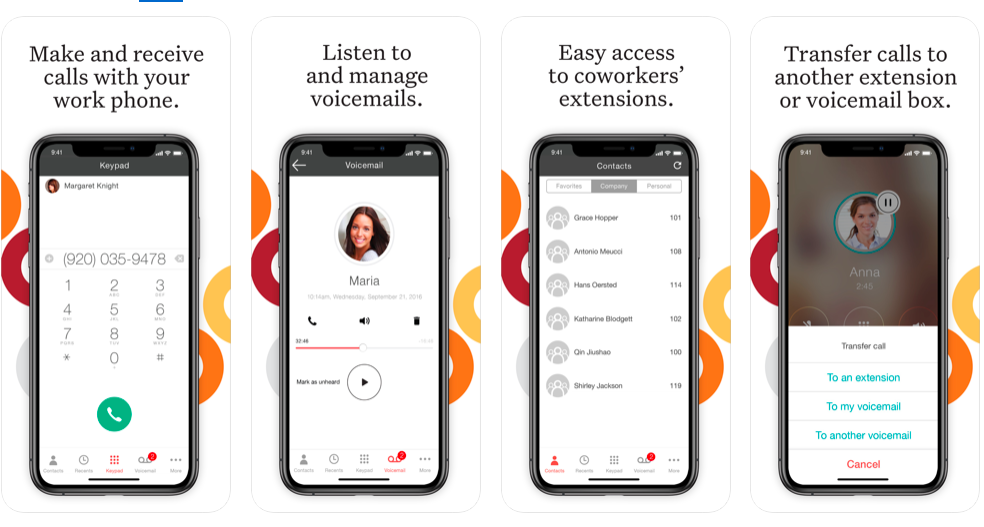
Screenshot of Ooma Business Phone Mobile AppScreenshot of Ooma Office Pro Desktop AppScreenshot of Customizable Virtual ReceptionistScreenshot of Configure System Settings through Ooma Office Manger Online Portal