Hololink is a web-based Augmented Reality editor which enables creation of AR through a visual no-code solution. AR created in Hololink is served directly in the mobile browser without the use of an app, making the whole process from creation to end-user 100% browser-based. Hololink gives creators access to: A visual storyboard to ensure a clear overview of all end-user interactions and the entire user journey, making it possible to use rich storytelling. The…
$59
per month For 1 white label including all pro features
Pulseway
Score7 out of 10
Mid-Size Companies (51-1,000 employees)
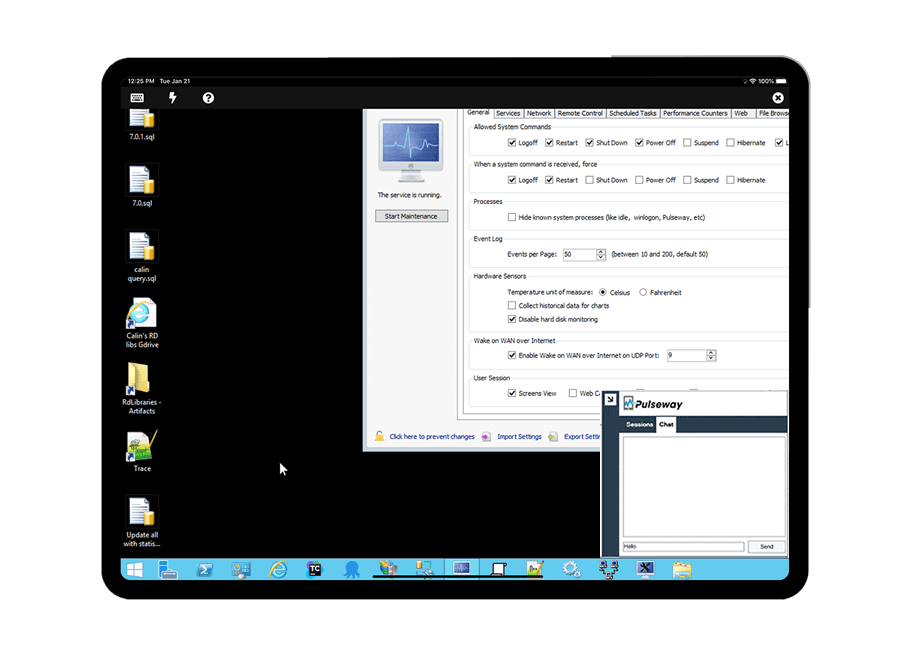
Pulseway is an IT monitoring and management solution that enables users to monitor, manage and control all systems and servers from a smartphone, tablet or browser. For system administrators, Pulseway sends a notification, so they can see an issue and sort it in seconds. Pulseway features: Automation: Auto-remediation workflows, so that IT issues are fixed before users even notice them. Mobile Access: Customers can monitor, manage, connect with…
$0.80
per month per installation
TeamViewer
Score8.6 out of 10
N/A
Teamviewer offers secure remote access, IT support and device management on a scalable platform. It speeds up problem resolution, reduces downtime and enhances control through automation, unattended access and complete visibility of every device and location.
$299
per year
Pricing
Hololink
Pulseway
TeamViewer
Editions & Modules
No answers on this topic
Enterprise
$0.80
per month per installation
Remote Access
$24.90
per month (billed annually) 1 Licensed User
Business
$50.90
per month (billed annually) 1 Licensed User
Premium
$102.90
per month (billed annually) 15 Licensed Users
Corporate
$206.90
per month (billed annually) 30 Licensed Users
Offerings
Pricing Offerings
Hololink
Pulseway
TeamViewer
Free Trial
Yes
Yes
Yes
Free/Freemium Version
Yes
Yes
Yes
Premium Consulting/Integration Services
Yes
Yes
Yes
Entry-level Setup Fee
No setup fee
No setup fee
Optional
Additional Details
—
No hidden fees or contracts. Term-based discounts.
Engineering Technician in Information Technology at Hogan's Systems Consulting, LLC (Information Technology & Services, 1-10 employees)
Chose Pulseway
I will admit, we started with Pulseway several years ago because we were able to start using it with a free account, which allowed us to install it on some in-house servers and gain experience with it. The other products we looked at all seem to require a considerable …
A de minimis incentive was given to thank the reviewer for their time. The incentive was not used to bias or drive a particular response, nor was the incentive contingent on a positive endorsement. More Info
TeamViewer
Verified User
Chose TeamViewer
Pricing wise, the TeamViewer license is a lot more costly, but makes up for it in feature-richness and reliability. Pulseway has the benefit of having the possibility to keep an eye the IT infrastructure so you can catch things before they go wrong but our main focus was a …
A de minimis incentive was given to thank the reviewer for their time. The incentive was not used to bias or drive a particular response, nor was the incentive contingent on a positive endorsement. TR verified that a representative sample of customers was invited. More Info
Senior systems analyst in Information Technology at Bridged IT Services (Information Technology & Services, 11-50 employees)
Chose TeamViewer
Horses for courses they say but all around, TeamViewer is the best software for remote management, period. Pulseway's remote desktop can work well on the phone app but on a desktop, it is often unreliable and drops connections. AnyDesk is not appropriate for our business and …
A de minimis incentive was given to thank the reviewer for their time. The incentive was not used to bias or drive a particular response, nor was the incentive contingent on a positive endorsement. More Info
Verified User
Chose TeamViewer
They both feel the same. Different UI obviously, but they both seem to have the same capabilities
A de minimis incentive was given to thank the reviewer for their time. The incentive was not used to bias or drive a particular response, nor was the incentive contingent on a positive endorsement. TR verified that a representative sample of customers was invited. More Info
Engineering Technician in Information Technology at Hogan's Systems Consulting, LLC (Information Technology & Services, 1-10 employees)
Chose TeamViewer
ConnectWise Control is much easier to use than TeamViewer. It is much easier to set up a "one-off" remote support session and much much much easier to set up a "permanent" remote support connection. ConnectWise also provides a lot more information about the computers …
A de minimis incentive was given to thank the reviewer for their time. The incentive was not used to bias or drive a particular response, nor was the incentive contingent on a positive endorsement. More Info
I only know Hololink from an educational point of view, but as a teacher, I find it easy to use and a fun way to incorporate tech in reports and presentations. My knowledge of the demands in other traits is too little for me to decide whether Hololink is up for the task. For the tasks I've had at hand, Hololink has been a good choice.
If you have to manage a large number of computers, especially spread over multiple clients or a large physical area. This is one of the main products that allows us to act as a Managed Service Provider (MSP) and actually manage our clients devices and not just react to issues as clients call them in. Clients really love the proactive approach it allows us to take. Sadly as we became more familiar with options out there we found this area lacking and what was actually holding us back.
A de minimis incentive was given to thank the reviewer for their time. The incentive was not used to bias or drive a particular response, nor was the incentive contingent on a positive endorsement. More Info
I would definitely recommend it, and that's why I've stuck with it so long: continuous improvement. Now AI has fully embraced it to help with faster monitoring and Troubleshooting, saving me a huge amount of time and effort. Affordable to use for both personal and Professional work to assist colleagues from different workstations.
As opposed to all other AR creation tools that I know, Hololink does not require consumers to download an app, thereby bypassing the primary problem of creating AR experiences, which is getting people to download an app. Let it be known that native apps are going away, the future is web-based because it is easier.
The Hololink image-tracking, which enables AR elements to be projected upon real-world objects and images is exceptionally good compared to other AR projects that also use image-tracking. In Hololink your buttons, 3D models, and videos do not sail away from the objects that they're supposed to be attached to.
The people working on Hololink are very focused on UX, and the few times that I have had suggestions, they have been very attentive.
It monitors computers and notifies us of any issues with any computer.
It allows remote control of computers, such as requesting a computer to reboot itself.
It is very highly configurable to monitor exactly what we need to monitor. For example, on server, we can have it notify us any time the server is shutdown or rebooted. On the other hand, for a desktop computer, we don't have to be bothered with notifications when a user decides to reboot his computer.
A de minimis incentive was given to thank the reviewer for their time. The incentive was not used to bias or drive a particular response, nor was the incentive contingent on a positive endorsement. More Info
A de minimis incentive was given to thank the reviewer for their time. The incentive was not used to bias or drive a particular response, nor was the incentive contingent on a positive endorsement. TR verified that a representative sample of customers was invited. More Info
Hololink comes pre-packed with a lot of 3D models there are cases where I would like to write text on models directly, instead of using the annotation function which Hololink provides. It would be easier than having to upload my own 3D models, which is also possible.
A de minimis incentive was given to thank the reviewer for their time. The incentive was not used to bias or drive a particular response, nor was the incentive contingent on a positive endorsement. More Info
MFA could be a lot better when connecting to the remote device. If a phone is added to security for the remote worker, then the admin cannot use Easy Access to access the device without interaction with the remote worker. Admins should have access to remote devices via other MFA methods.
App updates sometimes cause unstable status and computer must be restarted.
OS updates often require additional user interaction before completing the sign-in process, leaving TeamViewer in an incomplete startup state and preventing the Remote Worker from accessing the device. An admin then has to remote into the device using another remote desktop access tool (Apple Remote Desktop, for instance) and bypass the user interaction screens, which allows the login process to complete and TeamViewer to start up fully. It would be best if the TeamViewer Host could connect even when the OS is prompting for user interaction (e.g., clicking OK on modal dialog boxes post-update).
A de minimis incentive was given to thank the reviewer for their time. The incentive was not used to bias or drive a particular response, nor was the incentive contingent on a positive endorsement. TR verified that a representative sample of customers was invited. More Info
We need this tool in our day to day business. It is what we do all day remoting into clients devices. In this day and age we can access devices all over the world as long as we have secure internet connection. It certainly saves money in gas, and even if you are away you can help.
A de minimis incentive was given to thank the reviewer for their time. The incentive was not used to bias or drive a particular response, nor was the incentive contingent on a positive endorsement. TR verified that a representative sample of customers was invited. More Info
The tool is easy to use however it is can be daunting with the amount of features available in it. Last I checked, their knowledge base was not very expansive and they relied a lot on the changelog for how to do some stuff. This can make it hard to learn how to do some more advanced things like the automation.
A de minimis incentive was given to thank the reviewer for their time. The incentive was not used to bias or drive a particular response, nor was the incentive contingent on a positive endorsement. More Info
TeamViewer is a reliable and really strong tool for accessing remote IT platforms secure and fast. We don't know any product that provide us such strong functionality to make our life as a internationally recognized MES provider with DIAMES with an international clientele so easy. We look forward for any new TeamViewer functionality that supports us even more.
A de minimis incentive was given to thank the reviewer for their time. The incentive was not used to bias or drive a particular response, nor was the incentive contingent on a positive endorsement. More Info
TeamViewer has always been available when we needed to use it. We have not noticed any outages or periods where the software functions were unavailable.
A de minimis incentive was given to thank the reviewer for their time. The incentive was not used to bias or drive a particular response, nor was the incentive contingent on a positive endorsement. More Info
TeamViewer performance has always been very good. Pages load quickly and we can see what the remote engineers are doing on the computer in real time. This is very beneficial for our own technicians and engineers and helps their learning curve. Troubleshooting is much easier with TeamViewer. We have not noticed and lagging of our computers while using TeamViewer.
A de minimis incentive was given to thank the reviewer for their time. The incentive was not used to bias or drive a particular response, nor was the incentive contingent on a positive endorsement. More Info
I have never had to use the support for Pulseway. However, when initially starting out, we would receive emails every so often asking how we are doing and if there is any support that they can provide. I would imagine that any request would be supplied with the same great support!
A de minimis incentive was given to thank the reviewer for their time. The incentive was not used to bias or drive a particular response, nor was the incentive contingent on a positive endorsement. More Info
the few times i have had to contact teamviewer support, they were very responsive and give me quick answers and seemed to understand my problems quickly and easily. I did not have to sit on the phone for hours on hold or get passed around to multiple phone support techs before finding a solution to my issues, so i would rate their support very highly.
A de minimis incentive was given to thank the reviewer for their time. The incentive was not used to bias or drive a particular response, nor was the incentive contingent on a positive endorsement. More Info
As expected without any problem! Alternate in-person training is another efficient way to learn how a product works. There are many third party supporters for TeamViewer courses available that can give additional ideas how to use TeamViewer for specific functions and features as we did require in respect of our usage.
A de minimis incentive was given to thank the reviewer for their time. The incentive was not used to bias or drive a particular response, nor was the incentive contingent on a positive endorsement. More Info
I have never used the online training either. I have watched a few informational videos that were helpful when learning how to do a specific procedure within TeamViewer and get the most out of the software by utilizing one of the many features that are available with the software. Again, 5 if for neutral.
TeamViewer installation and deployment to other devices is pretty straightforward and does not require much technical know-how. This makes ease of use attractive when supporting both new and existing clients with limited technical knowledge. I think ease of use is a huge factor in getting new clients. TeamViewer handles that extremely well.
A de minimis incentive was given to thank the reviewer for their time. The incentive was not used to bias or drive a particular response, nor was the incentive contingent on a positive endorsement. TR verified that a representative sample of customers was invited. More Info
A long time ago I use Aurasma. As I recall it was quite heavy because you had to transfer the Aura from your computer to the student's smartphones through signup on the internet and making them connect to your user with an invitational code, and if it didn´t work it was hard to figure out why. Hololink is just a scan away and you don´t have to connect to any user accounts to see other student products.
Pulseway has the most features, the best looking app with the best design and better usability than any others we evaluated. We liked the uniformity of the app design across all platforms (Windows, Android, Apple) and the notifications displayed on each platform. The price was a major contributor to our selection of Pulseway compared to the competition.
A de minimis incentive was given to thank the reviewer for their time. The incentive was not used to bias or drive a particular response, nor was the incentive contingent on a positive endorsement. More Info
TeamViewer's cost is much lower than that of other solutions, and its security is far superior to RemotePC's. TeamViewer is also a request-based remote session manager, unlike other software that allows indefinite connection time. TeamViewer's free version makes it even better for one end of the group to find support, while the other end has the paid version.
A de minimis incentive was given to thank the reviewer for their time. The incentive was not used to bias or drive a particular response, nor was the incentive contingent on a positive endorsement. TR verified that a representative sample of customers was invited. More Info
A de minimis incentive was given to thank the reviewer for their time. The incentive was not used to bias or drive a particular response, nor was the incentive contingent on a positive endorsement. More Info
AR is hot right now and thus helps attract people. In the future, the AR-excitement might lessen, but it has clear affordances in terms of communication that will continue to be relevant as long as people have smartphones or google-glasses or the likes.
Problems can be dealt with more rapidly because I have access to systems from anywhere. I don't have to carry a computer with me nor do I have to find a location with potentially non-secure wifi to gain access to my systems.
I can handle 99% of my system admin tasks using Pulseway and never have to touch a system or connect to the console.
Pulseway gives so much control over a system that I don't need to spend extra money on other software to perform management tasks.
A de minimis incentive was given to thank the reviewer for their time. The incentive was not used to bias or drive a particular response, nor was the incentive contingent on a positive endorsement. More Info
A de minimis incentive was given to thank the reviewer for their time. The incentive was not used to bias or drive a particular response, nor was the incentive contingent on a positive endorsement. TR verified that a representative sample of customers was invited. More Info