
Laureen Mwende
Account Assistant
Chose Sage Intacct
Sage Intacct had a short learning curve compared to Microsoft Dynamics 365 Finance. Sage Intacct also integrates with more numbers of third-party APIs compared to Microsoft Dynamics 365 Finance.

| Product | Rating | Most Used By | Product Summary | Starting Price |
|---|---|---|---|---|
 Sage Intacct | N/A | Sage Intacct is a cloud ERP system targeted at high-growth small and medium-sized businesses. Intacct includes applications for core financials and accounting, purchasing, order management, and financial reporting and business intelligence. It also integrates with 3rd party software like Salesforce. | N/A | |
 Microsoft Dynamics 365 | N/A | Microsoft Dynamics 365 is a CRM providing sales, marketing, and service functionality. It is offered as SaaS and on-premise. Dynamics 365 is part of the larger Dynamics suite of business intelligence and ERP products. | $44 per month | |
 Spreadsheet Server | N/A | The Spreadsheet Server platform is designed to work as a Microsoft add-in to provide live reporting data and analysis from the user’s ERP solution into Excel. The vendor aims to help users eliminate the hassle of re-keying or downloading any data into spreadsheets make that spreadsheet an integral part of their business environment. | N/A |
| Sage Intacct | Microsoft Dynamics 365 | Spreadsheet Server | ||||||||||||||||||||||
|---|---|---|---|---|---|---|---|---|---|---|---|---|---|---|---|---|---|---|---|---|---|---|---|---|
| Editions & Modules | No answers on this topic | No answers on this topic | No answers on this topic | |||||||||||||||||||||
| Offerings |
| |||||||||||||||||||||||
| Entry-level Setup Fee | No setup fee | No setup fee | No setup fee | |||||||||||||||||||||
| Additional Details | Must contact sales team for pricing. | — | Prices can be different for any company interested in Spreadsheet Server depending on size and who should be involved. Feel free to contact us for a free demo to see if it is the right reporting tool for you. | |||||||||||||||||||||
| More Pricing Information | ||||||||||||||||||||||||
| Sage Intacct | Microsoft Dynamics 365 | Spreadsheet Server | |
|---|---|---|---|
| Considered Multiple Products |  Sage Intacct Laureen Mwende Account Assistant Chose Sage Intacct Sage Intacct had a short learning curve compared to Microsoft Dynamics 365 Finance. Sage Intacct also integrates with more numbers of third-party APIs compared to Microsoft Dynamics 365 Finance.  Pankaj Prashad Assistant Manager F &A Chose Sage Intacct I have used all these software. as discussed earlier Sage Intacct helps us in Inventory management. which is not good in our previous accounting software so we moved to Sage Intacct from that one. Some of the above mentioned software is not good for large scale businesses. I …  Courtney Scully, CPA Accounting Supervisor Chose Sage Intacct Sage Intacct is night and day over Microsofit Dynamics. The ease of use and efficiency is so much better with Sage Intacct. The conneciton options and reporting is as well. I would not recommend Microsoift Dynamics to anyone espcially after using Sage Intacct. I would most …  Mohammad Hourani, MBA, CMA, CIA, CertIFR Senior Project Finance Manager Chose Sage Intacct We were using Dynamics before switching to Intacct. The advantage of Intacct is being a cloud-based system, not a remote desktop.  Eric Amanfoh, CPA VP Finance Chose Sage Intacct All the solutions provided a cloud-based platform; they were all very different and unique. Sage Intacct appealed to the selection team because of the use of dimensions. For our economic development work, we track a lot of grants and have to be very detailed in monitoring how …  Saren Holland Accounts Payable Specialist Chose Sage Intacct Sage is much easier to use with much fewer errors.  Shelly Coulter Senior Accountant Chose Sage Intacct We used MS Dynamics back when it was still called Great Plains. I actually loved that software. It was so user-friendly, intuitive, and easy to use! Switching to [Sage] Intacct was a little difficult, as it was not quite as intuitive and easy to figure out. Sage Intacct is, …  Juan Carlos Rodríguez Bueno Robles Super User Chose Sage Intacct Sage Intacct is the more intuitive of all. |  Microsoft Dynamics 365 Pankaj Prashad Assistant Manager F &A Chose Microsoft Dynamics 365 Microsoft stands different from all of them. It's easy to use and comes with Microsoft's trust. On the basis of security, it's one of the best. It mainly solves the purpose and works as per desire. On the other hand, all the abovementioned items are also suitable for meeting … |  Spreadsheet Server No answer on this topic |
| Sage Intacct | Microsoft Dynamics 365 | Spreadsheet Server | |||||||||||||||||||||||||||||||||||||||||||||||||||||||||||||||||||||||||||||||
|---|---|---|---|---|---|---|---|---|---|---|---|---|---|---|---|---|---|---|---|---|---|---|---|---|---|---|---|---|---|---|---|---|---|---|---|---|---|---|---|---|---|---|---|---|---|---|---|---|---|---|---|---|---|---|---|---|---|---|---|---|---|---|---|---|---|---|---|---|---|---|---|---|---|---|---|---|---|---|---|---|---|
| Payroll Management |
| ||||||||||||||||||||||||||||||||||||||||||||||||||||||||||||||||||||||||||||||||
| Customization |
| ||||||||||||||||||||||||||||||||||||||||||||||||||||||||||||||||||||||||||||||||
| Security |
| ||||||||||||||||||||||||||||||||||||||||||||||||||||||||||||||||||||||||||||||||
| Reporting & Analytics |
| ||||||||||||||||||||||||||||||||||||||||||||||||||||||||||||||||||||||||||||||||
| General Ledger and Configurable Accounting |
| ||||||||||||||||||||||||||||||||||||||||||||||||||||||||||||||||||||||||||||||||
| Inventory Management |
| ||||||||||||||||||||||||||||||||||||||||||||||||||||||||||||||||||||||||||||||||
| Order Management |
| ||||||||||||||||||||||||||||||||||||||||||||||||||||||||||||||||||||||||||||||||
| Sales Force Automation |
| ||||||||||||||||||||||||||||||||||||||||||||||||||||||||||||||||||||||||||||||||
| Customer Service & Support |
| ||||||||||||||||||||||||||||||||||||||||||||||||||||||||||||||||||||||||||||||||
| Marketing Automation |
| ||||||||||||||||||||||||||||||||||||||||||||||||||||||||||||||||||||||||||||||||
| CRM Project Management |
| ||||||||||||||||||||||||||||||||||||||||||||||||||||||||||||||||||||||||||||||||
| CRM Reporting & Analytics |
| ||||||||||||||||||||||||||||||||||||||||||||||||||||||||||||||||||||||||||||||||
| Social CRM |
| ||||||||||||||||||||||||||||||||||||||||||||||||||||||||||||||||||||||||||||||||
| Integrations with 3rd-party Software |
| ||||||||||||||||||||||||||||||||||||||||||||||||||||||||||||||||||||||||||||||||
| Platform |
|
| Sage Intacct | Microsoft Dynamics 365 | Spreadsheet Server | |
|---|---|---|---|
| Small Businesses |  QuickBooks Self-Employed (discontinued) Score 6.4 out of 10 |  Salesmate Score 10.0 out of 10 | QuickBooks Self-Employed (discontinued) Score 6.4 out of 10 |
| Medium-sized Companies |  Zoho Books Score 9.1 out of 10 |  Creatio Score 9.1 out of 10 | Zoho Books Score 9.1 out of 10 |
| Enterprises |  SAP Cloud ERP Score 8.6 out of 10 | Creatio Score 9.1 out of 10 | SAP Cloud ERP Score 8.6 out of 10 |
| All Alternatives | View all alternatives | View all alternatives | View all alternatives |
| Sage Intacct | Microsoft Dynamics 365 | Spreadsheet Server | |
|---|---|---|---|
| Likelihood to Recommend | 8.5 (1462 ratings) | 7.6 (103 ratings) | 8.0 (7 ratings) |
| Likelihood to Renew | 9.8 (82 ratings) | 8.0 (20 ratings) | 9.0 (1 ratings) |
| Usability | 5.7 (140 ratings) | 7.5 (33 ratings) | 8.0 (1 ratings) |
| Availability | 7.2 (13 ratings) | - (0 ratings) | - (0 ratings) |
| Performance | 7.0 (14 ratings) | - (0 ratings) | - (0 ratings) |
| Support Rating | 8.7 (127 ratings) | 8.0 (11 ratings) | 6.0 (1 ratings) |
| In-Person Training | 8.2 (6 ratings) | - (0 ratings) | - (0 ratings) |
| Online Training | 2.0 (13 ratings) | 7.5 (2 ratings) | - (0 ratings) |
| Implementation Rating | 8.6 (21 ratings) | 9.2 (4 ratings) | - (0 ratings) |
| Configurability | 7.1 (12 ratings) | - (0 ratings) | - (0 ratings) |
| Contract Terms and Pricing Model | - (0 ratings) | 3.8 (3 ratings) | - (0 ratings) |
| Ease of integration | 9.0 (309 ratings) | - (0 ratings) | - (0 ratings) |
| Product Scalability | 7.3 (11 ratings) | - (0 ratings) | - (0 ratings) |
| Professional Services | - (0 ratings) | 9.0 (1 ratings) | - (0 ratings) |
| Vendor post-sale | 7.0 (10 ratings) | - (0 ratings) | - (0 ratings) |
| Vendor pre-sale | 8.3 (10 ratings) | - (0 ratings) | - (0 ratings) |
| Sage Intacct | Microsoft Dynamics 365 | Spreadsheet Server | |
|---|---|---|---|
| Likelihood to Recommend | Sage
| Microsoft
| Insightsoftware, Inc
|
| Pros | Sage
 Hailey Waguespack Sr. Client Service Lead, Client Accounting Services | Microsoft
Pankaj Prashad Assistant Manager F &A | Insightsoftware, Inc
 Mary Soffner Controller |
| Cons | Sage
| Microsoft
| Insightsoftware, Inc
|
| Likelihood to Renew | Sage
| Microsoft
 Chris Jensen Analyst / CRM Administrator | Insightsoftware, Inc
 Pamela Lee, CPA Sr. Manager Internal Auditor |
| Usability | Sage
| Microsoft
 Justin Pink Systems & Data Manager | Insightsoftware, Inc
|
| Reliability and Availability | Sage
| Microsoft No answers on this topic | Insightsoftware, Inc No answers on this topic |
| Performance | Sage
| Microsoft No answers on this topic | Insightsoftware, Inc No answers on this topic |
| Support Rating | Sage
| Microsoft
 Todd Jankowski Marketing Specialist | Insightsoftware, Inc
|
| In-Person Training | Sage
 Pam Bakker Controller and Director of Human Resources | Microsoft No answers on this topic | Insightsoftware, Inc No answers on this topic |
| Online Training | Sage
 Ryan Hachenberger, CPA VP of Accounting & Finance | Microsoft No answers on this topic | Insightsoftware, Inc No answers on this topic |
| Implementation Rating | Sage
 Brian Goldrick Director Of Accounting | Microsoft
 Sara Tsoodle Marketing Director | Insightsoftware, Inc No answers on this topic |
| Alternatives Considered | Sage
 Lisa Beason FCAS Controller | Microsoft
 Patrick Stephens Director Of Communications | Insightsoftware, Inc
Mary Soffner Controller |
| Contract Terms and Pricing Model | Sage No answers on this topic | Microsoft
 Mst Rahima Khatun Marketing Product Management | Insightsoftware, Inc No answers on this topic |
| Scalability | Sage
Brian Goldrick Director Of Accounting | Microsoft No answers on this topic | Insightsoftware, Inc No answers on this topic |
| Professional Services | Sage No answers on this topic | Microsoft
Mst Rahima Khatun Marketing Product Management | Insightsoftware, Inc No answers on this topic |
| Return on Investment | Sage
 Ashling Heenan AR / AP Consultant | Microsoft
 Alexander Cooper Applications Consultant | Insightsoftware, Inc
|
| ScreenShots | Sage Intacct Screenshots      | Spreadsheet Server Screenshots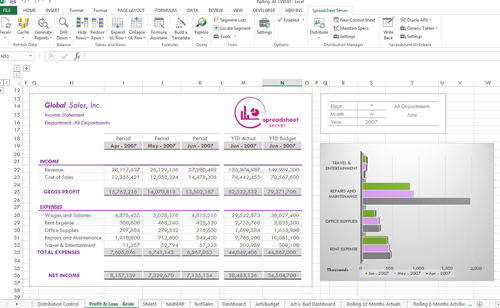  |