Overview
ProductRatingMost Used ByProduct SummaryStarting Price
Sage Intacct
Score 8.6 out of 10
N/A
Sage Intacct is a cloud ERP system targeted at high-growth small and medium-sized businesses. Intacct includes applications for core financials and accounting, purchasing, order management, and financial reporting and business intelligence. It also integrates with 3rd party software like Salesforce.N/A
Oracle Hyperion (legacy)
Score 7.5 out of 10
N/A
Oracle's Corporate Performance Management suite was acquired from Hyperion in 2007. Hyperion customers are encouraged to migrate to Oracle Fusion Cloud EPM.N/A
QuickBooks Online
Score 8.0 out of 10
N/A
QuickBooks Online is a SaaS version of the QuickBooks product. It contains all of the features found in the local version. Higher-priced plans include greater automation, payment management, inventory and time tracking, and analytics features.
$38
per month
Pricing
Sage IntacctOracle Hyperion (legacy)QuickBooks Online
Editions & Modules
No answers on this topic
Simple Start
$38
per month
Essentials
$75
per month
Plus
$115
per month
Advanced
$275
per month
Offerings
Pricing Offerings
Sage IntacctOracle Hyperion (legacy)QuickBooks Online
Free Trial
NoNoYes
Free/Freemium Version
NoNoNo
Premium Consulting/Integration Services
NoNoNo
Entry-level Setup FeeNo setup feeNo setup feeNo setup fee
Additional DetailsMust contact sales team for pricing.
More Pricing Information
Community Pulse
Sage IntacctOracle Hyperion (legacy)QuickBooks Online
Considered Multiple Products
Sage Intacct
Chose Sage Intacct
Sage Intacct has been great - we were coming over from Sage 50 and wanted to stay in the Sage ecosystem. Other than my aforementioned areas of improvement, we have been super happy with the platform.
Chose Sage Intacct
Sage Intacct is a comprehensive all in one ERP business management tool that stacks up very well compared to the competition, it has very useful modules and functions within each module. The multi-entity and dimension functionality can be a game changer depending on if it is …
Chose Sage Intacct
Sage Intacct is superior to all the products I have used.
Chose Sage Intacct
At first, we were indeed attracted to Intacct because it offered a lot of customization options and helped us better integrate multiple programs. However, we later discovered that the learning curve was steep, and because the vendor didn’t fully understand our business, we had …
Chose Sage Intacct
We selected the Sage Intacct Package due to the overall sales points by the VAR that this would improve our project costing and meet our payroll type needs. The last selling point was the ability to have a VAR within the state who could be in person for meetings with us and …
Chose Sage Intacct
Sage 50 has significantly less features/capabilities to Sage Intacct. Intacct's ability to report and segment data, in addition to it being web-based, make it much more user friendly and easy to access both the platform and relevant data needed. We are still using Rent Manager …
Chose Sage Intacct
Sage was cheaper than Acumatica and already being used, so it was easier to stick with Sage than make a big transition with a lean team. QuickBooks would not have had the revenue recognition capabilities that Sage has.
Chose Sage Intacct
Sun systems by Infor was not 100% in cloud, It was still depending on Excel. Oracle was too big M3 was too old
Chose Sage Intacct
I think Sage is much easier to use and makes more accounting sense than either MIP or FE. I often wonder if accountants are involved in creating accounting software but i do not feel like that with Sage.
Chose Sage Intacct
We selected Sage Intacct for the multientity multi currency platform.
Chose Sage Intacct
We felt the 2nd best alternative to Sage Intacct was Aplos, then Blackbaud. However, there were some issues:
> Overall functionality - All of our initial business requirements were fully met with Sage Intacct, which was mostly similar to other offerings. Where Sage Intacct …
Chose Sage Intacct
For an emerging software company, we should have stayed longer on QBO before moving to Intacct. QBO would have been less expensive and easier to use.
Chose Sage Intacct
I think Sage Intacct is by far the worst accounting software I have ever used. We only selected Sage Intacct in order to integrate with WooCommerce's order management platform...which we have since then ditched. We should have never migrated over from QuickBooks. We should have …
Chose Sage Intacct
I selected both. They work together. I specifically selected MineralTree because it has a direct and bi-directional API sync with Sage Intacct. Again, I think Sage needs to be proactive to smooth out a couple of bumps: 1. the mapping of the restriction field; 2. the deleting of …
Chose Sage Intacct
Intacct is cheaper than NetSuite; we're interested in Rillet and Campfire, but don't want to undergo the process of an implementation.
Chose Sage Intacct
This is my first controller position, and I have used Sage in depth more than any prior ERP.
Chose Sage Intacct
Sage Intacct offered more cloud-based options and greater customization than the software previously used. The cost-to-benefit ratio could not be beat.
Chose Sage Intacct
I have not used other accounting software to compare it against.
Chose Sage Intacct
I have mentioned several of the tools and applications that Sage has made available to my company and how my company has constructed to use them and apply them to our daily lives of bookkeeping, with receivable and checks and balances, making it a better and proper system with …
Chose Sage Intacct
Sage Intacct was less expensive and provided all of the functionality we needed.
Chose Sage Intacct
MS GP was no longer supported, so we switched to Intacct. QuickBooks wasn't nearly as robust, and we were enticed by both the peer organizations that use Intacct and the ability to make the system work for us in ways MS financial software had historically not.
Chose Sage Intacct
We evaluated Sage Intacct alongside many other options, but Blackbaud and NetSuite were the frontrunners. They all were cloud-based and capable systems, but for our team, Sage Intacct was the clearer choice for a few reasons. First, usability. Our team has varying levels of …
Oracle Hyperion (legacy)
Chose Oracle Hyperion (legacy)
Hyperion was easier to use and learn and problem solve issues than Oracle Financials
Chose Oracle Hyperion (legacy)
I use Oracle Hyperion Enterprise Performance Mangement because the company I work at requires me to use it in the Financial Planning sector as most of their data is stored in it. I am open minded and ready to use other performance management tools created by Oracle if my work …
Chose Oracle Hyperion (legacy)
Compared with some of the other products that had been used, Oracle Hyperion had solved the major impediment of integrating multiple ERP systems (both SAP and non-SAP) with relative ease while providing the business the leverage to analyze, comprehend, and rectify the data.
Chose Oracle Hyperion (legacy)
Hyperion makes it easier to create reports based on the data available on Hyperion. However is Phocas is better for drilling down information and it is also much more mobile.
Chose Oracle Hyperion (legacy)
None of the other products used or evaluated are available for me to select.
I have used EPMware with is a competing software to DRM. I find the ROI on this tool greater then DRM. It is about a quarter of the cost and directly interfaces with multiple Hyperion applications.
CXO …
Chose Oracle Hyperion (legacy)
Hyperion is easy to implement and maintain, low cost of ownership is also a great reason to select this product.
Oracle's investment to keep the product innovations and improvements over the years is well appreciated by the users. The ease of managing integration with different …
Chose Oracle Hyperion (legacy)
It is the leading system, with the most power and flexibility of any of these. It is also the most expensive. Berkeley needs the best possible tool for this job. Questica and Workday cannot handle the number of dimensions we use. Adaptive might be a good competitor but since I …
Chose Oracle Hyperion (legacy)
We utilize Tableau as well for reporting, but the good thing about OracleHyperion Enterprise Performance Management is it is in sync with our ledger as we utilize Oracle Ledger from our side. Tableau has a better user interface but the EPM's understanding of the data makes it …
Chose Oracle Hyperion (legacy)
When we were trying to decide between Oracle Hyperion and SAP BPC, the cost and functionality were pretty much the same between both products, but we decided for the Oracle solution as it was better positioned in the Gartner Magic Quadrant for consolidation softwares, and some …
Chose Oracle Hyperion (legacy)
Due to being the industry forefront and owned by Oracle
Chose Oracle Hyperion (legacy)
Oracle has led the charge on the development of true EPM reporting. The development of rudimentary KPIs to much more complex models all can be housed and managed by Hyperion. Integrates with Office through Smartview, which provides flexibility in creating Word documents, board …
Chose Oracle Hyperion (legacy)
We also took a look to Cognos, but since we have Oracle eBS as our main ERP, we decided without a very deep analysis.
Chose Oracle Hyperion (legacy)
In our review, Oracle Hyperion Enterprise Performance Management stacks up pretty well against SAP Business Warehouse. The most glaring area was cost. For a product capable of the same level of reporting day in and day out, Hyperion offered the best bang for the buck. This …
Chose Oracle Hyperion (legacy)
Toyota has a global presence and deals with different countries and different currencies. To manage finance, this tool is the most reliable tool I found if the company has a global presence. If you deal with any tool to manage Financial matters, performance and reliability is …
Chose Oracle Hyperion (legacy)
Pricing is one factor and the features offered by the Oracle EPM and IBM cognos shifted the favour in terms of Oracle EPM.
Chose Oracle Hyperion (legacy)
We have evaluated other options in the past, and we are currently re-evaluating some of the SaaS providers due to the increased strength of those products over the last few years. However, our biggest need continues to be a very capable consolidation tool as we are …
QuickBooks Online
Chose QuickBooks Online
Sage accounting is not very user friendly compare to the QuickBooks Online. When there are adjustments in the vendor accounts, it hard to process in Sage accounting and reconcile the accounts. In QuickBooks Online, it is easy to process the whole accounting with ease. The …
Chose QuickBooks Online
We have mainly only used QuickBooks for the past few years. The last time we evaluated another similar product was Square, and that was probably 5 years ago. QuickBooks was much more robust and, at the time, offered us more features overall than Square did. It just felt like a …
Chose QuickBooks Online
I do prefer Honeybook over QuickBooks Online due to it being more user friendly and not having as many "hoops" to jump through for setup.
Chose QuickBooks Online
QBO is the cheapest of the mentioned options. It is much easier to navigate than NetSuite. Rillet and Campfire are still pretty new, so they are building out their different functionalities. QBO lacks the strength of the AI native platforms, like Campfire and Rillet, and it …
Chose QuickBooks Online
It's great to start out and scale out of. The product is seamless and better for small teams; it's nice to use and easy to pick up.
Chose QuickBooks Online
Since I perform most of my accounting activities in QBO, I genuinely consider it my go-to software, and I find all its features highly useful.
Chose QuickBooks Online
I used Avalara for 1099's I would use QuickBooks Online, however, for the few we do, it is more cost effective to use Avalara.
Chose QuickBooks Online
QuickBooks Online is best for small and mid sized businesses needing simple affordable accounting. Its starting price is from $19. Xero is stronger for collaboration with unlimited users. Their cost starts with 15, and they are good for flexible reports. Netsuite is built for …
Chose QuickBooks Online
QuickBooks is the best overall as it is intuitive and easy to use, whilst meeting the needs of a CFO. Xero is very popular for IFRS reporting standards and the English-speaking countries internationally. MYOB is the most popular in Australia. SAGE is very strong for …
Chose QuickBooks Online
The employer I am currently with already had QuickBooks in place. The other ERP systems are much more robust, however they come with a much steeper price that might not be necessary if the business is in its infancy.
Chose QuickBooks Online
So much better than dumbed-down Xero.
Chose QuickBooks Online
Shelby is more for larger companies, can be overwhelming. It's pretty easy to use but I still prefer QBO.
Chose QuickBooks Online
Bench is currently doing our book keeping and we are happy with them. I am not sure if QuickBooks also does book keeping.
Chose QuickBooks Online
QuickBooks Online makes working with clients in distant states more seamless. When my clients were on Desktop, I had to upload backups for the client to download and execute. They would frequently make changes and not tell me, which would lead to inaccurate reporting at the end …
Chose QuickBooks Online
Sage excells at more complex accounting, but clients do not find the app on the move as easy to use as QuickBooks Online
Chose QuickBooks Online
I only selected QuickBooks online to control the cost of bookkeeping and accounting for my company. Freshbooks was a delight to use, with excellent support, intuitive UI, and easy integrations. The only reason I stay with QuickBooks is because I personally do not have the …
Chose QuickBooks Online
I initially chose QuickBooks Online because I had already used the desktop version and was familiar with the interface. I have not tried any other similar software.
Chose QuickBooks Online
QuickBooks online is the only program I have used.
Chose QuickBooks Online
Xero has alot of dead ends, you cant click through to things, you have to go all the way back out, theres no shortcuts, so it takes alot of time. With both, the transactions dont let you know they are connected to a bank feed transactions, you are just assuming they are until …
Chose QuickBooks Online
Sage Intacct is very difficult to use and the inter-face is decades behind QB online. The ease to which one can find and manage information on QB online versus Sage Intacct is remarkable. QB Online is made for people who actually manage and facilitate financial information. I …
Chose QuickBooks Online
Widely adopted by U.S. customers, Stronger tools, easier to download and save. We have been a QuickBooks Online customer for 10 years and the price nearly never increases and always stays roughly the same, and offers richer functionality than Xero. We had Xero mostly when we …
Features
Sage IntacctOracle Hyperion (legacy)QuickBooks Online
Payroll Management
Comparison of Payroll Management features of Product A and Product B
Sage Intacct
7.0
Ratings
8% below category average
Oracle Hyperion (legacy)
-
Ratings
QuickBooks Online
8.0
Ratings
6% above category average
Pay calculation7.00 Ratings00 Ratings8.40 Ratings
Benefit plan administration6.40 Ratings00 Ratings7.20 Ratings
Direct deposit files7.10 Ratings00 Ratings8.50 Ratings
Salary revision and increment management6.90 Ratings00 Ratings8.20 Ratings
Reimbursement management7.60 Ratings00 Ratings7.90 Ratings
Customization
Comparison of Customization features of Product A and Product B
Sage Intacct
7.7
Ratings
2% above category average
Oracle Hyperion (legacy)
-
Ratings
QuickBooks Online
7.0
Ratings
8% below category average
API for custom integration7.90 Ratings00 Ratings7.00 Ratings
Plug-ins7.50 Ratings00 Ratings7.00 Ratings
Security
Comparison of Security features of Product A and Product B
Sage Intacct
8.7
Ratings
6% above category average
Oracle Hyperion (legacy)
-
Ratings
QuickBooks Online
8.3
Ratings
1% above category average
Single sign-on capability8.80 Ratings00 Ratings8.40 Ratings
Role-based user permissions8.60 Ratings00 Ratings8.20 Ratings
Reporting & Analytics
Comparison of Reporting & Analytics features of Product A and Product B
Sage Intacct
7.9
Ratings
1% above category average
Oracle Hyperion (legacy)
-
Ratings
QuickBooks Online
8.2
Ratings
4% above category average
Dashboards7.80 Ratings00 Ratings8.20 Ratings
Standard reports8.10 Ratings00 Ratings8.40 Ratings
Custom reports7.70 Ratings00 Ratings7.90 Ratings
General Ledger and Configurable Accounting
Comparison of General Ledger and Configurable Accounting features of Product A and Product B
Sage Intacct
8.0
Ratings
5% above category average
Oracle Hyperion (legacy)
-
Ratings
QuickBooks Online
7.9
Ratings
4% above category average
Accounts payable8.30 Ratings00 Ratings8.70 Ratings
Accounts receivable8.10 Ratings00 Ratings8.80 Ratings
Cash management8.10 Ratings00 Ratings8.10 Ratings
Bank reconciliation8.10 Ratings00 Ratings9.00 Ratings
Expense management8.00 Ratings00 Ratings8.30 Ratings
Time tracking7.10 Ratings00 Ratings7.00 Ratings
Fixed asset management7.50 Ratings00 Ratings8.00 Ratings
Multi-currency support7.90 Ratings00 Ratings7.60 Ratings
Multi-division support8.60 Ratings00 Ratings7.30 Ratings
Regulations compliance7.60 Ratings00 Ratings8.00 Ratings
Electronic tax filing7.70 Ratings00 Ratings8.10 Ratings
Self-service portal7.50 Ratings00 Ratings7.40 Ratings
Global Financial Support8.10 Ratings00 Ratings6.70 Ratings
Intercompany Accounting8.40 Ratings00 Ratings7.90 Ratings
Journals and Reconciliations8.70 Ratings00 Ratings8.50 Ratings
Enterprise Accounting8.10 Ratings00 Ratings7.10 Ratings
Configurable Accounting8.20 Ratings00 Ratings7.90 Ratings
Centralized Rules Framework7.90 Ratings00 Ratings7.70 Ratings
Standardized Processes8.30 Ratings00 Ratings8.80 Ratings
Primary and Secondary Ledgers00 Ratings00 Ratings8.10 Ratings
Localizations00 Ratings00 Ratings7.90 Ratings
Inventory Management
Comparison of Inventory Management features of Product A and Product B
Sage Intacct
6.8
Ratings
7% below category average
Oracle Hyperion (legacy)
-
Ratings
QuickBooks Online
6.9
Ratings
6% below category average
Inventory tracking7.80 Ratings00 Ratings6.70 Ratings
Automatic reordering5.50 Ratings00 Ratings7.10 Ratings
Location management8.60 Ratings00 Ratings7.30 Ratings
Manufacturing module5.20 Ratings00 Ratings6.60 Ratings
Order Management
Comparison of Order Management features of Product A and Product B
Sage Intacct
7.6
Ratings
2% above category average
Oracle Hyperion (legacy)
-
Ratings
QuickBooks Online
7.9
Ratings
6% above category average
Pricing7.70 Ratings00 Ratings8.00 Ratings
Order entry8.00 Ratings00 Ratings7.80 Ratings
Credit card processing7.50 Ratings00 Ratings8.40 Ratings
Cost of goods sold6.30 Ratings00 Ratings8.30 Ratings
End-to-end order visibility8.20 Ratings00 Ratings7.90 Ratings
Order Orchestration00 Ratings00 Ratings7.40 Ratings
Order exception Resolution00 Ratings00 Ratings7.50 Ratings
Budgeting, Planning, and Forecasting
Comparison of Budgeting, Planning, and Forecasting features of Product A and Product B
Sage Intacct
-
Ratings
Oracle Hyperion (legacy)
10.0
Ratings
9% above category average
QuickBooks Online
-
Ratings
Long-term financial planning00 Ratings10.00 Ratings00 Ratings
Financial budgeting00 Ratings10.00 Ratings00 Ratings
Forecasting00 Ratings10.00 Ratings00 Ratings
Scenario modeling00 Ratings10.00 Ratings00 Ratings
Management reporting00 Ratings10.00 Ratings00 Ratings
Analytics and Reporting
Comparison of Analytics and Reporting features of Product A and Product B
Sage Intacct
-
Ratings
Oracle Hyperion (legacy)
8.2
Ratings
0% above category average
QuickBooks Online
-
Ratings
Personalized dashboards00 Ratings8.00 Ratings00 Ratings
Color-coded scorecards00 Ratings7.10 Ratings00 Ratings
KPIs00 Ratings9.90 Ratings00 Ratings
Cost and profitability analysis00 Ratings9.90 Ratings00 Ratings
Key Performance Indicator setting00 Ratings8.00 Ratings00 Ratings
Benchmarking with external data00 Ratings6.00 Ratings00 Ratings
Best Alternatives
Sage IntacctOracle Hyperion (legacy)QuickBooks Online
Small Businesses
QuickBooks Self-Employed (discontinued)
Score 5.1 out of 10
MIP Fund Accounting
MIP Fund Accounting
Score 8.7 out of 10
QuickBooks Self-Employed (discontinued)
Score 5.1 out of 10
Medium-sized Companies
Zoho Books
Zoho Books
Score 9.0 out of 10
Centage
Centage
Score 9.4 out of 10
Zoho Books
Zoho Books
Score 9.0 out of 10
Enterprises
Oracle Fusion Cloud Enterprise Performance Management
Score 7.4 out of 10
OneStream
OneStream
Score 8.8 out of 10
Oracle Fusion Cloud Enterprise Performance Management
Score 7.4 out of 10
All AlternativesView all alternativesView all alternativesView all alternatives
User Ratings
Sage IntacctOracle Hyperion (legacy)QuickBooks Online
Likelihood to Recommend
8.4
(0 ratings)
10.0
(0 ratings)
8.4
(0 ratings)
Likelihood to Renew
5.4
(0 ratings)
5.0
(0 ratings)
9.6
(0 ratings)
Usability
5.1
(0 ratings)
-
(0 ratings)
8.3
(0 ratings)
Availability
9.0
(0 ratings)
-
(0 ratings)
9.0
(0 ratings)
Performance
10.0
(0 ratings)
-
(0 ratings)
1.0
(0 ratings)
Support Rating
2.7
(0 ratings)
8.0
(0 ratings)
9.9
(0 ratings)
In-Person Training
8.2
(0 ratings)
-
(0 ratings)
-
(0 ratings)
Online Training
1.0
(0 ratings)
-
(0 ratings)
-
(0 ratings)
Implementation Rating
1.0
(0 ratings)
-
(0 ratings)
9.9
(0 ratings)
Configurability
3.0
(0 ratings)
-
(0 ratings)
1.0
(0 ratings)
Ease of integration
6.5
(0 ratings)
-
(0 ratings)
1.3
(0 ratings)
Product Scalability
2.0
(0 ratings)
-
(0 ratings)
2.0
(0 ratings)
Vendor post-sale
1.0
(0 ratings)
-
(0 ratings)
5.0
(0 ratings)
Vendor pre-sale
1.0
(0 ratings)
-
(0 ratings)
5.0
(0 ratings)
User Testimonials
Sage IntacctOracle Hyperion (legacy)QuickBooks Online
Likelihood to Recommend
Sage Intacct is well suited for below areas 1) Integrations with third party applications 2) Contracts module for billing based on milestones and Direct Invoicing 3) Customer communications for Pending Invoices/ Dunning 4) End to End Procure to Pay module for vendor payments 5) Bank reconciliations by integrating with Bank Portals Sage Intacct is less suited for 1) Prospective MEA Allocations 2) MEA allocations during Partial cancellation of contracts 3) Past due reminders for customers 4) Exchange rate history is not available in Intacct.
Read full review
Well suited: For use in multiple offices around the world. I was able to obtain financial reporting data from 5 foreign offices and then consolidate their data with 3 domestic USA offices to prepare a consolidated financial statement. Less Appropriate: Translating the financial value for consulting services could be a bit challenging because that required human interaction and judgement. It would have been great to be able to set up some software to be able to interpret this and let it run for all future project work revenue projection.
Read full review
I appreciate the ability to auto-generate invoices for recurring transactions, which saves time, as well as the option to set up auto-generated transactions. The report option is super helpful when reviewing information, as you can click to view the details in the report without having to go back and forth.
Read full review
Pros
  • Custom, real-time financial reporting. I am able to streamline my reporting to pull in various account groups and calculations which save me time from having to do it in Excel.
  • Out of the box standard reports for clients who don't require as custom of reporting or even as a great starting point to build out reports.
  • Integrations with other platforms, such as Airbase, various banks, Rippling, etc.
  • The dashboard module is extremely helpful in my monthly review of various entities.
Read full review
  • HFM is very powerful for financial consolidations .
  • Hyperion Planning is used to project accurate planning and thus provide the benefit to organization to do allocations and driver based planning so that it can justify the numbers based on headcount, number of stops & Revenue and thus provide valuable projections and thus help reduce the expenses.
  • Essbase is powerful engine helps provide analytical adhoc reporting for financial users . Performance of reporting and ease of use helps excellent customers experience when doing adhoc analysis.
Read full review
  • Workflows for accounts payable invoice review are terrific.
  • Bill payment allows you to pay vendors online via ACH or check without having to write a physical check, which reduces admin time.
  • The cloud based login lends well to a remote or hybrid work environment for staff.
  • QuickBooks Online allows you to pre-configure vendors' general ledger expense accounts. This helps with general ledger coding accuracy and consistency.
  • QuickBooks Online integrates with Rippling HRIS, Coast, Capital One, JPMorgan Chase, etc., which lends well to an efficient month-end closing and reduced administrative time.
Read full review
Cons
  • The budgeting module is archaic. It needs to have more application features, including tracking changes made throughout the year.
  • The creation of reports is complicated and lacks sufficient filtering options during the process.
  • The Purchasing module should be more flexible, allowing users to add change orders to an existing PO rather than creating a new one.
Read full review
  • Oracle Hyperion requires a lot of knowledge and expertise to be successful.
  • The underlying infrastructure of Oracle Hyperion is complex and can be difficult to implement.
  • Some of the Oracle Hyperion application servers only run on Windows. Windows can sometimes be unstable.
  • Oracle Hyperion application server processes are dependent on each other and need to be started in a specific order. Therefore, if certain services die on one server, it could require all services/processes in the entire Hyperion landscape to be restarted in the correct order.
Read full review
  • Purchase Orders cannot be linked to multiple bill payments which makes tracking purchase orders in QuickBooks Online obsolete. Without the function we have to track this within a different more manual spreadsheet.
  • Would be helpful if you could "split" bank transactions directly from the "review" downloads from the bank. Currently, to split transactions to multiple accounts we need to first categorize, then review after assigning to 1 account.
Read full review
Likelihood to Renew
Sage Intacct continues to well-satisfy our needs and is an easy-to-use product. Service reliability has been excellent. The ability to integrate Sage Intacct with best-in-class companion products that handle expense reporting, budgeting, etc... makes Sage Intacct an excellent value. We continue to be extremely well-satisfied with the results and performance of our experience using Sage Intacct.
Read full review
We're in the middle of the road because we are not sure that other products on the market fit the bill for what we need yet. Hyperion is expensive and burdensome from an administrator and maintenance standpoint, but it still seems to be the best solution for what we need. Show us an equally capable SaaS consolidation product and we'll talk again.
Read full review
QBO needs better integration with non-Intuit products and developers need to use Intuit's open API to develop better add-ons. Clients are having a great deal of problems with their data importing from the bank and this takes time away from better revenue producing activities. Although the efficiencies are there, they are outweighted by the shortcomings of the product. When we ran a parallel of QBO versus other cloud accounting products, we had more issues with the QBO product than any other
Read full review
Usability
The ease of use as a seasoned user is wonderful; however, new users struggle to adapt to the program efficiently. Better training videos--all in one location--would be beneficial. The use of a "sandbox" environment is a great tool for new employees or for the fiscal department to test certain journal entries or other transactions to verify accuracy of data.
Read full review
No answers on this topic
I had very little trouble setting up the program and migrating from our old accounting system. The daily usage is also very intuitive and easy. Anytime we run into minor trouble with the program, there are always tons of help available on YouTube, so we don't even look up the online manual anymore.
Read full review
Reliability and Availability
There has only been one occurrence where Sage Intacct was not available to me, however I had already been working a number of hours trying to get a project completed. It honestly allowed me to step back and take a much needed break.
Read full review
No answers on this topic
We have rarely had outages in the last 10 years. I can only recall 2 times in the last 10 years where we were not able to access our client files.
Read full review
Performance
As fas as integration is concerned I don't feel this slows Sage Intacct down at all. However, sometimes I do feel it takes some larger reports more time to load due to all the detail. As well as, I "move very fast" in my motions so sometimes I double click on fuctions too quickly and the system seems to think that I have a duplicate request.
Read full review
No answers on this topic
Everything process has its bugs lately with the new interface. Nothing has worked smoothly since this all began last month.
Read full review
Support Rating
Only a few times have we had to reach out to support, and every time we did, we received a relatively quick response and a solution was found fairly quickly. Only once was there an issue that took longer than a week to resolve, but it still did eventually get solved.
Read full review
The premium support team provides much needed dedicated customer service which we are after for what we have paid for this service. We are satisfied with the service and support and do not have any instance where there was an issue that requires escalation to get the right support team. Though the incidence of major issues that requires the premium support are less, we prefer to keep this as a safety net.
Read full review
In my experience, most representatives keep me on the phone for hours, literally, for a single issue and then usually cannot resolve it satisfactorily. I have 10 open cases that need resolution and, in my experience, there has been NO follow-up communication on any of them.
Read full review
In-Person Training
I have taken in person training classes at several of the annual Sage Intacct user conferences. It is very interactive and the trainers are very easy to follow and understand. They are great at getting everyone in the class involved. They also make sure everyone has learned to task before moving to a new one.
Read full review
No answers on this topic
Online Training
The free training is very minimal. For what we pay for the service, I would like more training. We end up training new users in-house because the provided free training is not nearly comprehensive enough. That being said, the training provided, for the material covered, was adequate and relevant for the given topics.
Read full review
No answers on this topic
Implementation Rating
I would not use a thrid party administrator to implement your system, especially if you are going to be modifying the system at all. Use Intacct implementors as they will be able to better support you on any issues that come up after you go live.
Read full review
No answers on this topic
The person in charge of QB needs to be very accurate with record keeping and is recommended to stay on top of tasks. The biggest issue we have is reconciliation, and those issues occur only when too much time has occurred between reconciliations
Read full review
Alternatives Considered
We felt the 2nd best alternative to Sage Intacct was Aplos, then Blackbaud. However, there were some issues: > Overall functionality - All of our initial business requirements were fully met with Sage Intacct, which was mostly similar to other offerings. Where Sage Intacct distinguished itself was in its business model, what we would end up with after implementation that would stream-line our organization. > Open architecture - APIs for our other specific software tools were already part of Sage Intacct and others did not have the robust existing offerings and did not make clear how we would build such hooks. > Pricing - Sage Intacct ended up the best price, with the software and implementation support bundled into one annual price. Our multi-year agreement was also the best price, through negotiations / iterations. > References - We contacted references for each vendor in consideration. Church/non-profit Sage Intacct users spoke and understood "our language" and were incredibly positive about their experience with Sage Intacct. References provided by other vendors missed the mark in terms of a business match, which doesn't bode well if those are what is offered.
Read full review
Hyperion is easy to implement and maintain, low cost of ownership is also a great reason to select this product. Oracle's investment to keep the product innovations and improvements over the years is well appreciated by the users. The ease of managing integration with different business systems is also considered while selecting this product.
Read full review
QBO is the cheapest of the mentioned options. It is much easier to navigate than NetSuite. Rillet and Campfire are still pretty new, so they are building out their different functionalities. QBO lacks the strength of the AI native platforms, like Campfire and Rillet, and it doesn't hang well with NetSuite on inventory.
Read full review
Scalability
There is so much that we have yet to learn with and about Sage Intacct, I am excited for the future.
Read full review
No answers on this topic
As we have grown along our professional path, we have also expanded our use of QB. The scalability is easy and features seem to be waiting for you until you need them. We have increased profits by over 10x from our first year in business to the current and have yet to find a reason to look elsewhere
Read full review
Return on Investment
  • Positive - It runs better than our old software when we all work together, rather than having to sign off on each other and deal with syncing issues.
  • Negative - It's not as easy to go back to fix an amount, a date, etc. Sometimes, a very small mistake needs to be corrected by voiding and redoing the entire transaction.
  • We can successfully sync other software we use with Intacct! It reduces workload when things are automated.
Read full review
  • We had to get the planning application designed correctly before we got a good ROI, but once we did it became well liked and highly utilized.
  • It has had a very positive overall impact on increasing finance literacy across campus, allowing units a better insight into their revenues and expenses and the overall planning process.
  • It has been an essential tool during a time where the campus needed to reduce it's budget by over 100 million dollars annually. Without this product, we would not have a way to identify, track and report on our progress reducing the budget.
Read full review
  • I think the help function is cumbersome and hard to use. When I go to refresh myself on a function, say quarterly, I feel like I have to cast about just looking for it.
  • The account reconciliation works, but in this place that could benefit from messaging, there are no easy helping functions flagging things like amounts that fit the discrepancy.
  • Even styling invoices and documents is more cumbersome than it should be.
Read full review
ScreenShots

Sage Intacct Screenshots

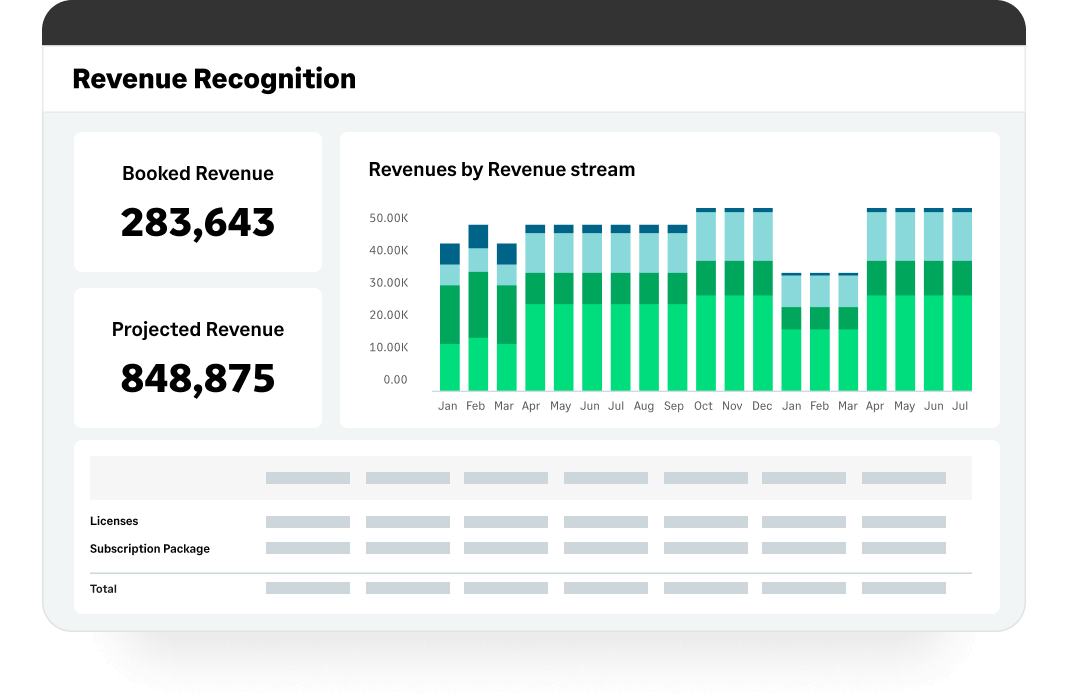
Screenshot of Accounts Receivable: Automate accounts receivable processes.Screenshot of Revenue Recognition: Automated and compliant revenue recognition with complete support for ASC 606 and IFRS 15.Screenshot of Real-Time Reporting: Real-time reporting with up-to-minute financials across multiple business dimensions. Show only the metrics that matter based on the user viewing the dashboard.Screenshot of the times and expense management dashboard, which is customized to reflect the user's role, displaying relevant information that aligns with their position, thereby presenting each individual with the data most pertinent to their responsibilities.Screenshot of the detailed company metrics used to forecast business growth.Screenshot of the order management workflows, which are automated to accelerate quote-to-cash sales

QuickBooks Online Screenshots

Screenshot of the accounting and bank transactions interfaceScreenshot of an overview of the accounting inventoryScreenshot of book marksScreenshot of the business tax overviewScreenshot of the customer hubScreenshot of the dashboard