Overview
ProductRatingMost Used ByProduct SummaryStarting Price
Intermapper
Score 8.4 out of 10
N/A
Intermapper is a network monitoring and mapping software for hybrid environments. Intermapper provides real-time performance alerts and bandwidth monitoring with cross-platform functionality.N/A
Juniper Paragon Insights
Score 7.8 out of 10
N/A
Paragon Insights (formerly HealthBot) is a cloud-native, network health and diagnostic solution that provides operational intelligence across all service provider, cloud, and enterprise network domains, from network access to servers in the data center. Paragon Insights supports multiple open-source data collection formats, including Junos telemetry interface (JTI) and standards-based OpenConfig telemetry. Once collected, built-in advanced…N/A
PingPlotter
Score 8.9 out of 10
N/A
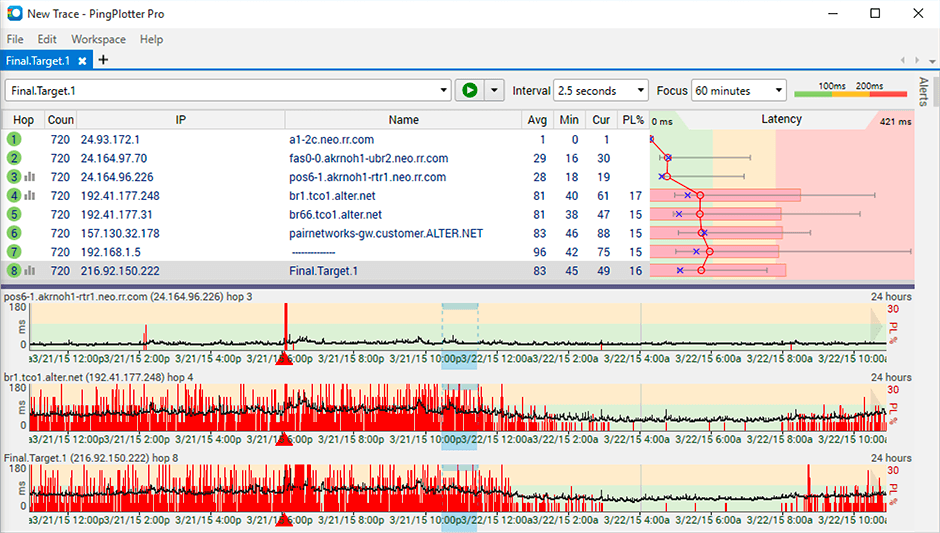
PingPlotter is a graphical traceroute and ping tool that visualizes network performance in a way that makes identifying the source of problems quicker and easier for everyone from online gamers and video streamers to VoIP admins and IT pros. Features for remote deployment, network monitoring, scripting, and a web interface are included along with several additional capabilities.
$0
per user
Pricing
IntermapperJuniper Paragon InsightsPingPlotter
Editions & Modules
No answers on this topic
PingPlotter Free
$0.00
per user
PingPlotter Free
$0.00
per user
PingPlotter Standard
$6.99
per user per month
PingPlotter Professional
$29.00
per user per month
PingPlotter Standard
$39.99
per user
PingPlotter Professional
$349.00
per user
Offerings
Pricing Offerings
IntermapperJuniper Paragon InsightsPingPlotter
Free Trial
YesNoYes
Free/Freemium Version
YesNoYes
Premium Consulting/Integration Services
YesNoNo
Entry-level Setup FeeOptionalNo setup feeNo setup fee
Additional DetailsIntermapper pricing is based on number of devices monitored. Intermapper is free for 5 devices or less. Subscription pricing starts at $303 for 25 devices. Device-based pricing starts at $765 for 25 devices.
More Pricing Information
Community Pulse
IntermapperJuniper Paragon InsightsPingPlotter
Features
IntermapperJuniper Paragon InsightsPingPlotter
Network Performance Monitoring
Comparison of Network Performance Monitoring features of Product A and Product B
Intermapper
7.2
8 Ratings
11% below category average
Juniper Paragon Insights
-
Ratings
PingPlotter
8.3
30 Ratings
3% above category average
Automated network device discovery7.05 Ratings00 Ratings8.220 Ratings
Network monitoring8.08 Ratings00 Ratings9.130 Ratings
Baseline threshold calculation7.05 Ratings00 Ratings9.021 Ratings
Alerts7.08 Ratings00 Ratings7.417 Ratings
Network capacity planning7.03 Ratings00 Ratings00 Ratings
Packet capture analysis7.04 Ratings00 Ratings00 Ratings
Network mapping8.07 Ratings00 Ratings00 Ratings
Wireless infrastructure monitoring7.05 Ratings00 Ratings00 Ratings
Hardware health monitoring7.07 Ratings00 Ratings00 Ratings
Customizable reports00 Ratings00 Ratings7.817 Ratings
Best Alternatives
IntermapperJuniper Paragon InsightsPingPlotter
Small Businesses
NinjaOne
NinjaOne
Score 9.1 out of 10
Auvik
Auvik
Score 8.5 out of 10
NinjaOne
NinjaOne
Score 9.1 out of 10
Medium-sized Companies
PingPlotter
PingPlotter
Score 8.9 out of 10
PingPlotter
PingPlotter
Score 8.9 out of 10
SolarWinds NetFlow Traffic Analyzer (NTA)
Score 9.4 out of 10
Enterprises
PingPlotter
PingPlotter
Score 8.9 out of 10
PingPlotter
PingPlotter
Score 8.9 out of 10
SolarWinds NetFlow Traffic Analyzer (NTA)
Score 9.4 out of 10
All AlternativesView all alternativesView all alternativesView all alternatives
User Ratings
IntermapperJuniper Paragon InsightsPingPlotter
Likelihood to Recommend
8.0
(9 ratings)
7.6
(2 ratings)
9.2
(29 ratings)
Usability
-
(0 ratings)
-
(0 ratings)
9.1
(9 ratings)
Support Rating
9.0
(1 ratings)
-
(0 ratings)
9.0
(1 ratings)
User Testimonials
IntermapperJuniper Paragon InsightsPingPlotter
Likelihood to Recommend
Fortra
Intermapper is a light weight, quick and easy to use monitoring application. It will get you up and monitoring key infrastructure devices with a simple management interface and effective alert system that doesn't generate a lot of noise. It provides mobile device access through a web interface and is relatively inexpensive.
Read full review
Juniper Networks
There are many products in this particular space. I believe Juniper has divided up the product suite which comprises automation, programmability and general DevOps, but this also makes it frustrating, as the functionality may not be inherent to the particular product. I recommend making sure all use-cases are covered by the product or products prior to being implementation, because a partial solution may grow stagnant or losing funding if it does not meet all KPI.
Read full review
Pingman Tools
It is well suited for performing monitoring and testing from a single device. It is less appropriate if you have to monitor from multiple different endpoints. That type of deployment would be more of an enterprise application. If you are looking for an end user monitoring solution then PingPlotter is the one for you.
Read full review
Pros
Fortra
  • The best thing about Intermapper is that it is map-based. You start by building your map, which is done completely automatically. I've used many different monitoring software packages, Solarwinds, Nagios, Opmanager, and it is a royal PITA to create live maps with those.
  • Another great feature is that it shows you, visually, the bandwidth utilization of your network by using "ants" and color codes. Incredibly useful.
  • Alarms are very easy to setup, again much easier than the packages mentioned above.
Read full review
Juniper Networks
  • Visibility: it is one of its key features that supports us by showing multidimensional views and facilitates [use] in the monitoring process.
  • Customization: its flexibility is worth appreciating and its dashboard offers customizations and we can have resource metrics according to our personalization.
  • Integration: integration is easy and great that allows us to integrate it with any 3rd source platform.
  • Data collection is another feature that allows us to collect data in our desired standard method.
Read full review
Pingman Tools
  • Monitor traffic in network
  • Measure stops when contacting network locations such as websites
  • Measures the lag and latency it takes to contact network locations
  • Gives you both induvidual measurements as well as good oversight
  • identifies when network lag or disconnect occurs
Read full review
Cons
Fortra
  • Setting up probes in bulk can be difficult, so it can take a long time to get the system set up correctly to start.
  • Sometimes the probes can be sensitive and report false positives.
  • Interface can be a little clunky and non intuitive at times.
Read full review
Juniper Networks
  • Appliance-version would be a nice addition
  • Additional product/protocol support for a wider data ingress
  • Better documentation / online support
Read full review
Pingman Tools
  • Its a little confusing to see which targets are currently running pings and which ones are displayed in the plots.
  • Starting and stopping pings requires a right click and that would be better with a play/pause button I think.
  • Ability to drag and drop the graphs to reorder them.
  • more columns to show which targets are running and which are displayed. Currently this is done with symbols so you cant sort by just the running targets for example I've found.
Read full review
Usability
Fortra
No answers on this topic
Juniper Networks
No answers on this topic
Pingman Tools
I installed it and it just started working. I realized I could then tweak it to show what I needed but didn't have to spend a long time configuring it before use, editing YAML files etc. Maybe that's fine for a network professional, but I only need this software if something goes wrong, and then need it to work quickly out of the box.
Read full review
Support Rating
Fortra
The product works well and is very easy to maintain. As such, we haven't had many occasions to use support. When we have called them they were easy to contact and responsive to our questions. We have had the product for years and it may have been a year or better since the last time we contacted them.
Read full review
Juniper Networks
No answers on this topic
Pingman Tools
I have not had much contact with the PingPlotter support, only one time have I went to them and it was a positive experience. The questions I had were answered quickly and professionally. I have no issue with the experience I had with the Support team. This was from before and after the purchase of the product.
Read full review
Alternatives Considered
Fortra
Intermapper is a cross between WhatsUp Gold and Nagios. WhatsUp Gold being for a less technical end-user and Nagios doing more than just SNMP scans and up down monitoring.
Read full review
Juniper Networks
We decided to go for Paragon after checking all the pros and
cons as we didn’t have a good experience of Memfault and maybe it was just
because we haven’t made enough research on it and we had to suffer cause of its
malfunctioning and difficulty. Moreover, I think that I can never regard
Memfault as a complete package which Paragon insight definitely is.
Read full review
Pingman Tools
A balance of a generic tool vs a network equipment product is necessary when investigating network incidents or disruptions. Need to train the engineer to use both tools to perform their analysis and to dive down to the issues as fast as they can. Experience with the tools will continue to play a part if we were to adopt PingPlotter
Read full review
Return on Investment
Fortra
  • Downtime costs money. Every minute we can get ahead of an outage is time that a plant is not sitting there waiting. We don't need to wait for a call from a plant, we know they are down immediately and we can begin troubleshooting.
Read full review
Juniper Networks
  • The KPI shown in the dashboards has assisted in business devices.
  • The playbooks with user- or event-triggered actions has reduced manhours.
  • The automated workflow has reduced outages due to human error.
Read full review
Pingman Tools
  • Great ROI, troubleshooting time has been reduced by 90%
  • Network Discoveries used to take 2 to 3 hours and were inconsistent - now it is a matter of minutes
  • lacks integration into our MSP toolkit, and we now use it as a stand alone product
Read full review
ScreenShots

Intermapper Screenshots

Screenshot of Intermapper maps are flexible to configure exactly to your liking.Screenshot of See your devices on a Google map. Access on any device with our web-based version.Screenshot of Device statuses give you real-time information about how your equipment is performing

PingPlotter Screenshots

Screenshot of Screenshot of Screenshot of