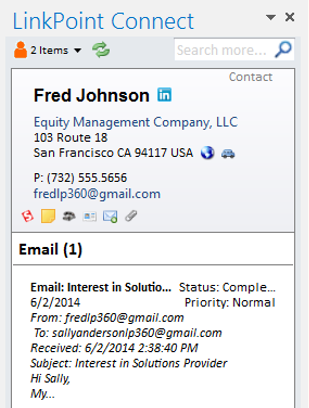
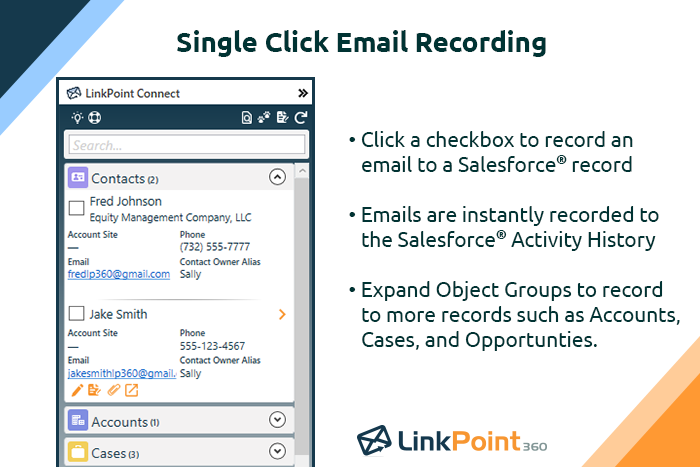
LinkPoint Connect promises to streamline data entry and access by enabling users to instantly view CRM data within their email client. This sales intelligence solution integrates Salesforce and Microsoft Dynamics CRM data in Outlook or IBM Notes. According to the vendor, key capabilities include: View real-time Salesforce data without ever leaving your email. Click on an email, and the LinkPoint Connect Side Panel instantly displays that contact’s information directly from…
$192
per user, per year
Pipedrive
Score 8.4 out of 10
N/A
Pipedrive is a customer relationship management (CRM) software built to help small teams to drive sales.
$24
per month per seat
Streak
Score 8.3 out of 10
N/A
Streak is a cloud-based sales email tracking tool for Gmail. The vendor describes Streak as "CRM in your inbox," and the mission is to allow users to run their entire businesses from their inboxes. It includes email power tools such as view tracking info, mail merge, snooze, send later, snippets, and thread splitter. Streak is used by a range of different teams: Sales, Product Dev, Deal Flow, Fundraising, Support, Hiring, and Real Estate.
$49
per month billed annually per user
Pricing
LinkPoint Connect
Pipedrive
Streak
Editions & Modules
LinkPoint Connect for Outlook + Salesforce
$192
per user, per year
LinkPoint Connect for Outlook + Microsoft Dynamics CRM
$192
per user, per year
LinkPoint Connect for IBM Notes + Salesforce
$228
per user, per year
LinkPoint Connect for IBM Notes + Microsoft Dynamics CRM
$228
per user, per year
Essential
$24
per month per seat
Advanced
$49
per month per seat
Professional
$69
per month per seat
Power
$79
per month per seat
Enterprise
$129
per month per seat
Pro
$49
per month billed annually per user
Pro
$59
per month per user
Pro+
$69
per month billed annually per user
Pro+
$89
per month per user
Enterprise
$129
per month billed annually per user
Enterprise
$159
per month per user
Offerings
Pricing Offerings
LinkPoint Connect
Pipedrive
Streak
Free Trial
Yes
Yes
Yes
Free/Freemium Version
No
No
No
Premium Consulting/Integration Services
Yes
No
No
Entry-level Setup Fee
$16 per user per year
No setup fee
No setup fee
Additional Details
Subscriptions are billed annually. Discounts available for non-profits. Volume discounts available. LinkPoint Connect Solutions are available for Outlook and IBM Notes users. These include preconfigured implementations for Advologix, Apto, Apttus, FinancialForce.com, Jobscience, Navatar, Pardot, Salesforce Shield, and TaskRay.
Monthly plans are available. The Essentials monthly plan at $24 per month.
Includes email tracking, link tracking, email sharing, snippets, and mail merge (up to 50/day)
Pipedrive is somehow "disconnected from the rest of the world" being a standalone app (the last time I used it was three years ago, that may have changed.)
Salesforce is over-complicated and cumbersome for the "discovery" part of the sales process.
Streak is straightforward to …
LinkPoint is well suited to any situation where Outlook is used for email correspondence and calendar items and there is need to have a record of those items and/or perform connected actions (schedule tasks, follow up reminders, etc.) in Salesforce. Automating this process and removing as much duplication of work as possible is the primary goal and the primary benefit that LinkPoint provides. In addition to efficiency, automating the process also provides a pretty substantial increase in accuracy, removing ca. 50% of the chance for human error. It's pretty simple functionality in concept, but extremely valuable in execution.
Pipedrive is a fantastic tool to help monitor and track lead generation and referral sources. It helps maintain accountability with the sales team and helps ensure that we are doing appropriate marketing to maintain a steady influx of cases. The weekly and quarterly sales reports that it can generate are incredibly helpful and insightful. They help inform us of what we need to focus on each quarter/year.
If you receive a notification that a prospect just read your email and you don't receive a response, you're then aware they've received it and your pitch or product is on their mind -- making a call later that day all the more effective.
Great visual visibility of the funnel plus easy to drag the deals across the stages
The email integration that collects all relevant communication (also through the possibility of adding a deal-specific Pipedrive address on BCC)
The integration with Pandadoc, which we use a lot, so that Pipedrive keeps a really handy overview of the documents we have sent out / which have been signed
Showing the customers name on the pipeline page. Right now I can only get it to show the brand name twice. I wish it would replace the second brand name with the main point of contact.
Better reporting tools. Their reporting tools are not easy to pick up. I've spent time trying to figure it out and it isn't something I can pick up on quickly.
Better training options. I wish I had a personal trainer to walk me through the best way to use Pipedrive so I can get the most out of it.
Pipedrive is easy to use and has a clean interface so we can follow up accurately. Its custom features help manage leads and evaluate team performance. It saves time and improves efficiency. Pipedrive is stable and supports integrations and automation.
Between quick video tutorials and having very quick feedback from their support teams, it is one of the main reasons I would recommend Pipedrive. It is critical, especially when setting up the platform to meet your companies needs, that a solid support team like Pipedrive has is there to make the transition easier.
Prior to our move to LinkPoint, we used the Salesforce add-in for Outlook. This required manual syncing of email and calendar items and no easy to use interface between the two programs. It was very cumbersome for me to use, to the point where I quit using it altogether some time ago. I found it far less frustrating to just switch back and forth between Outlook and Salesforce and manually perform the requisite actions, create tasks or other items, enter the required data, etc.
I much prefer the interface of Pipedive when compared to Zoho. Much more user friendly and the team is always readily available when we need them. Pipedrive allowed for many custom integrations to be added, as Zoho was a tad more complicated to manipulate. We would not go back to Zoho in any case.
HubSpot was almost too freeform, I had a hard time grasping how it could work for me because there was so much that could be changed around. Streak was so easy to figure out without much time invested and I like that it just lives in my Gmail without needing to go to a separate website/login.
Great on setup which made our work easier and less technically equipped people can manage a lot of things(compared to SalesForce where you need to hire a developer to set it up)
We were able to integrate our calling system easily and get things going on the lead calling aspect.
Great multipipeline option where we were able to manage both organisations under one roof.