LogicMonitor vs. Mode Analytics

Overview
ProductRatingMost Used ByProduct SummaryStarting Price
LogicMonitor
Score 9.0 out of 10
Mid-Size Companies (51-1,000 employees)
LogicMonitor’s SaaS-based platform, LM Envision, enables observability across on-prem and multi-cloud environments. It provides IT and business teams operational visibility and predictability across their technologies and applications.N/A
Mode
Score 9.0 out of 10
N/A
Mode, or Mode Analytics, from ThoughtSpot since the June 2023 acquisition, is a business intelligence platform that unifies company analytics by bringing data teams and business teams together, so analysts can provide rapid answers to strategic, ad hoc questions. And, business stakeholder can access relevant data to answer their own questions which can often detract more impactful work.N/A
Pricing
LogicMonitorMode Analytics
Editions & Modules
Enterprise
Contact sales team
Website Monitoring
Contact sales team
No answers on this topic
Offerings
Pricing Offerings
LogicMonitorMode
Free Trial
YesYes
Free/Freemium Version
NoYes
Premium Consulting/Integration Services
YesNo
Entry-level Setup FeeNo setup feeNo setup fee
Additional DetailsOur platform is broken down into Pro and Enterprise Pricing. Pro includes monitoring for all of your cloud, hybrid, and on-premises infrastructure. Our Enterprise package includes all of this, plus our AIOps and Machine Learning functionality that provides dynamic thresholds, root cause analysis, anomaly detection and more! LogicMonitor only charges by the device. What is considered a device? A device is anything with an IP address that you want to monitor, including a physical device or a cloud resource. This means multiple data sources under the same IP address can be monitored for the same price. Unlike some monitoring platforms. we don’t charge per node, interface, or metric.
More Pricing Information
Community Pulse
LogicMonitorMode Analytics
Features
LogicMonitorMode Analytics
IT Infrastructure Monitoring
Comparison of IT Infrastructure Monitoring features of Product A and Product B
LogicMonitor
8.2
1 Ratings
0% above category average
Mode Analytics
-
Ratings
Network visibility8.21 Ratings00 Ratings
Multi-system monitoring8.21 Ratings00 Ratings
Performance analysis and forecasting7.31 Ratings00 Ratings
Dashboards and visualization9.11 Ratings00 Ratings
BI Standard Reporting
Comparison of BI Standard Reporting features of Product A and Product B
LogicMonitor
-
Ratings
Mode Analytics
8.5
9 Ratings
4% above category average
Pixel Perfect reports00 Ratings9.34 Ratings
Customizable dashboards00 Ratings8.49 Ratings
Report Formatting Templates00 Ratings7.86 Ratings
Ad-hoc Reporting
Comparison of Ad-hoc Reporting features of Product A and Product B
LogicMonitor
-
Ratings
Mode Analytics
7.4
9 Ratings
8% below category average
Drill-down analysis00 Ratings7.18 Ratings
Formatting capabilities00 Ratings6.79 Ratings
Integration with R or other statistical packages00 Ratings7.39 Ratings
Report sharing and collaboration00 Ratings8.78 Ratings
Report Output and Scheduling
Comparison of Report Output and Scheduling features of Product A and Product B
LogicMonitor
-
Ratings
Mode Analytics
7.9
8 Ratings
4% below category average
Publish to Web00 Ratings8.15 Ratings
Publish to PDF00 Ratings5.88 Ratings
Report Versioning00 Ratings7.74 Ratings
Report Delivery Scheduling00 Ratings9.68 Ratings
Delivery to Remote Servers00 Ratings8.34 Ratings
Data Discovery and Visualization
Comparison of Data Discovery and Visualization features of Product A and Product B
LogicMonitor
-
Ratings
Mode Analytics
6.5
9 Ratings
21% below category average
Pre-built visualization formats (heatmaps, scatter plots etc.)00 Ratings7.79 Ratings
Location Analytics / Geographic Visualization00 Ratings5.56 Ratings
Predictive Analytics00 Ratings6.46 Ratings
Access Control and Security
Comparison of Access Control and Security features of Product A and Product B
LogicMonitor
-
Ratings
Mode Analytics
9.5
2 Ratings
11% above category average
Multi-User Support (named login)00 Ratings10.02 Ratings
Role-Based Security Model00 Ratings9.02 Ratings
Multiple Access Permission Levels (Create, Read, Delete)00 Ratings9.02 Ratings
Single Sign-On (SSO)00 Ratings9.82 Ratings
Application Program Interfaces (APIs) / Embedding
Comparison of Application Program Interfaces (APIs) / Embedding features of Product A and Product B
LogicMonitor
-
Ratings
Mode Analytics
9.0
1 Ratings
15% above category average
REST API00 Ratings9.01 Ratings
Best Alternatives
LogicMonitorMode Analytics
Small Businesses
ConnectWise Automate
Score 8.5 out of 10
Yellowfin
Yellowfin
Score 8.7 out of 10
Medium-sized Companies
Icinga
Icinga
Score 8.8 out of 10
Reveal
Reveal
Score 10.0 out of 10
Enterprises
ScienceLogic SL1
ScienceLogic SL1
Score 8.8 out of 10
Kyvos Semantic Layer
Score 9.5 out of 10
All AlternativesView all alternativesView all alternatives
User Ratings
LogicMonitorMode Analytics
Likelihood to Recommend
9.4
(179 ratings)
8.1
(9 ratings)
Likelihood to Renew
6.7
(8 ratings)
-
(0 ratings)
Usability
8.3
(29 ratings)
8.1
(4 ratings)
Availability
9.1
(1 ratings)
-
(0 ratings)
Performance
9.1
(1 ratings)
-
(0 ratings)
Support Rating
9.2
(109 ratings)
7.4
(5 ratings)
In-Person Training
8.2
(1 ratings)
-
(0 ratings)
Online Training
7.3
(1 ratings)
-
(0 ratings)
Implementation Rating
9.6
(24 ratings)
-
(0 ratings)
Configurability
9.1
(1 ratings)
-
(0 ratings)
Contract Terms and Pricing Model
7.4
(5 ratings)
-
(0 ratings)
Ease of integration
7.3
(1 ratings)
-
(0 ratings)
Product Scalability
9.1
(1 ratings)
-
(0 ratings)
Professional Services
7.6
(4 ratings)
-
(0 ratings)
Vendor post-sale
9.1
(1 ratings)
-
(0 ratings)
Vendor pre-sale
9.1
(1 ratings)
-
(0 ratings)
User Testimonials
LogicMonitorMode Analytics
Likelihood to Recommend
LogicMonitor
I would recommend LogicMonitor to mid-sized IT teams or MSPs. I thought it was going to be just another monitoring tool, but the more you work with it, the more you realize how solid it actually is; now it's a full-on platform. I've had a really good experience with Logic Monitor. It's powerful, a little messy in Parts. But once it's running smoothly, it's kind of a beast, definitely made my life easier.
Read full review
ThoughtSpot
Mode is a clear category winner for how it easy it is to go from interactive analysis to professional quality reporting. You can easily do all your SQL and quite a bit of R/Python. If you want to quickly go from your database to simple charts, this is your pick. If you need to do heavier data modeling, scheduling jobs, or ML, you'll need something else, like Databricks. In my opinion, the quality of visualizations and some developer/analyst features make Databricks an unacceptable substitute.
Read full review
Pros
LogicMonitor
  • It shows us system issues right away so we can fix them fast.
  • It finds new devices on its own, so we do not miss anything.
  • It alerts us only when something really unusual happens.
  • Its dashboards make it easy for everyone to see system health.
  • It helps us see trends so we are ready for busy times.
Read full review
ThoughtSpot
  • It allows me to undertake data visualization tasks by creating really insightful charts and dashboards
  • It allows for easy sharing and work collaboration on data analysis tasks
  • Mode has an easier to use SQL editor as well
  • I love how it organizes all our SQL data tables into easy-to-view data we can draw insights on
Read full review
Cons
LogicMonitor
  • Segmentation at an instance level not just the resource when clients are sharing the same device but shouldn't see each other's relevant data
  • ARM CPU support for collectors to allow for a lighter weight appliance deployment
  • WMI collection with a Linux collector so a windows collector would not be needed or a virtual appliance template that can be used to deploy collectors
Read full review
ThoughtSpot
  • Date ranges aren't always the most intuitive to set, strangely
  • Faster refresh rates would be ideal
  • Would love more dynamic mobile device integration (alerts, etc)
Read full review
Likelihood to Renew
LogicMonitor
This product has met virtually all of our needs. It was easy to implement and has been simple to support. Customization has been intuitive with many options available. They keep adding features and expanding available options. The future of LogicMonitor looks even better than it is today which is very promising. The management and support teams at LogicMonitor are always helpful
Read full review
ThoughtSpot
No answers on this topic
Usability
LogicMonitor
Set up is super easy. Just stand up a small Linux or Windows server to act as a collector. There are no agents to install on monitored devices and all you need is SNMP or WMI access. When creating dashboards, all you have to do is find the widget on the device you want to show up and choose the menu option to add it.
Read full review
ThoughtSpot
For the advanced user already familiar with Python. It is just the same tool, already managed and connected to the data.
Read full review
Support Rating
LogicMonitor
The sales team support we received was top notch. They worked hand in hand to make sure the product met all expectations. So far we have not really had to work with support that much; we have worked with setup team after purchase to deploy product fully. No issues so far and we are four weeks in.
Read full review
ThoughtSpot
Mode has dedicated agents who are online in a chatroom, ready to take on any questions and provide helpful feedback.
Read full review
In-Person Training
LogicMonitor
Add good training
Read full review
ThoughtSpot
No answers on this topic
Online Training
LogicMonitor
The training is good but room to improve
Read full review
ThoughtSpot
No answers on this topic
Implementation Rating
LogicMonitor
The implementation experience was awesome for me, as the LogicMonitor team was really helpful to us. They installed everything on our primary server and provided clear, intelligible explanations. They even trained our non-tech team on it as well. Therefore, my team and I had a very simple and pleasurable implementation experience.
Read full review
ThoughtSpot
No answers on this topic
Alternatives Considered
LogicMonitor
Our business used the trial period they provided on one of our systems and conducted sessions with all of this software. Our team tested all of these software options before deciding on LogicMonitor, as our business is expanding daily and we needed a system that could accommodate our growing workforce and automatically add systems to our network, which LogicMonitor alone provided.
Read full review
ThoughtSpot
We used both Qlik and Mode at our organization. The mode was used a quick analysis SQL tool while Qlik was our enterprise BI solution.
Read full review
Contract Terms and Pricing Model
LogicMonitor
Pricing seems to be getting more and more aggressive, I worry that it's going to turn into ServiceNow or SAP and everything minor feature will be an extreme cost that prices out us and our customers
Read full review
ThoughtSpot
No answers on this topic
Professional Services
LogicMonitor
Haven't really used it but our initial onboarding PS was disappointing. Felt like we were being told what we needed to cover as opposed to what we wanted to cover. In addition, we were pushed into using the PS in tight time frames and we were not ready to do so.
Read full review
ThoughtSpot
No answers on this topic
Return on Investment
LogicMonitor
  • We Eliminated an on-prem monitoring tool which was in excess of 25 servers
  • A decrease in time to response from our Network Operations Center resulted in a more consistent client experience
  • Dynamic alert thresholds helped reduce alerting by about 10 to 15% as soon as we turned it on for volatile metrics like CPU and memory
Read full review
ThoughtSpot
  • Extremely positive. It's a key feature in our application.
  • Were it not for the account management bit, Mode would be hands-down our recommendation for anyone looking for cloud BI.
Read full review
ScreenShots

LogicMonitor Screenshots

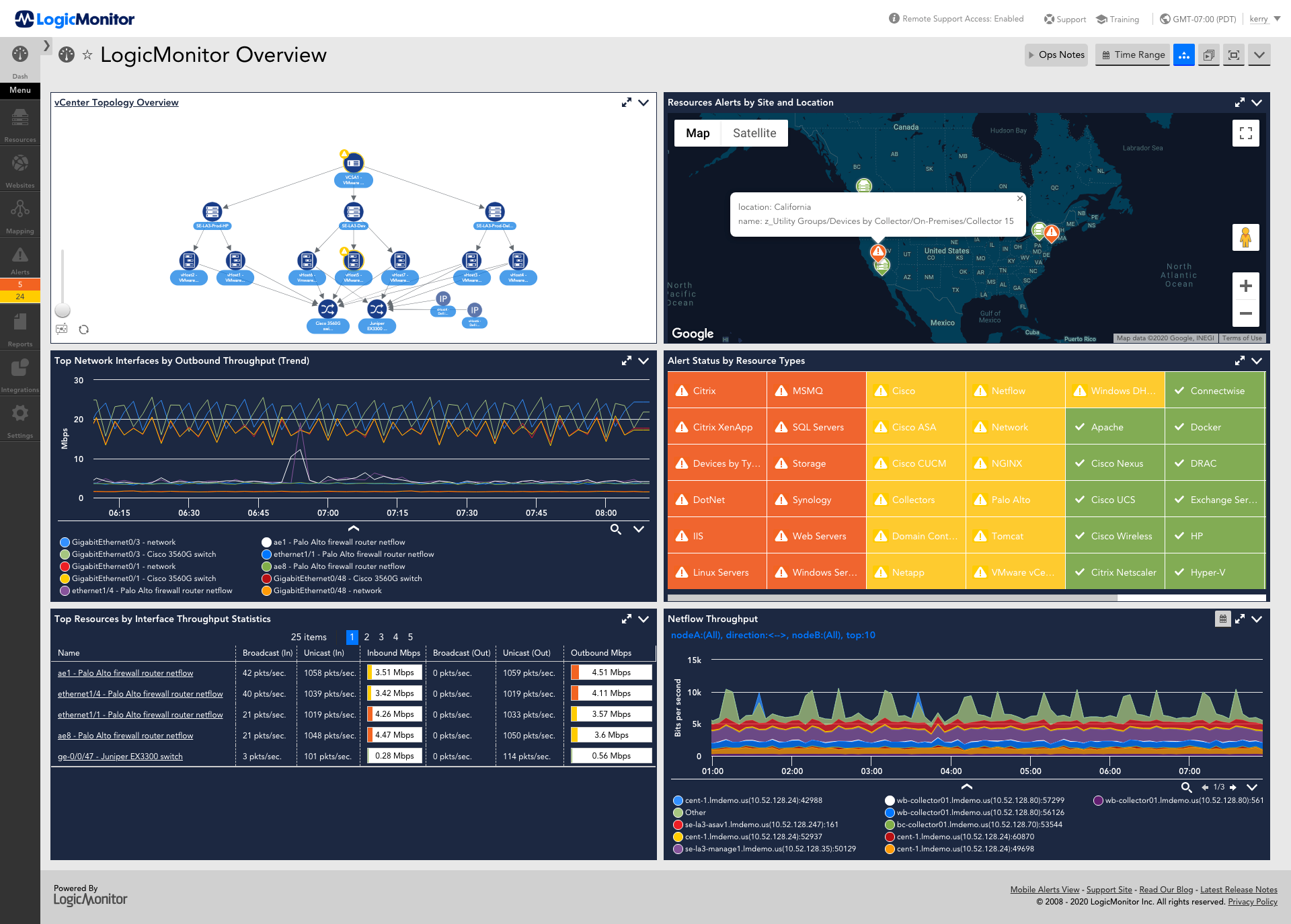
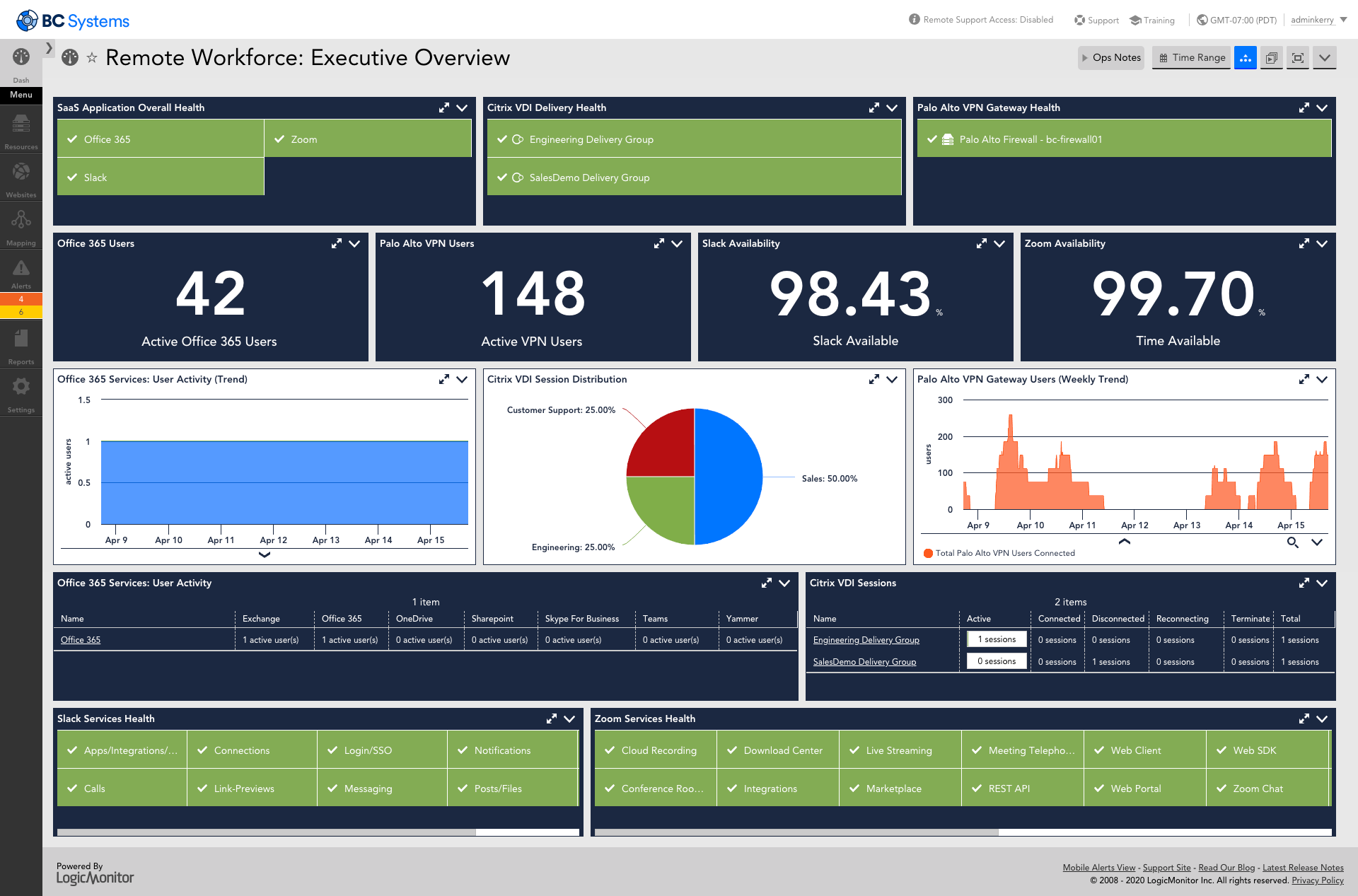
Screenshot of AIOps features for enterprises using technology or hybrid environments with cloud and container resources. LogicMonitor can be used to monitor and improve the performance of complex enterprise networks with dynamic thresholds, topology mapping, anomaly detection, and root cause analysis.Screenshot of LM Envision's comprehensive monitoring and observability capabilities across the IT infrastructure, that help to identify alerts for the most important systems while ensuring the user experience is uninterrupted across the globe.Screenshot of Monitoring that ensures servers and the applications running on top of them are highly available. Helps resolve issues and optimize resource consumption for the server infrastructure.Screenshot of LogicMonitor remote workforce monitoring, which ensures that employees are connected to the systems that keep them productive and provide proactive insight into dispersed systems and third-party outages.Screenshot of Unified cloud monitoring across a hybrid multi-cloud ecosystem.Screenshot of LM Logs delivering log analysis at enterprise scale.