
Chose Intuit Mailchimp
Intuit Mailchimp vs. ReachMail vs. WebEngage
Intuit Mailchimp vs. ReachMail vs. WebEngage
| Product | Rating | Most Used By | Product Summary | Starting Price |
|---|---|---|---|---|
 Intuit Mailchimp | N/A | Mailchimp is an email marketing and marketing automation platform. Beyond just tracking how campaigns perform, Mailchimp takes it a step further by analyzing data from over half a billion emails to show why campaigns perform, driving informed decisions. | $0 per month | |
 ReachMail | N/A | ReachMail focuses on assisting email marketers in achieving delivery success, and present their services a a guide in the ever-changing world of marketing and transactional email. ReachMail includes tools like optimized time-of-day sending, integrated list hygiene and expert support. | $9 per month | |
 WebEngage | N/A | WebEngage calls itself a multi-channel user engagement platform. It automates communication across a user's lifecycle and helps companies send messages via these channels: Web Messages In-app Messages Push Notifications Web Push Notification Email Marketing SMS Marketing Facebook Remarketing According to the vendor, cross-device tracking helps keep communication coherent and contextual, making the… | N/A |
| Intuit Mailchimp | ReachMail | WebEngage | ||||||||||||||||||||||
|---|---|---|---|---|---|---|---|---|---|---|---|---|---|---|---|---|---|---|---|---|---|---|---|---|
| Editions & Modules |
|
| No answers on this topic | |||||||||||||||||||||
| Offerings |
| |||||||||||||||||||||||
| Entry-level Setup Fee | No setup fee | No setup fee | No setup fee | |||||||||||||||||||||
| Additional Details | — | — | Pricing is customised according to the customer usage and requirement. Contact support@webengage.com to know more about pricing plans. | |||||||||||||||||||||
| More Pricing Information | ||||||||||||||||||||||||
| Intuit Mailchimp | ReachMail | WebEngage | |
|---|---|---|---|
| Considered Multiple Products |  Intuit Mailchimp |  ReachMail  Jamie Caroland Independent Consultant Chose ReachMail Constant Contact:
Program marketing dollars disallowed when organization was absorbed by another entity, so Reachmail's free account was chosen to replace for localized target audiences. Constant Contact is visually more appealing and has more ready-to-use templates, but …  Kindred Alana Inside Sales Chose ReachMail In my opinion, ReachMail is a good competitor to Mailchimp, probably has more features though and analytics to help organize information. There are also a lot more third party integrations that have helped us compared to other apps that we've tried before, but ReachMail has … | WebEngage No answer on this topic |
| Intuit Mailchimp | ReachMail | WebEngage | |||||||||||||||||||||||||||||||||||||||
|---|---|---|---|---|---|---|---|---|---|---|---|---|---|---|---|---|---|---|---|---|---|---|---|---|---|---|---|---|---|---|---|---|---|---|---|---|---|---|---|---|---|
| Email & Online Marketing |
| ||||||||||||||||||||||||||||||||||||||||
| Lead Management |
| ||||||||||||||||||||||||||||||||||||||||
| Campaign Management |
| ||||||||||||||||||||||||||||||||||||||||
| Social Media Marketing |
| ||||||||||||||||||||||||||||||||||||||||
| Reporting & Analytics |
| ||||||||||||||||||||||||||||||||||||||||
| Platform & Infrastructure |
| ||||||||||||||||||||||||||||||||||||||||
| Pre-Send Testing |
|
| Intuit Mailchimp | ReachMail | WebEngage | |
|---|---|---|---|
| Small Businesses |  Vbout Score 9.9 out of 10 |  Mad Mimi Score 10.0 out of 10 | Vbout Score 9.9 out of 10 |
| Medium-sized Companies |  PFL Direct Mail Platform Score 9.0 out of 10 |  VerticalResponse Score 10.0 out of 10 | PFL Direct Mail Platform Score 9.0 out of 10 |
| Enterprises | PFL Direct Mail Platform Score 9.0 out of 10 |  Emma by Marigold Score 8.7 out of 10 | PFL Direct Mail Platform Score 9.0 out of 10 |
| All Alternatives | View all alternatives | View all alternatives | View all alternatives |
| Intuit Mailchimp | ReachMail | WebEngage | |
|---|---|---|---|
| Likelihood to Recommend | 8.6 (565 ratings) | 10.0 (11 ratings) | 7.3 (6 ratings) |
| Likelihood to Renew | 10.0 (53 ratings) | - (0 ratings) | - (0 ratings) |
| Usability | 8.5 (434 ratings) | 10.0 (2 ratings) | - (0 ratings) |
| Availability | 9.5 (6 ratings) | - (0 ratings) | - (0 ratings) |
| Performance | 8.9 (7 ratings) | - (0 ratings) | - (0 ratings) |
| Support Rating | 8.9 (19 ratings) | - (0 ratings) | - (0 ratings) |
| Implementation Rating | 7.4 (22 ratings) | - (0 ratings) | - (0 ratings) |
| Configurability | 10.0 (2 ratings) | - (0 ratings) | - (0 ratings) |
| Ease of integration | 8.0 (4 ratings) | - (0 ratings) | - (0 ratings) |
| Product Scalability | 9.5 (6 ratings) | - (0 ratings) | - (0 ratings) |
| Vendor post-sale | 10.0 (2 ratings) | - (0 ratings) | - (0 ratings) |
| Vendor pre-sale | 10.0 (2 ratings) | - (0 ratings) | - (0 ratings) |
| Intuit Mailchimp | ReachMail | WebEngage | |
|---|---|---|---|
| Likelihood to Recommend | Intuit
 Irfan Ahmad Software Engineer | ReachMail, Inc
Jamie Caroland Independent Consultant | WebEngage
 Atul Chaudhary Product Manager |
| Pros | Intuit
 Faisal Darbar Sales & Customer Services Manager | ReachMail, Inc
| WebEngage
 Rohit Asesh Deputy Manager - Digital Marketing |
| Cons | Intuit
| ReachMail, Inc
 Adam Weller Senior Interactive Marketing Specialist | WebEngage
Rohit Asesh Deputy Manager - Digital Marketing |
| Likelihood to Renew | Intuit
 Harrison Pershing Digital Marketing Strategist | ReachMail, Inc No answers on this topic | WebEngage No answers on this topic |
| Usability | Intuit
 Maria Sergeeva UX and Content Designer | ReachMail, Inc
| WebEngage No answers on this topic |
| Reliability and Availability | Intuit
 Ben Caplan Risk Manager, and Insurance Agent | ReachMail, Inc No answers on this topic | WebEngage No answers on this topic |
| Performance | Intuit
Ben Caplan Risk Manager, and Insurance Agent | ReachMail, Inc No answers on this topic | WebEngage No answers on this topic |
| Support Rating | Intuit
 Valie Robbins Owner | ReachMail, Inc No answers on this topic | WebEngage No answers on this topic |
| Implementation Rating | Intuit
 Vicki Lesage Digital Marketing Specialist | ReachMail, Inc No answers on this topic | WebEngage No answers on this topic |
| Alternatives Considered | Intuit
| ReachMail, Inc
Kindred Alana Inside Sales | WebEngage
Atul Chaudhary Product Manager |
| Scalability | Intuit
Ben Caplan Risk Manager, and Insurance Agent | ReachMail, Inc No answers on this topic | WebEngage No answers on this topic |
| Return on Investment | Intuit
 John Dykstra Small Business Owner | ReachMail, Inc
 John Cupoli Account Manager | WebEngage
|
| ScreenShots | Intuit Mailchimp Screenshots      | WebEngage Screenshots  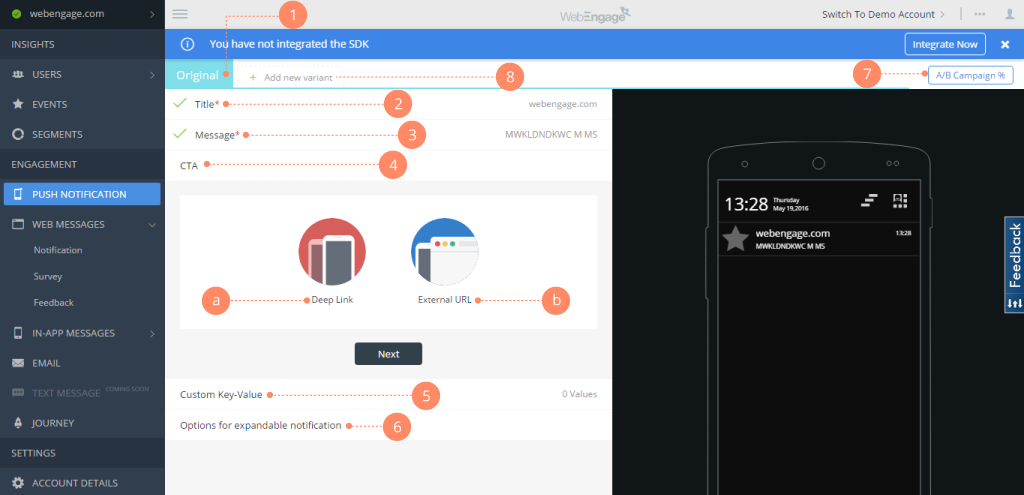    |
