Method:crm is a QuickBooks-integrated, cloud-based CRM platform.
$35
per month per user
Oracle CRM On Demand
Score 9.3 out of 10
N/A
The basis of this offering is the Market2Lead product that Oracle acquired in 2010. It has now been fully integrated with Oracle's On Demand CRM product and is a full-featured marketing automation product with features from lead management and nurturing, to measuring marketing ROI.
N/A
OutboundEngine
Score 9.9 out of 10
N/A
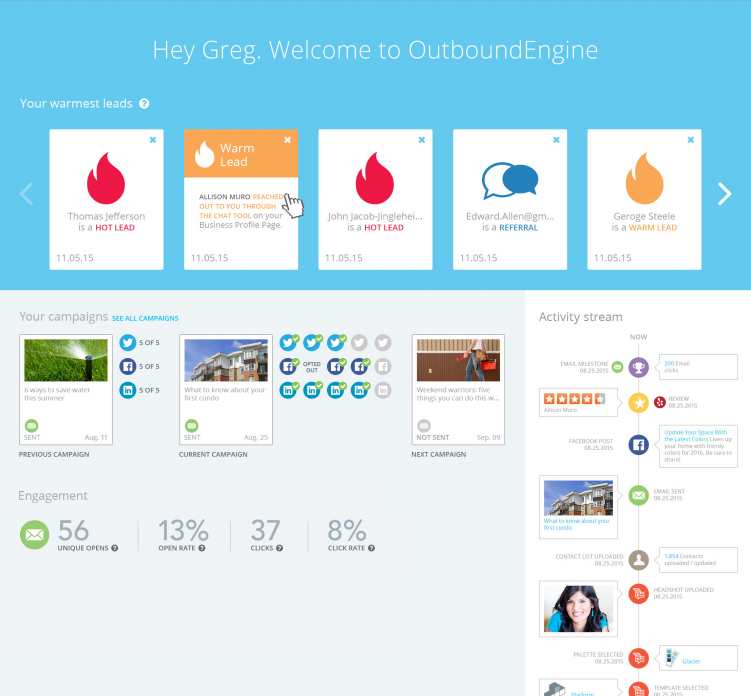
OutboundEngine provides a hands-off way for small business owners to market and grow their business. The product aims to provide small businesses with what big companies have achieved with marketing automation. The service aims to help users keep in touch with clients and prospects with professionally designed, branded campaigns. Benefits include: driving engagement, surfacing warm leads from current contacts, generating referrals and repeat business from their existing contacts, social…
$199
per user
Pricing
MethodCRM
Oracle CRM On Demand
OutboundEngine
Editions & Modules
CRM Quick Start
$35
per month per user
CRM Pro
$59
per month per user
CRM Enterprise
$97
per month per user
CRM Multi-Entity
Custom Quote
No answers on this topic
Essential
$199
per user
Value
$299
per user
Premium
$499
per user
Offerings
Pricing Offerings
MethodCRM
Oracle CRM On Demand
OutboundEngine
Free Trial
Yes
No
No
Free/Freemium Version
No
No
No
Premium Consulting/Integration Services
Yes
No
No
Entry-level Setup Fee
No setup fee
No setup fee
$99 per user
Additional Details
Discount available for annual billing.
—
More information is available on the vendor's website.
More Pricing Information
Community Pulse
MethodCRM
Oracle CRM On Demand
OutboundEngine
Features
MethodCRM
Oracle CRM On Demand
OutboundEngine
Sales Force Automation
Comparison of Sales Force Automation features of Product A and Product B
MethodCRM
8.1
22 Ratings
3% above category average
Oracle CRM On Demand
8.9
25 Ratings
13% above category average
OutboundEngine
-
Ratings
Customer data management / contact management
8.422 Ratings
8.025 Ratings
00 Ratings
Workflow management
8.420 Ratings
9.024 Ratings
00 Ratings
Territory management
1.81 Ratings
8.024 Ratings
00 Ratings
Opportunity management
8.420 Ratings
8.025 Ratings
00 Ratings
Integration with email client (e.g., Outlook or Gmail)
8.820 Ratings
9.022 Ratings
00 Ratings
Contract management
8.711 Ratings
9.024 Ratings
00 Ratings
Quote & order management
9.218 Ratings
10.023 Ratings
00 Ratings
Interaction tracking
9.019 Ratings
9.024 Ratings
00 Ratings
Channel / partner relationship management
10.012 Ratings
10.023 Ratings
00 Ratings
Customer Service & Support
Comparison of Customer Service & Support features of Product A and Product B
MethodCRM
10.0
2 Ratings
26% above category average
Oracle CRM On Demand
9.7
24 Ratings
23% above category average
OutboundEngine
-
Ratings
Case management
10.01 Ratings
10.024 Ratings
00 Ratings
Call center management
9.92 Ratings
10.023 Ratings
00 Ratings
Help desk management
10.01 Ratings
9.024 Ratings
00 Ratings
Marketing Automation
Comparison of Marketing Automation features of Product A and Product B
MethodCRM
8.9
19 Ratings
14% above category average
Oracle CRM On Demand
8.5
24 Ratings
9% above category average
OutboundEngine
-
Ratings
Lead management
8.817 Ratings
8.024 Ratings
00 Ratings
Email marketing
9.014 Ratings
9.022 Ratings
00 Ratings
CRM Project Management
Comparison of CRM Project Management features of Product A and Product B
MethodCRM
7.6
20 Ratings
1% below category average
Oracle CRM On Demand
9.0
24 Ratings
16% above category average
OutboundEngine
-
Ratings
Task management
9.218 Ratings
9.023 Ratings
00 Ratings
Billing and invoicing management
10.015 Ratings
9.022 Ratings
00 Ratings
Reporting
3.617 Ratings
9.023 Ratings
00 Ratings
CRM Reporting & Analytics
Comparison of CRM Reporting & Analytics features of Product A and Product B
MethodCRM
7.7
18 Ratings
0% above category average
Oracle CRM On Demand
8.5
24 Ratings
10% above category average
OutboundEngine
-
Ratings
Forecasting
8.09 Ratings
10.024 Ratings
00 Ratings
Pipeline visualization
9.017 Ratings
6.623 Ratings
00 Ratings
Customizable reports
6.017 Ratings
9.024 Ratings
00 Ratings
Customization
Comparison of Customization features of Product A and Product B
MethodCRM
7.6
19 Ratings
1% below category average
Oracle CRM On Demand
8.2
24 Ratings
7% above category average
OutboundEngine
-
Ratings
Custom fields
6.619 Ratings
9.024 Ratings
00 Ratings
Custom objects
6.618 Ratings
9.024 Ratings
00 Ratings
Scripting environment
9.212 Ratings
5.820 Ratings
00 Ratings
API for custom integration
8.014 Ratings
9.023 Ratings
00 Ratings
Security
Comparison of Security features of Product A and Product B
MethodCRM
8.3
19 Ratings
1% below category average
Oracle CRM On Demand
9.5
25 Ratings
12% above category average
OutboundEngine
-
Ratings
Single sign-on capability
8.217 Ratings
10.022 Ratings
00 Ratings
Role-based user permissions
8.419 Ratings
9.025 Ratings
00 Ratings
Integrations with 3rd-party Software
Comparison of Integrations with 3rd-party Software features of Product A and Product B
MethodCRM
10.0
2 Ratings
29% above category average
Oracle CRM On Demand
9.0
22 Ratings
18% above category average
OutboundEngine
-
Ratings
Marketing automation
10.02 Ratings
9.022 Ratings
00 Ratings
Compensation management
10.02 Ratings
9.020 Ratings
00 Ratings
Platform
Comparison of Platform features of Product A and Product B
MethodCRM
7.6
15 Ratings
0% above category average
Oracle CRM On Demand
9.0
18 Ratings
17% above category average
OutboundEngine
-
Ratings
Mobile access
7.615 Ratings
9.018 Ratings
00 Ratings
Social CRM
Comparison of Social CRM features of Product A and Product B
MethodCRM
-
Ratings
Oracle CRM On Demand
9.0
18 Ratings
19% above category average
OutboundEngine
-
Ratings
Social data
00 Ratings
9.018 Ratings
00 Ratings
Social engagement
00 Ratings
9.018 Ratings
00 Ratings
Email & Online Marketing
Comparison of Email & Online Marketing features of Product A and Product B
MethodCRM
-
Ratings
Oracle CRM On Demand
-
Ratings
OutboundEngine
5.9
50 Ratings
19% below category average
Mobile optimization
00 Ratings
00 Ratings
8.643 Ratings
Email deliverability reporting
00 Ratings
00 Ratings
3.150 Ratings
List management
00 Ratings
00 Ratings
6.044 Ratings
Lead Management
Comparison of Lead Management features of Product A and Product B
MethodCRM
-
Ratings
Oracle CRM On Demand
-
Ratings
OutboundEngine
6.4
38 Ratings
1% below category average
Automated sales alerts and tasks
00 Ratings
00 Ratings
6.438 Ratings
Social Media Marketing
Comparison of Social Media Marketing features of Product A and Product B
Method[:CRM] is well suited when you have a large company that needs to keep track of customers. It also connects with Quickbooks and that has really been nice for our organization. Our company is small so this really helps us stay on track and build our data base of customers.
I think it is well suited for organizations which are large with a lot of users so as to be able to minimize the cost of operations. Also, the organization which interacts mostly with customers can use Oracle CRM on demand.
OutboundEngine does a referral campaign and I've been able to close a couple of deals based on getting in touch with people who engage with this campaign and state they could use my services in the next 6 months. This is a great follow up tool for those you may or may not know are going to be needing your services.
Several of our members were not familiar with various IT functions within CRM prior to working with it and so they were able to develop a working knowledge of IT pretty quickly afterwards.
It has a familiar feel to it as it allows users to work the data into a spreadsheet type layout with pivot tables and graphs and so it is quick to adopt.
Customization is great with a working knowledge of HTML, which isn't too hard to learn. You can really adapt CRM to any needs stylistically or content wise.
The content that they generate to send to our clients is relevant and the clients want to engage with us. It makes us appear more professional and consistent, even though we are a smaller company.
It helps us stay in touch with clients and helps us stay top of mind. We are able to generate more new business leads if we are in consistent contact with current, former, and potential clients.
Their customer service and support is outstanding. All my questions were answered and I went into the program feeling confident and knowledgeable.
The ability to schedule and push out reports is missing from this system. If we want to mass deliver a report on a schedule, we must run it, export it and email it out to the group, or purchase a 3rd party system.
The ability to trigger workflow events on a schedule is missing this system. Currently, there has to be a trigger initiated by a user and we have situations where we'd like to be able to schedule a work flow routine to go out and check from specific situations and then trigger an action. We'd also like to be able to trigger workflow actions on one object based on something in another object and this capability is very limited.
I do not like the use of drawings to attract new customers, and they have ignored my requests to eliminate that for my personal emails.
I do not like it when a competitor in my immediate market has the same posts. It cheapens the service or makes it appear that I am simply sharing another's post.
The things Method does well - QuickBooks data integration and extreme customization - it does very, very well. If you are looking for a CRM product or any business process automation software that integrates with QuickBooks, you have to look at Method CRM
The biggest issue is poor ROI. The second biggest issue is rigid customer service process, lack of a sense of urgency, and inability to reach out to upper management with issues.
Method has a great overall "usability". Once we started using the software; it did not take long before we were able to start editing our own web lead forms, email templates, etc. I think there is a learning curve however the learning curve is not bad. Anyone looking for a cloud CRM should start here
Compared to other competitors I find it very easy to use and learn .It has been helpful in our organisation and we have been able to manage our projects and operations well without interference.
Overall, OutboundEngine is very user friendly. It is simple to set up and explore, and if there are any issues or questions, the customer service team and account managers are always available to help. They are very knowledgeable and were able to explain everything in detail to me. The program is easy to navigate and helps me stay organized, and an uncomplicated and straightforward solution was exactly what I was looking for
I haven't had to contact Outbound Engine because I haven't had any application errors or unplanned outages. I basically have had such a trouble free experience with them that I haven't had to call. Everything is automated and I get a notice to review every isse. I suppose if I personalized the newsletter a bit more and added some of my own articles, I would need to contact them, (which I should really start to do) but so far things have been so on point, I haven't felt the need.
The Customer Support of this app is fantastic. If you ever have any questions they are there to answer you or fix whatever issue that you are having. The FAQ pages are also extremely helpful when you want to learn about the more in-depth qualities this program has to offer.
The customer service was excellent! Everyone I spoke to was kind and knowledgeable. My account manager was easily reachable. Setup of the OutboundEngine program was explained really thoroughly, and we knew how we could best use the product to meet the needs of our clients and get our online and social media presence off the ground.
Be available to learn! There is a huge learning curve to this program. You have to be willing to take it all in. Be available to the Method expert and be patient.
We chose Method:CRM for the QuickBooks integration. It was important for us to have integrations that allowed us to view payments, organize our contacts, and manage our sales force. There were some learning curves, however, such as creating activities, leads, customers and making sure our payments were being logged appropriately. I do wish that payments would be added to the calendar automatically so that the sales rep could view and make a phone call letting them know their invoice is due.
MS Dynamics was easy to integrate to MS Power BI. This BI and reporting aspect is a clear strong point for Microsoft. MS solutions seem easier to integrate and learn, but this depends on the IT landscape and the complexity of integrations in a respective company.
I selected it for the ability to have an automated system do 3 things all at once, social media posts, emails and the instant communication with the chat box. I have never seen a chat come through that lead to a helpful client touchpoint. I have never used another product but have since begun to weigh some of the less expensive options.
This software can display in real-time when an order is submitted, received, fulfilled, and shipped out. We are able to know within the week of what new orders came in and how effective we are being from targeting specific regions of the nation.