
Chose QuickBooks Desktop Premier
QuickBooks Desktop Premier vs. Wave Accounting vs. Xero
QuickBooks Desktop Premier vs. Wave Accounting vs. Xero
| Product | Rating | Most Used By | Product Summary | Starting Price |
|---|---|---|---|---|
 QuickBooks Desktop Premier | N/A | QuickBooks Desktop Premier is an installed version of QuickBooks for general business, contractors, manufacturing and warehouse accounting, as well as nonprofits, professional services, and retail. | N/A | |
 Wave Accounting | N/A | Wave Accounting is a free, cloud-based accounting platform exclusively for small businesses. It supports double-entry bookkeeping and permits unlimited user access, invoicing, and expense management. Wave Accounting integrates with Wave's invoicing, receipt scanning, payment processing and payroll apps. | $16 per month | |
 Xero | N/A | Xero is an online accounting software product for small businesses and personal finance. Its features beyond general ledger and double-bookkeeping include quotable invoicing, bank reconciliation, purchase order and expense management, and tax management. Third party apps can extend its features further. | $13 per month |
| QuickBooks Desktop Premier | Wave Accounting | Xero | ||||||||||||||||||||||
|---|---|---|---|---|---|---|---|---|---|---|---|---|---|---|---|---|---|---|---|---|---|---|---|---|
| Editions & Modules | No answers on this topic |
|
| |||||||||||||||||||||
| Offerings |
| |||||||||||||||||||||||
| Entry-level Setup Fee | No setup fee | No setup fee | No setup fee | |||||||||||||||||||||
| Additional Details | — | — | Prices in table are in USD and just apply to the US - other markets & prices are listed below: Canada - Starter $18 CAD/month, Standard $45 CAD/month, Premium 5 $58 CAD/month UK - Starter £14/month, Standard £28/month, Premium £36/month AU - Starter $29 AUD/month, Standard $59 AUD/month, Premium 5 $76 AUD/month NZ - Starter $31 NZD/month, Standard $66 NZD/month, Premium $84 NZD/month | |||||||||||||||||||||
| More Pricing Information | ||||||||||||||||||||||||
| QuickBooks Desktop Premier | Wave Accounting | Xero | |
|---|---|---|---|
| Considered Multiple Products |  QuickBooks Desktop Premier  Dawn Carey Owner Chose QuickBooks Desktop Premier Not so user-friendly, and has limitations depending on the level of software that you sign up for.  Andrew Newman CPA Owner Chose QuickBooks Desktop Premier I could not get the line above to work. The programs i reviewed and evaluated were Peachtree, QB online, Xero and Intacct. The reason I continue to use QB is that i know the program and understand its strengths and weaknesses. Peachtree was much more cumbersome to implement and … |  Wave Accounting  Lisa A Lewis Owner Chose Wave Accounting Albeit Xero is much more robust and does require a monthly subscription payment. Wave Accounting is perfect for the very small client that does not have funds to pay for accounting subscriptions nor the high level of transactional/account management required of some clients.  Matthew Gehrman Agency Principal Chose Wave Accounting Across the board Wave takes the cake on price at $0/mo aside from payroll fees and credit card processing. That aside I'd say most accounting systems are fairly similar, however what I like about Wave is just how simple the interface is and the outstanding customer support from …  Tim Colling President Chose Wave Accounting I have used QuickBooks Premier. Compared to that, Wave looks like a very amateurish bookkeeping system. It is however a LOT less expensive. Also, QuickBooks has a TON of bugs that are known but never fixed. Wave tends to have bugs that get fixed in a more timely fashion.
With …  Penny Breslin Account Manager Chose Wave Accounting It fits a niche of clients that are tech savvy, often self employed and want to manage business and personal finances. We are finding that even as these companies grow new features are allowing them to stay in Wave.  Peter Cullen Partner at Core Performance Chose Wave Accounting entry level software - does not yet compare to XERO  David Goldstein Pro Advisor Chose Wave Accounting Xero Accounting is the only other app that stacks up to Wave. Wave is free, easy to learn and use, compared to others, has a very good support system, continues to evolve, and has a very dedicated and enthusiastic staff.  Andrew Wall, CPA, CMA Founder & President Chose Wave Accounting Xero and QBO. In my opinion Xero is the best platform. However, it is not cheap. While Wave does provide as gret an experience or as much functionality it does provide the necessities for free. This is great for small or new business who would otherwise be doing their … | Xero  Thomas Harding Chief Executive Officer Chose Xero When we reviewed Wave it just didn’t have the features of Xero for payroll and integration with our accounting firm.  Brett Levy Managing Director Chose Xero Xero had better recommendations and my accountant preferred it even though it wasn't the cheapest, it came out the most recommended. Wave had a free version and a fairly good mobile experience this was our second choice.  Brandon Scivolette President Chose Xero Personally, I always hated QuickBooks. I'm sure the online/cloud version is a lot different than the older desktop software, but I never found it to be easy to use and my books were always out of sync. Wave [Accounting] was the first Saas accounting software I tried, but I …  Ben Clifford Founder & Managing Director Chose Xero  Kimberly Wade Owner Chose Xero My accountant prefers Xero to QB  Chris Lombardo Owner Chose Xero In my opinion, the main competitor to Xero is QuickBooks but I migrated from QuickBooks to Xero because I was looking for an accounting software with an interface easier to use.  Angie Martin Growth Expert Chose Xero Xero stands out as the industry leader in terms of ease of use, functionality, integration possibilities, usability, and reporting functionality. Having extensive experience with various accounting software as a business owner and mentor, Xero consistently proves to be my top …  James E. Heyward CPA Principal Chose Xero I prefer Xero over the other options I have tried because it has a cleaner interface, operates faster on the web, has a strong API relationship with other applications and appears to be gaining ground on Quickbooks in the marketplace. QuickBooks Online is probably the most …  Mohsin Ejaz Senior Accountant Chose Xero Ignoring pricing, Xero is among the best options available. It has the most complete feature set along with Quickbooks. It is more user-friendly compared to most of its competitors. It has well-designed mobile apps that can actually do something in contrast with most …  Kelvin Leong Founding Partner Chose Xero The ease of use and feature sets are miles apart from the competition. The alternatives that I have compared Xero with are just years away from dozens of features which makes a user's life much easier. The competition's localizations are still very far apart, and the …  Ronen Amit Founder and Senior eCommerce Strategist & Consultant Chose Xero Xero as a cloud-based solution cannot be compared with the desktop solution, especially when much of our company's business is done online. The more the market moves online, the more desktop solutions will be cumbersome and outdated. Other cloud-based solutions, such as Accounti…  Ean Murphy Partner Chose Xero QuickBooks for Mac is not a viable product. PC desktop makes off-site work difficult (and hosted environments are clunky and slow). QuickBooks Online is improving, but all recent innovations seem directly in response to, and taking a lead from Xero base product. Overall, Xero …  Shelly Lingor Director of Business Accounting Solutions Chose Xero Xero is the best. Xero thinks about the accountants and supports that role very well. Xero "makes sense" to average business owners and also is very powerful tool for the accountants. They have built the product right and keep improving it with every release they do. We picked …  Scott Scharf Co-Founder Chose Xero Where to start, Xero is a significantly better designed product over the QBO or QBD as it was built as a cloud product from the core. Xero took the time to look at accounting and technology from a new perspective and has built a clean product that is easy to use, easy to learn, … |
| QuickBooks Desktop Premier | Wave Accounting | Xero | |||||||||||||||||||||||||||||||||||||||||||||||||||||||||||||||||||||||||||||||||||||||
|---|---|---|---|---|---|---|---|---|---|---|---|---|---|---|---|---|---|---|---|---|---|---|---|---|---|---|---|---|---|---|---|---|---|---|---|---|---|---|---|---|---|---|---|---|---|---|---|---|---|---|---|---|---|---|---|---|---|---|---|---|---|---|---|---|---|---|---|---|---|---|---|---|---|---|---|---|---|---|---|---|---|---|---|---|---|---|---|---|---|
| Payroll Management |
| ||||||||||||||||||||||||||||||||||||||||||||||||||||||||||||||||||||||||||||||||||||||||
| Customization |
| ||||||||||||||||||||||||||||||||||||||||||||||||||||||||||||||||||||||||||||||||||||||||
| Security |
| ||||||||||||||||||||||||||||||||||||||||||||||||||||||||||||||||||||||||||||||||||||||||
| Reporting & Analytics |
| ||||||||||||||||||||||||||||||||||||||||||||||||||||||||||||||||||||||||||||||||||||||||
| General Ledger and Configurable Accounting |
| ||||||||||||||||||||||||||||||||||||||||||||||||||||||||||||||||||||||||||||||||||||||||
| Inventory Management |
| ||||||||||||||||||||||||||||||||||||||||||||||||||||||||||||||||||||||||||||||||||||||||
| Order Management |
|
| QuickBooks Desktop Premier | Wave Accounting | Xero | |
|---|---|---|---|
| Small Businesses |  QuickBooks Self-Employed (discontinued) Score 6.4 out of 10 | QuickBooks Self-Employed (discontinued) Score 6.4 out of 10 | QuickBooks Self-Employed (discontinued) Score 6.4 out of 10 |
| Medium-sized Companies |  Zoho Books Score 9.1 out of 10 | Zoho Books Score 9.1 out of 10 | Zoho Books Score 9.1 out of 10 |
| Enterprises |  SAP Cloud ERP Score 8.6 out of 10 | SAP Cloud ERP Score 8.6 out of 10 | SAP Cloud ERP Score 8.6 out of 10 |
| All Alternatives | View all alternatives | View all alternatives | View all alternatives |
| QuickBooks Desktop Premier | Wave Accounting | Xero | |
|---|---|---|---|
| Likelihood to Recommend | 8.3 (75 ratings) | 8.4 (82 ratings) | 8.0 (246 ratings) |
| Likelihood to Renew | 7.5 (14 ratings) | 7.8 (3 ratings) | 6.5 (37 ratings) |
| Usability | 9.0 (26 ratings) | 9.3 (17 ratings) | 8.2 (174 ratings) |
| Availability | 10.0 (6 ratings) | 6.7 (4 ratings) | 9.1 (11 ratings) |
| Performance | 9.0 (5 ratings) | 2.9 (2 ratings) | 9.1 (9 ratings) |
| Support Rating | 4.0 (13 ratings) | 2.1 (12 ratings) | 5.3 (39 ratings) |
| In-Person Training | - (0 ratings) | - (0 ratings) | 9.1 (1 ratings) |
| Online Training | 1.0 (1 ratings) | 4.7 (3 ratings) | 10.0 (5 ratings) |
| Implementation Rating | 7.2 (7 ratings) | - (0 ratings) | 7.0 (12 ratings) |
| Configurability | 9.0 (2 ratings) | - (0 ratings) | 8.2 (2 ratings) |
| Ease of integration | 7.0 (1 ratings) | - (0 ratings) | 7.3 (132 ratings) |
| Product Scalability | 9.0 (5 ratings) | 3.0 (2 ratings) | 8.2 (7 ratings) |
| Vendor post-sale | 6.0 (1 ratings) | - (0 ratings) | 4.5 (3 ratings) |
| Vendor pre-sale | 6.0 (2 ratings) | - (0 ratings) | 4.5 (3 ratings) |
| QuickBooks Desktop Premier | Wave Accounting | Xero | |
|---|---|---|---|
| Likelihood to Recommend | Intuit
| Wave
| Xero
|
| Pros | Intuit
| Wave
| Xero
|
| Cons | Intuit
| Wave
 J.P. VanderLinden Owner | Xero
 Kate Henning Pack Leader |
| Likelihood to Renew | Intuit
 Tracie Jones Accounting Manager | Wave
 Jeanne Harris President | Xero
 Sarang Mandke Consultant - Cloud accounting integration, Real Time Accounting |
| Usability | Intuit
| Wave
 Melissa Whaley Owner | Xero
|
| Reliability and Availability | Intuit
 Silvia Evans President | Wave
Peter Cullen Partner at Core Performance | Xero
Scott Scharf Co-Founder |
| Performance | Intuit
| Wave
Melissa Whaley Owner | Xero
Lisa A Lewis Owner |
| Support Rating | Intuit
 Phillip Li Chief Operating Officer | Wave
| Xero
|
| In-Person Training | Intuit No answers on this topic | Wave No answers on this topic | Xero
 Garreth Collard Executive Director |
| Online Training | Intuit No answers on this topic | Wave
Peter Cullen Partner at Core Performance | Xero
Scott Scharf Co-Founder |
| Implementation Rating | Intuit
 Cristine Delos Santos Accounting Associate | Wave No answers on this topic | Xero
 Andre Yeu Owner / Head Trainer |
| Alternatives Considered | Intuit
 Andrea Campbell, CPA,CITP President | Wave
| Xero
 Chris Coetsee Senior Practice Manager |
| Scalability | Intuit
| Wave
Penny Breslin Account Manager | Xero
|
| Return on Investment | Intuit
| Wave
 Lukas Sundahl, MBA Co-Founder | Xero
|
| ScreenShots | Xero Screenshots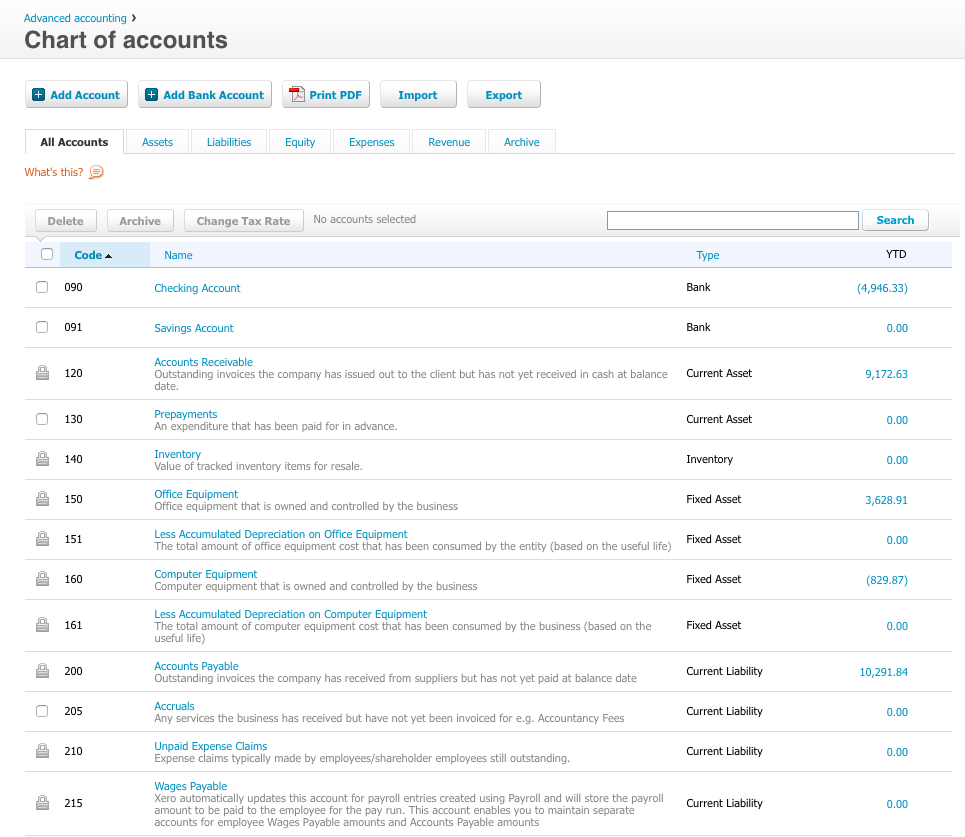     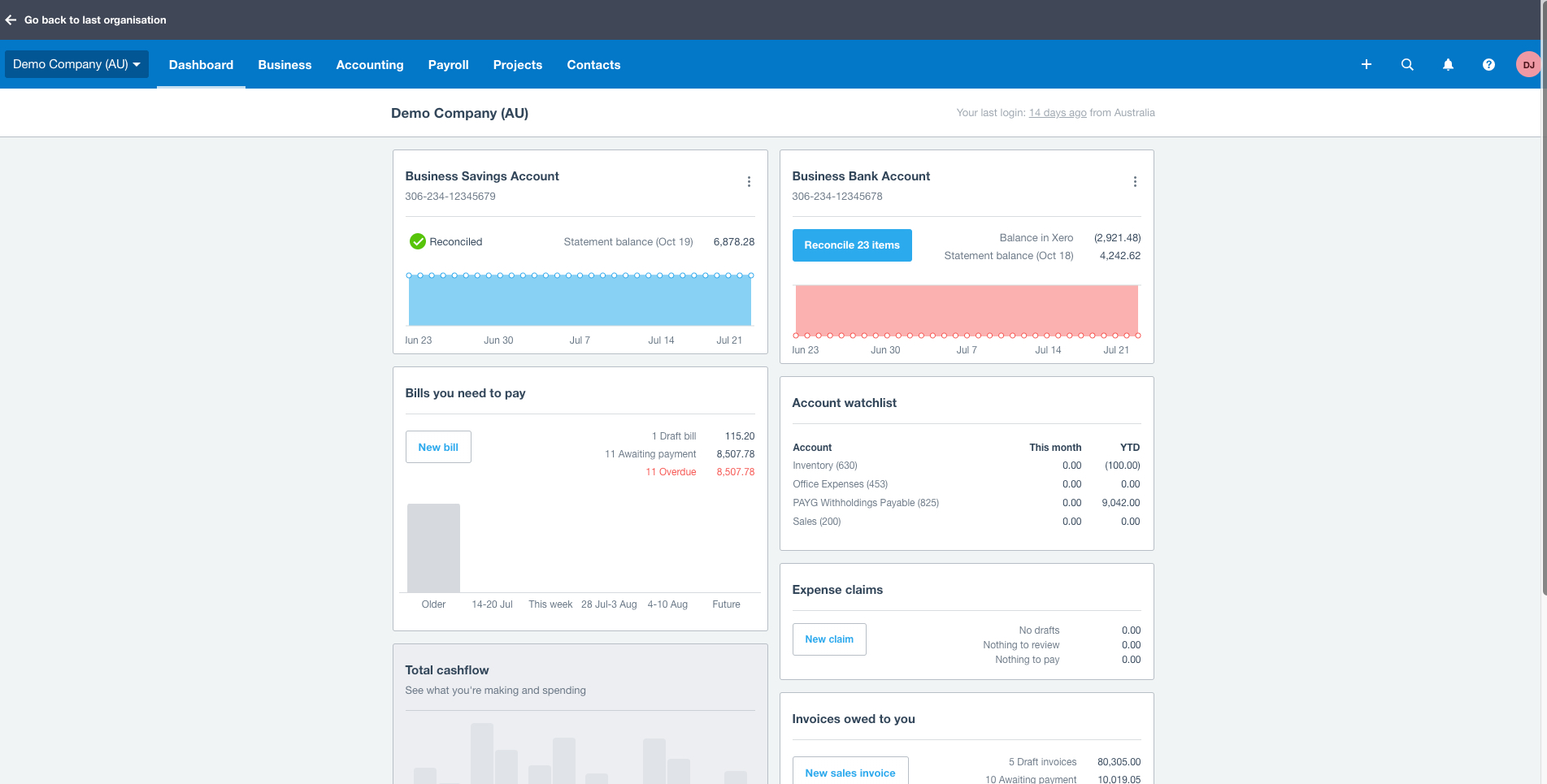 |