
valentine leamy
IT Technician
Chose Acronis True Image
- This is better than Ghost - lighter images and faster.
- Acronis True Image is the best imaging software currently on the market.
- Can restore computer failure within some minutes.

| Product | Rating | Most Used By | Product Summary | Starting Price |
|---|---|---|---|---|
 Acronis True Image | N/A | Acronis True Image is a backup, cloning, cyber protection and privacy tool suite for home users. | N/A | |
 Amazon Drive (discontinued) | N/A | Amazon Drive allows users to aggregate all of their digital content, including photos and videos, in one place. The Cloud Drive is build in to Amazon devices. Users have secure access from any computer, or via their free mobile apps. Amazon Drive offers a free 3-month trial, and pricing packages based on what type of storage users seek. For $11.99/yr, users can store unlimited photos plus 5GB of videos and other files. For $59.99/yr, users can upgrade to unlimited everything (photos, videos,… | $1.99 per month | |
 Dropbox | N/A | Dropbox is a cloud storage solution, equipped with features that help users to save time, improve productivity, and collaborate with others. Users can edit PDFs, share videos, sign documents, and collaborate with stakeholders without leaving Dropbox. | $9.99 per month |
| Acronis True Image | Amazon Drive (discontinued) | Dropbox | ||||||||||||||||||||||
|---|---|---|---|---|---|---|---|---|---|---|---|---|---|---|---|---|---|---|---|---|---|---|---|---|
| Editions & Modules | No answers on this topic |
|
| |||||||||||||||||||||
| Offerings |
| |||||||||||||||||||||||
| Entry-level Setup Fee | No setup fee | No setup fee | No setup fee | |||||||||||||||||||||
| Additional Details | — | — | — | |||||||||||||||||||||
| More Pricing Information | ||||||||||||||||||||||||
| Acronis True Image | Amazon Drive (discontinued) | Dropbox | |
|---|---|---|---|
| Considered Multiple Products | Acronis True Image valentine leamy IT Technician Chose Acronis True Image
| Amazon Drive (discontinued)  Jorden Beatty Digital Marketing Manager Chose Amazon Drive (discontinued) If you compare based on functionality and user-friendliness, other services like Google Drive and Dropbox are better options. However, if you are simply looking for somewhere to securely and reliably host your digital files, Amazon Cloud Drive is a great option. Adding to that …  Marcus Young Web Application Developer Chose Amazon Drive (discontinued) The functionality/integration of Amazon Cloud Drive is unbeatable. The syncing/usage/add-ons is no where near some of the others like OneDrive or Dropbox.  antonio lopez Publicidad Chose Amazon Drive (discontinued) I do not have any special reason to use Amazon Cloud Drive, except perhaps that it is cheap to increase storage size and maybe also because the video management is much more video-friendly in the Amazon environment than in Dropbox.  Sneha Sharma Assistant System Engineer Chose Amazon Drive (discontinued) Less costly compared to other cloud storage providers available in the market. Amazon Drive gives us [the] option to store and backup data with less or minimal effort from dev side. [Therefore,] we don't need to hire a specific developer for that. As we plan to extend or …  Micah Jones Chief Information Officer Chose Amazon Drive (discontinued) Without the "free" photo storage I wouldn't use Amazon Drive. It's really not suited to business use.  Blake Baron Ecommerce & Consumer Products Manager Chose Amazon Drive (discontinued) We're already inside the Amazon portal so often for sourcing, the cloud storage was an easy extension. It is included in our Prime membership so it was an easy option. Furthermore, the functionality is beyond simple, helping to sell the software internally and gain support …  Arlex Guzman VICEPRESIDENT Chose Amazon Drive (discontinued) ACD has lagged behind its competition. I would like to see more space and more features. Its main strength is the Amazon support.  Miguel Brito Director de Marketing en Festejos Car-Yan. C.A. Chose Amazon Drive (discontinued) Amazon Drive Cloud has the advantage of being backed by one of the companies that has had the highest growth in recent years: Amazon. That gives us security and has been the main reason for us to trust this product. We believe that the security systems of this company are good …  James Murphy Senior Web Developer Chose Amazon Drive (discontinued) I use this product in conjunction with other products to store information. As a storage solution it performs as expected, it's use as a business application could be open to improvement mainly due to the lack of collaboration, lock off of files, etc. However, its photo storage …  Jason Montoya Servant Leader Chose Amazon Drive (discontinued) The other services have a better computer syncing software, but the unlimited photo and video space for a small annual fee is unsurpassed by the competition. |  Dropbox  Chuck Graudins Professional Announcer Chose Dropbox Dropbox WAS faster, offered more storage, seemed more reliable six years ago. Today, Amazon, Google, OneDrive are outperforming DropBox. We will probably not renew our subscription and switch to one of the other providers. Miguel Brito Dj, Emprendedor y Community Manager en Eventos CAR-YAN Chose Dropbox I have been lucky that I have liked the programs that I have selected to store my music and other files. Dropbox is a comfortable program for me, because I have access to this software through my cell phone anywhere in the world, it's free and very easy. That is why I have … Chose Dropbox I have free cloud storage accounts for a number of services but dropbox and Google Drive are my go-to's. I use GSuite and Android mobile devices and Drive is heavily integrated, however, all my clients use dropbox. When I start working with new clients, it's the first service I … |
| Acronis True Image | Amazon Drive (discontinued) | Dropbox | |||||||||||||||||||||||||||||||
|---|---|---|---|---|---|---|---|---|---|---|---|---|---|---|---|---|---|---|---|---|---|---|---|---|---|---|---|---|---|---|---|---|---|
| File Sharing & Management |
| ||||||||||||||||||||||||||||||||
| Cloud Storage Security & Administration |
| ||||||||||||||||||||||||||||||||
| Cloud Storage Platform |
|
| Acronis True Image | Amazon Drive (discontinued) | Dropbox | |
|---|---|---|---|
| Small Businesses | No answers on this topic |  SugarSync Score 4.2 out of 10 | SugarSync Score 4.2 out of 10 |
| Medium-sized Companies |  Bacula Enterprise Score 9.6 out of 10 |  Druva Security Cloud Score 9.4 out of 10 | Druva Security Cloud Score 9.4 out of 10 |
| Enterprises | Bacula Enterprise Score 9.6 out of 10 | Druva Security Cloud Score 9.4 out of 10 | Druva Security Cloud Score 9.4 out of 10 |
| All Alternatives | View all alternatives | View all alternatives | View all alternatives |
| Acronis True Image | Amazon Drive (discontinued) | Dropbox | |
|---|---|---|---|
| Likelihood to Recommend | 9.3 (19 ratings) | 8.0 (24 ratings) | 8.5 (1348 ratings) |
| Likelihood to Renew | - (0 ratings) | - (0 ratings) | 8.1 (41 ratings) |
| Usability | 9.0 (3 ratings) | 6.0 (3 ratings) | 8.1 (496 ratings) |
| Availability | - (0 ratings) | - (0 ratings) | 6.8 (3 ratings) |
| Performance | 9.0 (1 ratings) | 6.0 (1 ratings) | 6.0 (8 ratings) |
| Support Rating | 8.9 (9 ratings) | 9.7 (3 ratings) | 6.6 (38 ratings) |
| Online Training | - (0 ratings) | - (0 ratings) | 8.2 (2 ratings) |
| Implementation Rating | - (0 ratings) | - (0 ratings) | 7.5 (4 ratings) |
| Configurability | - (0 ratings) | - (0 ratings) | 6.4 (1 ratings) |
| Product Scalability | 8.0 (1 ratings) | - (0 ratings) | 6.6 (4 ratings) |
| Acronis True Image | Amazon Drive (discontinued) | Dropbox | |
|---|---|---|---|
| Likelihood to Recommend | Acronis
| Discontinued Products
Jorden Beatty Digital Marketing Manager | Dropbox
 Deependra Gahane Customer Support Engineer L2 |
| Pros | Acronis
| Discontinued Products
| Dropbox
 Howard R. Berger Financial Advisor |
| Cons | Acronis
| Discontinued Products
| Dropbox
 Stephanie Crawford Realtor |
| Likelihood to Renew | Acronis No answers on this topic | Discontinued Products No answers on this topic | Dropbox
 Michelle Hidalgo Development and Marketing Manager |
| Usability | Acronis
 Diksha Limbachiya Server and Network Admin | Discontinued Products
James Murphy Senior Web Developer | Dropbox
|
| Reliability and Availability | Acronis No answers on this topic | Discontinued Products No answers on this topic | Dropbox
Deependra Gahane Customer Support Engineer L2 |
| Performance | Acronis
| Discontinued Products
Arlex Guzman VICEPRESIDENT | Dropbox
|
| Support Rating | Acronis
| Discontinued Products
Blake Baron Ecommerce & Consumer Products Manager | Dropbox
|
| In-Person Training | Acronis No answers on this topic | Discontinued Products No answers on this topic | Dropbox
Deependra Gahane Customer Support Engineer L2 |
| Online Training | Acronis No answers on this topic | Discontinued Products No answers on this topic | Dropbox
|
| Implementation Rating | Acronis No answers on this topic | Discontinued Products No answers on this topic | Dropbox
 Annesa L Lacey Founder & CEO |
| Alternatives Considered | Acronis
| Discontinued Products
Miguel Brito Director de Marketing en Festejos Car-Yan. C.A. | Dropbox
 Joy Cobert REALTOR |
| Contract Terms and Pricing Model | Acronis No answers on this topic | Discontinued Products No answers on this topic | Dropbox
Deependra Gahane Customer Support Engineer L2 |
| Scalability | Acronis
| Discontinued Products No answers on this topic | Dropbox
Deependra Gahane Customer Support Engineer L2 |
| Professional Services | Acronis No answers on this topic | Discontinued Products No answers on this topic | Dropbox
Deependra Gahane Customer Support Engineer L2 |
| Return on Investment | Acronis
| Discontinued Products
| Dropbox
|
| ScreenShots | Acronis True Image Screenshots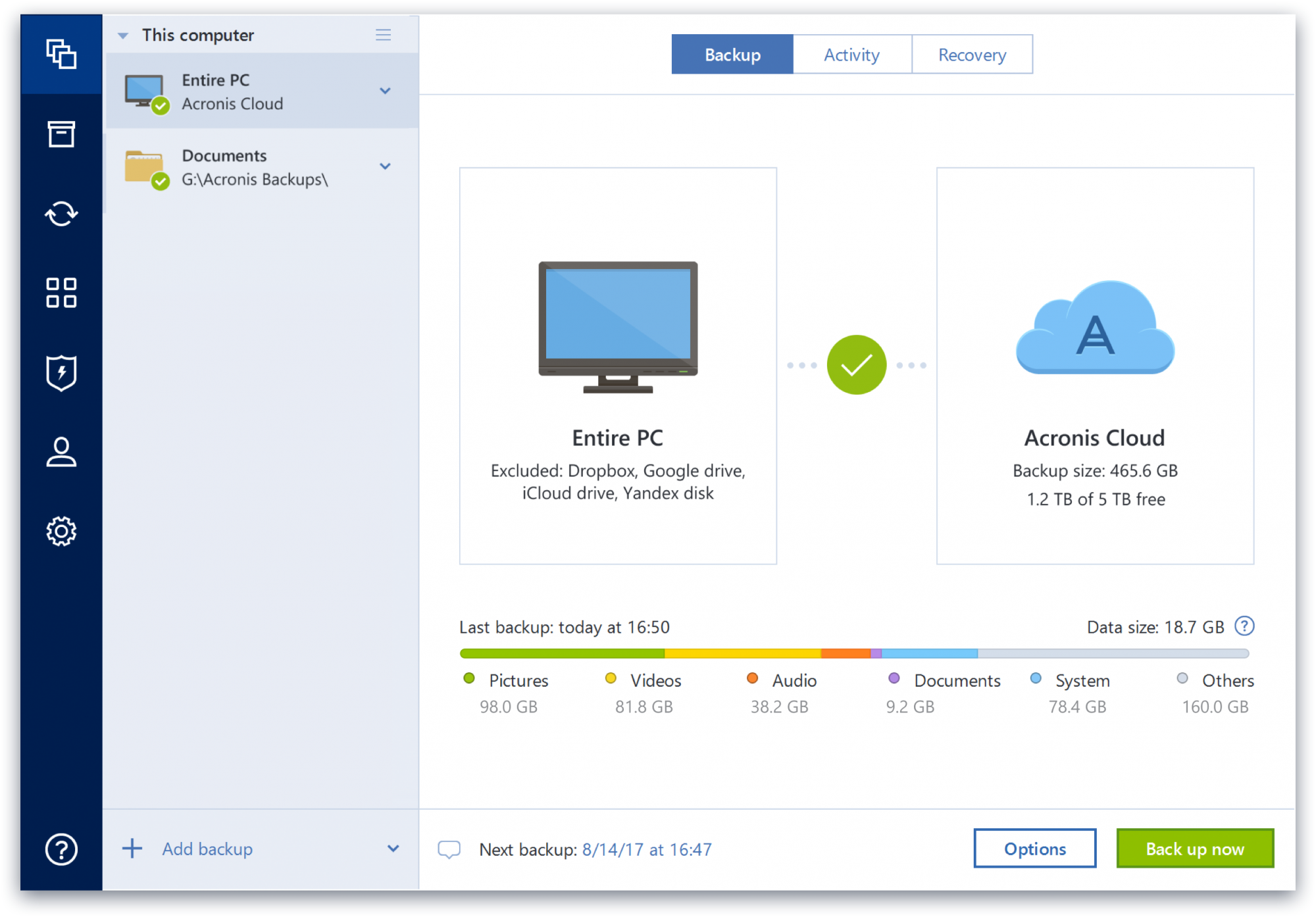  | Dropbox Screenshots    |
