Chose Adobe Acrobat
I use adobe for quick efforts with large PDFs, like combining them with other PDFs or optimizing the file size. I use Bluebeam when I need to spend time working on the PDF and adding comments, color, and other medications.

| Product | Rating | Most Used By | Product Summary | Starting Price |
|---|---|---|---|---|
 Adobe Acrobat | N/A | Adobe Acrobat DC is the current version of the well-established document / PDF management solution, part of the Adobe Document Cloud (the other part being Adobe's eSign services based on technology acquired with EchoSign in 2011). | $29.99 per month per seat | |
 AutoCAD | N/A | AutoCAD is a CAD product from Autodesk. It allows designers to work in 2D and 3D, and is available on Windows and Mac, but with extensive online collaboration tools. | $245 per month | |
 Bluebeam | N/A | Bluebeam Revu is a PDF management, control, and editing tool. It enables collaboration and markup within shared documents across projects’ life cycles and has takeoff and bid creation capabilities. | $240 per year per user |
| Adobe Acrobat | AutoCAD | Bluebeam | ||||||||||||||||||||||
|---|---|---|---|---|---|---|---|---|---|---|---|---|---|---|---|---|---|---|---|---|---|---|---|---|
| Editions & Modules |
|
|
| |||||||||||||||||||||
| Offerings |
| |||||||||||||||||||||||
| Entry-level Setup Fee | Optional | No setup fee | No setup fee | |||||||||||||||||||||
| Additional Details | — | — | — | |||||||||||||||||||||
| More Pricing Information | ||||||||||||||||||||||||
| Adobe Acrobat | AutoCAD | Bluebeam | |
|---|---|---|---|
| Considered Multiple Products | Adobe Acrobat  Avery Chipman Interior Designer Chose Adobe Acrobat The most important factor in choosing and using Adobe Acrobat is that it is an Adobe Suite software and nicely integrates with the other Adobe software we use to create print projects, such as InDesign, Photoshop, and Illustrator. It is also convenient that Acrobat has the free …  Marcos Sola Design Engineer Chose Adobe Acrobat Adobe Acrobat works hand-in-hand with Adobe Illustrator, PhotoShop, and InDesign. Anything that is designed within those platforms can easily be exported as a PDF in order to be viewed in Acrobat DC. Where Adobe Acrobat excels is that we can send our final PDFs to our customers …  Che Odom Marketing and Business Administrator Chose Adobe Acrobat Adobe Acrobat DC is easier to use and more intuitive than BlueBeam, we prefer Bluebeam for operations teams because it offers to scale and measuring for construction documents that our operations teams need, however, would prefer the Adobe suite for ease of use, and familiarity …  Erin Drake Director of Marketing Chose Adobe Acrobat I don't use Bluebeam, but many of my coworkers do - particularly when it comes to construction plans and surveys. They tend not to use Adobe Acrobat DC as much, sticking to Bluebeam for everything, but because they have the software they do not have difficulty using Adobe …  Adrienne Gould-Choquette, P.E. Principal Engineer Chose Adobe Acrobat Microsoft Word used to be my workhorse; however, now I only use it on very rare occasions. I am not a writer and if I were this review would read differently. I create technical documents using an array of software and the final submission of all documents is always a pdf …  Heather MacLean Project Administrator Chose Adobe Acrobat Our field team uses Bluebeam.  Özgür Erkek, MSc, PRINCE2® Exhaust Systems Supervisor Chose Adobe Acrobat Adobe Acrobat is an integrated tool, which captures open/view, edit and sign/stamp features all together in a single software without adds or advertisements. When cloud feature is added then it becomes an essential tool for the office work. Mobile version is a good plus to …  Graham Green Commercial Manager Chose Adobe Acrobat Having previously used Nitro Pro, we were pleased to gain the additional functionality that Adobe provides. Sending and tracking documents is much easier than on Nitro. The support function is slicker and quicker and there is a wider community of users to draw upon. I didn't …  Benjamin Wyszynski Healthcare Associate Chose Adobe Acrobat I think Acrobat DC really makes its case against Revu because of the ability to edit text much easier and add signing areas where in Bluebeam you need to be very exact and do not have the ability to make changes of document that may not lend itself for editing. | AutoCAD  Gautham Prasad Senior VDC Manager Chose AutoCAD  David Yerks Estimator/Project Manager Chose AutoCAD AutoCAD is much more stable and comes with 3D capability as standard. DraftSight is less stable and requires the pro version for 3D capability, but it is also 1/4 the price of AutoCAD.  Oliver Philippe Goulart Young Facility Designer II Chose AutoCAD AutoCAD is superior to the other two software in means of multi format compatibility and ability to save to previous versions. Adrienne Gould-Choquette, P.E. Principal Engineer Chose AutoCAD For the HVAC engineering and design field, companies like RHVAC and Wrightsoft make competing products. I have not used these packages, but I have seen the designs they produce. These designs are not up to the quality, customizability, or standard that I am able to put out …  Jake Karl Mechanical Engineer Chose AutoCAD AutoCAD is one of the original go-to programs for construction documents. It is great when you're using it in the right application. Our company does a lot of smaller tenant renovations in our city so using AutoCAD allows us to produce a high volume of quality drawings to be …  Neha Chopra Signalling Design Assistant Chose AutoCAD I like AutoCAD for design purpose so, I would highly recommend this software to anyone in the designing field, especially signal designing, architectural, engineering or surveying field. AutoCAD is user-friendly software. AutoCAD allows you to be very detailed with your …  Samantha Dross Administrative Assistant Chose AutoCAD Revit is the 3D modeling portion of AutoCAD. AutoCAD is great for 2D drafting and designing. AutoCAD is great for 2D because it analyzes each floor thoroughly.I believe 2D gives more of a detailed idea of what the design of the building and each floor is supposed to look like.  Jason Galati Hawaii / Guam Regional Manager Chose AutoCAD AutoCAD is the best of the bunch, but the older versions are easier to learn. We choose to stay with AutoCAD because the learning curve to switch to another software product would not be.  Gil Lopez CTS ING Integrated Technology Architect Chose AutoCAD | Bluebeam  Tim Corbett General Manager Chose Bluebeam  Michael Carter General Superintendent Chose Bluebeam I personally like the tools that Bluebeam offers over Acrobat and feel that, for my company, Bluebeam was much better suited. Scaling tools, markups, as-builts, RFI’s, submittal approval, and detail creation all really show its strength.  Michelle Lyn Paddock Finance Coordinator Chose Bluebeam It is just more advanced in terms of functionality. Bluebeam has far more features for collaboration, document sharing and marking up.  Babar Tahirkheli Senior Proposal Manager Chose Bluebeam Bluebeam has more enhanced features than Adobe. Heather MacLean Administrative Assistant Chose Bluebeam Bluebeam definitely blows Adobe out of the water in the basic to the basic comparison. You will have to do more research on how exactly to use all the tools if you have never used the program before such as myself. Oliver Philippe Goulart Young Facility Designer I Chose Bluebeam Much more complete than the competition.  Bob Kramer, RCDD, LEED AP Principal Chose Bluebeam Revu was much easier to use, more cost-effective, and is more generally used in the construction and design industry than Adobe. We found Adobe to be more of a resource hog, as well as being bloated with offers for other Adobe applications, which many times would slow down a …  Matthew Smith Safety and Project Manager Chose Bluebeam We've used these other products in conjunction with Bluebeam mainly because Bluebeam lacks RFI/COR/PO/Mark-up/revision tracking, and doesn't handle punch lists or tasks.  Jill Liegghio Accounts Payable Manager Chose Bluebeam Bluebeam Revu has a much more sophisticated interface that allows you to mark up documents in many different ways. It can store tools for standard markup use. It provides digital signatures which can be very useful for many document types. By creating a Revu studio, multiple …  M.A ADIL ANSARI Quantity Surveyor Chose Bluebeam Bluebeam Revu is easy to use and a lot cheaper compared to other products available in the market. |
| Adobe Acrobat | AutoCAD | Bluebeam | |||||||||||||||||||||||||||||||||||||||||||||||||||||||
|---|---|---|---|---|---|---|---|---|---|---|---|---|---|---|---|---|---|---|---|---|---|---|---|---|---|---|---|---|---|---|---|---|---|---|---|---|---|---|---|---|---|---|---|---|---|---|---|---|---|---|---|---|---|---|---|---|---|
| Computer-Aided Design Software |
| ||||||||||||||||||||||||||||||||||||||||||||||||||||||||
| Reporting & Analytics |
| ||||||||||||||||||||||||||||||||||||||||||||||||||||||||
| Construction Project & Field Management |
| ||||||||||||||||||||||||||||||||||||||||||||||||||||||||
| Estimating |
|
| Adobe Acrobat | AutoCAD | Bluebeam | |
|---|---|---|---|
| Small Businesses |  Square 9 Softworks Score 9.7 out of 10 |  Onshape Score 8.3 out of 10 |  FollowUp CRM Score 2.3 out of 10 |
| Medium-sized Companies |  MSB Docs Score 9.4 out of 10 | Onshape Score 8.3 out of 10 |  InEight Score 8.5 out of 10 |
| Enterprises |  Tungsten Capture Score 8.0 out of 10 |  Rhino Score 8.3 out of 10 | InEight Score 8.5 out of 10 |
| All Alternatives | View all alternatives | View all alternatives | View all alternatives |
| Adobe Acrobat | AutoCAD | Bluebeam | |
|---|---|---|---|
| Likelihood to Recommend | 8.8 (812 ratings) | 7.6 (87 ratings) | 9.7 (66 ratings) |
| Likelihood to Renew | 9.1 (45 ratings) | 10.0 (3 ratings) | 1.0 (2 ratings) |
| Usability | 9.2 (254 ratings) | 8.4 (8 ratings) | 9.5 (4 ratings) |
| Availability | 9.1 (3 ratings) | - (0 ratings) | - (0 ratings) |
| Performance | 5.8 (10 ratings) | - (0 ratings) | - (0 ratings) |
| Support Rating | 9.2 (63 ratings) | 6.9 (13 ratings) | 1.0 (11 ratings) |
| Online Training | 9.0 (1 ratings) | - (0 ratings) | - (0 ratings) |
| Implementation Rating | 9.8 (15 ratings) | 8.0 (2 ratings) | - (0 ratings) |
| Configurability | 8.0 (4 ratings) | - (0 ratings) | - (0 ratings) |
| Contract Terms and Pricing Model | 4.5 (2 ratings) | - (0 ratings) | - (0 ratings) |
| Ease of integration | 8.0 (8 ratings) | - (0 ratings) | - (0 ratings) |
| Product Scalability | 7.0 (4 ratings) | - (0 ratings) | - (0 ratings) |
| Vendor post-sale | 1.0 (2 ratings) | - (0 ratings) | - (0 ratings) |
| Vendor pre-sale | 1.0 (1 ratings) | - (0 ratings) | - (0 ratings) |
| Adobe Acrobat | AutoCAD | Bluebeam | |
|---|---|---|---|
| Likelihood to Recommend | Adobe
 Alan Gilbertson Creative Director | Autodesk
| Bluebeam, Inc.
|
| Pros | Adobe
| Autodesk
| Bluebeam, Inc.
Tim Corbett General Manager |
| Cons | Adobe
| Autodesk
| Bluebeam, Inc.
Heather MacLean Administrative Assistant |
| Likelihood to Renew | Adobe
Avery Chipman Interior Designer | Autodesk
 Nelson David Sanchez Villasmil Gerente de proyectos de Arquitectura ( Contrato fijo ) | Bluebeam, Inc.
 Michael Savala Assistant Account Manager |
| Usability | Adobe
| Autodesk
| Bluebeam, Inc.
 Ernest King Construction Operations & Process Manager |
| Reliability and Availability | Adobe
 Rod Lott Manager of Marketing Strategy | Autodesk No answers on this topic | Bluebeam, Inc. No answers on this topic |
| Performance | Adobe
 Daniel Epstein Senior Clinical Quality Analyst | Autodesk No answers on this topic | Bluebeam, Inc. No answers on this topic |
| Support Rating | Adobe
| Autodesk
| Bluebeam, Inc.
|
| Online Training | Adobe
 Michael Craven President | Autodesk No answers on this topic | Bluebeam, Inc. No answers on this topic |
| Implementation Rating | Adobe
Rod Lott Manager of Marketing Strategy | Autodesk
Nelson David Sanchez Villasmil Gerente de proyectos de Arquitectura ( Contrato fijo ) | Bluebeam, Inc. No answers on this topic |
| Alternatives Considered | Adobe
| Autodesk
Gautham Prasad Senior VDC Manager | Bluebeam, Inc.
|
| Contract Terms and Pricing Model | Adobe
 Sean Moore Marketing Specialist | Autodesk No answers on this topic | Bluebeam, Inc. No answers on this topic |
| Scalability | Adobe
 Jamie Caroland Independent Consultant | Autodesk No answers on this topic | Bluebeam, Inc. No answers on this topic |
| Return on Investment | Adobe
| Autodesk
 Paul Li Senior Associate | Bluebeam, Inc.
 Charlie Jewkes Estimator |
| ScreenShots | Adobe Acrobat Screenshots    | Bluebeam Screenshots 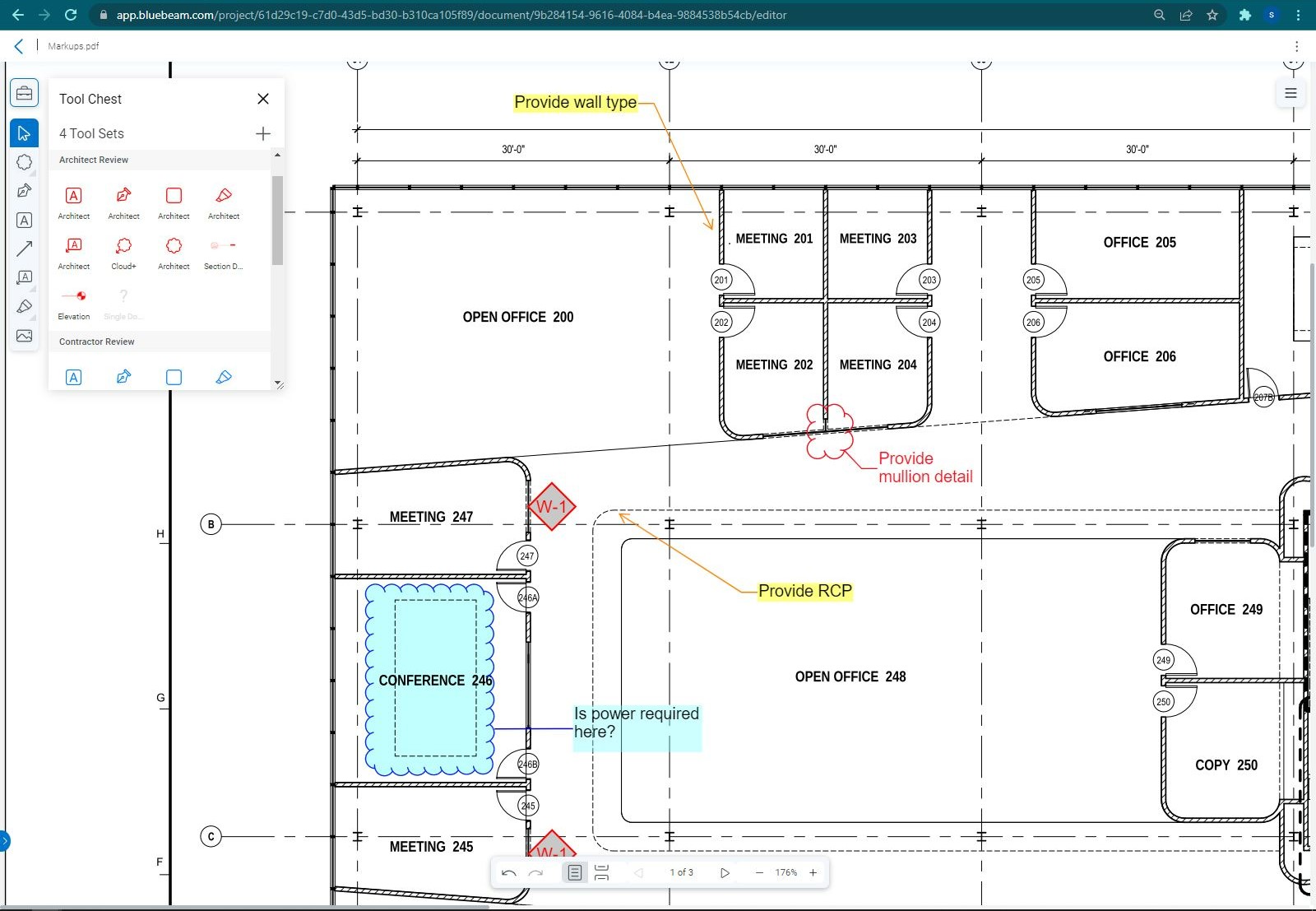 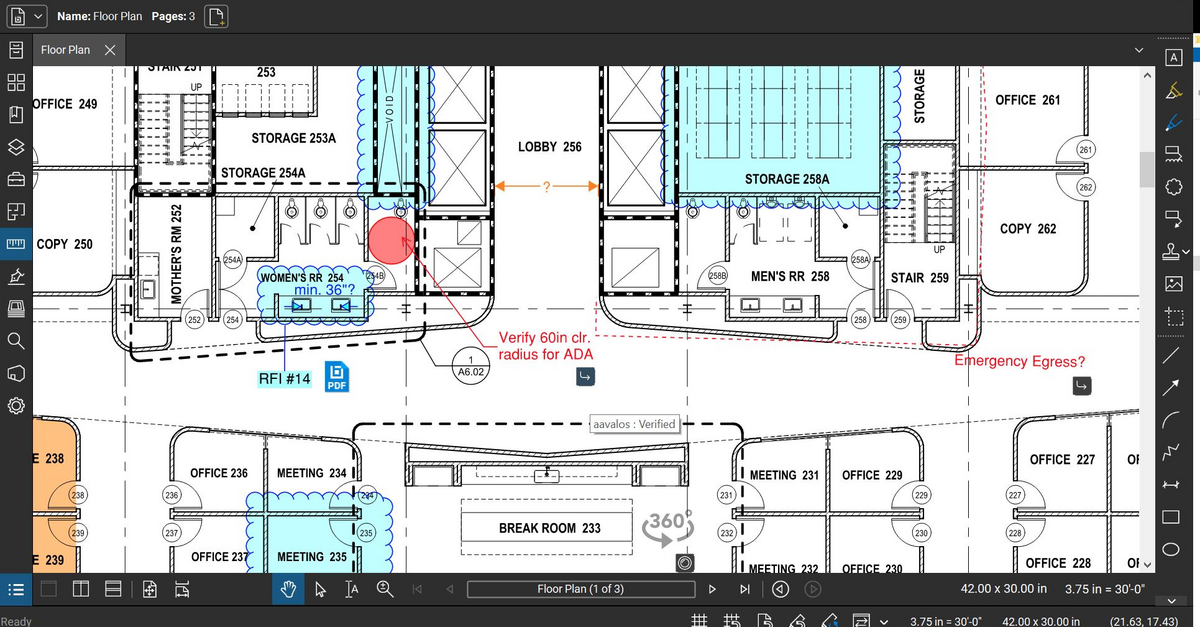 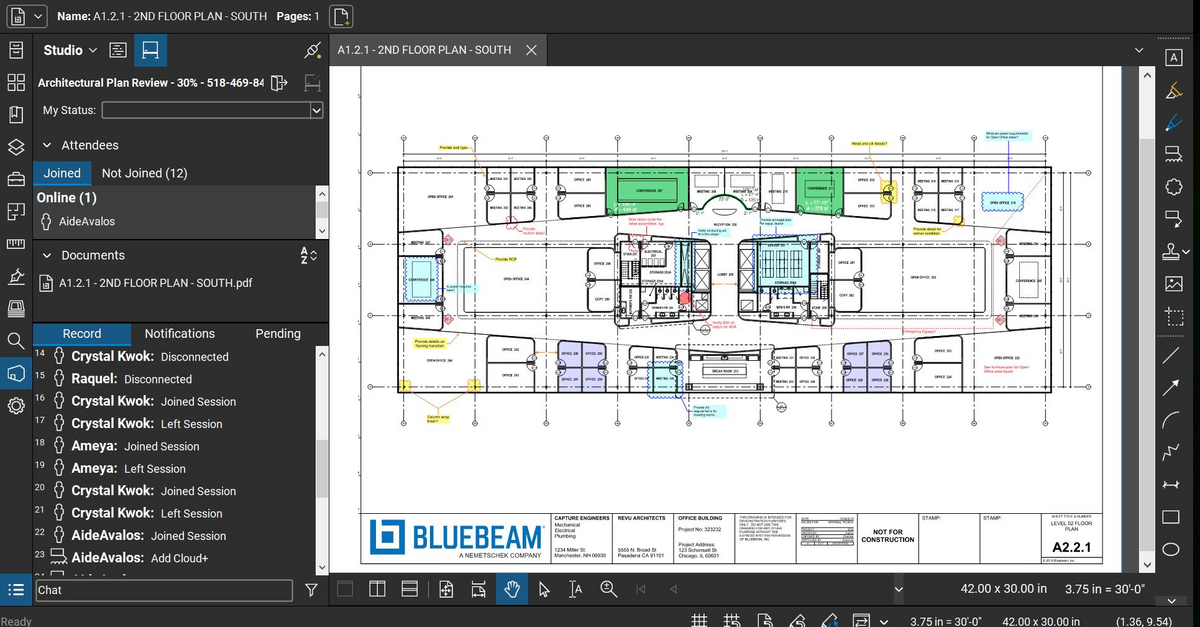 |