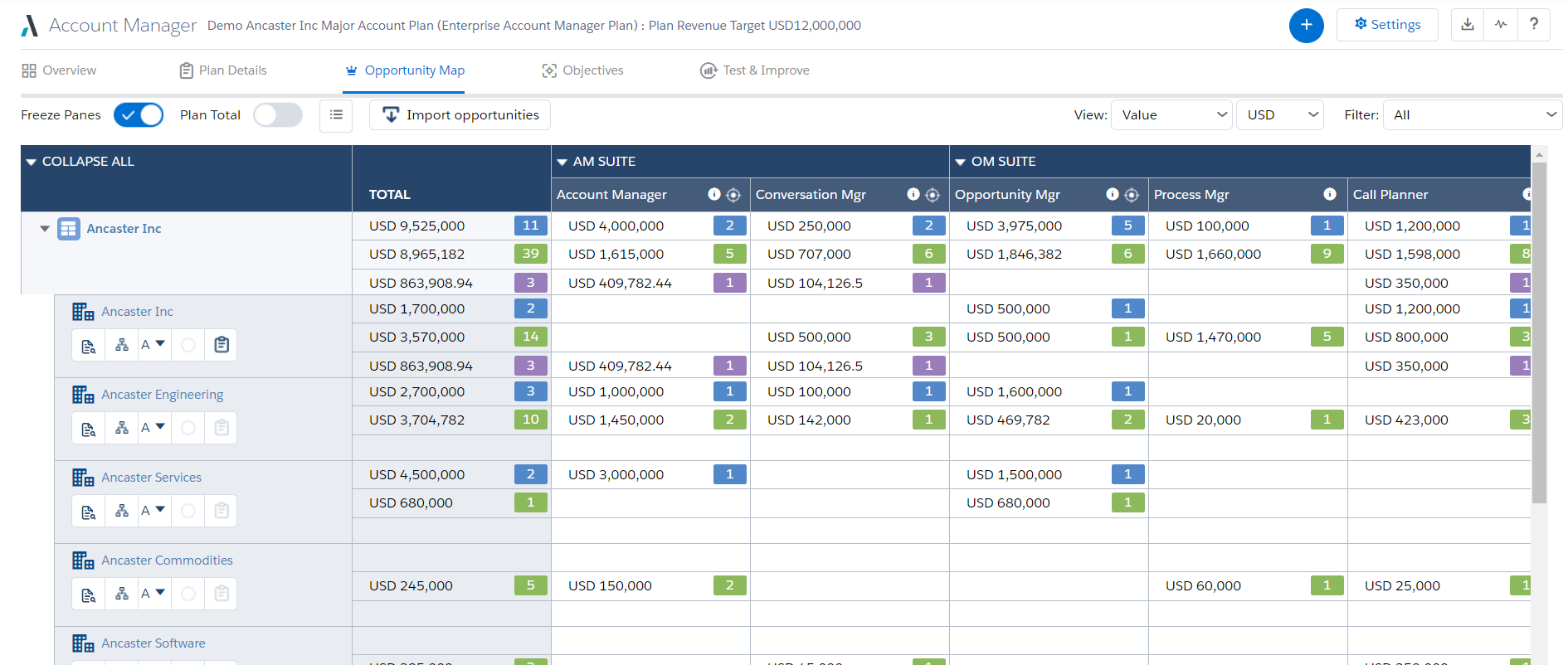
Altify’s suite of Salesforce native solutions guide and coach sellers to identify and map key relationships, uncover business insights, align sales processes to buying processes, qualify, manage and execute deals, and grow wallet share in accounts.
N/A
Asana
Score 8.5 out of 10
N/A
Asana is a web and mobile project management app. With tasks, projects, conversations, and dashboards, Asana lets an entire team know who's doing what by when, enabling workload balancing. Users can also add integrations for GANTT charts, time tracking and more.
$13.49
per month per user
Zoho Projects
Score 9.2 out of 10
N/A
Zoho Project is online project management and planning software that provides project teams with a web-based collaborative environment. Zoho Projects can also include a bug tracking module specifically design to support software development project. It is integrated with other Zoho products including Zoho CRM.
$5
per month per user
Pricing
Altify
Asana
Zoho Projects
Editions & Modules
No answers on this topic
Starter
$13.49
per month per user
Advanced
$30.49
per month per user
Enterprise
Contact Sales
Personal
Free
Free
$0
Premium
$5
per month per user
Enterprise
$10
per month per user
Project Plus
Contact Sales
Offerings
Pricing Offerings
Altify
Asana
Zoho Projects
Free Trial
No
Yes
Yes
Free/Freemium Version
No
Yes
Yes
Premium Consulting/Integration Services
Yes
Yes
Yes
Entry-level Setup Fee
Optional
Optional
Optional
Additional Details
—
A discount is offered for annual billing.
Discount offered for annual billing.
More Pricing Information
Community Pulse
Altify
Asana
Zoho Projects
Considered Multiple Products
Altify
No answer on this topic
Asana
Verified User
Manager
Chose Asana
We selected ASANA based on the feature set, and ease of rollout. monday.com had very good workflow automation but we found that ASANA was quicker and easier for staff to build a task eco-system that worked for them.
Zoho Projects was a very strong contender but was much more …
In comparison to other Project Management software tools that I have used, Asana is the most user friendly platform without compromising any advanced capabilities.
We were testing out Asana at the time we moved on to Zoho. Zoho seemed to have more features that met our needs. Asana was not quite developed to the point of our liking. Zoho has an awesome calendar function that I loved, which Asana did not.
MSP - Windows based. Not collaborative. Complex UI. Cannot be shared with people outside the organization easily. Cannot set security levels for users to access projects based on the rights granted to them. Trello and Asana - Expensive subscription plan. Limited …
I would choose HubSpot & Asana over Zoho because of their intuitive UIs and functionality. I would choose Zoho over Basecamp only when you are managing hundreds of projects.
I used Zoho projects initially because it was easy to setup and gets going for FREE. The best thing you can get out of Zoho projects is that it needs zero setup time. It is also a great tool for manage projects, however not that suitable for product management, I believe. JIRA …
Altify is very well suited for customer relationship mapping and for use on very large, long term and complex deals. Altify is created and represented as an enterprise-level tool, but even some of its functions are too overbuilt for enterprise level sales activities. Altify is a tool best utilized only for the top level of complex deals within an organization. Features such as customer relationship mapping do have use and benefit for mid to large level deals and is arguably the most valuable tool in the Altify suite. After nearly a year using Altify, my recommendation on its use would be to enable account plans, account management, opportunity management, and sales process manager only to the top strategic account reps in the organization, realizing that they are probably best used purely out of the box as any customizations create other complications. For the rest of the sales teams, the customer relationship mapping feature is the one tool reps would gain the most value out of.
The usability of Asana is broad since it's available in a variety of platforms that are widely used nowadays. I think that it would be great for people who are constantly on the move and switching devices, since it has allowed me to work from my phone, too. I also think that Asana has proven itself to handle a large quantity of work
My work involves projects of 5-15 people with numerous projects running simultaneously. Prior to Zoho, I did not have a central location from which to view all project statuses at once. Zoho looks to provide this and also looks like it will deliver. I am anxious to see how our organization's use of it develops. At this time, I feel I am likely to recommend Zoho Projects because my organization has made great software decisions in the past so I have a level of trust already that the research has been done that Zoho is the best solution for our line of work.
Through it, we were able to communicate and cooperate with the rest of the team to complete the work in the required manner and at the appropriate time.
We use it to manage our sales orders as there are lots of moving parts which are necessary to get client orders done properly.
I use it anytime I have a new idea I want to put into motion. As I can create a list for brainstorming, feedback, specific actions necessary in order to test and or implement the idea.
Unrelated to business, it's a great way to plan travel in order to make sure you don't forget those important things like passport, flight arrangement, client meeting confirmation, and meeting prep as far as what specific documents or things do you need to bring with you.
And since everyone is on the go and expected to keep up with work, the mobile/tablet app makes it a breeze to keep up, work on, and create new projects.
Sales Process Manager: The Altify Sales Process manager's biggest drawback is the lack of usability for the end user. Altify has an out of the box sales process or a custom one can be created based on the company sales process. The drawback is that unless the sales process includes very few items, it can be more cumbersome than helpful. The Rep walks through the Sales Process by selection whether they have "Completed" are "In Progress" or have "Not Completed" the sales process activities at each stage of the opportunity. Altify saves after each selection so there is considerable downtime as the user waits for their selection to be recorded before they can answer the next question. Altify has an option to automatically advance the Salesforce opportunity Sales Stage once a certain % or mandatory steps in the sales process are completed, however this is not entirely useful as it does not advance until the set % or mandatory marked processes within a Sales Stage are completed AS WELL as at least one process from the next sales stage. This becomes very confusing and cumbersome for the users. In most cases, the sales process manager becomes more of a micromanagement tool with managers requiring all items to be marked completed and the Users merely marking items to satisfy that requirement without getting the intended benefit of the guided selling experience.
Account Plans: Account Plans can be grouped in both "does well" and "does poorly" for the Altify Suite. I will outline the bad in this portion of the review. Altify Account Plans do have some ability for customization, however the standard out of the box options are incredibly overbuilt. Filling out all of the information within the Account Plan can consume 40+ man hours for a single Account. While some of this information can be useful and important to note, other portions become more cumbersome than useful. The Completeness and Scorecard portions of the use a number of calculations. These calculations are explained at the bottom of the page but from a user perspective are very confusing and not straightforward. Most users that begin using account plans quickly abandon them because of the difficulty in setting them up correctly and the minimal insights that are gleaned out of the work put into them. One place for the greatest opportunity to improve account plans is in the objectives section, there the user can set objectives and activities (tasks) to meet them. The tasks must be manually selected to create an actual task in Salesforce and this cannot be assigned out to other SF Users. This portion of the Account plan would be improved if it could be used as a holistic account management platform to manage tasks across all the opportunities and potential opportunities, with an ability to assign them out to others in Salesforce within the account team.
Altify Max Insights: Altify max insights is intended to provide coaching advice at the opportunity level. This feature is tied into the opportunity manager. The drawback to this feature is that the insight mainly pertains to whether or not a user filled out all the steps in the opportunity manager: the sales process, the opportunity assessment, strategy, and the customer relationship map. The insights are far less action-oriented and more of a reminder to use the tool components. This tool just doesn't hold value, especially as it is an add on product.
Lack of Customization - While Altify does allow customization of some of their products and components, Altify has a ton of limitations. One of the most frustrating aspects is that all of the processes happen from their "black box" which is the dealmaker opportunity objects that Altify creates. This is essentially a shadow copy of the opportunities within Salesforce that then push changes to the actual opportunity. There is no way to tap into this shadow opportunity to either run custom processes or to even surface the Altify insights in a BI tool such as Einstein. This means that a lot of the use and functionality that Altify does do well cannot be leveraged for company insights or user end improvements.
I've reviewed about 8 other project management solutions and Zoho Projects is the best I've seen without being overly complicated. Zoho Projects keeps getting better! Recent new enhancements makes it even easier to navigate. There are new keyboard shortcuts that cut my time way down. The tools are very easy to use.
It is very user-friendly. Takes a new employee an hour to start figuring out how the system works. That's an important factor. You don't want to encounter the issue where employees need a week to understand how the system works. For example, JIRA, I tried using it for a week and I still don't understand the complicated layout. Asana has a simple interface. Once you see it, you get it type of program.
Zoho Project has been very user-friendly. As a small business, we have a diverse group of people with varying skill sets. This platform has been easy for our team to learn, implement, and succeed with. The mobile version is also very handy for our team.
I haven't had to use their support so I can't rate it. The fact that I haven't needed them reflects the ease of use of the product. I would recommend that any new users schedule a complete demo of the product to ensure that they are using it to it's fullest (there's a lot of useful features).
Although it might lack intuitiveness, once you get a hang of how Zoho Projects works, you can do a LOT. The impact good project management has on profitability is huge, and it has helped not only improve communication and coordination when working on a project, but more importantly have adequate tracking of time, due dates and potential bottle necks
While Skuid is not a match to what Altify does in terms of capabilities, Skuid did allow us to natively create the functions that we needed within the business in a way that was more useful than the Altify tools out of the box functionality. Altify does not offer anything for a more "light touch" opportunity, which is its greatest drawback. With Skuid we were able to create our own solution for these lighter touch opportunities
Asana is a top-tier project management software that helps us organize and track projects from start to finish. It allows us to apply tasks/to-dos to multiple projects without duplication, divide complex projects into smaller tasks, and track project progress. It also helps us organize work on Kanban boards or linear lists. It stands out from the crowd in a big way compared to the competition.
Zoho Projects provides a more limited set of functionality and customization options than other task/bug trackers on the market, but what it lacks in functionality it makes up for in ease of use. It probably has 80-90% of the features of its competitors but takes about a third of the time to get up and running and realizing value.
We needed a system to organize our growing business, so anything was better than what we had, which was nothing.
Recording time spend is a huge reason for using project software. It has made me aware of the tasks that are taking too long and where we are not being profitable as a company.
It has kept our team accountable for what needs to get completed and when projects are not in motion or completed timely. It's helpful to know in order to get billing out faster.