Asana is a web and mobile project management app. With tasks, projects, conversations, and dashboards, Asana lets an entire team know who's doing what by when, enabling workload balancing. Users can also add integrations for GANTT charts, time tracking and more.
$13.49
per month per user
Backlog
Score 8.7 out of 10
N/A
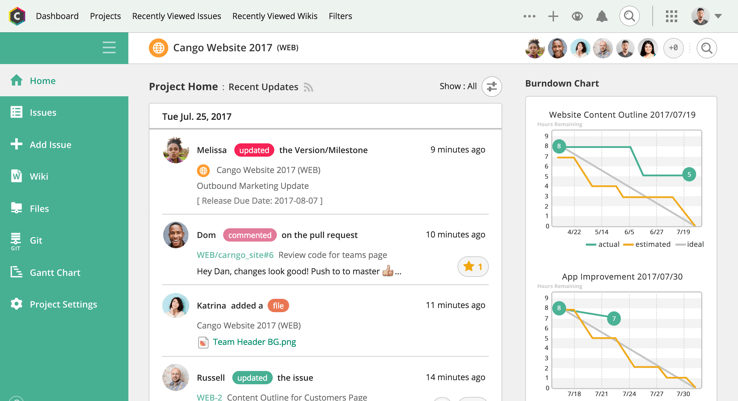
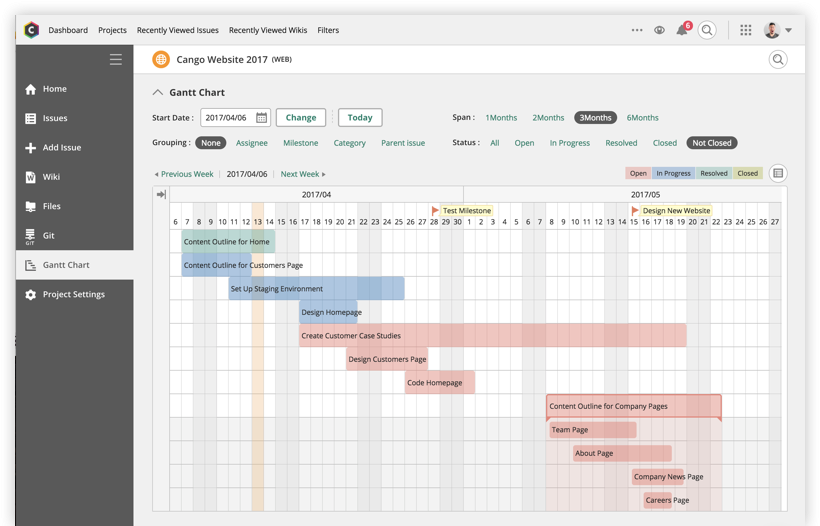
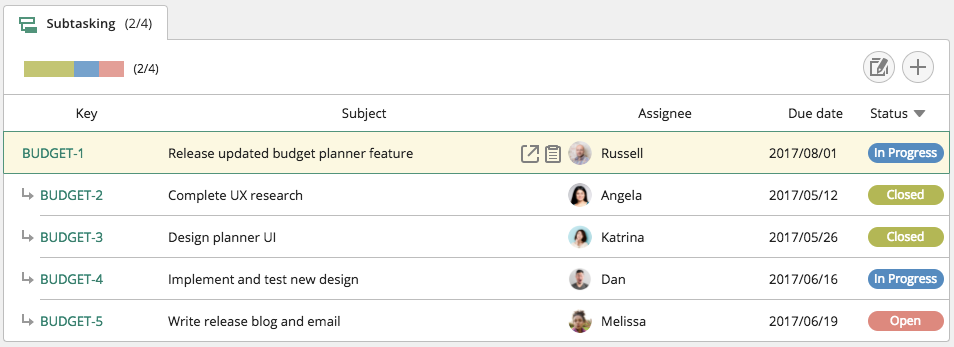
Backlog is a project management and bug tracking tool for teams that want higher productivity, greater visibility, and simple project tracking. Development teams can work together with Design, Marketing, IT, and more.
Backlog is designed to get everyone on track by organizing work, teammates, projects and tasks. The activity feed and watchlist are designed to help users keep an eye on relevant work and deadlines. Gantt charts and burndown charts are designed to help users visualize project…
N/A
Notion
Score 8.7 out of 10
N/A
Notion aims to present users with an all-in-one workspace — for notes, tasks, wikis, and databases, from Notion Labs in San Francisco.
Trello - great but a bit young. Good integration points. I think it could be a good too to integrate with. Some people enjoy the KanBan type view and Asana doesn't have that currently. Basecamp - more project manager focused but also a good integration point. JIRA - Better for …
Notion was more robust than Asana and allowed for greater flexibility. It feels like Notion also makes up product updates more frequently and adds new features on a consistent basis to help the product continually improve. It Notion works better and allows for more in-depth …
I didn’t select Notion over them. I picked Asana, Monday, and ClickUp over Notion everytime. They have better notifications, work smoothly, are easier to maintain, don’t need someone to spend hours to maintain.
I've used Evernote in the past and currently use Asana alongside Notion, so I can compare them based on my experience.
Notion is much more flexible than Evernote. While Evernote is great for basic note-taking, Notion allows me to structure my notes with nested pages, databases, …
Notion pretty much combines all the capabilities each one of these platforms have and just takes the most important ideas and concentrates on making them stand out. I can create a "Trello" type of timeline, and use a more traditional "Jira" or "Asana" type of waterfall view. …
Notion is much more robust than Google Tasks, which I find very limited. Notion is far more customizable and affordable than Asana, which is more of a turnkey solution for teams that want to work within a pre-defined structure. Notion and ClickUp are comparable, in my opinion, in …
The company uses both Notion and Trello within the company. Notion is more for North America employees while Trello is used between Operation team overseas and in North America. Sometimes it's a preference of how the tools look like for project management. I would say both …
It's a combination of the three put together but with the added benefit of web hosting being a part of its core. The other tools are more the same thing, with just a couple of different elements in between. Notion combines them all and consistently adds new functions to its core.
Notion felt much easier and intuitive than Confluence. Note: It's important to have someone set up templates and team spaces to make this easier. Confluence's search was less effective.
Google docs feels much more siloed and you can't make one document include multiple types …
Notion is all things to many people, but I prefer to move some of my intense project planning out of Notion into Jira. Jira's automations and APIs are much more robust and the data tracking Jira provides is better for spring planning. Notion is extremely flexible, though, and …
The usability of Asana is broad since it's available in a variety of platforms that are widely used nowadays. I think that it would be great for people who are constantly on the move and switching devices, since it has allowed me to work from my phone, too. I also think that Asana has proven itself to handle a large quantity of work
If you want a customizable solution that can be adapted for just about any scenario, I recommend using Notion. If you need a solution that's easy to share with people outside your organization, Notion is great and allows individual or team permission-setting. If you want a turnkey solution, Notion might not be the best since it requires a fair bit of set-up. There are templates that can be purchased to handle this, but I haven't found them very helpful.
Through it, we were able to communicate and cooperate with the rest of the team to complete the work in the required manner and at the appropriate time.
Backlog is one of the best management and collaboration tools available in the market for better managing of resources at the workplace.
I have been using this platform for a very long time and it has been helping me a lot to manage the business processes, manage employees, managing leads on different projects, and coordinating with colleagues.
It has been helping me a lot to check the issue in the project completion.
It gives me real-time status on the project/gives right insights of the system.
I use Notion on my personal tablet, and unlike on the computer, I have a lot of difficulty editing backgrounds, GIFs, and page dividers. It's not as user-friendly, and often the elements end up cut off or misaligned, which is frustrating.
While the current calendar feature is helpful, I'd love to see more customization options. The Google Calendar style isn't always ideal, especially for tasks without specific times or for ongoing projects that require daily maintenance.
It would be fantastic to have more flexibility in customizing Notion pages. For example, I'd love to create planners with the freedom to add illustration boxes, stickers, or GIFs without being restricted to a fixed layout.
It is very user-friendly. Takes a new employee an hour to start figuring out how the system works. That's an important factor. You don't want to encounter the issue where employees need a week to understand how the system works. For example, JIRA, I tried using it for a week and I still don't understand the complicated layout. Asana has a simple interface. Once you see it, you get it type of program.
Very easy to use (I learned how to use everything on my own) and I was able to set up an entire ecosystem without any courses or other tools. I often say that Notion is like Lego for adults, because there we can use all the available tools to create a multitude of things, from funnels to projects with calculated deadlines and tags.
I haven't had to use their support so I can't rate it. The fact that I haven't needed them reflects the ease of use of the product. I would recommend that any new users schedule a complete demo of the product to ensure that they are using it to it's fullest (there's a lot of useful features).
Asana is a top-tier project management software that helps us organize and track projects from start to finish. It allows us to apply tasks/to-dos to multiple projects without duplication, divide complex projects into smaller tasks, and track project progress. It also helps us organize work on Kanban boards or linear lists. It stands out from the crowd in a big way compared to the competition.
Backlog has all of the top-notch features to increase productivity, visibility, and project tracking. Backlog is easy to use. I first just logged in to the platform and it was [ready] to go. I easily started working on it and it started giving me the bugs’ details on our project. Always available for queries. Listen to the queries very attentively and try to give a solution on the go if applicable. Otherwise, take some time and respond with the advanced workable solution in the limited time frame.
The company uses both Notion and Trello within the company. Notion is more for North America employees while Trello is used between Operation team overseas and in North America. Sometimes it's a preference of how the tools look like for project management. I would say both Notion and Trello are nice tools and serves our needs.