Basecamp is a web-based project-management tool. Basecamp offers features standard to project management platforms, as well as mobile accessibility, unlimited users, and 3rd party integrations. Basecamp is priced by space requirements and concurrent projects.
$15
per month per user
ClickMeeting
Score 9.4 out of 10
N/A
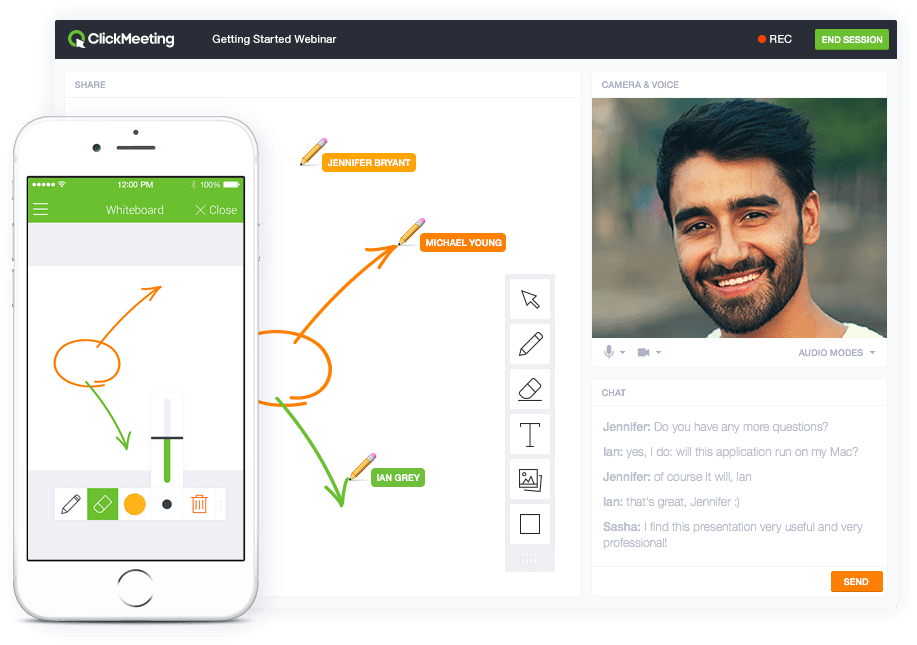
ClickMeeting is a webinar solution formerly owned by GetResponse, an email marketing software company. ClickMeeting's online meeting and collaboration tools are designed to support the sales, marketing, e-learning, and training needs of business of all sizes.
$25
up to 25 attendees
Dropbox
Score 8.6 out of 10
N/A
Dropbox is a cloud storage solution, equipped with features that help users to save time, improve productivity, and collaborate with others. Users can edit PDFs, share videos, sign documents, and collaborate with stakeholders without leaving Dropbox.
We have Teams, at our organization. But, we cannot add people who do not have our email address extension. We started to look into Teams to do the same thing as Basecamp, but it was too complicated and difficult to set up.
in my opinion, it is Inferior, clunky, ugly product as compared to the others. I only selected Basecamp on recommendations from someone else who was using it, and have moved on to ClickUp. This Basecamp app failed to notify myself, my teammates and the client so many times, …
I've also used ClickUp and Asana. My personal favorite is ClickUp although it is limited in how it integrates with Slack which caused me to switch to Asana. ClickUp has a ton of features, including on their free plan and in my opinion is much better than Basecamp. Asana is …
Both programs are good. We went with the one that most people on the team felt comfortable with so we would have the most buy-in. I also like the continual updates and feedback Basecamp takes to heart. Basecamp also has some functionality that met the needs of the organization …
We found that Basecamp worked better for our needs than these competitors. ML is a bit slow for our purposes, and it doesn't handle images/video in as nice of a way. Invision could potentially work alright for our needs but would require too many different screenshots being …
Basecamp is a feature-rich and user-friendly platform that outpaces other solutions we've explored. The vast number of integrations available, as well as the years of dedicated developers as well as the natively available mobile apps, really make Basecamp a leader in this …
Basecamp is the best application we've found for our team to interface with external clients. It makes project management simple, and allows our clients visibility into their projects, which in turn builds trust, fosters open communication, and improves customer satisfaction. …
Trello is less expensive and the free version works pretty well. For the paid version, Trello is also a really great tool. Overall, I do like Basecamp better. It's a more simple layout and structure to the software. I like the communication threads better on Basecamp. Trello …
Basecamp is probably my least favorite. As a project manager, I'm always auditing our workflow and processes, so I try to run at least trials of project management software to get a feel for if they would help us do things more efficiently. I struggled the most with Basecamp.
We tried other software while selecting paid plans of Basecamp; its customer service is fast and very prompt in comparison to others. Interface and UI & UX is also very good, which is very good for team members. The team loves this product and they are very happy with it. We …
Asana has an expanded list of capabilities over Basecamp. If you're looking for a simple tool, Basecamp is your go-to. If you need something that makes it easy to schedule recurring tasks, dependencies, mass updates, seeing a project map, and capacity of your team, Asana is the …
Trello, Gantify. We selected Basecamp because we liked the card system, even though it was lacking some of the other features we liked from other platforms.
We moved from Basecamp to Monday.com. Monday is much better suited to an environment where most projects are similar to other projects you are currently working on or have already completed. Monday isn't as "social" or as "community building" as Basecamp, but we've always used …
Basecamp if far simpler than ClickUp. We use Clickup to manage our internal task management, as it provides more customization, additional views and more room for extreme detail in tasks. We used Basecamp for clients because of its simplicity and ease-of-use. Basecamp requires …
Pretty good, but [Basecamp] has its drawbacks. Honestly I find the interface non-intuitive and sometimes have trouble figuring out how to change the status of a task. Perhaps it has something to do with the way it was originally set up by the admin, but I'm not sure. I liked …
Basecamp is simple to understand, easy to use, and does not come with the bloat and complications of a solution like Teams. It is certainly more organized and easy to follow than simply having a group chat on Slack and Viber. If you need to easily find information, it can be …
ClickMeeting was designed with webinars in mind, and it's done well. It features built-in registration forms, automated emails, surveys, and analytics, making event management and tracking easier. Furthermore, joining a webinar is simple and doesn't require software …
We chose ClickMeeting over zoom and teams because it’s better for running structured webinars and online workshops.
Unlike Zoom, it has built-in tools for registration, reminders, and audience engagement without needing extra setup. Teams is great for internal meetings, but not …
ClickMeeting stands out due to its more visually appealing interface and simplified usability. The layout feels more intuitive, especially for hosting webinars and interactive sessions. The platform is easier to navigate for both hosts and participants. Another strength of …
For several years we have been using the ClickMeeting platform exclusively for our webinars. As for meetings within the organization - here we previously used other platforms. However, since we have ClickMeeting we also use this platform to organize meetings for our teams. …
We selected ClickMeeting for its specialized focus on webinars and virtual events, which aligns with our organization's needs. ClickMeeting's dedicated webinar features and ease of use make it an ideal choice for hosting engaging and interactive online presentations and live Q&A…
The interface is clear and legible, user-friendly. The quality of audio-video is outstanding, as with the other platform we sometimes encountered some issues. ClickMeeting has a lot better registration tools and other user engaging features (polls and surveys). The technical …
I only use ClickMeeting to conduct online meetings and webinars. I don't need to change the program to another one. I am satisfied with the functionalities that the program offers. The ability to upload your own files and record meetings is very nice. The program helps a lot in …
While Google Meet is a reliable product for small, internal meetings, the specific features and functionalities of ClickMeeting make it a better fit for the purposes of organizing large scale events and webinars. Whether through the ability to add multiple event managers, …
ClickMeeting distinguishes itself as a standout EU solution primarily due to its GDPR compliance, a feature that sets it apart in the competitive market. Unlike Teams and Zoom, which often grapple with GDPR-related issues, ClickMeeting's adherence to these regulations makes it …
In addition to its benefits for staff meetings and online courses, ClickMeeting offers a range of teaching tools that enhance the learning experience. These tools allow for interactive presentations, real-time collaboration, and engaging multimedia content. Furthermore, …
While Google Meet is a reliable platform for simple meetings, ClickMeeting offers a more comprehensive set of features tailored for webinars and large-scale events. These include advanced event management, interactive engagement tools like polls and Q&As, and seamless screen …
We chose ClickMeeting because this solution offers us the optimal basis for our language teaching. Working with the ClickMeeting platform comes in our opinion closest to the possibilities of a face-to-face language training. All classroom tools can be found on the platform, …
Specialist in the marketing and communications department
Chose ClickMeeting
Our organization considered using skype, but it did not seem safe in terms of data security. Skype also offered fewer features than the ClickMeeting platform. Clickmeeting is a very secure platform. It offers a number of different functions. There is a possibility to conduct …
ClickMeeting is better priced, has post-event abilities that I am looking for. LOVE the automated webinars. Love being able to make a separate studio room for a tech check with guest presenters. Been using for so long, the product is very stable, tech support chat is really …
Zoom is fine for education, however, it has no support for earning with it ClickMeeting gives us suport for conntact with clients, we can manage webinars easily, it's integrated with FB, it save our time fo administration and organizational work it's really adopted for need of …
- does not require installation - clear interface - fast chat technical support - available in Polish language - provides a stable connection - it allows us to share presentations - we can also record the meeting - the process of creating the meeting is quick and easy also …
Google Drive is slower and less reliably syncs. But it is excellent as a collaboration tool and permissions are incredibly easy to resolve. If we need to work in the cloud on written, sheet, or presentation documents, my preference is on Google Drive and their ecosystem.
Dropbox and OneDrive share many similar features. OneDrive excels in integration with other Microsoft products, but this can make the platform feel clunkier and more unwieldly. Dropbox excels in providing a suite of simple, easy to use tools that get the job done. The platform …
Dropbox is much better for file reliability, large asset management, and creative team workflows. It's definitely more reliable for file syncing (especially large files)
All of these product offer reliable cloud storage and file sharing capabilities but Dropbox is easy to use,fast file synchronization and smooth user experience.Team members were able to adopt it quickly with minimal training. Compared to other products it provide more …
Dropbox has similar characteristics as Microsoft SharePoint. Both have the ability to share files and access them from multiple devices. Both offer upgrades to higher levels of storage capacity. I tend to use Dropbox more for personal files or ones that I want to share outside …
Regarding the core syncing experience on macOS, Dropbox has been rock-solid and the best among the ones I listed here. Also, it provides a native Linux client, which makes it more cross-platform. I do still use iCloud and Google Drive for other purposes. But for the main file …
The other platform has too many limitations on the storage end, and since I was already a client of Dropbox, it was easier to stay with the same platform.
Hate to be a broken record but it all goes back to ease of use and doing business. OneDrive and iCloud have extra steps to give access and it becomes cumbersome
Dropbox has the best value to feature ratio- and is so much more responsive and reliable than Google Drive- it is almost unusable for storing large media files especially folders of files!
I find that Dropbox works best for me, because I'm able to simply visit a website, drop off my files, and create a shareable link. Everything in Dropbox is more organised and quicker than the other products I've used - at least, in my experience.
We still use both, but we use Dropbox more for media files (photos, videos, photoshop files etc.) due to it's enhanced searching, organization and visual layout.
I prefer Dropbox due to the amount of features available as well as the esthetic of the platform. It just feels more premium & capable than some of it's competitors. It also is able to organize a lot easier. I have found the mobile usability to be far superior than some other …
Small to mid-size would be a great fit [for Basecamp]. It's simple to use and does not require a ton of ramp-up. Unlike other platforms that require you to learn their terminology in order to use the platform this works well for the non technical user whom just needs to put in simple task updates[.]
ClickMeeting is highly suitable for large-scale webinars, remote training sessions, team meetings, and non-profit outreach events due to its robust features and user-friendly interface. However, for small team meetings or highly interactive workshops, a simpler or more specialized platform might be preferable. Also, its performance could be impacted in areas with limited or unstable internet connections. Overall, it's an excellent tool for remote communication and collaboration, but its suitability may depend on the specific needs and circumstances.
Dropbox is well suited for sending File Requests to clients to upload documents, and for me to send File Transfers to clients with documents for them to download. I can create separate files for each client, and also create files within files, which is very convenient and useful for my business purposes. In Dropbox I can also see all of the File Requests that I have sent and it shows me how many times they've accessed it and how many files they uploaded. I can also see all of the File Transfers that I have made and whether how many times the client has accessed it and how many documents were downloaded. It also sends me notifications if the clients haven't downloaded their files yet so I can remind them. Dropbox Sign has been very easy to use, and I have already stated what could be changed with it
Task management - It is very easy to add, organize and discuss tasks within Basecamp's interface.
The "Campfire" function is great for communicating when you just have a quick question for someone on the team.
Notifications - Basecamp lets you decide how often and about what you'd like to be notified. The ability to respond to messages in Basecamp directly via email saves a lot of time.
ClickMeeting is user-friendly, the admin and user panel is simple, intuitive!
When conducting training, you can use default settings such as edu mode and it saves time, I don't have to worry if I'm sure I've muted everyone and if I'm the only one visible.
ClickMeeting is also integrated with the Moodle e-learning platform, so it's a great support in organizing blended-learning processes.
High Learning Curve. It's true that it can be easy to use, but to use well and effectively takes some time to learn. It's recommended to have an agreed-upon system in your team of what tools to use and when.
Notification Overload. If people aren't careful they could send a notification to everyone when only a couple people were meant to be prompted. And since emails are sent by default, you could have your mailbox overloaded with unnecessary updates. This is where it takes a bit of training in your team to have an agreed-upon system.
Lack of organization with Archived Projects. I will often need to reference an archived project to make a new one, but there is only a list of archived projects in alphabetical order, with no way to organize by archive date, or even search.
Individual Audio Controls. I'd love to be able to adjust the audio for each of the presenters within the platform, as the host. Not all presenters are tech savvy and sometimes don't know how to adjust this themselves.
Additional Saved Color Schemes. I'd love to be able to create/save multiple custom color schemes that I can use for various events instead of a single one.
I’d like to be able to hover over an image/document and have it expand/enlarge without actually opening it
I’d love to see a carousel that lets me thumb through more quickly
I’m almost always in thumbnail view. I’d like to see them re-organize automatically when something is moved or deleted instead of leaving an empty space.
When I bring new people onto a project, it's immediately obvious how to use Basecamp. I don't have to worry about teaching them the features or walking them through it, it's just incredibly user-friendly. For this reason, I'll continue to renew my subscription even as new people are brought onto production jobs or the client changes.
Dropbox is a user-friendly, easy tool which requires little to no skill and they offer a free version with a good amount of storage available. There are other file sharing tools available however at a cost. Dropbox free version I have used for years and it serves every purpose I need.
I would give it a ten but we have some very minor issues. Those have all been easy to work around and I still really like Basecamp. We also have trouble with some clients who can only handle email—but those are rare cases when technology is just not their thing.
ClickMeeting solves many problems related to the organization of online meetings. Thanks to this platform, you can easily connect with other people from anywhere in the world without leaving your home. This saves time and travel costs. ClickMeeting also enables interactive exchange of information, presentations and documents, which allows for more effective teamwork. Additionally, the platform offers features such as meeting recording, allowing you to easily store and share information. ClickMeeting also provides high quality audio and video, which allows for smooth and effective online communication. All these benefits translate into time savings and increased work efficiency.
It works extremely well, and we have never had any issues with connecting or sharing files. It's very easy to use, and any team member can share, add, and delete files to a virtual drive. This is extremely helpful, and it's an amazing tool to use, ensuring everyone can connect and work together effectively.
I've never experienced downtime while using Basecamp, or been unable to access it when I needed it. That's not to say they've never had downtime, but I've been lucky enough not to encounter any, and I work odd hours, including late nights when maintenance is often undertaken.
I really recommend the product for the Dropbox availability is a great having very very less downtimes, they errors are less I have been faced yet, due to connectivity sometimes we are getting errors. Only sometimes the limitations of some features show some errors.
Dropbox is really useful, you can access any file from anywhere and you can upload and even edit files online, but, sometimes it can be slow. Downloading, uploading, and syncing is a bit slow, it can take several minutes. Furthermore, the search engine for large amounts of data can be slow too and it is not powerful.
For the many reasons I've given, Basecamp is a very strong program. There are a few features I can imagine that might make it even better, but I don't have a basis for comparison to be able to say that there is definitely a better one out there. I've noticed that Basecamp has evolved a bit from the time I started using it until now, so that makes me think that the producer of this program values it and believes in continuous improvement. If you could use the features offered by Basecamp, I would think you could use it with confidence.
ClickMeeting has never disappointed. This platform made us organize webinars and trainings for our target groups more often. Our internal communication has also improved thanks to the use of this tool. ClickMeeting responds to all our need and we are very glad that we decided to use it. It is a cost-effective tool which is quite important for NGO.
They immediately responded like in an example that I gave where one of our staff members accidentally deleted the whole Special Hope Network Dropbox, we immediately contacted Dropbox they walked us through the steps of how to retrieve the information and luckily enough we were able to retrieve the entire Dropbox and we have had back and forth with Dropbox on what to do when an employee leaves how to remove them how to add another employee.
The person for corporate product dealing and knowledge of the product explore and better and secure use are properly handover to us. Also provide full software and tool training from the basic to the pro level with each and every possible explanation. Provide many sessions regarding every doubt. Also Guide better suitable options for our business to migrate and integrate for the expansion in all places employee smoothly.
I did not personally take any training for Dropbox so I am self taught but I know when our Vice President selected Dropbox, he personally did do some training modules on it and I'm assuming it was very easy and simple to understand since he now acts like he is a pro at it!
Decide the process before implementation - i.e. when it's due 8/9 does that mean 8am, noon, 5pm, 11:59pm? Check your to-do list frequently Set-up templates - just not with the dates (they can be funky)
I needed to stay current in improving my daily operations. Dropbox was suggested to me by a former colleague two-years ago and I've been using it just fine ever since.
Basecamp is the best application we've found for our team to interface with external clients. It makes project management simple, and allows our clients visibility into their projects, which in turn builds trust, fosters open communication, and improves customer satisfaction. It's easy to learn and use, and has just enough customizability to work for many different types of projects.
In addition to its benefits for staff meetings and online courses, ClickMeeting offers a range of teaching tools that enhance the learning experience. These tools allow for interactive presentations, real-time collaboration, and engaging multimedia content. Furthermore, ClickMeeting's optimized video streaming capabilities minimize delays, ensuring a smooth and uninterrupted learning environment for students.
I prefer the layout and visual aspect of Dropbox as it mirrors my files on my computer. I feel that I am more organized, and it's easier to find my files in Dropbox than it was with Google Drive.
It's easy to integrate with the systems of Windows and Linux, easy to have web versions accessible, which provide the web login credentials. Also, it can be installed for individuals for the best autosync features.
ClickMeeting has had a very positive impact on our organization’s objectives. It allows us to run open training sessions and webinars for participants from multiple organizations, reaching more people without the need for travel or large venues. The platform’s reliability and ease of use help us deliver high-quality training efficiently.