Chose Boomi
Boomi is overall easier to manage that other SOA products we've used

| Product | Rating | Most Used By | Product Summary | Starting Price |
|---|---|---|---|---|
 Boomi | N/A | Boomi is a cloud-based, on-premise, or hybrid integration platform. It offers a low-code/no-code interface with the capacity for API and EDI connections for integrating with external organizations and systems, as well as compliance with data protection regulations. | $550 per month | |
 Nintex | N/A | Nintex offers a platform that helps companies discover, automate, and optimize business processes. | $480 Minimum 1,000 users per user | |
 Zapier | N/A | The Zapier Automation Platform designed to integrate data between web apps. It is scaled for small to mid-sized businesses, with a functional but limited free version of the program. | $29.99 per month 750 tasks per month |
| Boomi | Nintex | Zapier | ||||||||||||||||||||||
|---|---|---|---|---|---|---|---|---|---|---|---|---|---|---|---|---|---|---|---|---|---|---|---|---|
| Editions & Modules |
|
|
| |||||||||||||||||||||
| Offerings |
| |||||||||||||||||||||||
| Entry-level Setup Fee | No setup fee | Optional | No setup fee | |||||||||||||||||||||
| Additional Details | — | — | 33% discount for annual pricing. | |||||||||||||||||||||
| More Pricing Information | ||||||||||||||||||||||||
| Boomi | Nintex | Zapier | |
|---|---|---|---|
| Considered Multiple Products |  Boomi  Fadi Dagher Solutions Architect Chose Boomi Boomi is one of the best integration platforms out there, but it still has its niche. It is suitable for most integration scenarios especially those that doesn't require very high throughput. The runtime could be hosted on-prem and in the cloud or even in a hybrid mode, which …  Lankit Patel AWS Developer | Laravel Developer Chose Boomi Compared to rest of the solutions, Boomi is centered around solving this exact problem not in just the landscape of SAP but many other backends. this puts them in place of very experienced in term of integration in wide range of scenarios. they most probably have encountered …  Jeffren Lorzano Business Solution Development Officer Chose Boomi MuleSoft and Boomi are built on totally different frameworks. Mulesoft is an API-led network whereas Boomi is an ETL middleware approach. In easy words, Mulesoft can connect to several apps and business units, can create and reuse multiple components. Boomi offers only …  Itay Rosenboim Development Manager Chose Boomi Specifically as an iPaaS solution, Boomi has a very good, easy to use, and fast to learn platform, which can be accessed from anywhere and any time.  Phi Hoang Senior Software Engineer Chose Boomi
 Cristian Bodnarasec Senior Software Development Manager Chose Boomi We have used Oracle SOA since 2010 for our custom on-premise applications integration purposes. To some extent we were successful but overall we did not manage to integrate and build other than several business processes with it. The main reasons were: - the IT …  Adam White Senior Systems Analyst Chose Boomi I would choose Boomi every day for real-time integrations. I really enjoy using it. I would struggle to recommend using it for a batch application unless you really had to. SSIS seems like it would be a better choice if doing batch jobs but the learning curve is much higher …  Rethwik Janardhanan Cloud Engineering Consultant Chose Boomi Dell Boomi is a low code cloud-based tool and it has a lot more inbuilt features compared with these tools.  Ankit Goyal Technical Consultant Chose Boomi Easy to use and supports of wide variety of systems  VenkataNaveen Kumar Senior Consultant EAI Chose Boomi We have evaluated Mulesoft as well before going with Dell Boomi. The only difference is the Complete Cloud architecture provided by Boomi and also the ease of using the software, where you don't need to install anything on a developer machine or testing machine or any quality …  Jake J. Darley Director of Finance, Revenue Operations Chose Boomi Even though Azuqua may be a bit more user friendly, Boomi can handle many more situations. Azuqua couldn't handle the majority of the processes we wanted to perform.  Britto Parthalomew Consultant Chose Boomi I have used other integration tools as well (with 10 years of integration experience). Eventually, I liked Boomi for its simplicity and easy graphical representation, development, installation, versioning and deployment. Testing Boomi processes is another plus because it is …  David Byrd Sr Integration Engineer - Dual Certified in Dell Boomi Developer 1 & 2, and Actian DataConnect Chose Boomi Our team has used Actian DataConnect since the Mid 1990's. It was formerly known as Data Junction and then Pervasive Data Integrator. We looked at Boomi as an additional tool to aid in our Integrations. We did compare it to Informatica and thought it was a better fit for … |  Nintex  Aftab Ahmad Azure, Power Platform & SharePoint Architect Chose Nintex Nintex is easier than Visual Studio and richer than SharePoint Designer, chosen for accessibility, scalability, and faster business process automation.  Matt Aldridge Knowledge Lead Chose Nintex We selected Nintex because Process Manager is a purpose designed platform for knowledge management. However, what we discovered is that there are significant limitations, which has lead us to now explore developing a knowledge management platoform in sharepoint. this is a much …  Julio Magana CTO Chose Nintex Microsoft environment does not have the scalability of Nintex; it is perfect for small and medium-sized companies, especially in environments where Microsoft environment is almost entirely used. Although Microsoft offers options to connect to other applications, its platform …  David Hofmann, MSMOT Senior Advisor Chose Nintex Not as useful as Power Automate  Kathy Mark, PMP ITT Project Director Chose Nintex Each has their purpose and function -- Nintex stacks high among the tools available |  Zapier  Ramón Carmona Medina Co-Founder and CMO Chose Zapier In case of IFTTT at the very begining you could use any of them to solve the same problem but with the time IFTTT became more hardware automation and Zapier more software services automation so eventually I end up moving 100% to Zapier and I still think IFTTT has its own use …  Thomas (TC) Riley Senior Director, Information Services Chose Zapier We actually utilize both Integromat and Zapier at our company, for all the reasons detailed in this review. Though Zapier is excellent for simple client integrations, we often run into internal use cases that require complexity that Zapier cannot provide. Specifically working …  Samantha Crawford Owner Chose Zapier Similar--free and paid accounts, both suitable for small businesses and sole proprietors. Similar apps also allow you to set up workflows so when a specific action is taken, a followup action is then taken. Works wonderfully and really helps save time on a day-to-day basis. It …  Matthew Smith Head Of School Chose Zapier I’ve used the free version of Hootsuite. I think this program is a more robust program once you pay for its features. Zapier is still better as a free version. So if you are looking to round out your digital presence with little investment go with Zapier. If you’re trying to …  Omar Abdelrehim CEO/President Chose Zapier
 Quentin Aisbett Digital Strategist Chose Zapier Zapier seemed better positioned to do what we need to do from a business perspective. I may be wrong but IFTTT seemed more personal/home use.  James Crook ☛ Business Coach for Massage Therapists ☚ Lead Business Coach for Massage Therapists Chose Zapier I have only tried IFTTT several years ago and at that time Zapier had a much wider range of integrations available. I’m not aware of there are any competitors that are at the same level.  Len Nevin Founder Chose Zapier I have used PieSync and Zapier was much easier to use for me.  Mohamed Jemaa Senior Marketing Manager Chose Zapier I am currently using Zapier and it became for us a must have tool that make us win a lot of time .  Omri Friedel - CPA, CA Head of Finance and Operations Chose Zapier We started out very quickly with Zapier, and it worked very well for us an organization, and have simply scaled on that specific platform. While we have used and tested some others, we decided at the end to stay with Zapier due to the extent of adoption across the … Chose Zapier Zapier is by far the best of any services like that I've seen. I really do recommend it to every small business I know!  Malessa Brisbane Web Marketing Consultant Chose Zapier I found Zapier easier to use, and it had more integrations for the apps that I use.  Andy Abramson CEO and Founder Chose Zapier Zapier is better but Tray had the ability to be more customizable. |
| Boomi | Nintex | Zapier | |||||||||||||||||||||||||||||||||||
|---|---|---|---|---|---|---|---|---|---|---|---|---|---|---|---|---|---|---|---|---|---|---|---|---|---|---|---|---|---|---|---|---|---|---|---|---|---|
| Cloud Data Integration |
| ||||||||||||||||||||||||||||||||||||
| Reporting & Analytics |
| ||||||||||||||||||||||||||||||||||||
| Process Engine |
| ||||||||||||||||||||||||||||||||||||
| Collaboration |
| ||||||||||||||||||||||||||||||||||||
| Content Management Capabilties |
|
| Boomi | Nintex | Zapier | |
|---|---|---|---|
| Small Businesses |  Make Score 9.3 out of 10 |  Square 9 Softworks Score 9.3 out of 10 | Make Score 9.3 out of 10 |
| Medium-sized Companies |  IBM App Connect Score 9.2 out of 10 | Square 9 Softworks Score 9.3 out of 10 | IBM App Connect Score 9.2 out of 10 |
| Enterprises | IBM App Connect Score 9.2 out of 10 |  CMW Platform Score 9.5 out of 10 | IBM App Connect Score 9.2 out of 10 |
| All Alternatives | View all alternatives | View all alternatives | View all alternatives |
| Boomi | Nintex | Zapier | |
|---|---|---|---|
| Likelihood to Recommend | 9.0 (0 ratings) | 7.6 (0 ratings) | 9.4 (0 ratings) |
| Likelihood to Renew | 10.0 (0 ratings) | 2.7 (0 ratings) | 10.0 (0 ratings) |
| Usability | 8.0 (0 ratings) | 7.7 (0 ratings) | 9.6 (0 ratings) |
| Availability | - (0 ratings) | 8.9 (0 ratings) | - (0 ratings) |
| Performance | 7.9 (0 ratings) | 9.7 (0 ratings) | - (0 ratings) |
| Support Rating | 6.0 (0 ratings) | 8.7 (0 ratings) | 1.0 (0 ratings) |
| In-Person Training | - (0 ratings) | 7.0 (0 ratings) | - (0 ratings) |
| Online Training | - (0 ratings) | 8.8 (0 ratings) | - (0 ratings) |
| Implementation Rating | - (0 ratings) | 8.0 (0 ratings) | - (0 ratings) |
| Configurability | - (0 ratings) | 8.8 (0 ratings) | - (0 ratings) |
| Ease of integration | - (0 ratings) | 9.8 (0 ratings) | - (0 ratings) |
| Product Scalability | - (0 ratings) | 9.8 (0 ratings) | - (0 ratings) |
| Vendor post-sale | - (0 ratings) | 9.7 (0 ratings) | - (0 ratings) |
| Vendor pre-sale | - (0 ratings) | 9.7 (0 ratings) | - (0 ratings) |
| Boomi | Nintex | Zapier | |
|---|---|---|---|
| Likelihood to Recommend |
|
|
|
| Pros |
Cristian Bodnarasec Senior Software Development Manager |
|
Omri Friedel - CPA, CA Head of Finance and Operations |
| Cons |
|
|
|
| Likelihood to Renew |
|
|
Malessa Brisbane Web Marketing Consultant |
| Usability |
Phi Hoang Senior Software Engineer |
 Justin Antczak Business Analyst |
|
| Reliability and Availability | No answers on this topic |
| No answers on this topic |
| Performance |
|
 Shivani Pandey Manager | No answers on this topic |
| Support Rating |
|
|
 David Hoffman Director of Marketing |
| In-Person Training | No answers on this topic |
Shivani Pandey Manager | No answers on this topic |
| Online Training | No answers on this topic |
| No answers on this topic |
| Implementation Rating | No answers on this topic |
| No answers on this topic |
| Alternatives Considered |
Jef L Business Solution Development Officer |
|
Thomas (TC) Riley Senior Director, Information Services |
| Scalability | No answers on this topic |
| No answers on this topic |
| Return on Investment |
|
|
Omar Abdelrehim CEO/President |
| ScreenShots | Nintex Screenshots 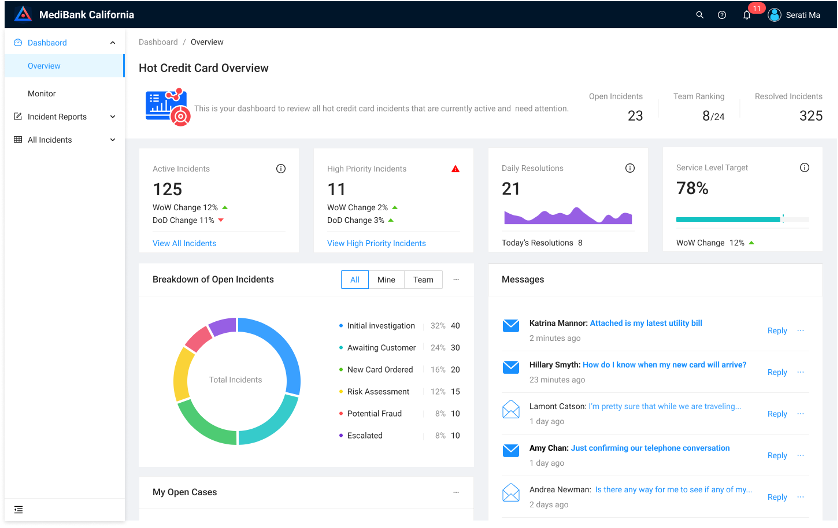 |
