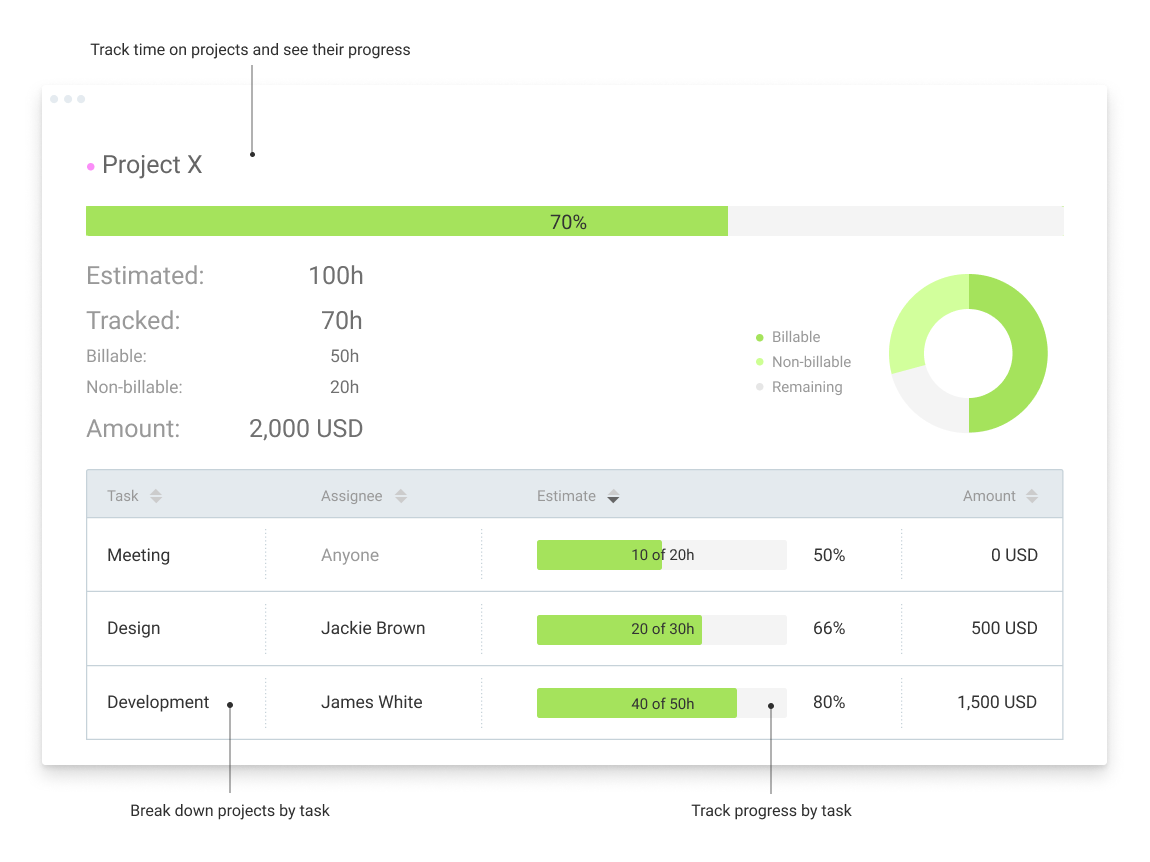
Clockify, from COING in Palo Alto, is a time tracker and employee timesheet software for teams of all sizes. Clockify lets users track how much time is spent working on tasks, as well as keep track of employee timesheets and billable hours, project completion, reports, and schedules.
$0
forever, unlimited everything
Gusto
Score 8.9 out of 10
N/A
Gusto offers payroll, benefits and compliance capabilities. Gusto is scaled for small to mid-sized businesses, and emphasizes an easy to use interface.
$49
per month
TriNet HR Plus
Score 4.9 out of 10
N/A
HR Plus (formerly Zenefits) is TriNet’s administrative services organization (ASO) solution, combining expert support and administration with a technology platform for HR, payroll, and benefits.
$10
per month
Pricing
Clockify
Gusto
TriNet HR Plus
Editions & Modules
Clockify Free
$0
forever, unlimited everything
Clockify Plus
$9.99
per month, per workspace
Clockify Enterprise
$9.99
per month, per user, per workspace
Clockify Premium
$29.99
per month, per workspace
Clockify Server
Starts at 450
Simple: A streamlined set of automatic payroll features and benefits integrations
$49/month + $6/mo per person
per month
Plus: Comprehensive payroll, benefits, and HR tools for employers building a great place to work
$80/month + $12/mo per person
per month
Premium: Scalable payroll and benefits, expert HR, and dedicated support for the complex needs of growing teams
$180/month + $22/mo per person
per month
No answers on this topic
Offerings
Pricing Offerings
Clockify
Gusto
TriNet HR Plus
Free Trial
Yes
Yes
No
Free/Freemium Version
Yes
No
No
Premium Consulting/Integration Services
Yes
Yes
No
Entry-level Setup Fee
Optional
No setup fee
Optional
Additional Details
Unlimited usage and number of users for free. Paid plans are solely for access to additional features. Self-hosting software on own servers available.
Gusto offers three pricing plans for payroll, benefits, and HR.
Gusto is the easiest to use out of all the payroll programs that I have tried out at various companies. Manually entering time is less complicated and requires less time on gusto than on the others.
Gusto allows us to verify time easier. Employees can not manually change time without inserting a note. This helps to hold them accountable and to know they are working efficiently
We left Zenefits for Gusto after Zenefits bungled tax payments to multiple states and had terrible customer service when we were working to get this corrected. So far we have not had similar issues with Gusto. Also, the customer service reps from Gusto are based in the US so I …
Even with Intuit Full Service Payroll the difference that Gusto provides is night and day. I went from constantly filing on time or being fearful that I was not properly taking care of the taxes and paperwork to knowing Gusto has my back. Employees have a portal to login and …
When compared to Zenefits, Gusto is easier to use and set up. Zenefits only had benefit information and I still had to go to Gusto for pay stubs, taxes, etc.
Zenefits isn't the same but they are trying to compete with each other. Zenefits is terrible. We've moved healthcare over to Gusto because Gusto was already doing a good job and Zenefits had very slow and poor service. I'd get off Zenefits entirely but Gusto doesn't support …
I really liked Gusto, and they offer most of the same features. I actually preferred Gusto because their HelpDesk seemed to be better. However, my current company already had Zenefits. It has worked well for us so far.
Overall, we picked Zenefits since they still fit our small business needs but have the capability and technology to seamlessly hire and retain talent. I love the fact that Zenefits is easy for administrators and users to use. Compared to Gusto, their reporting and compliance …
Verified User
Employee
Chose TriNet HR Plus
Zenefits and Gusto used to work really well together and I think they're a sort of similar product, but since they have become less integrated it's been really difficult linking my payroll and having to deal with deductions separately. I wish they would find a better way to …
Zenefits is my favorite payroll provider. I have used them all (ADP, Zenefits, Gusto, Intuit Payroll etc etc) and none compare in terms of features and price.
I personally run two businesses and have had no problems receiving support from Gusto. In my opinion, it has been an absolute delight in comparison to Zenefits.
Verified User
Director
Chose TriNet HR Plus
I have only used Gusto as an employee, not an administrator. I found both Zenefits and Gusto to be user-friendly and easy from the employee perspective. Ultimately, as an administrator, I went with Zenefits because they offer a discount for nonprofit organizations.
Love the UX of Zenefits, and the pricing was very fair.
Verified User
Administrator
Chose TriNet HR Plus
Zenefits had more features with HR management beyond just payroll. Our payroll situation is not complex so this was better for us.
Verified User
C-Level Executive
Chose TriNet HR Plus
Zenefits low-cost all in one solution was an ideal option for our HR, benefits, and payroll needs. Rather than managing different vendors for these services, Zenefits made an easy to use interface, built around simplicity an easy choice. Our payroll and benefits administrators …
I selected Zenefits because it had more, easier to use features than the rest. The sales process was pleasant and not pushy at all! The cost was better/the same as others with a friendly interface and more reporting.
Zenefits works really well for small businesses. Implementation was quick and we were able to integrate easily with other products in our HR tech stack. While the other products also have similar functionality, Zenefits has an ease of use and a fair pricing model that worked …
A large company with 15k employees acquired the small startup I was working for. Overnight we went from using Zenefits to Workday. The difference in the ease of use between Zenefits and workday was very apparent. Our joke was never to use WorkDay on a rooftop because you would …
I like Zenefits 2nd best only behind Paycom. Too many things in Zenefits are interconnected. As an example in Paycom I can assign different admins for different aspects of 1 employee profile (Manager A can approve their timecard, Manager B is responsible for approve …
Verified User
Partner
Chose TriNet HR Plus
pretty good and can serve as the whole hr hub, but pricey
We looked at a lot of different systems (Gusto, PEOs, Paylocity, etc.) we chose Zenefits for their all in one system. We needed one place that employees could go to that had all employee benefits in one place. Going paperless was also a big factor for us when switching vendors.
Clockify is an easy 10 over 10 recommendation for me. I would recommend this anyone especially if they're required to track their time and productivity while on the job. Office workers, tellers, bankers - any desk jobs really can very well use the awesome features of Clockify to the fullest extent. It is easy to use, very simple to set up, and doesn't require that much resource from your computer for up-keep
Gusto is well-suited for small businesses looking for a one-stop platform for payroll, tax-related tasks, and onboarding. It has many automated features that make tasks related to running a business/running an S-Corp simpler. I have not tried any other similar platforms, so I am unsure how it compares, but the pricing Gusto offers feels reasonable compared to other providers.
I think as a small business owner, this system gives peace of mind. When I'm onboarding an employee I can automatically integrate the process with Gmail and Quickbooks. I feel like they are always doing work in the background and I don't have to keep checking up on them or verifying the work that's been done
Clockify records exact times on a per project basis when you click Start/Stop.
User interface is very easy. It is easy to add a project on the fly, change the times I just recorded if I forgot to click Stop for example. The interface is intuitive and gives me the flexibility I need.
Reporting gives me everything I need from times, hours per project, billable or not, per client and any tags I've created. This provides enough flexibility for many different use cases.
In general, manuals or how to use instructional videos are always welcome - just covering the very basic are very good to get everyone up and running.
Maybe work on your scalability - the main reason why we switched to a different provider is because the company was ramping up and the competitors have more features that come with not just time and productivity tracking.
I always like the classic blue and white pallets on the app but sometimes I just wish there's more option to customize how it looks just to give it a little more flavor.
Gusto upsold us labor law posters, but I later found them available for free online. Since we’re a fully remote team, I had to manually download and distribute them digitally. It would be much more efficient if Gusto offered free, auto-distributed digital posters tailored to remote compliance.
Benefits setup is unintuitive for startups
While our rep was helpful, navigating the benefits system felt complex and not tailored to early-stage companies. More guided flows or simplified options for small, remote startups would be a big help.
Limited dashboard customization for remote workflows
As a fully online company, we’d benefit from dashboard options that highlight relevant tools for remote operations—like compliance tracking, digital communications, or onboarding checklists.
I'm using the free version at the moment and loving it. What a great product, easy, responsive and has better up time than Yahoo Mail. :) What isn't there to like?
Unless they break it, I'm never leaving. It's just too easy. Gusto is also really affordable, and for what I pay, it's worth having the historical record within the system. I like that I can go back and pull up W2's for year's past. This sort of easy access reporting, has been helpful especially when getting reports for PPP loans.
We've already renewed after our first year with Zenefits due to the cost savings, ease of administration, reduction in overhead required to perform HR functions, and the employees happily embracing and liking the software. I've found employees generally hate anything new, but we've had no complaints about Zenefits outside the first few weeks of getting used to it.
Very affordable, accessible and simple. For this very reason I would say, it culminates to Clockify being very beginner and start-up friendly. It is its strongest suit after all, and this is the main reason why I would recommend this to anyone. I am very thankful for me ex colleague who recommended this to me, we're no longer working together but I still hear that he's still using Clockify to this very day on his own business
Wonderful overall usability – especially for the new business owner. The user interface is clean and intuitive, so it's easy to find what you're looking for. They also have great explanation pages ingrained into the process, so if you get stuck knowing what to do next, there's a link right there to walk you through the process!
It's extremely user friendly and customer service is super helpful. The app needed help a while back but it has greatly improved. There were issues with files being cut off, and when I was onboarded, it actually cut my offer letter off hiding important information. Since then, it's been fixed so they are continually improving.
I have never had an issue logging in or it not being available. I use Clockify every work day during the week, frequently starting/stopping projects. I've had past experience with other systems that suddenly aren't usable for an hour and that is something I have never experienced with Clockify. They are doing something right on their backend. Nice job, Clockify folks
We have not experienced any application errors or unplanned outages in the two years I have been using this app. Sometimes there is a lag in the time keeping/ confirming your location, however, it quickly resolves itself within seconds and more often than not is an internet connection error
I already mentioned how it feels light across the wire. Pages load fast in the web browser. I have not tried the browser plug-in nor the mobile app. I give it a 9 instead of 10 as the desktop app seemed to hesitate when I clicked the start/stop of a project/task
This app always loads extremely quickly and in a reasonable time frame. Like I said, when we do experience lags from this app, it is more often than not an internet connection error
I dealt very little with customer support because Clockify is so easy to use. That being said, the few times I did, I got fast responses and any issues that I did have were solved in a very fast manner.
Gusto's customer service has really deteriorated lately and they seem to have really changed their focus. It used to be when you called you were routed to an individual who knew about payroll, benefits, reporting, etc. but now you get someone who seems to have not received the correct training. My last call about a dismissal payroll took me over an hour of my time and the person still could not help me and finally transferred me to someone else.
Not good at all. Basically I typically feel like they can solve the issue at hand. However, they take forever and it never feels like they really care. It can be frustrating that the agent will never speak with you on the phone or just give you their direct contact info so that you can continue to follow up on the same issue. Once they "close" the issue - you have to go back to the main customer service email or line again, even though it may be related to something you've contacted them about in the past
Reach out to support immediately if you are having trouble setting up Gusto. Rather than being confused and trying to figure it out yourself, it's much better to talk to someone who knows what they are doing. Save yourself time and frustration and reach out to support
Unfortunately I do not have any insights on the implementation of Zenefits as I was not employed with this company when Zenefits was introduced. Based on how effortless it is to use Zenefits, I wouldn't image there would be many issues with the implementation of Zenefits
Harvest is very similar to Clockify. The only difference is that Harvest also has an invoicing and billing system built into it. So if you're billing your clients based off of time directly, Harvest may be a better option as far as that goes. Of course, Harvest only has minimum billing increments of 6 or 10 minutes, there is no 10-minute option so that's something where Clockify has them beat. They are both very easy to use.
It's been a while since I used QuickBooks for payroll, but it doesn't even come close to it. Gusto is infinitely easier, allowing for employee time tracking, handling calculations and payments of payroll and payroll taxes, managing regulatory compliance in the background, and more. I had a lot of moments using QuickBooks Payroll where I thought, "Am I even doing this right?" — it felt like you had to have additional knowledge of HR regulations in your state to do everything correctly. Gusto has it ALL handled so you can focus your time on higher-impact tasks in your business.
Zenefits has been a better tool for our purposes than Paychex Flex. While Zenefits is a fairly rigid tool without a lot of options for customization, Paychex has even fewer options for customization and their customer services is even more difficult to deal with
Because it feels light on the wire and runs so smoothly with great up-time. I have to assume that the same is true as it scales. I'm a single user so maybe I don't see if there are any scalability issues. With the way it seems architected to run so quickly across many platforms (desktop, mobile, web, browser plug-in), I have to think that it is using recent technology that provides scalability options
The free plan really did everything we needed for the 6 months or so we used it. Without Clockify, we would have had to pay roughly $40+/month for a software tool.
When we upgraded to the paid version, it was still only $10/month and helped us be able to have minimum billing increments which is a huge monetary increase.
I am not involved enough to know well, but I would say that Gusto has saved me about 1-2 hours in my onboarding process with my new company compared to my past experiences trying to onboard with ADP. I have also finished the process and am not frustrated like usual.
California Meal Break Violations cost a full hour of each employees pay rate. If an employee clocks in 1 minute early it costs us at least 10.50 (minimum wage Ca, 15.00 in Los Angeles) which adds up quickly. We had 37 meal break violations when we first rolled it out. They need to add a feature that disallows them to clock in ahead of 30 minutes, or add a feature that shows them how long they've been on break.