Devolutions Server vs. mRemoteNG vs. Splashtop

Overview
ProductRatingMost Used ByProduct SummaryStarting Price
Devolutions Server
Score 8.5 out of 10
N/A
Devolutions Server (DVLS) is a self-hosted, centralized platform designed to manage shared accounts, credentials, and privileged access for businesses of all sizes. DVLS offers high-level security with advanced encryption, role-based access controls (RBAC), session auditing, and privileged session management. Its key differentiators include integration with Remote Desktop Manager and Devolutions Hub, as well as support for custom security policies and extensive compliance reporting. By enforcing…
$499.99
per year
mRemoteNG
Score 8.8 out of 10
N/A
mRemoteNG is a fork of mRemote, an open source, tabbed, multi-protocol, remote connections manager.N/A
Splashtop
Score 9.0 out of 10
N/A
Splashtop is a software solution for both remote access and remote support. Boasting 30+ million customers worldwide and users among both large and small organizations across the globe, Splashtop presents their solution as secure, high-performing, and fit to specific use-cases. Splashtop is ISO certified, SOC 2 and GDPR compliant. Splashtop Remote Access provides remote desktop connections for business professionals and teams to work from anywhere, using any device.…
$99
per year per user
Pricing
Devolutions ServermRemoteNGSplashtop
Editions & Modules
Team Edition
$499.99
per year Up to 15 Named Users, 1 Instance, 1 Domain
Enterprise Edition
1,999.99
per year Up to 50 Named Users, 1-3 Instances, 1 Domain
Platinum Edition
Contact Sales
per year No User Limitations, 4+ Instances, 2+ Domains
No answers on this topic
Splashtop Remote Access Solo
$6.00
per month per user, billed annually
Splashtop Remote Access Pro
$8.25
per month per user, billed annually
Splashtop Remote Access Performance
$13.00
per month per user, billed annually
Splashtop Remote Support Enterprise
Contact Sales
per month per concurrent technician, billed annually
Splashtop Remote Access Enterprise
Contact Sales
per month per user, billed annually
Splashtop On-Prem
Contact Sales
Splashtop Autonomous Endpoint Management (AEM)
Contact Sales
per month per endpoint, billed annually
Splashtop Remote Support SOS
Starting at $22.00
per month per concurrent technician, billed annually
Offerings
Pricing Offerings
Devolutions ServermRemoteNGSplashtop
Free Trial
YesNoYes
Free/Freemium Version
YesYesNo
Premium Consulting/Integration Services
NoNoNo
Entry-level Setup FeeNo setup feeNo setup feeNo setup fee
Additional DetailsDevolutions Server is offered on a subscription-based model, ensuring that users receive ongoing updates and support. Pricing is based on the number of users and the specific features required, with optional add-ons for enhanced security, privileged access management, and integration capabilities.
More Pricing Information
Community Pulse
Devolutions ServermRemoteNGSplashtop
Features
Devolutions ServermRemoteNGSplashtop
Remote Administration
Comparison of Remote Administration features of Product A and Product B
Devolutions Server
-
Ratings
mRemoteNG
8.6
6 Ratings
9% above category average
Splashtop
7.8
43 Ratings
1% below category average
Screen sharing00 Ratings8.01 Ratings9.337 Ratings
File transfer00 Ratings5.23 Ratings9.039 Ratings
Secure remote access with Smart Card authentication00 Ratings10.01 Ratings00 Ratings
Over-the-Internet remote session00 Ratings9.53 Ratings9.342 Ratings
Remote management of servers & workstations00 Ratings10.06 Ratings9.07 Ratings
Remote Active Directory® management00 Ratings9.13 Ratings00 Ratings
Centralized management dashboard00 Ratings9.13 Ratings7.132 Ratings
Session record00 Ratings10.01 Ratings7.219 Ratings
Annotations00 Ratings7.01 Ratings9.02 Ratings
Monitoring and Alerts00 Ratings9.01 Ratings6.05 Ratings
Multi-platform remote control00 Ratings7.26 Ratings8.733 Ratings
Instant message00 Ratings00 Ratings7.930 Ratings
Access to sleeping/powered-off computers00 Ratings00 Ratings3.013 Ratings
Initiate remote control from mobile00 Ratings00 Ratings7.626 Ratings
Best Alternatives
Devolutions ServermRemoteNGSplashtop
Small Businesses

No answers on this topic

Getscreen.me
Getscreen.me
Score 9.6 out of 10
Getscreen.me
Getscreen.me
Score 9.6 out of 10
Medium-sized Companies
ManageEngine ADManager Plus
Score 9.3 out of 10
Remote Desktop Manager
Score 9.5 out of 10
Remote Desktop Manager
Score 9.5 out of 10
Enterprises
BeyondTrust Endpoint Privilege Management
Score 10.0 out of 10
Remote Desktop Manager
Score 9.5 out of 10
Remote Desktop Manager
Score 9.5 out of 10
All AlternativesView all alternativesView all alternativesView all alternatives
User Ratings
Devolutions ServermRemoteNGSplashtop
Likelihood to Recommend
9.8
(4 ratings)
9.1
(6 ratings)
8.8
(563 ratings)
Likelihood to Renew
10.0
(1 ratings)
-
(0 ratings)
9.3
(40 ratings)
Usability
-
(0 ratings)
9.0
(3 ratings)
8.8
(28 ratings)
Availability
-
(0 ratings)
-
(0 ratings)
9.1
(6 ratings)
Performance
-
(0 ratings)
-
(0 ratings)
9.1
(6 ratings)
Support Rating
-
(0 ratings)
-
(0 ratings)
8.8
(522 ratings)
Implementation Rating
-
(0 ratings)
-
(0 ratings)
8.8
(18 ratings)
Configurability
-
(0 ratings)
-
(0 ratings)
9.0
(3 ratings)
Contract Terms and Pricing Model
-
(0 ratings)
-
(0 ratings)
9.1
(2 ratings)
Ease of integration
-
(0 ratings)
-
(0 ratings)
10.0
(2 ratings)
Product Scalability
-
(0 ratings)
-
(0 ratings)
9.8
(5 ratings)
Professional Services
-
(0 ratings)
-
(0 ratings)
9.1
(1 ratings)
Vendor post-sale
-
(0 ratings)
-
(0 ratings)
9.1
(4 ratings)
Vendor pre-sale
-
(0 ratings)
-
(0 ratings)
9.0
(4 ratings)
User Testimonials
Devolutions ServermRemoteNGSplashtop
Likelihood to Recommend
Devolutions
I feel that Devolutions VLS is a great product which makes storing of secrets a hassle free job, as you can access your data in so many ways. Whether you are a small team who wants easy access to devices or for storing passwords to your internet sites to large teams with many types of devices to manage, and many types of information to keep safe.
Read full review
Open Source
Well suited to environments where IT staff need to access multiple servers/systems at the same time, cutting down on time wasted opening multiple windows. Not so useful for users that only need to access one system remotely, as most of its functions are largely unused in that case.
Read full review
Splashtop
Based on the price of their basic plan, Splashtop is easily the best solution available for small installations like mine. I am confident with their security implementation and reconnection to devices after a remote restart have never failed me. They feature many higher-level tools and solutions but I've just never needed to use them.
Read full review
Pros
Devolutions
  • Role based access control.
  • Active Directory Integration.
  • Remote Desktop Manager integration.
  • Password Vault.
Read full review
Open Source
  • Easy to organize and group servers.
  • Many different protocols for remote access.
  • The ability to make use of external applications for non-directly supported protocols.
  • Servers can inherit settings from nodes above so you can set up properties once making adding new servers/devices very quick.
  • Easy to export and share config with new team members (be mindful of what you do with passwords though).
Read full review
Splashtop
  • Seamless RMM Integration - Splashtop’s integration into Syncro is functionally invisible, but in a good way. I don't have to manage a separate contact list or worry about syncing credentials between my RMM and my remote tool. I click "Remote Desktop" in Syncro, and Splashtop launches instantly.
  • High Performance Graphics & Low Latency - The frame rate and refresh speed are consistently superior to competitors I’ve used in the past. Even when connecting to a client with a dual monitor setup or a slower upload speed, the lag is minimal. The picture quality is crisp enough that I can read fine print on error logs without squinting.
  • "SOS" Ad-Hoc Workflow - r clients who aren't on a managed contract (my "break/fix" customers), the SOS feature is a lifesaver. I don't have to walk a non-technical user through a complex installation. I just tell them to go to the site, give me the 9-digit code, and I'm in!
Read full review
Cons
Devolutions
  • Easier ways to adjust inherit or at least access directly into a file/folder. If I want to give a user access to a specific folder inside a project, I have to manually remove his access to other folders in that project.
Read full review
Open Source
  • The user interface for configuration is a little basic, and not obvious for a new user to set up connections. It could be a bit clearer how to do that.
  • It does not seem to automatically update itself to new versions - though older ones work fine, you can miss out on some new functions if you don't check for updates manually.
Read full review
Splashtop
  • Compared to our prior solution, Splashtop does not "organize" devices nearly as well. They need some some sort of tagging solution so that you can, say, pull up a list of "all machines at this campus" or "All Macs at this site"
  • The Business App that runs locally feels clunky, and is presented in a weirdly-sized window
Read full review
Likelihood to Renew
Devolutions
I think that we will stick with this service for as long as possible.
Read full review
Open Source
No answers on this topic
Splashtop
I believe that I will renew Splashtop without any problems in the coming years as eating stable costs without increases even in critical periods such as the Covid virus, Splashtop allows access to 25 unattended stations and has continuous updates and new features. It also allows resale to users with sub-accounts
Read full review
Usability
Devolutions
No answers on this topic
Open Source
Because it is easy to use once installing. The interface is very intuitive and there are help files available for anyone needing further set up assistance. For someone who is currently overwhelmed with managing too many things in too many places, mRemote simplifies this and puts the power back in the administrators hands with their intuitive interface.
Read full review
Splashtop
It's hard to find any significant faults with Splashtop. It offers a very responsive remote access experience with clear and simple interface. There's very little learning curve as it's toolbar mimics other popular remote access solutions graphical user interface. It's gives you access to your remote computer quickly and stays out of your way
Read full review
Reliability and Availability
Devolutions
No answers on this topic
Open Source
No answers on this topic
Splashtop
I recall one outage, and it wasn't very long. We use QuickAssist when someone's having a problem connecting with Splashtop on a Windows machine. Fortunately, that doesn't happen very often. QuickAssist is for the QUICK Assist. Splashtop is far better for addressing more complex support needs.
Read full review
Performance
Devolutions
No answers on this topic
Open Source
No answers on this topic
Splashtop
I've found occasional speed bumps and disconnects that are annoying. I don't know who or what to blame. If there was a way for Splashtop to survive through dropped packets, that might help. A tool like Microsoft Remote Desktop disconnects far more easily than Splashtop does, but Splashtop sometimes requires three to four sessions, or at least shows 3-4 sessions in the logs/reports for a given support call.
Read full review
Support Rating
Devolutions
No answers on this topic
Open Source
Never actually needed to use support so have no idea - honestly it's simple enough to use I'd be surprised if anyone really needs support with it.
Read full review
Splashtop
The phone number is in the top right of each page of the website and app and when called, the person who picks up (before any automation delays the call) is ready to assist or immediately recognize the appropriate place for a transfer. If transferred to a different department, that department picks up immediately and each person is fully trained to help resolve a (typically user error) call.
Read full review
Implementation Rating
Devolutions
No answers on this topic
Open Source
No answers on this topic
Splashtop
It couldn't have been any easier to setup and I have had no issues with it since it was implemented. It's a great product and makes remotely connecting to another device so simple and quick. I can't recommend it enough
Read full review
Alternatives Considered
Devolutions
LastPass has a browser extension that I use daily. Granted I am a free user of the application not a paid user so there is probably a difference. LastPass does have the autofill option which is a great option when accessing multiple sites instead of having to open the password vault itself.
Read full review
Open Source
Every now and then I do look to see if there is any other software that can bring together multiple remote access protocols in a single interface that can contain multiple connections to remote devices with image scaling to mage use of a windowed interface and have yet to find an alternative that does all that but doesn't cost a huge amount. Don't get me wrong I would happily pay for an alternative that could provide an overall better, more convenient experience, but I have yet to find one that has made me think it's worth jumping ship from mRemoteNG.
Read full review
Splashtop
I have not looked at TeamViewer in quite some time but I found Splashtop SOS for me to be at least a 1 to 1 feature switch. And right now connecting to mobile devices to see a customers screen is included with Splashtop SOS and it is a real value add. I hope it says that way. TeamViewer is just too expensive in comparison.
Read full review
Contract Terms and Pricing Model
Devolutions
No answers on this topic
Open Source
No answers on this topic
Splashtop
A colleague got a significantly better deal that did not allow him to use Groups. His savings/pricing was far more attractive than mine was. I tried to get that from sales, and they told me it was not an option. That was disappointing.
Read full review
Scalability
Devolutions
No answers on this topic
Open Source
No answers on this topic
Splashtop
I bought service for 250 unattended machines. I anticipate the next level will be very expensive, so I may stop at 250. It works very well for our needs. Only recently have I needed to add a second team to add a group of computers, but it's all been great.
Read full review
Professional Services
Devolutions
No answers on this topic
Open Source
No answers on this topic
Splashtop
Do not use.
Read full review
Return on Investment
Devolutions
  • We are very new to Devolutions in this company, so we can't say yet.
Read full review
Open Source
  • Very easy to hand over connections to new starters.
  • Having multiple remote protocols in one place is a massive time saver.
Read full review
Splashtop
  • Remote support makes my business possible, period.
  • Switching from TeamViewer to Splashtop has made a huge difference to my operation: the cost is both lower and more predictable, and getting from "answering the phone from a client in trouble" to "satisfied client" is much faster and easier.
  • I apologize that I don't actually have hard numbers, but I can sincerely recommend Splashtop and Splashtop SOS. It will make your life and business better!
Read full review
ScreenShots

Devolutions Server Screenshots

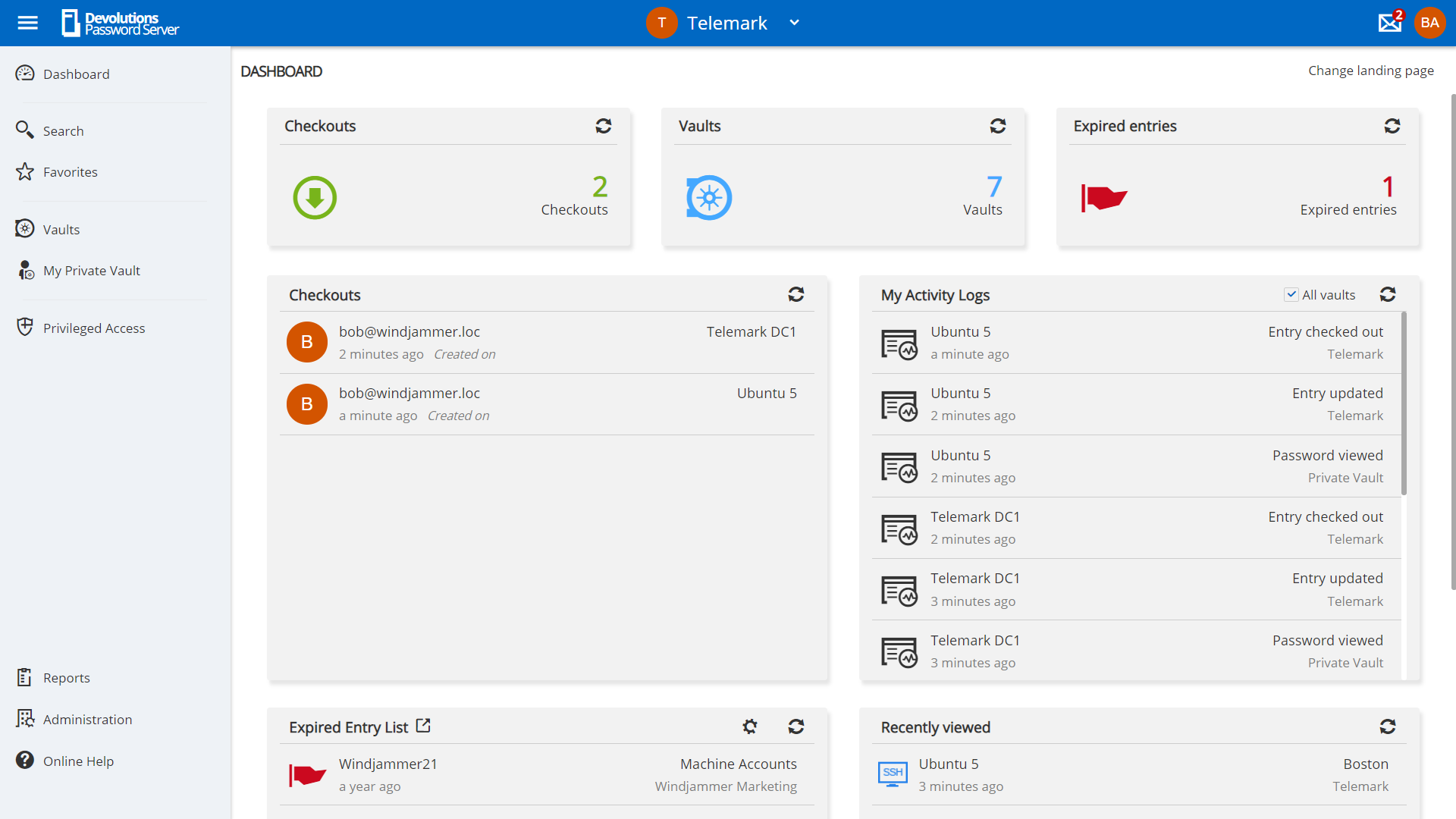
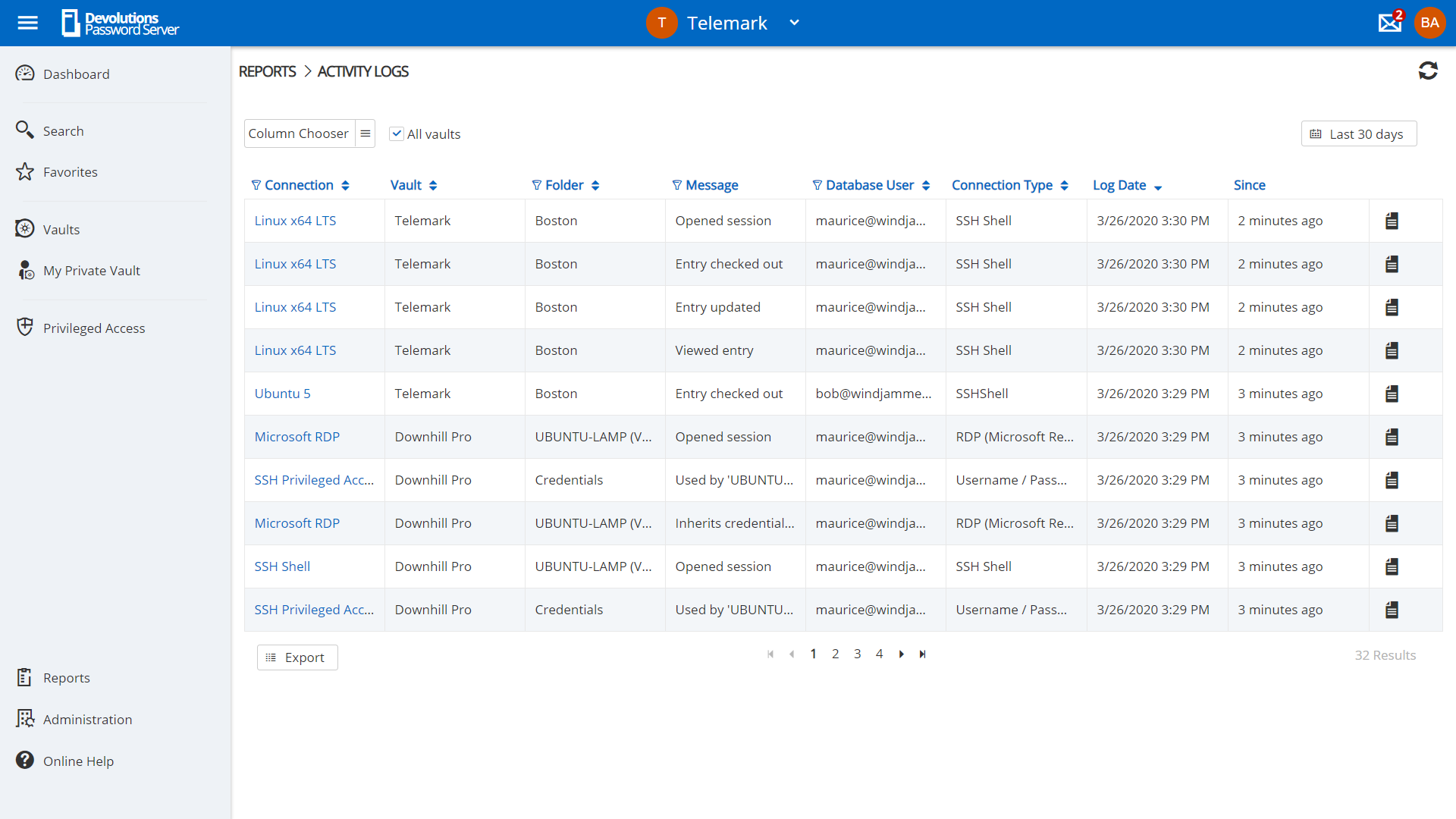
Screenshot of privilege account management in Devolutions Server.Screenshot of request management in Devolutions Server.Screenshot of Role-Based Access Control used to control access to critical assets.Screenshot of a view of account activities in the dashboard.Screenshot of an example of reporting and logging, to meet compliance needs.

Splashtop Screenshots

Screenshot of Splashtop Streamer: Used to connect to and remote into computers.
Splashtop Business App: Used to connect from and remotely access other computers.Screenshot of Splashtop SOS - Accessed with a 9-digit session code, it can be customized with a brand, logo and text.Screenshot of a view of computer sessions.Screenshot of where users can transfer files and folders from local and remote computers during a session.Screenshot of Splashtop Remote Support Enterprise : On-demand support with service desk capabilities.Screenshot of a dashboard - This offers key insights on endpoint status, security metrics, and scheduled tasks.