Freshdesk (a product of Freshworks Inc.) is a customer service solution with enterprise capability. Freshdesk unifies channels, conversations, AI capabilities, customer insights, and advanced ticketing into the Freshdesk Command Center so agents are ready to resolve. With Freddy, People-first AI, customer service teams can take AI agents live in minutes to fully resolve complex and simple queries, get response and resolution assistance from AI copilot, and stay ahead with AI insights.…
$18
per month per user
Freshservice
Score 8.4 out of 10
N/A
Freshservice is a cloud-based service desk and IT service management (ITSM) solution that currently serves more than 10,000 SMB, mid-market, and enterprise customers worldwide.
$29
per month per agent
Kustomer
Score 8.7 out of 10
N/A
Kustomer is a customer service CRM platform built for managing high support volume by optimizing experiences throughout the customer service journey. Kustomer was acquired by Facebook in late 2020, but spun out in 2023 and re-launched as an independent entity, Kustomer, LLC.
$89
per month per user
Pricing
Freshdesk
Freshservice
Kustomer
Editions & Modules
Growth
$18
per month per agent
Pro
$59
per month per agent
Enterprise
$95
per month per agent
Starter
$29.00
per month per agent
Growth
$59.00
per month per agent
Pro
$119.00
per month per agent
Enterprise
Custom
Enterprise
$89
per month, per user
Ultimate
$139
per month, per user
Offerings
Pricing Offerings
Freshdesk
Freshservice
Kustomer
Free Trial
Yes
Yes
No
Free/Freemium Version
Yes
No
No
Premium Consulting/Integration Services
Yes
Yes
No
Entry-level Setup Fee
No setup fee
Optional
No setup fee
Additional Details
—
Discount available for annual billing.
All plans require an annual subscription and 8 users minimum.
Spiceworks was too much work to get off the road and didn't offer much on the user's side. Freshservice is a lot more focused on IT work and I'd recommend starting with it. Desk.com is great for a whole organization, but rules frequently break with a mixed bag of how useful the …
Our Sharepoint solution was a home grown solution to track issues that never really worked. Everything we needed we had to build from scratch. It also didn't lend well to expanding into other departments. When I tried Freshservice, I liked it quite well - but it was just a …
Kustomer is great, however, is missing the mark when it comes to managing multiple service lines/unique stores under one account. Freshdesk's ability to do exactly this makes them a superior product.
Freshdesk stacks up against Zoho Desk, Zendesk Support Suite, and Freshservice in terms of accurate time tracking, pricing, ease of use, and app integration. Zoho Desk does not support real-time tracking and is not very user-friendly, though it works well with knowledge base …
We ultimately migrated to Freshservice because it was able to offer some of the things that FreshDesk didn't have out of the box, such as SLAs and reports.
We evaluated Odoo before; it was a good tool with more features than Freshdesk, making it an all-in-one solution. But it is exactly because it is an All-in-one tool that Freshdesk has more refined features for request management and the portal we have considered.
We use all Freshdesk, Freshchat, and other Freshworks tools—they’re all great. Freshchat is awesome for real-time support, while Freshdesk handles tickets, automation, and multi-channel queries really well. Using them together gives us a complete, seamless customer service …
Freshdesk has significantly more features that work at an improved rate compared to the competitor. "Round robin" ticket automation, scenario execution, canned responses, etc are all features we use daily and things that Zendesk did not have (or you would need a 3rd party app …
The most important is the pricing. Freshdesk/Freshworks all the solution and base price is available on the internet, which is easier for us to make fast decisions rather than waiting for other sales reps to get back to us. The graphic user interface is easy to see and use.
Freshdesk works really well for ticketing, but that's it. It doesn't have most of what Freshservice can offer. You miss out on asset management, lots of automation features, and service requests. However, its API is just as robust as Freshservice and integrates nicely with …
We use Freshservice for our wider business but use Freshdesk, chat & caller for our customer service team. We believe Freshservice is a tool designed for IT & other departments and believe Freshdesk provides better tools for our customer service team.
Freshdesk is great, if you have a smaller team with a shared inbox, unfortunately, FreshService helped segregate data from our department and others departments, in a way that Freshdesk didnt provide.
As we moved to an ITIL framework this just made sense to transfer across as migration was very simple and completed on our behalf. Also alot of the customisation we had came across which really helped.
Freshservice is more related to IT and helpdesk. We didn't have requirements that doesn't fit into the IT world. That is way we decided to select Freshservice.
Student Health Business Systems Analyst / IT Operations
Chose Freshservice
We picked Freshservice over the others for many reasons. The first would be the ease of implementation. Another is due to the nice interface the system has. We also like the way we can push out a small piece of software to pull in the asset information for asset management. …
The feature sets, intuitive nature, and hosted options were all attractive to us as we looked for a ITIL- centric solution. The interface, and ability to be up-and-running in a very short amount of time drove us to invest in Freshservice.
I find it baffling how little data can be stored or associated with a customer in many other systems, and how difficult that can be to set up. It is fine if you already have a robust CDP that you can hook up and use to power your CRM, but it is rare that an organization has the …
The sales rep did a great job of making us feel heard and instilling trust. We felt that we would be valued as a client instead of just one of thousands, and a small company at that. When we signed they promised and delivered on an additional channel that they hadn't previously …
I believe Freshdesk is well-suited for companies that manage multiple accounts, such as those in the Business Process Outsourcing industry. It has all the necessary capabilities, such as ticket management that uses omnichannel to receive ticket requests from service requests (managed internally) in the system, emails, etc. There are also several workflow automations that can be built within the platform/system. What is lacking is the API documentation, which limits the possibilities for further automations. Overall, it is a highly recommended tool for managing employee productivity and timeliness.
Freshservice is well suited for companies looking to implement ticketing / case management across the organization, but only if IT will be using it. Otherwise, I'd recommend Freshdesk. IT departments that don't function in the ITIL style of incident, request, change, and project management may find it overkill if they are only looking for a simple Help Desk solution.
I would say the greatest strength of Kustomer is its flexibility. In the hands of a skilled admin, it can be adapted to tons and tons of different use cases. I've been able to make custom displays for different groups of agents, produce complex cross sections of users, draw interesting data relationships combining marketing contacts and customer-initiated contacts. For example, there's really no other data source in our company which could tell you which users received a specific promo code and checked out with it, received their delivery within 14 days and then can related that to the number of times they contacted us about using our product. At the intersection of communication, marketing, data, and relationship-management, Kustomer shines at the center. I would say it falls short when you are trying to coordinate multiple "side conversations" with multiple sources to resolve an issue. This is a tough task for any type of platform, but if you're maintaining 3 different email chains with a 3PL partner, the customer, and a separate internal conversation, it would be confusing anyway!
No prior experience with similar platforms is required to use Freshdesk. I found its interface to be quite intuitive, at least for the end user.
It's easy to connect with other platforms, so you can sync and manage data from other platforms because the integrations work correctly.
Freshdesk's technical support is quite responsive, with short and effective response times. They have easily handled my questions and issues.
It has tools for customizing automated chats, answering frequently asked questions before transferring to an agent. Its configuration is extensive and highly customizable.
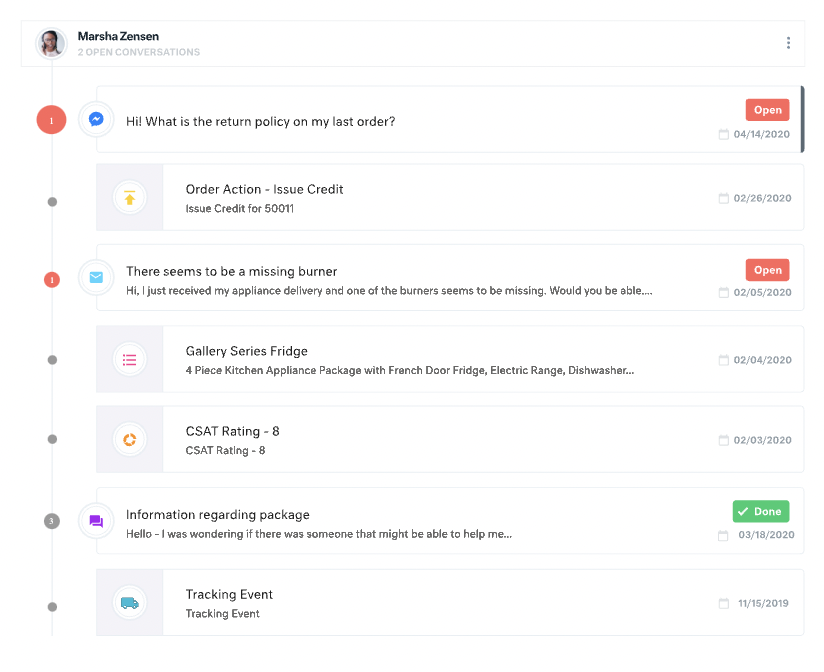
All customer data (past orders, communication with customer service, rewards account data) is in one place. This helps agents avoid confusion and reduces the number of tabs they need to open.
The Knowledge Base (or K Base) is very helpful. Any time we roll out a new policy or have a limited-time promotion, we can add all the relevant information and worksheets there for the convenience of the agents. That way they can stay in a chat while looking up the answer to a question.
We can seamlessly move from chat into email if the customer leaves or the queue times are too long. All the interactions will stay on the customer profile page, so they are kept up to date.
To have more options on what to do with the emails that arrive in the support mailbox (which goes to Freshservice), Setting some special rules or detailed filtering is not possible.
Non 3rd party tools to connect to Intune are missing. Additionally, the third-party tool available in the store is not satisfactory. It would be nice to have native support for importing devices from our Azure cloud.
The contract requires you to prolong your contract end-date by two years instead of just one year, which to us is a bit aggressive.
For our team, the feature that defaults all notes to begin in "done" status is difficult. Throughout each day we need to have notes open and assigned back and forth to different teams, and we have to remember to manually "open" each note. There is too much room for human error with this setting, and it is easy for important notes to be missed if a user forgets to open the note.
Similarly, it can be hard to remember to assign emails/notes to a particular team in addition to a user. We almost exclusively work out of team inboxes, and if someone on Care writes an email to a customer, the email will automatically be "done" when it is created, and it will be assigned to the user who wrote it, but not also to the user's team. There are instances where an email needs to be snoozed for several days/hours with further action needed, and unless the user remembers to assign the email to their team it may "awake" from the snooze and not be visible to anyone except the user who created it. Similarly to my first comment, this leaves a lot of room for human error and is not very intuitive.
Personally, I do not love that all tickets/emails/notes are jumbled together in the same inbox. While this gives visibility to everything on the "to do" list at the same time, it can be visually overwhelming. We have created unique folders for certain types of projects or categories of work, but have experienced tech glitches or just the awkwardness of another step to manually read the note, determine what type of category it is, and then manually assign it to another folder. Would love to have things auto-sort and take out this manual lift.
I love the idea of the autopilot setting, but we have not been able to use this for our work because it sorts items based on time, and not based on priority. In our line of work, we may have an urgent situation arise that needs attention before an email that was sent in 60 minutes ago. The autopilot feature would push the email to my associates sooner than it would the urgent situation from 5 minutes ago. Due to this, we manually monitor inboxes and assign work to ourselves and others.
New support agents can learn the system quickly, minimizing training time and maximizing productivity from day one. Agents are more willing to use a system that is simple, reducing resistance to change and ensuring all interactions are logged (a common problem with complex systems). The platform is known for being easy to set up and customize, allowing teams (especially smaller ones) to get started with minimal technical expertise.The platform makes it easy to set and monitor Service Level Agreements (SLAs), ensuring customers get timely responses and helping managers enforce performance standards.
We are pretty invested in Freshservice right now and have integrated it pretty heavily into our environment, so it would be hard to move away from it. For the most part, we are happy with Freshservice and the ease of use it gives us in managing tickets through the system. The only complaint we've had is customer service.
Freshdesk is extremely easy to use as implemented it on our own with average technical skills. A lot of the options are straightforward and Freshdesk provides easy-to-understand explanations for some of the more complex-sounding ones. We recently onboarded new specialists and they were able to learn Freshdesk with minimal training.
The UI design of Freshservice is simple and intuitive. You don't have to be a technical expert to navigate your way into the different pages/modules available. There are no buttons that are hidden in plain sight. Even our HR team required little to no help when they started using Freshservice.
There is a learning curve, but it is more than worth it, especially to have a dedicated resource pointed at Kustomer and any other software it interacts with. The basic implementation is useful, and powerful - certainly a MASSIVE upgrade over taking care of your customers in an email inbox or shuffling between multiple windows and applications! It is also set up really well to grow and reconfigure with your business. I'm a big fan.
I have encountered a lot of errors in the Freshdesk, however, they tend to resolve it on priority or at least they will share the timeline by when this can be resolved. Most of the time the issue has been from the other partner's end. They take time to resolve their vendor issues and they don't have any timelines in case of developed app errors.
In our 3 years of using Freshservice, we've experienced several outages in the first 2 years. There were times where it only took minutes or hours but there are also times where it took a few days. Each time, Freshservice remained transparent and constantly communicated their progress. We haven't had one in the past year which indicates Freshservice have improved their servers.
The reports take a lot of time to download if the time period is large. Also, the tickets take their sweet time to open and load. It is not fast as Zendesk. Only 30 tickets are visible in a single go and there isn't any option to select all. If we need to change the pages and dashboards it takes a lot of time to open.
Pages load quickly but internet connectivity can also play a big role. Integrations doesn't affect the performance but internet connectivity may be a big factor. As a company with most employees working from home, different network providers from different areas/countries can have different experiences. Search load time needs improvement.
Because I never worked with a company that responds so quickly to their customer! They are always fast at responding and very open to new ideas and quickly turning them around to include them in future releases. They walk us through when we need assistance and are very good at communicating. Overall top notch support
Support from OEM is decent but needs improvement. Sometimes OEM also needs to understand the criticality of the customer and help as an Ad-hoc, which is somewhat lacking at Feshservice. Although the normal support team is well-equipped and helps according to the matrix, if something critical for the partner or customer requires immediate attention, it still goes through the L1-L2-L3 levels, which wastes a lot of time.
I did not reach out to Kustomer support when we had an issue. Still, whenever we provide feedback to our manager regarding what can improve based on our experience using Kustomer, our manager always comments that Kustomer support always replies with some positive feedback based on our suggestions.
In-person training is provided to all the agents and it is very easy to learn the basics of the Freshdesk interface. Solving tickets via dashboards, replying to the guest queries in bulk via Freshdesk. The training which is a bit hard is creating the logic according to the ticket flow and intergeration.
This tool is no doubt easy to learn but in-person training is a lot better than online training. It takes time to grasp things in the online training, however, in pandemic we have done all the training online. Apart from a bit more time we haven't faced any issues with online training.
Their documentation is pretty good, but only available in English. This makes it difficult for some of our users to understand. There are also some basic video courses available.
Was a fairly quick implementation for us. However, we are only doing email integration and not some of the more complex integrations that are possible. One clarification on an earlier question. I selected that Freshdesk doesn't have a given feature, but this is not true. I selected this because there wasn't a selection for I don't use the feature. This is a weakness in the survey.
Creating the correct groups for the stakeholders and enabling the right notifications are one of the most important aspect of the implementation. Creating Change templates will also help in the long run and it's a good practice to create one, if applicable.
Compared to Crisp, Freshdesk offers much more organization and is just much more helpful when it comes to having more than one region/team. Not that Crisp is bad, but with Freshdesk, internal communication and collaboration are much easier, which was quite important for our team to grow.
Easy setup and a lot of customization which can be made. They offer the full ITSM tool for 75$ per agent and all the PRO are included in the package, which makes it easy to calculate and use. There are only a few add-ins that you need to pay for, based on the number of agents or the number of executions.
Apps like Intercom, Zendesk, and Gorgios all treat customer inquiries as tickets, just tracking that one issue or interaction with a customer. Kustomer treats each customer as an individual, which allows us to provide top-notch customer service. Customers love that we're able to be more conversational and informal, while still solving their issues quickly. It also helps us build relationships with customers and increases repeat orders.
I was not very involved with the purchase/contract (my company purchased Fresjdesk before I was brought on), but I will say that pricing per agent made it difficult to grow our support team. Additionally, we were kind of disappointed after our upgrade because it didn't solve our pain points as much as we expected.
Freshservice allows flexibility with contract terms and pricing model. Monthly and annual payments are allowed. The unit pricing needs a bit of improvement. It would be great if they offer unit pricing per capability instead of one pricing for all the capabilities. Small businesses have different use cases and not every agent needs all the modules available.
My company had Freshdesk agents from support and success. It's generally difficult to customize permissions for different agent "roles." We were a fully distributed company, so "multiple sites" doesn't apply to us. We found Freshdesk features lacking as we grew our customer base, and adding agents wasn't easy because price steeply increases with number of agents.
We were able to scale easily across multiple departments. As our company keeps growing, we have not needed to change anything in terms of scaling since we started using Freshservice. There were no changes to the admin and end-user experience from when we were a 1,000-employee company vs to our current head count of 2,000+.
We’re getting so much positive feedback — which is not something you traditionally associate with a customer care team — because we’re making it effortless for customers to deliver both positive and negative feedback, and we can now resolve the bad feedback really really quickly.
Primarily from our increased efficiency with Kustomer, we’ve seen a significant reduction of $3 to $4 for every cost per contact.