Gainsight Customer Success (CS) is presented as a growth engine for modern post-sale teams. Built for CROs, CS leaders, and operations pros, it provides visibility into customer health, expansion potential, and revenue risk. With automation, AI, and health scoring, Gainsight helps scale outcomes without scaling headcount. With its playbooks and success plans to CSQL tracking and journey orchestration, Gainsight CS helps teams to take the right action at the right time, every time. Access to…
$2,500
Per Company Per Month
Gainsight PX
Score7.6 out of 10
N/A
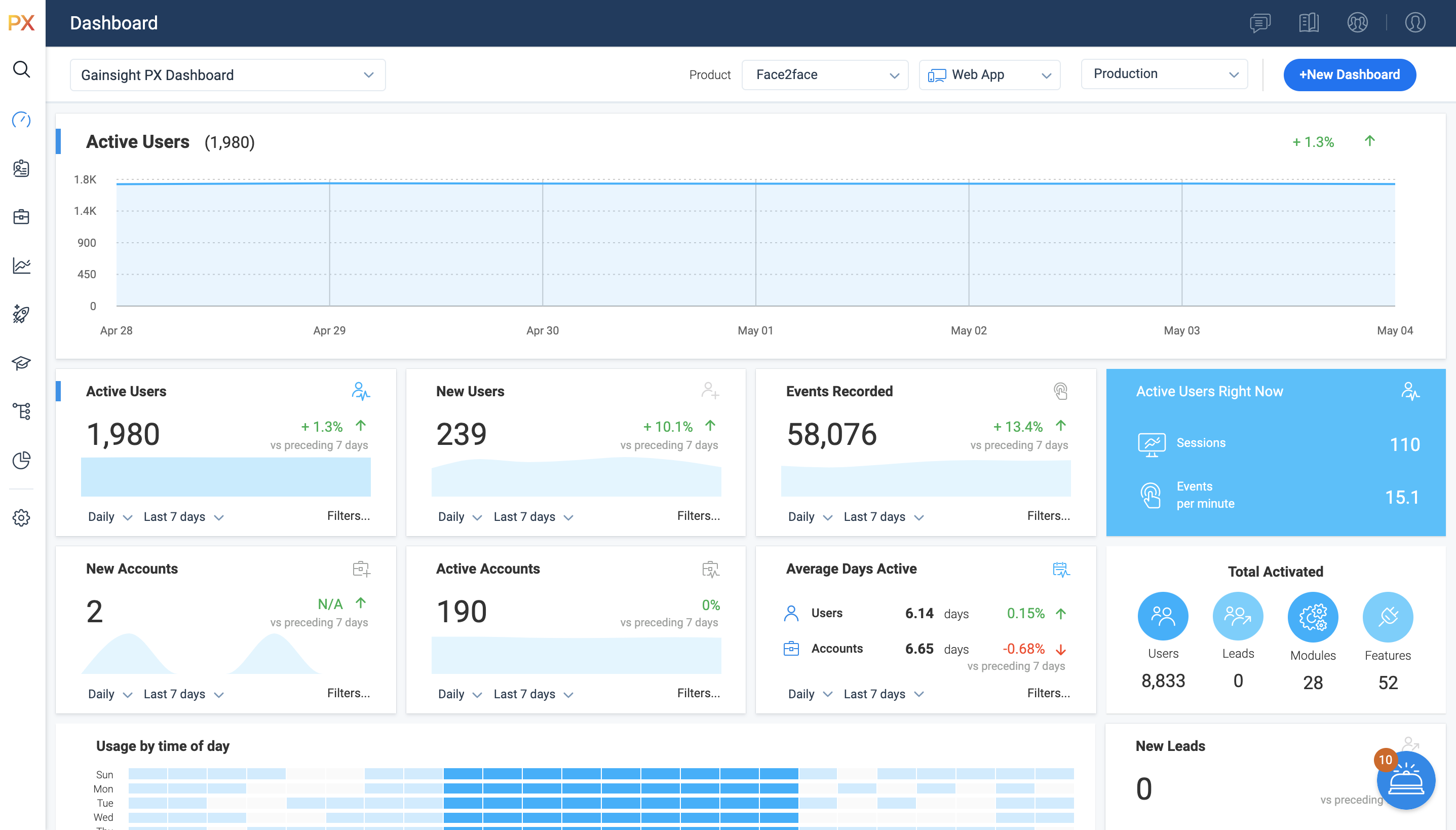
For SaaS products, Gainsight's product experience software enables companies to track every step of their user's journey and fully understand how they're interacting with a product over time.
A de minimis incentive was given to thank the reviewer for their time. The incentive was not used to bias or drive a particular response, nor was the incentive contingent on a positive endorsement. More Info
Verified User
Chose Gainsight CS
More customization with Gainsight CS, but Churn zero did have a great UI and easier to use. Would recommend CZ if you're a smaller company with no technical admin.
A de minimis incentive was given to thank the reviewer for their time. The incentive was not used to bias or drive a particular response, nor was the incentive contingent on a positive endorsement. More Info
Verified User
Chose Gainsight CS
It is the most flexible CS platform in terms of how to manipulate and use your data.
A de minimis incentive was given to thank the reviewer for their time. The incentive was not used to bias or drive a particular response, nor was the incentive contingent on a positive endorsement. More Info
A de minimis incentive was given to thank the reviewer for their time. The incentive was not used to bias or drive a particular response, nor was the incentive contingent on a positive endorsement. More Info
A de minimis incentive was given to thank the reviewer for their time. The incentive was not used to bias or drive a particular response, nor was the incentive contingent on a positive endorsement. More Info
Verified User
Chose Gainsight CS
We have used other products to serve our customers, but none have been as feature-rich as what Gainsight can provide. My experience is with well-known software as well as some in-house solutions that I even participated in designing. Some things are worth subscribing to, and …
A de minimis incentive was given to thank the reviewer for their time. The incentive was not used to bias or drive a particular response, nor was the incentive contingent on a positive endorsement. More Info
A de minimis incentive was given to thank the reviewer for their time. The incentive was not used to bias or drive a particular response, nor was the incentive contingent on a positive endorsement. More Info
Verified User
Chose Gainsight PX
I trusted Gainsight PX from the start since I am familiar with other Gainsight products.
A de minimis incentive was given to thank the reviewer for their time. The incentive was not used to bias or drive a particular response, nor was the incentive contingent on a positive endorsement. More Info
Verified User
Chose Gainsight PX
Between the products analyzed, Pendo and Gainsight PX were most complete/mature. At the time, Pendo's UI seemed more intuitive than Gainsight PX. Chameleon and Appcues seemed easiest to use, but were lacking some of the functionality we were looking for. Ultimately chose …
A de minimis incentive was given to thank the reviewer for their time. The incentive was not used to bias or drive a particular response, nor was the incentive contingent on a positive endorsement. More Info
Verified User
Chose Gainsight PX
Working with both Gainsight PX and Mixpanel, my experience has been that the integration of Gainsight PX was much easier. Additionally controlling profiles and personas to make sure each group is getting the data they need, and only the data they should see, is easier with Gains…
A de minimis incentive was given to thank the reviewer for their time. The incentive was not used to bias or drive a particular response, nor was the incentive contingent on a positive endorsement. More Info
I really enjoy using Gainsight CS because we can track our customers through their life cycles through our CSM/Implementation teams, Customer Community, and even our Academy! All of the information is in one spot for us to use and see. I would recommend this product (as well as CC & CE) for any SaaS company that needs visibility across all products and teams.
A de minimis incentive was given to thank the reviewer for their time. The incentive was not used to bias or drive a particular response, nor was the incentive contingent on a positive endorsement. More Info
It’s a robust tool that allows you to easily map and track key features and actions within your products. It also allows for in app communications to help guide the user through the path you want them to follow. The ability to connect with Gainsight CS also allows you to leverage that data to drive actions for the account team, incorporate it in health scoring, and use it to trigger digital programs. You do need a well thought out strategy for management of the platform, the data and how you will use it.
One source of truth for all things CS - managing day-to-day tasks.
Getting ahead of the risk by having a very detailed and evolving health score system. Gainsight's CSM was incredibly helpful in building our risk mitigation plan using the health score, sharing their best practices.
Having a mutually agreed upon Success Plan that you can share with the customer. It was also incredibly helpful with assigning other parties to take actions, along with due dates and reminders
A de minimis incentive was given to thank the reviewer for their time. The incentive was not used to bias or drive a particular response, nor was the incentive contingent on a positive endorsement. More Info
Gainsight PX provides powerful segmentation capabilities to help marketers target the right customers with the right message. Through its segmentation capabilities, Gainsight PX enables marketers to create custom segments based on user behavior, demographics, and other criteria to ensure that the right message is delivered to the right customer.
Gainsight PX offers robust analytics capabilities to help marketers gain insights into customer behavior and engagement. Through its analytics capabilities, Gainsight PX enables marketers to track user engagement, identify customer trends, and gain insights into customer behavior.
Gainsight PX provides an intuitive user interface to help marketers quickly and easily create and manage campaigns. Through its user interface, Gainsight PX enables marketers to create and manage campaigns with ease, allowing them to quickly launch campaigns and track their progress.
A de minimis incentive was given to thank the reviewer for their time. The incentive was not used to bias or drive a particular response, nor was the incentive contingent on a positive endorsement. More Info
Outlook integration could be better as within Outlook we do not get much insight of the account. While contacting a contact from Outlook, it will be great if the Outlook -Gainsight CS tool can show certain important information, like any pending CTAs, the latest billing amount, and pending certifications, etc. This will improve the communications and make it more aligned with the company and account perspectives.
Limitations of report creation are user level - As a user I can not create report as per my wish on my set of accounts. Only the admin user has access to that, and also it's very intuitive compared to Salesforce.
Dashboard customization - as a user I have very much limited options to put in my dashboard. It's all about CTA all the time.
A de minimis incentive was given to thank the reviewer for their time. The incentive was not used to bias or drive a particular response, nor was the incentive contingent on a positive endorsement. TR verified that a representative sample of customers was invited. More Info
Dashboards. There is no way to provide notes to others which would be very beneficial in consuming data across a team. Lacking functionality - no resizing, no organization options, run into bugs when using it frequently, overall hard to design a layout that is easy to follow.
No way to identify what features/elements are being used but aren't tagged. This would be a huge value add.
Retention Analyzer. Default view doesnt allow for filtering and includes test data. In our case this doesnt allow for a true comparison between two segments.
Segments. You can't use segments in areas you should be able to. I shouldnt have to recreate a segment as a saved filter.
A de minimis incentive was given to thank the reviewer for their time. The incentive was not used to bias or drive a particular response, nor was the incentive contingent on a positive endorsement. More Info
Gainsight offers a level of support that I've not experience before. They will work with you to come up with a solution to a problem - or help match you with another client that has a similar setup as you to get their feedback. Also the functionality that we have built within the software works for us. It's 'easy' to use (once you get the hang of it) and our users rather enjoy working in the software.
A de minimis incentive was given to thank the reviewer for their time. The incentive was not used to bias or drive a particular response, nor was the incentive contingent on a positive endorsement. More Info
A de minimis incentive was given to thank the reviewer for their time. The incentive was not used to bias or drive a particular response, nor was the incentive contingent on a positive endorsement. More Info
Gainsight CSGainsight's usability is extremely intuitive. The dashboards are modular and the ability to click into each to learn more is helpful to gain visibility and strategizing where to prioritize time as a CSM. Logging activities is also extremely intuitive as is the CTA function. There is some confusion on "Where can I find..." if there are multiple dashboards so an internal AI tool to ask would be helpful as well.
A de minimis incentive was given to thank the reviewer for their time. The incentive was not used to bias or drive a particular response, nor was the incentive contingent on a positive endorsement. More Info
It is a good product, but like with every product, there is room for improvement or even just things I, as a user, would prefer, such as the ability to click on a company and have it go to Salesforce instead of Insight. It can also be difficult to find certain reports.
A de minimis incentive was given to thank the reviewer for their time. The incentive was not used to bias or drive a particular response, nor was the incentive contingent on a positive endorsement. More Info
Rarely any issues with availability or outages. When they do occur, there is excellent communication and consistent updates. Bugs are usually addressed in a timely manner, and communication around those issues is also extremely good
A de minimis incentive was given to thank the reviewer for their time. The incentive was not used to bias or drive a particular response, nor was the incentive contingent on a positive endorsement. More Info
There are some times when it can take almost a minute to load some of our reports or the rules engine. Within a rule it can also take time to load the actions as they each load one at a time when scrolling. The ability to scroll without waiting would be ideal
The CSMs are very hands-on and helpful, both Elaine and Lane have provided a lot of guidance and value over the years. Support is responsive and will jump on things as needed. The thought leadership and community is probably the most valuable part of our support from Gainsight.
A de minimis incentive was given to thank the reviewer for their time. The incentive was not used to bias or drive a particular response, nor was the incentive contingent on a positive endorsement. More Info
I have not had to contact support frequently but when I have I used the chat and my questions were answered immediately. I've also used their knowledge center, help documentation and training videos which are all very thorough. The support we've received from our Customer Success Manager has been helpful as well.
A de minimis incentive was given to thank the reviewer for their time. The incentive was not used to bias or drive a particular response, nor was the incentive contingent on a positive endorsement. More Info
The online videos are very good for basic tasks in the platform, but it isn't very descriptive or helpful trying to make your own specific variables fit the simple example that is typically used. Typically, I'll watch a video, try on my own and still have to get help from support or Customer Success team
I was not part of the implantation (I took over later). However, based on what was passed to me, the tool was not well implemented at our org. I think this had to do with complexity, wrong person assigned in our org, and org buy-in. I think it would have been very successful if we had a better assignment process internally.
A de minimis incentive was given to thank the reviewer for their time. The incentive was not used to bias or drive a particular response, nor was the incentive contingent on a positive endorsement. More Info
Gainsight CS and Vitally offer distinct strategic advantages depending on organizational maturity. We used Vitally for a year and it is pretty decent for mid-market teams requiring immediate agility. We just had a hard time getting our CSM's to adopt the tool. In contrast, Gainsight CS serves as a comprehensive System built for enterprise complexity. Its architectural depth allows for intricate data modeling and parent-child hierarchies, while its Bionic Rules engine provides professional-grade automation that handles nuanced triggers far beyond the capabilities of standard, trait-based systems.
A de minimis incentive was given to thank the reviewer for their time. The incentive was not used to bias or drive a particular response, nor was the incentive contingent on a positive endorsement. More Info
Heap has a great value proposition and very nice user experience. But it lacks the clear funnel analysis that Gainsight PX provides. Plus Heap also does not have integration with a lot of CRMs and Customer data platforms. Also, Additionally if you go in the market to find Heap implementors or SI vendors, you won't find any.
A de minimis incentive was given to thank the reviewer for their time. The incentive was not used to bias or drive a particular response, nor was the incentive contingent on a positive endorsement. More Info
It can lean a little heavily toward Customer Success, but the ability to customize many areas based on specific user or account characteristics allows you to make it work across many different roles. This also makes collaboration within the tool across teams possible. It a flexible tool if you have a skilled admin to help guide your process building.
A de minimis incentive was given to thank the reviewer for their time. The incentive was not used to bias or drive a particular response, nor was the incentive contingent on a positive endorsement. More Info
No metrics yet, but we have improved our at-risk customers by identifying risks earlier via our automated health score and with our Gainsight approved mitigation workflow, CSMs and leaders have better discipline with mitigation efforts and sharing at-risk customers across the org so other teams can step in and assist
A de minimis incentive was given to thank the reviewer for their time. The incentive was not used to bias or drive a particular response, nor was the incentive contingent on a positive endorsement. More Info
Allow us to integrate actual product usage with Salesforce.
Too much developer time went into it, especially when the premise was that this was mostly going to be handled by the Product team. This was mostly because the Gainsight PX event editor doesn't support more complex querying on events.
A de minimis incentive was given to thank the reviewer for their time. The incentive was not used to bias or drive a particular response, nor was the incentive contingent on a positive endorsement. More Info