Google Drive is a cloud file storage, synchronization, and collaboration platform and service, that features Google Docs, Sheets, and Slides for document editing and presentation.
$6
per month
SharePoint
Score7.9 out of 10
N/A
Microsoft's SharePoint is an Intranet solution that enables users to share and manage content, knowledge, and applications to empower teamwork, quickly find information, and collaborate across the organization.
$5
Per User Per Month
Planview AgilePlace
Score7.5 out of 10
N/A
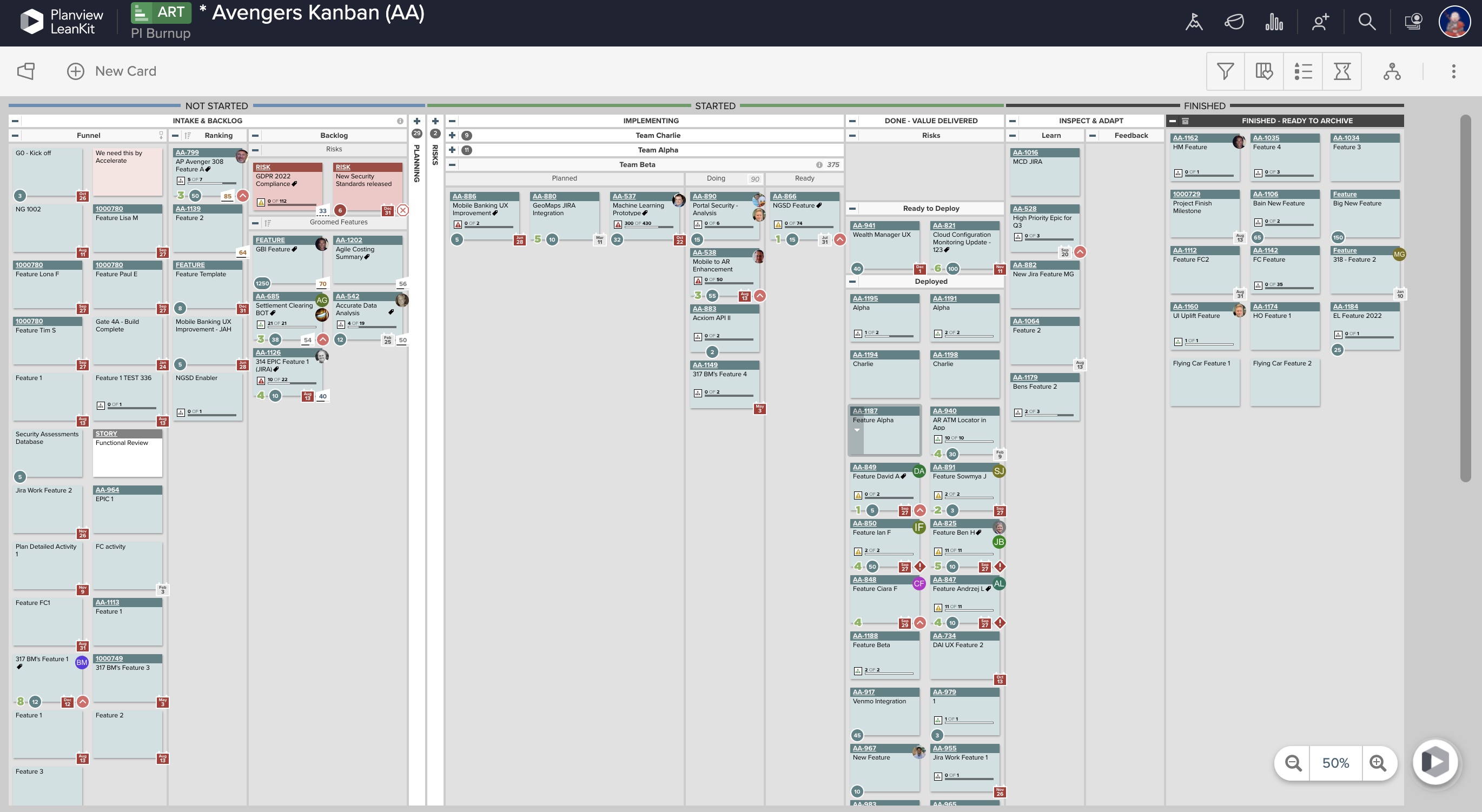
AgilePlace is a project management solution built around flexibility, data-driven analytics, and workflow automation. The software was acquired by Planview in December 2017 to expand that company's capabilities.
$19
per user, per month
Pricing
Google Drive
SharePoint
Planview AgilePlace
Editions & Modules
Basic
$6.00
per month
Business
$12.00
per month
Enterprise
Contact Vendor for Quote
per month
Plan 1
$5.00
Per User Per Month
Plan 2
$10.00
Per User Per Month
Office 365 E3
$20.00
Per User Per Month
Teams
$19
per user, per month
Scaled Teams
$29
per user, per month
Custom
Contact Sales for Quote
per user, per month
Offerings
Pricing Offerings
Google Drive
SharePoint
Planview AgilePlace
Free Trial
Yes
Yes
Yes
Free/Freemium Version
Yes
No
No
Premium Consulting/Integration Services
No
No
No
Entry-level Setup Fee
No setup fee
No setup fee
No setup fee
Additional Details
Discounts are available for students, educators, and non profit organizations.
Director in Professional Services at Kyt Consulting (Management Consulting, 1-10 employees)
Chose Google Drive
Compared to Microsoft SharePoint, the interface and learning curve for Google Drive are better mainly because the solution is much simpler and focuses on doing the basics well.
A de minimis incentive was given to thank the reviewer for their time. The incentive was not used to bias or drive a particular response, nor was the incentive contingent on a positive endorsement. TR verified that a representative sample of customers was invited. More Info
Verified User
Chose Google Drive
I feel like Google is a lot more affordable and though it would be nice to buy these products to use, drive provides what I need to meet my KPIs.
A de minimis incentive was given to thank the reviewer for their time. The incentive was not used to bias or drive a particular response, nor was the incentive contingent on a positive endorsement. More Info
A de minimis incentive was given to thank the reviewer for their time. The incentive was not used to bias or drive a particular response, nor was the incentive contingent on a positive endorsement. TR verified that a representative sample of customers was invited. More Info
Verified User
Chose Google Drive
They can all do the basics equally well, storing and sharing documents. Google Drive is the best from an ease of use perspective. SharePoint is a little better in terms of user management. Dropbox has the best name recognition, but not all the features you will need. If you …
A de minimis incentive was given to thank the reviewer for their time. The incentive was not used to bias or drive a particular response, nor was the incentive contingent on a positive endorsement. More Info
Verified User
Chose Google Drive
Google Drive and Box are extremely similar in functionality, the primary differences being aesthetic (Google is more user friendly, Box's UI design is a little less intuitive) and with regards to security (Box offers an enhanced level of protection commensurate with it's …
A de minimis incentive was given to thank the reviewer for their time. The incentive was not used to bias or drive a particular response, nor was the incentive contingent on a positive endorsement. More Info
Verified User
Chose Google Drive
Google Drive is better because it has its own suite of product features so it's simple and easy to use. It also allows multiple people to edit at once, whereas for other products (i.e. SharePoint) you have to "check" the document out for a single person's use.
A de minimis incentive was given to thank the reviewer for their time. The incentive was not used to bias or drive a particular response, nor was the incentive contingent on a positive endorsement. More Info
Business Analyst in Information Technology at TeleTech (Outsourcing/Offshoring, 10,001+ employees)
Chose Google Drive
i have been using google drive from 2012 and found the ease of use of it better than others. Even though I use Dropbox and OneDrive for work on some aspects mostly I prefer google drive for my work and personal.
A de minimis incentive was given to thank the reviewer for their time. The incentive was not used to bias or drive a particular response, nor was the incentive contingent on a positive endorsement. More Info
Senior Accounting Manager in Finance and Accounting at Creative West (Non-profit Organization Management, 11-50 employees)
Chose SharePoint
SharePoint feels more secure than Google Drive and maintains Excel sheets fully-- something Google constantly messes up. Confluence isn't great for collaboration, though the design elements are cute. SharePoint is a workhorse that always gets the job done, exactly as it needs. …
A de minimis incentive was given to thank the reviewer for their time. The incentive was not used to bias or drive a particular response, nor was the incentive contingent on a positive endorsement. TR verified that a representative sample of customers was invited. More Info
Verified User
Chose SharePoint
I like Microsoft SharePoint over Google Drive for its organization. I believe that Microsoft SharePoint keeps things much more organized than Google Drive. Also, typically when you purchase Microsoft SharePoint, you get the rest of the Microsoft Suite. However, Google Drive has …
A de minimis incentive was given to thank the reviewer for their time. The incentive was not used to bias or drive a particular response, nor was the incentive contingent on a positive endorsement. More Info
Verified User
Chose SharePoint
MS SharePoint lags behind its competitors in most areas. While it does offer more functionality, such as custom sites, MS SharePoint's bogged-down sharing system really hurts it. While sharing documents with coworkers, outside contractors, and guests is hassle-free with Google …
A de minimis incentive was given to thank the reviewer for their time. The incentive was not used to bias or drive a particular response, nor was the incentive contingent on a positive endorsement. More Info
Verified User
Chose SharePoint
We still have Confluence and Google Drive, but we wanted a product that could provide document security and a single point of access that easily integrated into our active directory. Since we use this for our intranet site, we found the features easier to stand up and the UI …
A de minimis incentive was given to thank the reviewer for their time. The incentive was not used to bias or drive a particular response, nor was the incentive contingent on a positive endorsement. More Info
Verified User
Chose SharePoint
I have only used Google Drive for personal reasons, not at work. SharePoint has a larger corporation safer feel to it as it uses the comfort of MS Office products for users.
A de minimis incentive was given to thank the reviewer for their time. The incentive was not used to bias or drive a particular response, nor was the incentive contingent on a positive endorsement. More Info
Verified User
Chose SharePoint
Google Drive is much easier to use although there is some lack of features.
A de minimis incentive was given to thank the reviewer for their time. The incentive was not used to bias or drive a particular response, nor was the incentive contingent on a positive endorsement. More Info
Graduate Teaching Assistant at Oklahoma State University (Research, 5001-10,000 employees)
Chose SharePoint
For my time\money, Google Drive is an infinitely better investment than SharePoint, including in a business setting. Although it may not integrate with existing infrastructure (e.g. Active Directory) as well as SharePoint, Google Drive is much more efficient and effective for …
A de minimis incentive was given to thank the reviewer for their time. The incentive was not used to bias or drive a particular response, nor was the incentive contingent on a positive endorsement. More Info
Verified User
Chose SharePoint
MS SharePoint's seamless integration with OneDrive makes it the hands-down winner over Google Drive. Although Google Drive is a fantastic tool, not being fully integrated with the MS Office Suite makes it less appealing for a large corporate storage solution.
A de minimis incentive was given to thank the reviewer for their time. The incentive was not used to bias or drive a particular response, nor was the incentive contingent on a positive endorsement. More Info
Senior Firmware Engineer in Engineering at Spirent Communications (Telecommunications, 1001-5000 employees)
Chose SharePoint
SharePoint has more features than Google Drive, but is not free. It has the ability to present full web pages, which Google Drive does not have. It also has integration into Microsoft 365, Microsoft Office, and Microsoft Outlook which are strong product lines for business. Googl…
A de minimis incentive was given to thank the reviewer for their time. The incentive was not used to bias or drive a particular response, nor was the incentive contingent on a positive endorsement. More Info
Verified User
Chose SharePoint
MS SharePoint offers far more beyond just document sharing like Google Drive or Dropbox. It allows our company to collaboate and complete tasks in a timely manner. It is a more robust solution and offers better security, customization, and scalability than other solutions.
A de minimis incentive was given to thank the reviewer for their time. The incentive was not used to bias or drive a particular response, nor was the incentive contingent on a positive endorsement. More Info
Verified User
Chose SharePoint
Prior to adopting MS SharePoint, our team used Google Drive. I think MS SharePoint has made big gains in recent years and now offers essentially the same functionality and services as Google Drive does with added functionality. While Google Drive allows individuals and …
A de minimis incentive was given to thank the reviewer for their time. The incentive was not used to bias or drive a particular response, nor was the incentive contingent on a positive endorsement. More Info
Senior Customer Care Representative in Customer Service at Helix (Biotechnology, 51-200 employees)
Chose SharePoint
We use Google Drive as well BUT the functions that are available in SharePoint are not translated in Google Docs. Formatting and uploading are not the same and some of the Excel functions do not transfer over. SharePoint makes it seamless! Either system is good but the …
A de minimis incentive was given to thank the reviewer for their time. The incentive was not used to bias or drive a particular response, nor was the incentive contingent on a positive endorsement. More Info
Information System Developer in Information Technology at Killeen ISD (Education Management, 5001-10,000 employees)
Chose SharePoint
Google Drive is useable and reliable but doesn't flow well with Microsoft 365 and district policy doesn't allow us to access Google Drive due to security.
A de minimis incentive was given to thank the reviewer for their time. The incentive was not used to bias or drive a particular response, nor was the incentive contingent on a positive endorsement. More Info
Verified User
Chose SharePoint
I think that Google Drive is much faster and more efficient than working in SharePoint. I understand that the benefit of using SharePoint is the integration of other MS tools such as Excel, Powerpoint, Outlook, etc. However, these tools all work more efficiently offline rather …
A de minimis incentive was given to thank the reviewer for their time. The incentive was not used to bias or drive a particular response, nor was the incentive contingent on a positive endorsement. More Info
A de minimis incentive was given to thank the reviewer for their time. The incentive was not used to bias or drive a particular response, nor was the incentive contingent on a positive endorsement. More Info
ERP Consultant in Professional Services at Platned Syngco (Information Technology & Services, 51-200 employees)
Chose SharePoint
Since Microsoft SharePoint comes with the MS business office package, it is fully integrated with other office products and really works together with other MS Office products like Word, PowerPoint, Excel, Access, Publisher, etc.. in real-time, so it's really easy to maintain …
A de minimis incentive was given to thank the reviewer for their time. The incentive was not used to bias or drive a particular response, nor was the incentive contingent on a positive endorsement. More Info
Verified User
Chose SharePoint
I think that MS SharePoint is a more robust and well integrated tool than other products. Because it lives in the Microsoft universe it likely integrates to the other software products you already have very easily. Most users will not have trouble adopting it as the UI is …
A de minimis incentive was given to thank the reviewer for their time. The incentive was not used to bias or drive a particular response, nor was the incentive contingent on a positive endorsement. More Info
Ingeniero de procesos in Customer Service at Evoluciona Chile (Telecommunications, 51-200 employees)
Chose SharePoint
OneDrive focuses mainly on being a repository in the cloud, but where the administrator of this information is usually the person who owns the site or the account where the information is stored. Unlike Sharepoint that allows generating groups of administrators, users and …
A de minimis incentive was given to thank the reviewer for their time. The incentive was not used to bias or drive a particular response, nor was the incentive contingent on a positive endorsement. More Info
Verified User
Chose SharePoint
Being integrated into Office 365 and included with your subscription, there are no added costs associated with setting up SharePoint. Also being able to sync one drive and being able to open files SharePoint files via file explorer is a great added benefit.
A de minimis incentive was given to thank the reviewer for their time. The incentive was not used to bias or drive a particular response, nor was the incentive contingent on a positive endorsement. More Info
A de minimis incentive was given to thank the reviewer for their time. The incentive was not used to bias or drive a particular response, nor was the incentive contingent on a positive endorsement. More Info
Verified User
Chose SharePoint
MS SharePoint is a better option for our team as we use Office 365 across our organization. It allows us some integration, and was a more familiar interface for many of the users on our team. It met our security needs and standards for our parent company as well.
A de minimis incentive was given to thank the reviewer for their time. The incentive was not used to bias or drive a particular response, nor was the incentive contingent on a positive endorsement. More Info
Verified User
Chose SharePoint
MS SharePoint had great Microsoft product integration compared to other services, and was a more complete enterprise package. We didn't evaluate many other services, as SharePoint's integration into other basic office programs was more valuable than saving a little bit or …
A de minimis incentive was given to thank the reviewer for their time. The incentive was not used to bias or drive a particular response, nor was the incentive contingent on a positive endorsement. More Info
Verified User
Chose SharePoint
There are a lot of other pieces of software out there that can do things that are similar to the things that SharePoint can do. Some are better and some are worse. We chose to start with what we already could access at no cost and work our way up from there.
A de minimis incentive was given to thank the reviewer for their time. The incentive was not used to bias or drive a particular response, nor was the incentive contingent on a positive endorsement. More Info
Sr Technology Architect in Research & Development at TELUS (Telecommunications, 10,001+ employees)
Chose SharePoint
There are overlapping capabilities of SharePoint and the above list of products. The simplest form seems to be the Google Suite of products that provide cloud integration with document creation, such as Docs/Slides/Sheets/Forms where storage is in Drive. The cloud nature …
A de minimis incentive was given to thank the reviewer for their time. The incentive was not used to bias or drive a particular response, nor was the incentive contingent on a positive endorsement. More Info
Vice President - Information Systems Director in Information Technology at Farmers National Company (Oil & Energy, 201-500 employees)
Chose Planview AgilePlace
Both VersionOne and Trello are good products. VersionOne is for the real hardcore Agile shops who want to track and report on everything related to the Agile process. Trello is a tool that works for Agile, but really is just a simple list making/tracking tool. Both tools serve …
A de minimis incentive was given to thank the reviewer for their time. The incentive was not used to bias or drive a particular response, nor was the incentive contingent on a positive endorsement. More Info
Director, Marketing & Communications in Marketing at Mueller Co. (Civil Engineering, 1001-5000 employees)
Chose Planview AgilePlace
While LeanKit was not designed for project and task management, we selected it because of its collaborative nature as a project and task management platform for our marketing team. It was also selected because our engineering and product management teams were using Leankit. We …
A de minimis incentive was given to thank the reviewer for their time. The incentive was not used to bias or drive a particular response, nor was the incentive contingent on a positive endorsement. More Info
It is possible to share files and folders with up to 200 email addresses, as well as with persons outside the company.Use the drop-down arrow to select who may see, comment on, or change the file or folder before sending out an invitation.I am very much impressed with this feature
It's Microsoft, so it rarely goes down or unnecessarily limits access. It works, though page load times can be long if you have lots of data. I feel like the Mac vs. PC divide has started to show up for MS products, but SharePoint works well with both.
This tool enables the visual management needed in many offshore teams to easily and quickly see the pending work, work in progress and completed work.For teams that work with a waterfall methodology and do not have AGILE internalized, I believe there are other solutions from Planview or other providers.
Any user with access can store a file using different platforms like Android, IOS, Windows, or Ubuntu (Desktop version)
You can share files with any number of different users with different access rights or you can even keep it public by providing the access link and assign different rights for public access
You can open Excel/Word files using google software Sheets/Docs in the browser environment without having to install software like Microsoft Office etc on your Windows OS
A de minimis incentive was given to thank the reviewer for their time. The incentive was not used to bias or drive a particular response, nor was the incentive contingent on a positive endorsement. More Info
A de minimis incentive was given to thank the reviewer for their time. The incentive was not used to bias or drive a particular response, nor was the incentive contingent on a positive endorsement. More Info
Having a little bit more control and clarity over what is shared and how it is shared would be a useful improvement.
Could be more robust and flexible as far as assigning restrictions.
Google Sheets could be enhanced because Excel really is not there yet as a product with equal capabilities as there are still quite a few limitations to the functionality.
A de minimis incentive was given to thank the reviewer for their time. The incentive was not used to bias or drive a particular response, nor was the incentive contingent on a positive endorsement. More Info
Windows Explorer users have some difficulty having to constantly UPLOAD / DOWNLOAD files. Specifically on the DOWNLOAD when they are used to Drag & Drop in & out of LOCAL folders via Window's explorer.
Microsoft SharePoint supports multiple "library" types. When implementing our "image" library the search function is done via "tags" and boolean logic. This is challenging to most end users. I'd like our users to be able to search our Microsoft SharePoint image library without having to enter KEYWORD or other BOOLEAN logic.
Microsoft SharePoint can also be an internal website for each department or company wide communication tool but I believe these features are geared for much larger organizations. Since we are a SMB we really aren't using these features. So maybe something more useful to SMBs would be nice.
A de minimis incentive was given to thank the reviewer for their time. The incentive was not used to bias or drive a particular response, nor was the incentive contingent on a positive endorsement. More Info
Ability to add more than 1 visual cue to the card. We use custom icons and sometimes more than 1 is appropriate but you have to choose which is most important since only 1 can be applied.
Better visibility to board access from the user administration screens. Currently have to run 1-2 reports to see this information. Would like to be able to click on a user within Configure Users and see what boards they have access to quickly.
It's perfect for me. It keeps things saved and is easy to remove items if needed. Also, I very much enjoy the formatting options. Along with the integrations it has for SSO. Overall, this is the most user friendly system I have ever come across.
It's integral to our business. It's already included with most of the Office 365 licensing we buy, so the cost is effectively zero. It stores our files, it is the foundation for custom applications, and Microsoft only continues to enhance its functionality and its connections to other Microsoft tools. SharePoint just keeps getting better and better.
A de minimis incentive was given to thank the reviewer for their time. The incentive was not used to bias or drive a particular response, nor was the incentive contingent on a positive endorsement. More Info
It's easy enough to use for computer users of all ages and skill levels. I am an advanced user, and I think the hardest part might be showing someone how to download and set up the app on their device if they weren't too familiar with computers, but overall it is very easy to understand.
A de minimis incentive was given to thank the reviewer for their time. The incentive was not used to bias or drive a particular response, nor was the incentive contingent on a positive endorsement. More Info
No usability issues reported. Individual teams also have allocated areas which replace legacy shared drives on local LANs. Access to Sharepoint resources is fully integrated with corporate Active Directory with additional two-factor authentication required for administrative users. Users have access to Microsoft Services Hub which allows you to create, manage, and track support requests while staying current on Microsoft technologies with access to select self-paced learning paths
A de minimis incentive was given to thank the reviewer for their time. The incentive was not used to bias or drive a particular response, nor was the incentive contingent on a positive endorsement. More Info
LeanKit isn't the best designed Kanban system I've seen, but overall it's pretty usable. The boards I've used are pretty complex, so it can be difficult to find things. I found that searching and filtering for specific cards was somewhat of a challenge. Dragging a card from one lane to another is kind of a fun way to get things done though.
A de minimis incentive was given to thank the reviewer for their time. The incentive was not used to bias or drive a particular response, nor was the incentive contingent on a positive endorsement. More Info
A de minimis incentive was given to thank the reviewer for their time. The incentive was not used to bias or drive a particular response, nor was the incentive contingent on a positive endorsement. More Info
A de minimis incentive was given to thank the reviewer for their time. The incentive was not used to bias or drive a particular response, nor was the incentive contingent on a positive endorsement. More Info
The documents load fairly quickly and also update in real time, especially given the fact that multiple people can be using it at once. The "Offline" feature works great to allow the user to make edits and access the document without access to the internet, and then sync changes later once they're back.
A de minimis incentive was given to thank the reviewer for their time. The incentive was not used to bias or drive a particular response, nor was the incentive contingent on a positive endorsement. More Info
A de minimis incentive was given to thank the reviewer for their time. The incentive was not used to bias or drive a particular response, nor was the incentive contingent on a positive endorsement. More Info
It takes a few days for customer support to get back to you. Although, I have not had to use support too often. Once you get an email back, they are very thorough and work hard to fix the problem quickly. It is a really great resource and a great way to get the help you need if you're stuck. A phone call also works quickly but you have to call during specific times.
A de minimis incentive was given to thank the reviewer for their time. The incentive was not used to bias or drive a particular response, nor was the incentive contingent on a positive endorsement. More Info
Every time I have reached out to the AgilePlace support team I have received a timely response in addition to professional & personal feedback. Their consultants are knowledgeable and the management team is happy to jump in and help when needed.
The effective google workspace using training that my organization received and was conducted by me (as a team lead of the ICT team) was mind-blowing and as a result, our staff is performing well in terms of using the application for their daily jobs than before. Now, in my institution, all teachers and all the administrative personnel are very much interested in cloud storage facilities, in previous my institution was afraid of losing all important documents in the cloud storage. But, after having received the training they are now realized that if anyone has only one google account then he or she can use 15GB of cloud storage freely and they are now happy because now it is not necessary for anyone to carry the traditional pen drive.
A de minimis incentive was given to thank the reviewer for their time. The incentive was not used to bias or drive a particular response, nor was the incentive contingent on a positive endorsement. More Info
The face to face training I received was on SharePoint Administration. It was rushed as there was a lot of information to cover and the application of the labs weren't that great either. I like to be able to relate what I am learning to what I am currently doing.
I like to learn at my own pace and online training allows for that. Additionally, you can skip through pieces of content that you already know or are already comfortable with. Microsoft actually offers great videos on their website for basic fundamental SharePoint Training. I have used these training videos in some of my own training sessions with end users.
It's an extremely easy software to implement, once you sign up for a google account you automatically have access to google drive with a set amount of storage space. The business or Google Suite accounts have more storage space than a regular free account, but setting up and accessing google drive is very easy in both cases
A de minimis incentive was given to thank the reviewer for their time. The incentive was not used to bias or drive a particular response, nor was the incentive contingent on a positive endorsement. More Info
In short, Google Drive is better for independent users who store a normal amount of stuff. OneDrive makes more sense for businesses and teams that are doing heavy-duty storage or large-scale syncing. Realistically, though, most users will fall somewhere in between the two, where either platform would meet their needs.
The reasons for selecting MS SharePoint are: SharePoint provides ease of use and web design assistance and support SharePoint helps you schedule your content for publishing. enables users to share documents with external parties and offers a better internal structure of the content and better indexing and searching capabilities.
A de minimis incentive was given to thank the reviewer for their time. The incentive was not used to bias or drive a particular response, nor was the incentive contingent on a positive endorsement. More Info
Originally, we had evaluated two other tools next to Planview LeanKit: Kanbantool and Kanbanflow. The latter was a close contestant for productive use, as it was also very customizable and a joy to work with and look at. It also had lower user fees and a mobile integration. In the end, we picked Planview LeanKit because of several reasons: Aesthetics: The look was much more clean and professional. Reporting: It was obvious from the start that we could use Planview LeanKit as a tool for improvement. API: We needed to integrate the Kanban into our central systems and Planview LeanKit API was (and still is) a way to do it. Card Headers: This sounds like a simple thing, but the headers above the titles fit our work perfectly and looked perfect, which helped the decision.
A de minimis incentive was given to thank the reviewer for their time. The incentive was not used to bias or drive a particular response, nor was the incentive contingent on a positive endorsement. More Info
A de minimis incentive was given to thank the reviewer for their time. The incentive was not used to bias or drive a particular response, nor was the incentive contingent on a positive endorsement. More Info
A de minimis incentive was given to thank the reviewer for their time. The incentive was not used to bias or drive a particular response, nor was the incentive contingent on a positive endorsement. More Info
A de minimis incentive was given to thank the reviewer for their time. The incentive was not used to bias or drive a particular response, nor was the incentive contingent on a positive endorsement. More Info
A de minimis incentive was given to thank the reviewer for their time. The incentive was not used to bias or drive a particular response, nor was the incentive contingent on a positive endorsement. More Info