Google Forms is an app for creating forms and surveys, and is part of Google Apps for Work. The product focuses on ease of use; the interface is similar to a document editor, with drop down lists of options and drag and drop question re-ordering. Users can embed images and video into surveys. Users can also program the question flow with custom logic. Google sends users basic summaries of the survey results automatically, or users can export the raw survey results data and analyze it via…
N/A
IBM SPSS Statistics
Score 8.2 out of 10
N/A
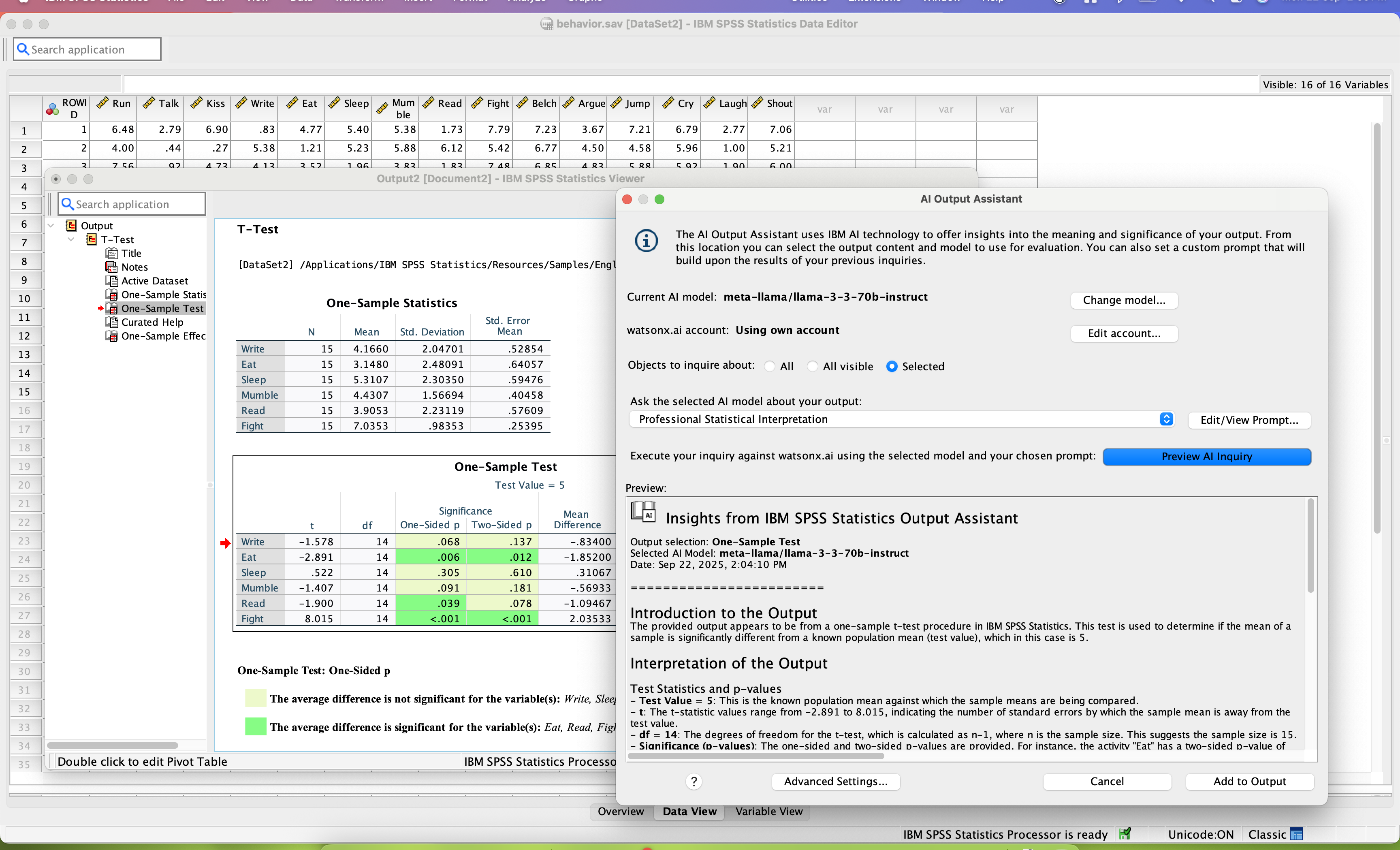
SPSS Statistics is a software package used for statistical analysis. It is now officially named "IBM SPSS Statistics". Companion products in the same family are used for survey authoring and deployment (IBM SPSS Data Collection), data mining (IBM SPSS Modeler), text analytics, and collaboration and deployment (batch and automated scoring services).
$105
per month per user
Wufoo
Score 9.0 out of 10
N/A
Wufoo is a web application for creating online forms. The tool automatically builds the database, backend and scripts needed making it easy to collect and understand data. Wufoo was acquired by SurveyMonkey in 2011.
The only other program I have personally used for data analyses is Excel. Honestly, if you just need to run a quick Pearson's r, Excel may be the way to go. Most of use already have extensive experience with Excel from using it throughout our schooling for various tasks. This …
We have used Google Forms in the past as well and we do like it's ability to populate a google drive spreadsheet immediately that can be shared with an entire committee. We do have a lot of long term use forms though that wufoo has more stability for maintaining.
Google Forms is too simple in its field options for my organization's purposes.
Wufoo has pre-formatted fields to collect phone numbers, email addresses, and first/last names. These fields do not allow submission without these fields formatted properly, reducing typos. …
Wufoo has an unparalleled ease of use. It's a simple to follow layout and support staff are accessible within an hour window almost without fail. The forms are more dynamic and easy to set up than either Google Forms or Salsa Labs based registration, but unlike Salsa Labs, the …
In terms of building reports, Wufoo is very similar to Google Forms. Both have the capability to edit live forms and immediately share them. Wufoo offers a few more features than Google Forms does as well. Overall, our department has looked at both options and continues to use …
I think out of these apps, Wufoo and SurveyMonkey maybe are the ones with more robust and complex features. But neither has a design so beautiful as Typeform, nor the simplicity of creating and answering surveys in Google Forms. Usually I use:
For companies who want budget-friendly, customizable forms software that allowed them flexibility and ease of use (where design did not matter), our first recommendation would be Wufoo. Wufoo has all the integrations and capabilities that Typeform has - with more, actually. The …
Both are good basic options. While Google Forms is free, Wufoo provides a free version with premium options. Wufoo has additional customization options such as logos, backgrounds, and other visual changes. Both offer analytics abilities to digest the data and to find common …
Wufoo is more robust than Survey Monkey and has more question/answer options. Wufoo also has more customization options for a cleaner, more professional experience for the user when compared to Survey Monkey and Google Forms.
It was the most affordable, easiest to use and best product that we researched and evaluated. We liked the interface of it, how you could make multiple accounts, the different theme options you could choose from and how easy it was to share your form. We needed something we …
Google Forms is great for simple surveys, such as quick polls, but any logic beyond conditional pages is not supported. Google Forms is best used when the survey participants have and are permitted to use a Google Account to fill out the form; we ran into issues with hospital IT departments. I don't believe there's a better free tool out there than Google Forms, though.
SPSS's ability to deal with things like survey verbatims is a significant competitive disadvantage. The ability to do most of what researchers do without having to learn to program (think R or Python) is the primary advantage SPSS brings to bear.
Wufoo is well suited when someone needs to gather data from visitors. It's not so well suited when you need to have people send files over 25MB in size. That's the limit and it's pretty low. We use it for resumes and MS Word files, so the size is okay for us, but might not be the case for other needs.
Live results: When a user completes the form the results are added instantly.
Easy to create: Google Forms has a simple interface that allows for a wide range of question types. Google will even try to guess the question type based on the question (but this can be overridden).
Answers export to Google Sheets: It is easy to have each response to your form add a row to a Google Sheet, allowing for further analysis or processing.
Ability to automatically collect email addresses within a domain: If you have a form that has been shared with users in your domain, you can set it to automatically collect the users' email addresses without them needing to type it in. Makes checking whether all students have completed the form easy.
SPSS has been around for quite a while and has amassed a large suite of functionality. One of its longest-running features is the ability to automate SPSS via scripting, AKA "syntax." There is a very large community of practice on the internet who can help newbies to quickly scale up their automation abilities with SPSS. And SPSS allows users to save syntax scripting directly from GUI wizards and configuration windows, which can be a real life-saver if one is not an experienced coder.
Many statistics package users are doing scientific research with an eye to publish reproducible results. SPSS allows you to save datasets and syntax scripting in a common format, facilitating attempts by peer reviewers and other researchers to quickly and easily attempt to reproduce your results. It's very portable!
SPSS has both legacy and modern visualization suites baked into the base software, giving users an easily mountable learning curve when it comes to outputting charts and graphs. It's very easy to start with a canned look and feel of an exported chart, and then you can tweak a saved copy to change just about everything, from colors, legends, and axis scaling, to orientation, labels, and grid lines. And when you've got a chart or graph set up the way you like, you can export it as an image file, or create a template syntax to apply to new visualizations going forward.
SPSS makes it easy for even beginner-level users to create statistical coding fields to support multidimensional analysis, ensuring that you never need to destructively modify your dataset.
In closing, SPSS's long and successful tenure ensures that just about any question a new user may have about it can be answered with a modicum of Google-fu. There are even several fully-fledged tutorial websites out there for newbie perusal.
Flexible, multiple entry forms: Wufoo allows users to create forms with multiple options or formats (radio, single choice, checkbox, text, paragraph text)
Conditional forms: Need to ask a question that only applies to a specific group? Then Wufoo is for you - it allows you to create conditional logic that allows you to reserve specific paths for specific entrants.
Integrations: Wufoo integrates with EVERYTHING via Zapier. You can sync it to Google sheets, email ESPs / CRMs, payment gateways... All kinds of applications for this software with its flexible uses & integrations, including embeddable HTML or direct integration to your website.
Sometimes finding the output -- a Google Sheet with all responses-- is a little difficult. It's also sometimes confusing to figure out how to get back into the Google Form Survey itself.
As always, sharing among an institutional Google account and your personal Google account can be frustrating. You have to make a copy and can't share across the two different accounts very easily.
collaboration - SPSS lacks collaboration features which makes it near impossible to collaborate with my team on analysis. We have to send files back and forth, which is tedious.
integration - I wish SPSS had integration capabilities with some of the other tools that I use (e.g., Airtable, Figma, etc.)
user interface - this could definitely be modernized. In my experience, the UI is clunky and feels dated, which can negatively impact my experience using the tool.
I will definitely renew my use of Google Forms because I really like the ease of use and the number of tools that Google forms provide. I also love that I can administer a test in real-time and get results in a timely manner
Both money and time are essential for success in terms of return on investment for any kind of research based project work. Using a Likert-scale questionnaire is very easy for data entry and analysis using IBM SPSS. With the help of IBM SPSS, I found very fast and reliable data entry and data analysis for my research. Output from SPSS is very easy to interpret for data analysis and findings
I only give it this mid-range rating because, since the 2014 Super Bowl is history, our company will be closing in a couple months. I hope in my next employment opportunity that I will be able to use Wufoo again. I will probably use it to a limited extent in my personal life to communicate with friends and contacts in a unique manner. I am also working on a Certificate in Web Development and I definitely use Wufoo as embedded forms in websites I build.
Overall ease of use for staff, volunteers, and adult learners, and easy to get reports and to share reports via Sheets. As a free tool, it does more than expected. Easy to change the look and brand it to your organization, or just make it more fun, depending on what you want to use it for.
Probably because I have been using it for so long that I have used all of the modules, or at least almost all of the modules, and the way SPSS works is second nature to me, like fish to swimming.
Wufoo's usability from the user to the client is simple. The forms are simple to construct and they are easy for our clients to fill out. I have yet to really hit something that is difficult to do and even when I do get a little stumped their excellent support team helps me through it.
In the years I've used GoogleForms I've never ran into any issues with the reliability or availability. Google is a gigantic company with essentially limitless resources which makes it very easy to trust that I will continue to be able to enjoy the same reliability I've come to know and expect from GoogleForms
One of the things that comes as a benefit of the lack to create complex logic branching and truly custom design is that there isn't lot of room to bog down the software. GoogleForms has always loaded just as fast as my internet service and device would allow it. I'm not sure about front end integrations or integrations into the form itself, as I've never explored it, but on the backend, I've never had any issues with integrations channeling from GoogleForms from the GoogleForms's end of things.
Every time I try to use a different Form Builder - I constantly go back to Wufoo, especially compared to WordPress Plugin Form Builders. The biggest reason is the reliability of the form notifications getting sent and delivered are better than form builder that rely on the Wordpress Mail Send Feature. The only feature that I have found over the last 3 years that Wufoo is missing is the ability to customize the layout of the notification emails. But that is minor in the grand scope of its reliability.
We haven't used much official support for Google Forms. However, because it is so widely used, there are a ton of articles and guides available online to help administrators of varying technical abilities to work through problems that arise. Additionally, Google provides an official support forum where there are discussions with other users as well as Google developers that can help address issues if needed.
I have not contacted IBM SPSS for support myself. However, our IT staff has for trying to get SPSS Text Analytics Module to work. The issue was never resolved, but I'm not sure if it was on the IT's end or on SPSS's end
I will be completely honest - I have never needed to contact any specific support for Wufoo. This is because we've never had any problems with Wufoo that I'm aware of! It has proved to be a reliable and easy to use product, and therefore, we have not needed to reach out for any kind of support or assistance. I suppose this would speak to the exceptional quality of the product!
Google Forms doesn't really require "implementation": simply log into GDrive and create a survey! You can configure settings per survey to, for example, automatically write responses to a GSheet.
Have a plan for managing the yearly upgrade cycle. Most users work in the desktop version, so there needs to be a mechanism for either pushing out new versions of the software or a key manager to deal with updated licensing keys. If you have a lot of users this needs to be planned for in advance.
Implementing Wufoo was a seamless process. It was an instantaneous transition from the old pdf forms and webforms we were using to the easier to understand Wufoo forms. Employees learned it with ease and the clients response was instantaneously positive. Adding Wufoo to your workflow is not only easy it is necessary.
Although both platforms offer similar functionalities, Google Form has a personal advantage and it is the impeccable integration with the different applications of the Google suite, this allows to make use of all of them in a transparent way, which in the work environment allows to perform work efficiently and without affecting the quality of it.
If you have made it this far, you should have a very good idea of how SPSS stacks up the competition (data processing and analytics tools). Even the free ones, such as r Studio or Stata, are leaps and bounds ahead of SPSS. IBM is resting on a reputation developed nearly 30 years ago and has shown no desire to improve.
In terms of building reports, Wufoo is very similar to Google Forms. Both have the capability to edit live forms and immediately share them. Wufoo offers a few more features than Google Forms does as well. Overall, our department has looked at both options and continues to use Wufoo because of the data management and ease of building forms.
GoogleForms lacks the ability for complex logic branching and the ability to truly design it in a custom manner. It's pretty obvious when you land on a GoogleForm that it is in fact a GoogleForm. This rating solely reflects the lack of flexibility which in turn makes it something that wouldn't usually be scaled. That being said, if needing to scale a simple solution, GoogleForms would be up for the job.
IBM Cognos Analytics may have been designed to scale up to a very large number of users however we are a small business with small number of users and the program worked equally well for us. We would highly recommend the product for any business no matter the size, small to large.
I found SPSS easier to use than SAS as it's more intuitive to me.
The learning curve to use SPSS is less compared to SAS.
I used SAS, to a much lesser extent than SPSS. However, it seems that SAS may be more suitable for users who understand programming. With SPSS, users can perform many statistical tests without the need to know programming.
Wufoo has had a positive impact on our marketing department by allowing us to create and deploy forms on our websites and landing pages with significantly increased efficiency and speed.
Wufoo has also had a huge impact in reducing our reliance on IT support to build and deploy forms to our websites.
Wufoo has also empowered our marketing team to be able to try and solve our business problems through tons of integrations between Wufoo and other 3rd party systems (such as Salesforce and Zapier).