From Google, the Google Tag Manager is a tag management application that facilitates creating, embedding, and updating tags across websites and mobile apps. It is a free option, vs. the company's enterprise-tier Google Tag Manager 360.
$0
Moz Pro
Score7.9 out of 10
N/A
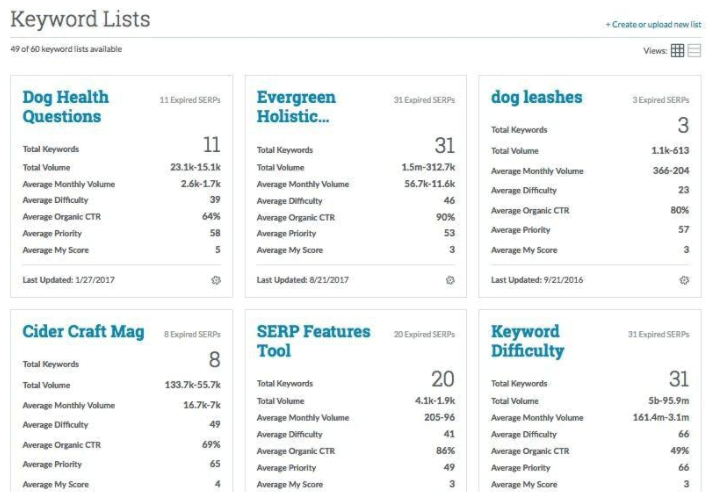
MozPro , from Moz in Seattle, Washington, is an SEO platforms for tracking the performance of all inbound marketing efforts comprehensively. It reveals how content is being shared through social channels and how that drives traffic to a website, and features a broad toolset for search engine optimization: rank tracking, link opportunites, site audit via Moz Analytics, prospective keyword analysis and content grading, as well as a crawl test to find broken or poorly designed site elements.
Moz…
$99
per month
Pricing
Google Tag Manager
Moz Pro
Editions & Modules
No answers on this topic
Standard
$99
per month
Medium
$179
per month
Large
$299
per month
Premium
$599
per month
Offerings
Pricing Offerings
Google Tag Manager
Moz Pro
Free Trial
No
Yes
Free/Freemium Version
Yes
No
Premium Consulting/Integration Services
No
No
Entry-level Setup Fee
No setup fee
No setup fee
Additional Details
—
Discount available for annual billing.
More Pricing Information
Community Pulse
Google Tag Manager
Moz Pro
Considered Both Products
Google
Verified User
Chose Google Tag Manager
I've used other tools like Hotjar for website performance tracking and Tag Manager is nicer because it ties in with Google Analytics and allows you to specifically create the tags you want rather than watching to see what happens.
A de minimis incentive was given to thank the reviewer for their time. The incentive was not used to bias or drive a particular response, nor was the incentive contingent on a positive endorsement. More Info
Verified User
Chose Google Tag Manager
As far as I know, Google Tag Manager is the only program that provides this service.
A de minimis incentive was given to thank the reviewer for their time. The incentive was not used to bias or drive a particular response, nor was the incentive contingent on a positive endorsement. More Info
Verified User
Chose Google Tag Manager
We looked at Kissmetrics but we wanted an all-inclusive product that is fully integrated with Google Analytics, so we opted to go with Google Tag Manager. It's reassuring to know that our data will always be accurate, and can be accessed via one login (Google Analytics). This …
A de minimis incentive was given to thank the reviewer for their time. The incentive was not used to bias or drive a particular response, nor was the incentive contingent on a positive endorsement. More Info
I have found Google Tag Manager as the go to solution for managing all of your event and conversion tags for your website. Not only does it make it easy to manage all of your tags in the one place, it is fairly intuitive to use and there is plenty of videos and help documentation online to help set up what ever you need. No scenarios come to mind at the moment on where it is less appropriate to use.
A de minimis incentive was given to thank the reviewer for their time. The incentive was not used to bias or drive a particular response, nor was the incentive contingent on a positive endorsement. More Info
Businesses looking to keep track of their web presence and utilize a tool to identify areas of opportunity. The trends tracking and competitor modeling allow businesses to be able to build an SEO strategy that they can track progress over time and fill in content gaps. This is used by our company in conjunction with our marketing automation tool and Google's web presence suite (eg. Google Analytics, Search Console, Tag Manager).
A de minimis incentive was given to thank the reviewer for their time. The incentive was not used to bias or drive a particular response, nor was the incentive contingent on a positive endorsement. More Info
Selecting elements on a site [object, class, cookie, etc] (to later fire an event, send some data, etc) is very easy with triggers. Want to add an event when someone clicks on a button? Super easy. It was many many DOM selectors and you can even add custom functions if you need to do something more specific
In general, firing events in different circumstances is very easy mixing triggers and tags. You can track almost any element of the DOM and do whatever you want with it.
Testing is a great functionality. Only you can see what's on the site and you can debug it easily by seeing which events or tags were triggered and all the DOM elements involved (and why they matched the trigger).
Working in environments (staging, production) and versioning is easy to do, deploying changes in 2 clicks.
A de minimis incentive was given to thank the reviewer for their time. The incentive was not used to bias or drive a particular response, nor was the incentive contingent on a positive endorsement. More Info
A de minimis incentive was given to thank the reviewer for their time. The incentive was not used to bias or drive a particular response, nor was the incentive contingent on a positive endorsement. More Info
There are several good integrations, but there can always be more. Native tracking for call tracking solutions, analytics providers, non-Google advertisers would be top of my list.
Documentation is just dreadful. Luckily there are some awesome folks out there doing crowdsourced tutorials (shout out to Simo Ahava) but by and large the Google Tag Manager instructions are worth what you pay for them.
A de minimis incentive was given to thank the reviewer for their time. The incentive was not used to bias or drive a particular response, nor was the incentive contingent on a positive endorsement. More Info
Some of the auto-gen visual tables aren't all that useful for smaller companies. For instance on the Search Visibility tab, many of my clients have a tiny % of keywords in the top-10, so the table shows basically 4 overlaid flat lines. I wish we had some options to customize this table or expand the range or something.
I wish there were some more tools relating to the technical aspects of the site/pages. The whole tool is very keyword-oriented, which is fine, but I feel like over time this has become and will continue to be less important than technical aspects, site speed, voice search, etc.
There's an Anchor Text tab, but it only looks at Inbound links—I wish this feature was for on-site anchor text—this could be a much better optimization tool. Because there's nothing you can do about inbound link text.
A de minimis incentive was given to thank the reviewer for their time. The incentive was not used to bias or drive a particular response, nor was the incentive contingent on a positive endorsement. More Info
I haven't found another option for us to use especially one that is free. Down the road we may go a different route but for now GTM is a good option and does what we need it to do. It'd be nice to get more support or more integrations but with the free version there's only so much one can expect to get I suppose.
A de minimis incentive was given to thank the reviewer for their time. The incentive was not used to bias or drive a particular response, nor was the incentive contingent on a positive endorsement. More Info
We've been paying monthly for Moz for at least four years. We rely heavily on it for our daily work, and would need to re-engineer many of our processes if we were to cancel our subscription. I suspect we'll continue to use Moz as long as we are in business (assuming they maintain their quality).
No difficult obstacle to overcome but Google Tag Manager can still be difficult for many users to deploy. Sure the basic HTML script can be deployed quite easily, but when you start to require triggers, variables, etc, it can be a little daunting.
A de minimis incentive was given to thank the reviewer for their time. The incentive was not used to bias or drive a particular response, nor was the incentive contingent on a positive endorsement. More Info
it's easy to use once you get the hang of it and most people with any sort of background in using online tools and analytics systems can figure it out. it's just not as intuitive as it could be like google webmaster tools or Adobe (Site Catalyst)
GTM does not provide support. This is one of GTM's biggest issues but it's due to the level of customization for each website. If your team thinks they would heavily rely on the need for a support staff it is probably better to invest in a paid service with a team that can support your needs.
A de minimis incentive was given to thank the reviewer for their time. The incentive was not used to bias or drive a particular response, nor was the incentive contingent on a positive endorsement. More Info
As I have mentioned before, if you have enterprise subscription, the staff are super helpful. Moz also participated in the marketing tech conferences especially moz in seattle. These sessions are super useful in helping digital marketing analyst like me to investigate new marketing techniques, tracking leads and conversions and eventually monetize them. Their staff is not only knowledgeable in their own product but they have been around. For example Dr Peter from moz always publishes his insights and I have relied somewhat on his opinions.
A de minimis incentive was given to thank the reviewer for their time. The incentive was not used to bias or drive a particular response, nor was the incentive contingent on a positive endorsement. More Info
Planning and communication will help greatly with an in-house implementation. If there are large teams, try to limit the number of people involved to 1-2 developers (back-end dev may be necessary depending on your platform), one analytics marketer and one project manager.
A de minimis incentive was given to thank the reviewer for their time. The incentive was not used to bias or drive a particular response, nor was the incentive contingent on a positive endorsement. More Info
We moved to GTM from a standard Google Analytics implementation. GTM is much more flexible and easier to make changes, especially as the changes relate to multiple sites and environments. While there is a learning curve when figuring out how to use GTM, I believe the change has been worth it because it helps us understand at a more fundamental level how our tracking works and gives us a lot more control over what we track and how.
A de minimis incentive was given to thank the reviewer for their time. The incentive was not used to bias or drive a particular response, nor was the incentive contingent on a positive endorsement. More Info
Moz emerged as an industry leader with a great reputation for driving optimal SEO performance and ROI for customers. Moz' thought leadership on all things SEO gave us a lot of confidence to invest and partner with them. The wide array of product features was also something that was important to us relative to Moz' competitors. In the end, we felt there wasn't anything we couldn't do with Moz. We were also impressed with the on demand platform training and tools provided from day 1. Lastly, Moz was one of the more expensive platforms, but it wasn't the most expensive, so we felt we received great value for the overall price.
A de minimis incentive was given to thank the reviewer for their time. The incentive was not used to bias or drive a particular response, nor was the incentive contingent on a positive endorsement. More Info
GTM is very useful to determine if a particular element on the site is useful (i.e. is it being watched, is it being clicked, does it help customers navigate through more pages). As an SEO person, I can use this information to decide what to optimize for but also to track progress and see improvements in engagement.
With the use of Google Tag Manager, I was able to easily inject an A/B testing tool which lead to several improvements in lead generation.
A de minimis incentive was given to thank the reviewer for their time. The incentive was not used to bias or drive a particular response, nor was the incentive contingent on a positive endorsement. More Info
Here I can easily find competitor's ranking keywords and their backlinks. It also gives you another exciting feature where you can compare two domains at the same time.
The thing that I don't like about this software is, that sometimes your page can take too much time for crawling.
A de minimis incentive was given to thank the reviewer for their time. The incentive was not used to bias or drive a particular response, nor was the incentive contingent on a positive endorsement. More Info