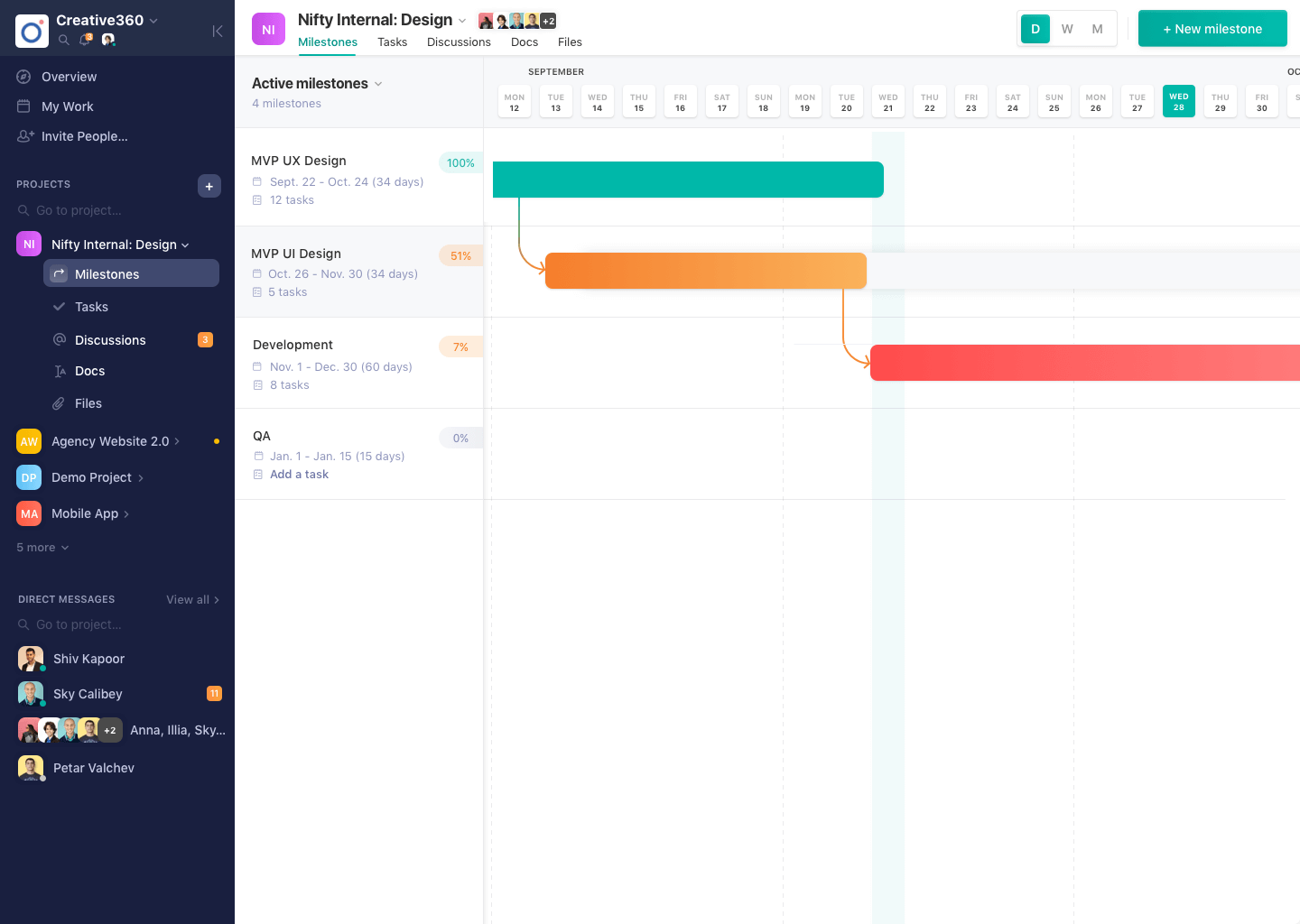
Nifty consolidates projects, work, and communications in one place. Nifty simplifies and automates the tracking of project milestones, communications with teammates and clients, collaborative document creation, and more in a centralized workspace! Nifty enables organizational oversight across projects and teammates with project & team workload overviews. With communications, project management, and workflow collaboration centralized in one place, teams can consolidate their workday as well…
N/A
QuickBooks Time
Score 8.7 out of 10
N/A
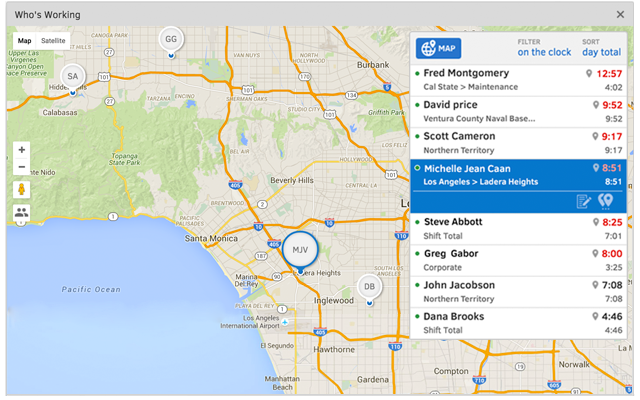
QuickBooks Time (formerly TSheets) is a cloud-based time tracking and scheduling app that allows employees to clock in and out from the job site with the devices they’ve already got in their pockets. The vendor aims to help companies replace paper timesheets with accurate, electronic time data as well as make payroll and invoicing faster and less costly. QuickBooks Time also accurately tracks time and GPS points (even without cell or internet service) then automatically syncs when back…
$0
1 user, unlimited projects
Trello
Score 8.4 out of 10
N/A
Trello from Atlassian is a project management tool based on a Kanban framework. Trello is ideal for task-management in a to-do list format. It supports sharing boards and cards across users or teams. The product offers a free version, and paid versions add greater automation, collaboration, and administrative control.
$6
per month per user
Pricing
Nifty
QuickBooks Time
Trello
Editions & Modules
No answers on this topic
Free
$0
1 user, unlimited projects
Premium
$8
per user/month + $20 base fee/month (paid annually)
Elite
$10
per user/month + $40 base fee/month (paid annually)
Standard
$6
per month per user
Premium
$12.50
per month per user
Enterprise
$17.50
per month per user
Free
Forever Free
Offerings
Pricing Offerings
Nifty
QuickBooks Time
Trello
Free Trial
Yes
Yes
No
Free/Freemium Version
Yes
Yes
Yes
Premium Consulting/Integration Services
Yes
No
No
Entry-level Setup Fee
$89 simple flat-rate pricing
No setup fee
No setup fee
Additional Details
—
—
A discount is offered for annual billing and for larger numbers of users.
There's no comparison. Nifty does what all of these do all in one place (with the exception of Slack's community aspect with hashtagging - not sure if Nifty can do this, never tried)
Nifty even has the ability to import directly from many other platforms - I've personally …
The one thing that makes this nifty stand out from its peers is its ability to support everything that one can think of while working/managing a project! It has got effective timeline management, charting capabilities, chat functionality, document storage, and the ability to …
We've tried several project management tools and most of them lacked the features we exactly needed. Jira was the last we tested and it was complicated to handle as projects grew bigger. Nifty is structured well and has major features that can handle big projects and does well …
We used to do all of our scheduling manually or in archaic software that wasn't user-friendly. We researched other software and found that this was going to meet our needs most comprehensively. Staff used to track their hours on a notepad on their phone or on an excel …
Trello provides precise goal setting, targets, and activity tracking with minimal human intervention, while Trello provides tags and tasks to add users and communicate visual task organization. Trello also offers real-time updates, team collaboration, and project progress …
Features
Nifty
QuickBooks Time
Trello
Project Management
Comparison of Project Management features of Product A and Product B
Nifty
9.6
3 Ratings
21% above category average
QuickBooks Time
-
Ratings
Trello
8.5
222 Ratings
9% above category average
Task Management
8.83 Ratings
00 Ratings
9.5222 Ratings
Resource Management
9.43 Ratings
00 Ratings
9.3185 Ratings
Gantt Charts
10.03 Ratings
00 Ratings
7.173 Ratings
Scheduling
10.03 Ratings
00 Ratings
9.1168 Ratings
Workflow Automation
9.43 Ratings
00 Ratings
8.2142 Ratings
Team Collaboration
10.03 Ratings
00 Ratings
9.0218 Ratings
Support for Agile Methodology
10.01 Ratings
00 Ratings
8.9147 Ratings
Support for Waterfall Methodology
10.03 Ratings
00 Ratings
7.6115 Ratings
Document Management
9.43 Ratings
00 Ratings
8.2159 Ratings
Email integration
10.02 Ratings
00 Ratings
7.6146 Ratings
Mobile Access
10.03 Ratings
00 Ratings
9.1192 Ratings
Timesheet Tracking
8.53 Ratings
00 Ratings
9.388 Ratings
Change request and Case Management
9.03 Ratings
00 Ratings
8.8102 Ratings
Budget and Expense Management
10.02 Ratings
00 Ratings
7.673 Ratings
Professional Services Automation
Comparison of Professional Services Automation features of Product A and Product B
It would be very useful for certain remote jobs that require a high level of presence, as in the case of web development, or remote maintenance sessions, so that when reviewing the work data it is possible to ensure that there will be no failures. By being able to include files in the management, from the equipment tab, it is possible to fully control the hours in which each change in these files were made.
For teams or individuals with lots of individual tasks/details to track, Trello is perfect! It basically removes the need for a paper checklist. For those that need an overall project management tool that requires less tasks and more overarching goals, collaboration amongst various teams, and gantt charts I would suggest monday.com
Support (their help desk team is incredibly helpful and always quick to respond).
Ease of access and use (the app is user-friendly an intuitive, and the desktop version is equally as approachable).
Manager functionality (it's useful to be able to clock employees in and out at multiple events on the same day by sorting them into different groups by manager/event).
Time Expense could be improved since we cannot edit the previous/past time logs entered.
Lacks expense management and Purchase order management functionality
Newest product updates are not always stable and I had to reach Nifty's support team a couple of times in the past to fix the issues with new updates e.g. our document management and meeting integrations had to be re-authorized
The desktop version of the TSheets schedule does not have a search feature. This makes it challenging to find things you are looking for without extra work
The app can be a bit buggy. Though it is a great app, there are many reasons that the app will stop syncing and can cause problems with staff scheduling
TSheets tech support people, like Shawn Sommer, from Tsheets. She has been instrumental, after terminating the person in charge of TSheets I was left with a learning curve too high to climb but after 10 mins of her instructions I was able to make payroll in no time. She cleared all errors that nobody had fixed before. TSheets is not a vendor for me, TSheets is my partner in business. Thank you TSheets.
I am very likely to renew Trello, because it doesn't cost anything to do so. I am also very likely to use Trello's upgraded features in the future because a lot of my team's data is stored on there and they have already gotten used to the platform. Trello is very easy for new team members to pick up, making the onboarding and usability very streamlined.
Our employees find TSheets easy to use and spend minimal time at reporting hours using it. As an administrator and user of the TSheets "data and information" I am extremely positive on the functionality and reporting that it has provided me. From its ease of set-up to training to reporting, TSheets has made us so much more efficient from an administration standpoint
Trello is incredibly intuitive, both on desktop and mobile right away. It is also full of helpful features that make it even easier to use, and is flexible enough to suit almost any organizational need. Onboarding for the software is thorough, but concise, and the service is frequently updated with even more QOL improvements.
I have never failed to have an issue resolved within minutes of contacting Support. Jen D recently assisted my with an export issue and I was back on track in less the 10 minutes. She was knowledgable and thought about the current and future contexts of the issue and assured there would be no recurrence next payroll.
I haven't reached out to their support very often and their support is very limited anyway for the free users. They do have tons of great articles and videos in their Help Center and constantly send emails with updates and add-ons to the product. The fact that I've barely ever had to contact their support team means that they've developed a great product.
For our small business, getting a few of us started well on Trello was the key, I think. As long as a couple of us were really comfortable with the interface, we could lead others and help them with any questions. From now on, anyone who works with us just naturally uses Trello for information sharing - it's just part of what we do.
There's no comparison. Nifty does what all of these do all in one place (with the exception of Slack's community aspect with hashtagging - not sure if Nifty can do this, never tried) Nifty even has the ability to import directly from many other platforms - I've personally imported projects from Trello and Asana, saving tons of time in migration.
Besides Intuit Payroll (Sage), the only program I've used is WorkBrain through Menards, and it's more as a scheduling guideline for management, employees don't use it to punch in or out or record hours. However, WorkBrain does show scheduling and it matches with a punch clock to record those hours. Every other place I've used has used either punch clocks or handwritten time cards. I think the TSheets is modern, user-friendly, convenient, accessible, and cost-effective for the owners. It also streamlines payroll for the Accountant instead of manually entering all hours for multiple employees by hand into a software program like Sage.
Trello is more simple and not as "robust" as the other tools, but it's easier to use and manage and understand and ACTUALLY get stuff done with. It's simplicity is part of the beauty of using it. You don't need a million options that nobody uses, you just need to get stuff done.
Trello keeps me organized, focused, and on track. I could filter the Trello board to only see my issues and understand what I needed to work on and when.
Trello helped our team implement an agile structure. It's a very simple kanban method of viewing all of your team's tasks and statuses. You can completely customize the columns to your team's specific workflow and create tags relevant to your work.
Trello helps reduce unnecessary communications between teams. When I want to request translations, I simply create a card on the localization Trello board -- no need to directly message anyone on the team, and I can watch the status of the card change from "in progress" to "in review" to "translated," all without having to directly ask for updates.