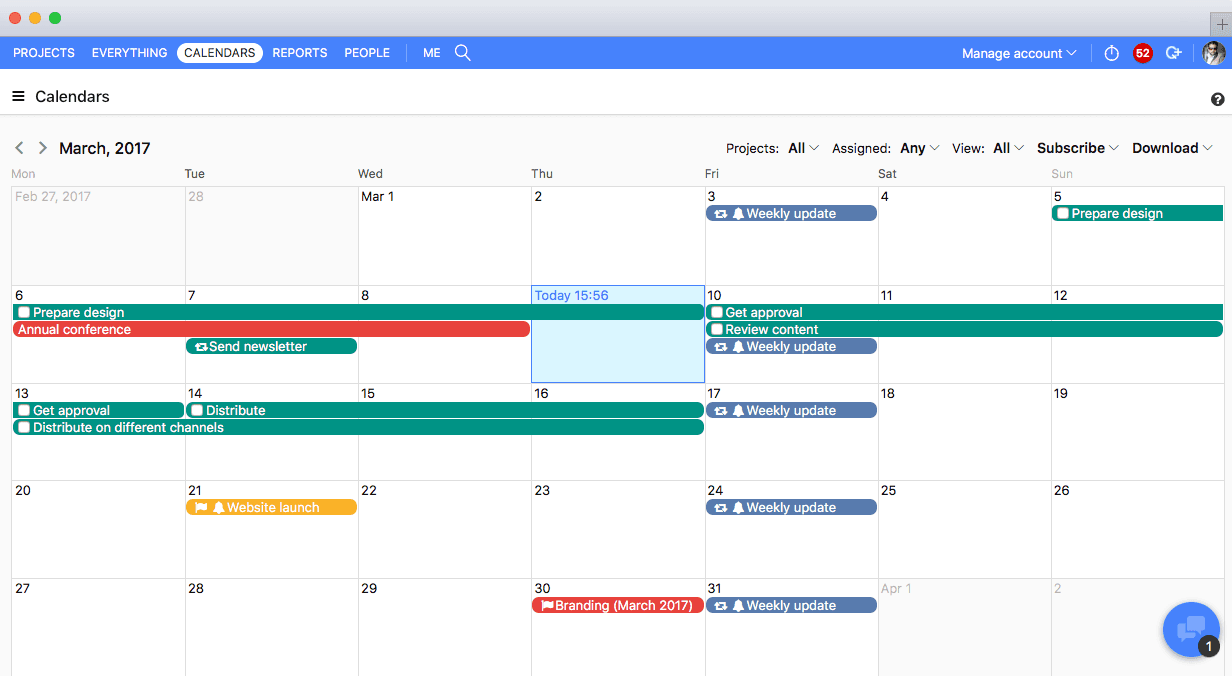
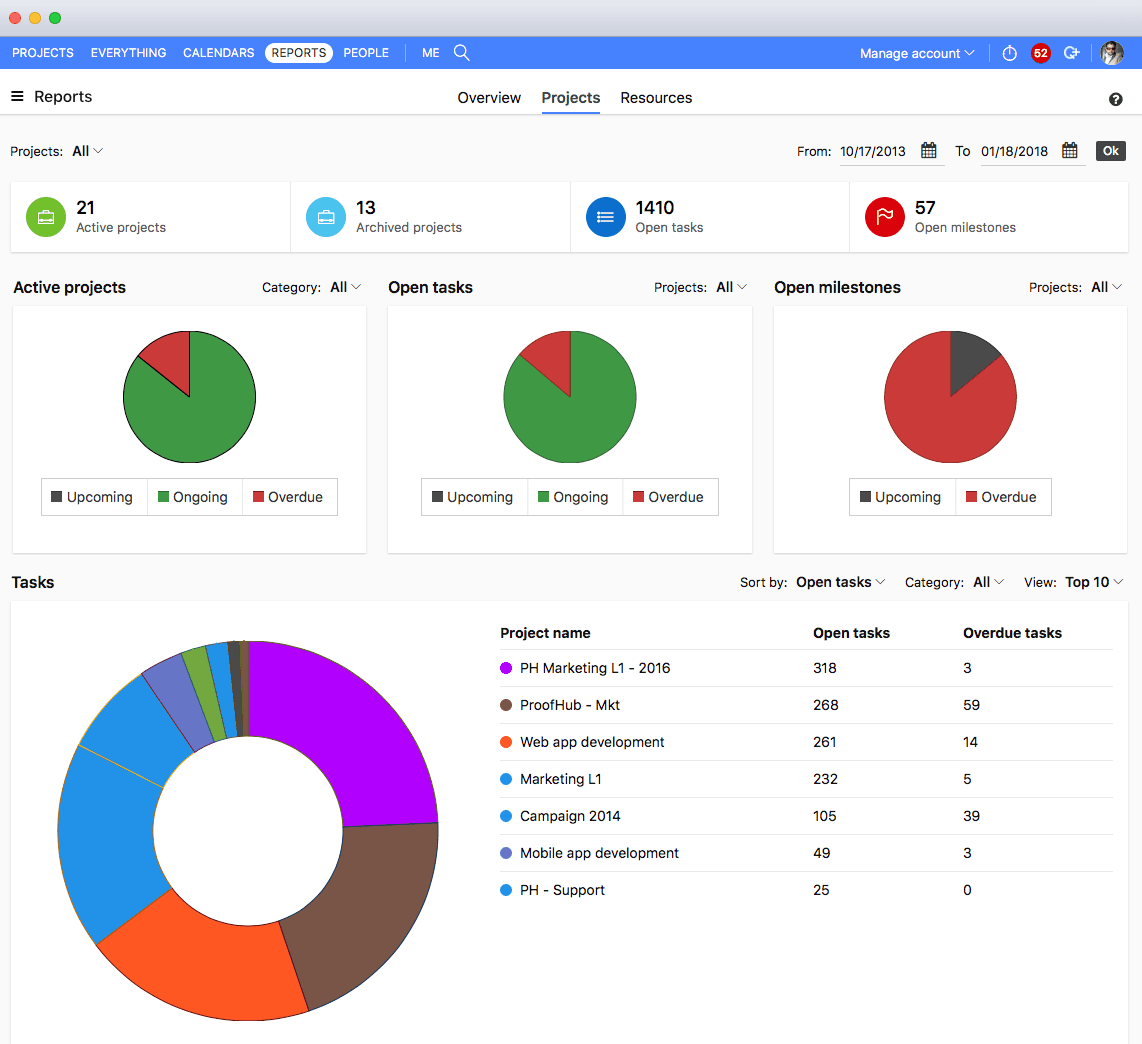
ProofHub is a SaaS based project management software from ProofHub LLC in Walnut, CA. It is an online project management and collaboration tool that comes with integrated Group chat, quick Discussions on projects, Workflows and boards, Project reports, among other features. Document (e.g. Excel, Powerpoint) uploading and sharing is supported, along with an integrated an Online proofing tool to aid in image and document review. ProofHub aims to enable teams to…
$50
per month
Upland PSA
Score 5.8 out of 10
N/A
Upland PSA helps professional services teams grow their business.
$15
per month
Wrike
Score 8.6 out of 10
Mid-Size Companies (51-1,000 employees)
Wrike is a project management and collaboration software. This solution connects tasks, discussions, and emails to the user’s project plan. Wrike is optimized for agile workflows and aims to help resolve data silos, poor visibility into work status, and missed deadlines and project failures.
$240
per year 2 users (minimum)
Pricing
ProofHub
Upland PSA
Wrike
Editions & Modules
Essential
$45
per month (billed annually) unlimited users
Ultimate Control
$89
per month (billed annually) unlimited users
Large Team
$279
per month (billed annually) unlimited users
No answers on this topic
Wrike Free
$0
per month per user
Wrike Team
$10
per month (billed annually) per user (2-15 users)
Wrike Business
$25
per month (billed annually) per user (5-200 users)
Apex
Request a quote
per month per user
Pinnacle
Request a quote
per month per user
Offerings
Pricing Offerings
ProofHub
Upland PSA
Wrike
Free Trial
Yes
Yes
Yes
Free/Freemium Version
No
No
Yes
Premium Consulting/Integration Services
No
No
Yes
Entry-level Setup Fee
No setup fee
No setup fee
No setup fee
Additional Details
—
—
Every premium plan begins with a 14-day trial period.
Unfortunately ProofHub did not compare very well. The pricing model is fantastic and I think the approach the software takes to creative project management isn't necessarily bad, it's just others do it better. For example, Wrike has very powerful and easy-to-manage form …
In many ways it is similar and somewhat of a clone of Wrike however the system tended to be significantly slower when being used by our team. Not sure if that was related to our connection internally or not but when we switched to Wrike it worked significantly faster but we …
beacuse my company use it at it seems powerfull buta as a staff I think the main problem of wrike is the user interfaces whicis not simple and hard for finding some funtion like deleting task, add subtask etc. I expect it will be like ms excel that we can add task easily
It suits well for those businesses who want to operate on a global level without investing too much over creating infrastructure. A business can easily reach out to various clients, customers, partners and other stakeholders and communicate and collaborate with them in a fast and transparent manner and can effectively tap any opportunities coming its way. Such opportunities if properly implemented can lead to gains for the parties involved.
We have discovered over the last few years using Tenrox that we could adapt our needs or processes to fit in the Tenrox box rather than adapting Tenrox to fit in ours completely. I feel like Tenrox would be better suited for a company that has fewer clients and projects over the course of a year, as well as fewer users. We have approximately 350 clients, 21,077 projects in Tenrox at this exact moment (we close projects as we can), 188 active users currently, and 415,635 tasks (some of course assigned to now closed projects). With this much information hosted through the Tenrox cloud server, we experience increased lag time frequently. This causes a lot of unwanted rejection towards Tenrox in our company.
I believe it's well suited if you have multiple jobs/projects that you need to keep organized. We work with multiple job types from print/creative to web, copy and digital ads so it helps us stay organized. I don't think it would be suitable for a company that doesn't have a lot of jobs to manage. We average over 1,200 requests a year.
The obvious, proofing! We need something in-house that can do this instead of hiring one person for this job. Each person on our marketing team knows how to use it.
We love that our timesheets are pre-populated with all our employee's assigned contracts and we get to control what is on their timesheet as far as funder and contract codes.
Tenrox did very well with our integration and getting a timesheet that exports well with our payroll provider.
Tenrox has a great email reminder system for when people need to submit or approve timesheets.
Proofhub can improve a bit in areas of helping people customize their accounts a bit more. That makes managing work even more easier, when you have things just the way you want them to be.
Tax calculation per state tax rules. Tenrox's current capabilities relative to tax codes is extremely limited and we have to do several time-consuming work-arounds in order to apply the tax as needed for our business. What is particularly frustrating about this aspect is that our need is based on tax laws and codes set by states and I feel a financial system should be able to sufficiently structure for legally-defined tax codes.
Tenrox Project Planning add-on module. This portion of the system has never worked as seamlessly as you would assume given they were designed to work together. We've run in to many bugs and just oddities over the years. It's very finicky in my experience. We only use TPP for a small portion of our projects - those being our smaller or need to have huge task lists per client naming requirements.
(The bad that became the good!) In the past, we have had significant customer-service challenges with Tenrox and then Upland, however over the past several months we have noticed a marked change in this. If we had not previously experienced issues with the customer service, I would not have any issue with the level of service that we are currently receiving. Given the history, I am cautiously optimistic that our current level of customer service will continue. I think our service concerns finally reached the 'right' people and I am reasonably confident the positive changes are here to stay!
With an array of useful features available that solve all our work issues, each department has an access to it. Each one knows what’s going on with different teams. This makes collaboration easier, as different teams just need one tool to come together and get things done. I think this is a great product! it has really helped my company get MUCH better organized.
I am not in charge of renewing the Tenrox contract. However, if it was up to me, I would renew in a heartbeat. Tenrox is an asset to our organization and it keeps us focused. I am not aware of other products similar to Tenrox that provide the depth that they do.
I wish that Wrike had more drag and drop functionality that would be connected to assignee and also I wish that the finish date of a task would update to the date where you checked completed. It does not do that. Also finishing a task doesn't move the start date of the next task it "protects your time in that way", but our management team wants us to quickly see what we have down the pipeline rather than having to scroll down the list of upcoming tasks.
I feel like if the user interface could combine time and expense for users to be entered on one screen rather than two completely separate locations it would greatly improve usability. If the expense entry process could be improved completely, it would greatly improve the usability as well. Everything else within Tenrox, makes everything very user friendly.
It does take some time and work to really understand and use it properly, but I think the accessibility to help and documentation make that completely feasible. Once you know how to use it, I find it to be very user-friendly, and have very few complaints.
Over two years of (almost) daily usage without outages. Don't remember any errors. I give it 9 only because some Wrike plugins (for online document edit) are based on NPAPI architecture. These types of plugins are being phased out in new browsers, and NPAPI plugins are disabled by default in recent versions of Chrome so you have to do some browser adjustments when you switch browsers or move to another computer.
Wrike tasks loads fine, but I hate clicking files and wait for a bit of time since it is powerpoint or word, Wrike assumes I want to open those on Wrike. My suggestion is to link it to office 365 so we do not need Wrike based decoder for PPTX and DOCX
Great support website and had reps follow up multiple times in our trial process. Getting started was very straightforward and adding people is easy too.
The support team is always very helpful and strives to ensure they have met your needs and corrected your issues in a timely manner. If they need more information or cannot recreate the issue themselves, then they will follow-up to gather the necessary data themselves. They are constantly striving to meet the needs of all users and understand so many different industries and types of environments out there, it is very impressive.
During my learning phase with Wrike, I initially struggled with setting up automation rules and request forms. However, Wrike support was always my go-to, resolving issues within seconds or minutes. Their assistance made the learning process much easier. My best experience was receiving step-by-step screenshots to follow, with the support team on standby until I was completely satisfied.
I love the Wrike training options. Wrike Discover has tons of courses, learning plans, certifications, etc. This is an area where Wrike definitely shines! I wish these resources were more in your face for new people, because it seems like a lot of coworkers didn't know all of this training was available to them.
The main thing with implementation is to make sure you have taken full advantage of the "sandbox testing" site that Tenrox provides to you during development. Try out every scenario you can think of, have other people enter information if needed, so that you can make sure you have not missed any big items. If you have the opportunity, roll out implementation to small groups of users. Depending on how your company is set up, I would choose groups that are not all in the same department so that you can address questions across all areas before adding in more users in the next wave of implementation.
There are a lot of bells and whistles in Wrike, and not all of it is easy or intuitive to understand once it's plopped in your lap. It's easier when there are a few choice people who understand Wrike as a platform and articulate it in such a way where it makes it easy to pass it along to others in the group
We used Basecamp in the past, but we did encounter some problems while working with it. But these concerns have been better addressed in ProofHub. It has a simple interface which is so easy to operate and this was not the case in Basecamp. ProofHub lets us quickly chat with our team members over various work matters through its inbuilt chat feature and resolve them fast while Basecamp provides this feature through a third-party tool which added to our expenses and it was not a very convenient affair. ProofHub has got an inbuilt proofing tool which allows us to get quality feedback over designs instantly saving our time and costs, whereas Basecamp enables proofing through a third party tool which again was not convenient for us. ProofHub’s casper mode feature helps us to protect privacy and secrecy over confidential issues but Basecamp lacks such an important feature. So ProofHub has more to offer and better too in comparison to Basecamp. (answer to Describe how ProofHub stacks up against them and why you selected ProofHub.
The Tenrox software looks and feels older and is not as user friendly! Harvest, for example, is an upgraded version that is easier to track and compile. This is what I'm comparing it to and it's not even close! We only selected Tenrox because it was cheaper and we had a connection in the company with someone at Tenrox to use that platform. We are currently looking for a change.
Jira did not at all help us get our work done as content creators. I think that was because Jira wasn't quite right for our uses. Wrike fits our needs so much better. I can't tell you enough the relief I felt when we adopted Wrike and I never had to use Jira again.
The sky is the limit for what can be done in Wrike. We started with 1 use case and within 5 months we migrated several key business practices over to Wrike because they were easier to manage. Use cases so far: process improvement, management review, corrective actions, maintenance requests, month-end financial closing, and document management. As we grow, it's easy to imagine putting even more into Wrike where it becomes a cornerstone for how we do business
Proofhub has a great impact on our ROI. Due to a systematic approach of handling each clients’ project, we have been able to double the number of clients we had prior to signing up for Proofhub.
Tracking, tracking, tracking. It keeps the data we need and gives us the ability to look at it in countless different ways with just a few clicks, which is a big time saver. Without Tenrox, we would definitely have to increase our headcount in order to accomplish billing and payroll.
We recently were able to automate a huge portion of business that was still (yes, still in 2014!) being managed out of an Excel spreadsheet. We experienced a great deal of resistance to the change with our own employees, however now that we have it going we have cleaned up our invoicing and impressed the highest-financial officer for two consecutive months - our first/only two months billing directly from Tenrox for that group.
A newer development for our team - Some client managers in the other divisions our company have begun to look at what we are able to do with Tenrox and our other primary system and get some of their work moved over to our group. This is great and is giving us new opportunities - we will likely need to increase the headcount of our admin. team, but for a good reason (too much work coming our way!).
Different teams (e.g., contracting, compliance, provider relations) can view updates in real time, comment directly on tasks, and escalate items when needed.
Wrike allows us to template the contracting process (from intake to signature) to ensure consistency across payers and reduce administrative overhead.
Leadership can see the status of negotiations at a glance, identify bottlenecks, and prioritize resources accordingly.